mirror of
https://github.com/dw-0/kiauh.git
synced 2025-12-14 11:04:29 +05:00
Compare commits
2 Commits
| Author | SHA1 | Date | |
|---|---|---|---|

|
195b7fa926 | ||

|
12919c7140 |
@@ -11,5 +11,5 @@ end_of_line = lf
|
||||
[*.py]
|
||||
max_line_length = 88
|
||||
|
||||
[*.{sh,yml,yaml,json,md}]
|
||||
[*.{sh,yml,yaml,json}]
|
||||
indent_size = 2
|
||||
31
.github/workflows/deploy-docs.yml
vendored
31
.github/workflows/deploy-docs.yml
vendored
@@ -1,31 +0,0 @@
|
||||
name: Deploy Documentation
|
||||
on:
|
||||
workflow_dispatch:
|
||||
push:
|
||||
branches:
|
||||
- docs
|
||||
permissions:
|
||||
contents: write
|
||||
jobs:
|
||||
deploy:
|
||||
runs-on: ubuntu-latest
|
||||
steps:
|
||||
- uses: actions/checkout@v4
|
||||
- name: Configure Git Credentials
|
||||
run: |
|
||||
git config user.name github-actions[bot]
|
||||
git config user.email 41898282+github-actions[bot]@users.noreply.github.com
|
||||
- uses: actions/setup-python@v5
|
||||
with:
|
||||
python-version: 3.x
|
||||
- run: echo "cache_id=$(date --utc '+%V')" >> $GITHUB_ENV
|
||||
- uses: actions/cache@v4
|
||||
with:
|
||||
key: mkdocs-material-${{ env.cache_id }}
|
||||
path: .cache
|
||||
restore-keys: |
|
||||
mkdocs-material-
|
||||
- name: Install dependencies
|
||||
run: pip install -r requirements.txt
|
||||
- name: Build and deploy documentation
|
||||
run: mkdocs gh-deploy --force
|
||||
@@ -1,6 +0,0 @@
|
||||
FROM squidfunk/mkdocs-material:latest
|
||||
|
||||
# Install additional plugins required by our mkdocs configuration
|
||||
RUN pip install \
|
||||
mkdocs-git-revision-date-localized-plugin \
|
||||
mkdocstrings[python]
|
||||
@@ -1,8 +0,0 @@
|
||||
services:
|
||||
mkdocs:
|
||||
build: .
|
||||
ports:
|
||||
- "8000:8000"
|
||||
volumes:
|
||||
- ./:/docs
|
||||
command: serve --dev-addr=0.0.0.0:8000
|
||||

Binary file not shown.
|
Before Width: | Height: | Size: 22 KiB |

Binary file not shown.
|
Before Width: | Height: | Size: 49 KiB |

Binary file not shown.
|
Before Width: | Height: | Size: 58 KiB |
@@ -276,7 +276,7 @@ Each service gets its corresponding instance added to the service filename.
|
||||
|
||||
* The user can now choose to install Klipper as a systemd service.
|
||||
|
||||
* The Shell Command extension and `shell_command.py` got renamed to G-Code Shell Command extension and `gcode_shell_command.py`. In case the [pending PR](https://github.com/KevinOConnor/klipper/pull/2173) will be merged in the future, this was an early attempt to dodge possible incompatibilities. The [G-Code Shell Command docs](extensions/gcode-shell-command) has been updated accordingly.
|
||||
* The Shell Command extension and `shell_command.py` got renamed to G-Code Shell Command extension and `gcode_shell_command.py`. In case the [pending PR](https://github.com/KevinOConnor/klipper/pull/2173) will be merged in the future, this was an early attempt to dodge possible incompatibilities. The [G-Code Shell Command docs](gcode_shell_command.md) has been updated accordingly.
|
||||
|
||||
* The way how KIAUH interacts and writes to the users printer.cfg got changed. Usually KIAUH wrote everything directly into the printer.cfg. The way it will work from now on is, that a new file called `kiauh.cfg` will be created if there is something that needs to be written to the printer.cfg and everything gets written to `kiauh.cfg` instead. The only thing which then gets written to the users printer.cfg is `[include kiauh.cfg]`. This line will be located at the very top of the existing printer.cfg with a little comment as a note. The user can then decide to either keep the `kiauh.cfg` or take its content, places it into the printer.cfg directly and remove the `[include kiauh.cfg]`.
|
||||
|
||||
@@ -1 +0,0 @@
|
||||
# Community Extensions
|
||||
@@ -1,23 +0,0 @@
|
||||
!!! tip "Important"
|
||||
This documentation is for KIAUH version 6 and still work in progress!
|
||||
|
||||
<h1 align="center">
|
||||
KIAUH - Klipper Installation And Update Helper
|
||||
</h1>
|
||||
|
||||
<p align="center">
|
||||
<img src="assets/logo-large.png" alt="KIAUH logo" width="400"/>
|
||||
</p>
|
||||
<p align="center" style="font-size: 1.2em; font-weight: bold;">
|
||||
A handy installation script that makes installing Klipper (and more) a breeze!
|
||||
</p>
|
||||
|
||||
|
||||
## Features
|
||||
|
||||
- Easy installation of Klipper and related components
|
||||
- Support for multiple instances
|
||||
- Extension system for additional functionality
|
||||
- Configuration management
|
||||
- And more!
|
||||
|
||||
@@ -1,39 +0,0 @@
|
||||
# Installing KIAUH
|
||||
|
||||
In the following sections, you will be guided through the installation
|
||||
process step-by-step.
|
||||
|
||||
To use KIAUH, it is enough to download the script and run it on your
|
||||
Raspberry Pi or other compatible device. If you need to know how to
|
||||
set up a Raspberry Pi or if you are unsure whether your current setup
|
||||
is sufficient, please refer to the [Raspberry Pi Installation Guide](raspberry-pi-setup.md)
|
||||
and follow the steps therein. Afterwards, you can return to this guide to install KIAUH.
|
||||
|
||||
### Prerequisites
|
||||
Before you can download and run KIAUH, you need to ensure that ``git`` is
|
||||
installed on your system. Open a terminal and run the following command:
|
||||
|
||||
```bash
|
||||
sudo apt-get update && sudo apt-get install git -y
|
||||
```
|
||||
|
||||
### Downloading KIAUH
|
||||
After `git` was successfully installed, you can download KIAUH by
|
||||
cloning the repository from GitHub. It is recommended to clone it into
|
||||
your home directory. Run the following command in your terminal:
|
||||
```bash
|
||||
cd ~ && git clone https://github.com/dw-0/kiauh.git
|
||||
```
|
||||
|
||||
### Running KIAUH
|
||||
Once the repository is cloned, you can start KIAUH. Make sure you are in
|
||||
your home directory and execute the script by running the following
|
||||
command:
|
||||
```bash
|
||||
./kiauh/kiauh.sh
|
||||
```
|
||||
|
||||
After executing the command, you will be presented with the KIAUH menu,
|
||||
which allows you to install and manage various 3D printing software.
|
||||
For more information on how to use KIAUH, please refer to the
|
||||
[Usage Guide](usage.md).
|
||||
@@ -1,49 +0,0 @@
|
||||
# Raspberry Pi Setup
|
||||
|
||||
This guide will help you set up a Raspberry Pi for running Klipper and other,
|
||||
Klipper related 3D printing software. In case you are using a different single-board
|
||||
computer (SBC), please refer to the manufacturer's instructions for installing
|
||||
a compatible version of Linux on your device.
|
||||
|
||||
It is assumed that you have at least a Raspberry Pi 3 or newer, along with a
|
||||
microSD card (at least 8GB, preferably 16GB or more) and a power supply.
|
||||
Additionally, you will need a computer with an SD card reader to prepare
|
||||
the microSD card.
|
||||
|
||||
KIAUH requires a Linux operating system that has already been flashed to your
|
||||
Raspberry Pi's (or other SBC's) microSD card. As a result, you must ensure that you
|
||||
already have a functional Linux system on hand before you can proceed with
|
||||
installing KIAUH. `Raspberry Pi OS Lite` (either 32bit or 64bit) is a recommended Linux image
|
||||
if you are using a Raspberry Pi.
|
||||
|
||||
---
|
||||
|
||||
To flash `Raspberry Pi OS Lite` to your microSD card using the official [Raspberry Pi Imager](https://www.raspberrypi.com/software/),
|
||||
follow the steps below. If you encounter any issues or need further assistance, please refer to the [official Raspberry Pi documentation](https://www.raspberrypi.com/documentation/computers/getting-started.html).
|
||||
|
||||
1. Open the Raspberry Pi Imager application on your computer.
|
||||
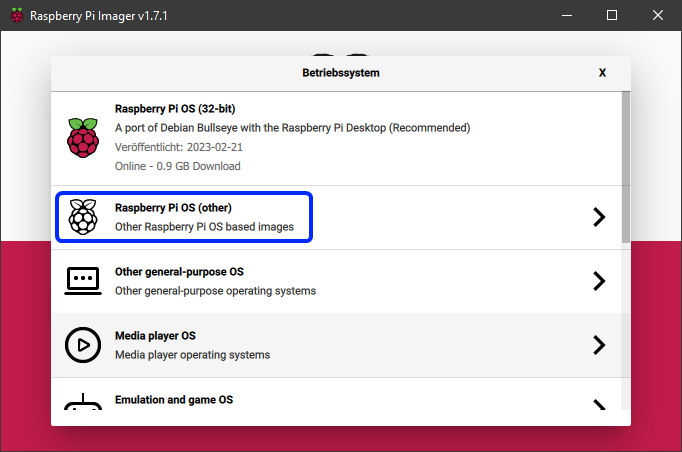
2. Click on `Choose OS` and select `Raspberry Pi OS (other)`.
|
||||
|
||||
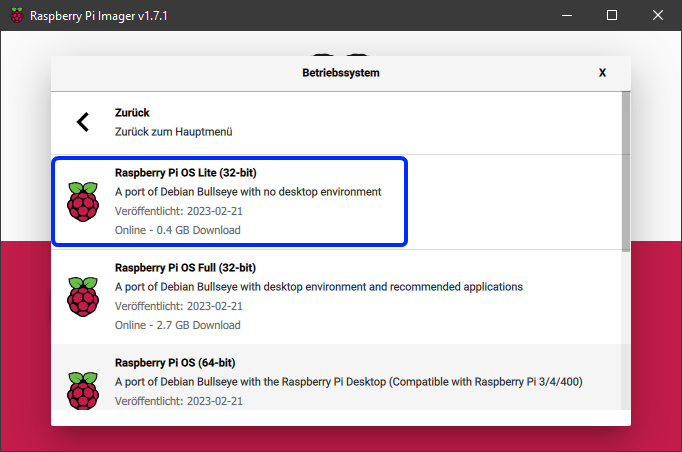
3. Choose `Raspberry Pi OS Lite (32bit)` (or 64bit if desired).
|
||||
|
||||
4. Insert the microSD card into your computer's SD card reader.
|
||||
5. In the main menu of the Imager, select the correct microSD card.
|
||||
6. Click the gear icon at the bottom left of the main menu to open advanced options.
|
||||
7. Enable SSH and enter your Wi-Fi credentials.
|
||||
|
||||
!!! info
|
||||
Wi-Fi is only necessary if you want to connect to your Raspberry Pi over a wireless network. If you plan to use a wired Ethernet connection, you can skip this step. SSH is required for remote access to your Raspberry Pi, so make sure to enable it.
|
||||
|
||||
8. Click `Save` to close the advanced options menu.
|
||||
9. Click `Write` to start flashing the image to the microSD card.
|
||||
|
||||
!!! warning
|
||||
All data on the microSD card will be overwritten!
|
||||
|
||||
10. Once the flashing process is complete, safely eject the microSD card from your computer.
|
||||
11. Insert the microSD card into your Raspberry Pi.
|
||||
12. Connect your Raspberry Pi to a power source to boot it up.
|
||||
13. Wait for a few minutes to allow the Raspberry Pi to complete its initial setup.
|
||||
14. You can now connect to your Raspberry Pi via SSH using the IP address assigned by your router. The default username is `pi` and the default password is `raspberry`.
|
||||
|
||||
If you successfully connected to your Raspberry Pi via SSH, you can proceed to install KIAUH by following the instructions in the [Installation Guide](installation.md).
|
||||
0
kiauh/components/klipper/services/__init__.py
Normal file
0
kiauh/components/klipper/services/__init__.py
Normal file
0
kiauh/components/moonraker/menus/__init__.py
Normal file
0
kiauh/components/moonraker/menus/__init__.py
Normal file
@@ -16,8 +16,9 @@ from typing import List
|
||||
|
||||
from utils.fs_utils import get_data_dir
|
||||
|
||||
SUFFIX_BLACKLIST: List[str] = ["None", "mcu", "obico", "bambu", "companion"]
|
||||
|
||||
# suffixes that are not allowed to be used for instances
|
||||
# because they would cause conflicts with other components or are reserved
|
||||
SUFFIX_BLACKLIST: List[str] = ["None", "mcu", "obico", "bambu", "companion", "hmi"]
|
||||
|
||||
@dataclass(repr=True)
|
||||
class BaseInstance:
|
||||
|
||||
@@ -150,9 +150,9 @@ class ExtensionSubmenu(BaseMenu):
|
||||
if website or repo:
|
||||
links_lines: List[str] = ["Links:"]
|
||||
if website:
|
||||
links_lines.append(f"- Website: {website}")
|
||||
links_lines.append(f"● {website}")
|
||||
if repo:
|
||||
links_lines.append(f"- GitHub: {repo}")
|
||||
links_lines.append(f"● {repo}")
|
||||
|
||||
links_text = Logger.format_content(
|
||||
links_lines,
|
||||
|
||||
@@ -4,6 +4,7 @@
|
||||
"module": "gcode_shell_cmd_extension",
|
||||
"maintained_by": "dw-0",
|
||||
"display_name": "G-Code Shell Command",
|
||||
"description": ["Run a shell commands from gcode."]
|
||||
"description": ["Run a shell commands from gcode."],
|
||||
"updates": false
|
||||
}
|
||||
}
|
||||
|
||||
@@ -5,6 +5,8 @@
|
||||
"maintained_by": "Staubgeborener",
|
||||
"display_name": "Klipper-Backup",
|
||||
"description": ["Backup all your Klipper files to GitHub"],
|
||||
"website": "https://klipperbackup.xyz",
|
||||
"repo": "https://github.com/Staubgeborener/klipper-backup",
|
||||
"updates": true
|
||||
}
|
||||
}
|
||||
|
||||
@@ -4,6 +4,8 @@
|
||||
"module": "mainsail_theme_installer_extension",
|
||||
"maintained_by": "dw-0",
|
||||
"display_name": "Mainsail Theme Installer",
|
||||
"description": ["Install Mainsail Themes maintained by the Mainsail community."]
|
||||
"description": ["Install Mainsail Themes maintained by the Mainsail community."],
|
||||
"website": "https://docs.mainsail.xyz/theming/themes",
|
||||
"updates": false
|
||||
}
|
||||
}
|
||||
|
||||
@@ -7,6 +7,7 @@
|
||||
"description": [
|
||||
"Companion for Mobileraker, enabling push notification for Klipper using Moonraker."
|
||||
],
|
||||
"repo": "https://github.com/Clon1998/mobileraker_companion",
|
||||
"updates": true
|
||||
}
|
||||
}
|
||||
|
||||
@@ -11,6 +11,8 @@
|
||||
"- 25FPS High-Def Webcam Streaming",
|
||||
"- Free 4.9-Star Mobile App"
|
||||
],
|
||||
"website": "https://obico.io",
|
||||
"repo": "github.com/TheSpaghettiDetective/moonraker-obico",
|
||||
"updates": true
|
||||
}
|
||||
}
|
||||
|
||||
@@ -12,6 +12,7 @@
|
||||
"- Live Gcode preview",
|
||||
"- And much much more!"
|
||||
],
|
||||
"repo": "https://github.com/crysxd/OctoApp-Plugin",
|
||||
"updates": true
|
||||
}
|
||||
}
|
||||
|
||||
@@ -11,6 +11,8 @@
|
||||
"- Real-time Notifications",
|
||||
"- Live Streaming, and More!"
|
||||
],
|
||||
"website": "https://octoeverywhere.com",
|
||||
"repo": "github.com/QuinnDamerell/OctoPrint-OctoEverywhere",
|
||||
"updates": true
|
||||
}
|
||||
}
|
||||
|
||||
@@ -5,6 +5,7 @@
|
||||
"maintained_by": "Kragrathea",
|
||||
"display_name": "PrettyGCode for Klipper",
|
||||
"description": ["3D G-Code viewer for Klipper"],
|
||||
"repo": "https://github.com/Kragrathea/pgcode",
|
||||
"updates": true
|
||||
}
|
||||
}
|
||||
|
||||
@@ -1,13 +1,16 @@
|
||||
{
|
||||
"metadata": {
|
||||
"index": 10,
|
||||
"module": "simply_print_extension",
|
||||
"maintained_by": "dw-0",
|
||||
"display_name": "SimplyPrint",
|
||||
"description": [
|
||||
"3D Printer Cloud Management Software.",
|
||||
"\n\n",
|
||||
"3D printing doesn't have to be a complicated, analog, SD card-filled experience; step into the future of modern 3D printing"
|
||||
]
|
||||
}
|
||||
"metadata": {
|
||||
"index": 10,
|
||||
"module": "simply_print_extension",
|
||||
"maintained_by": "dw-0",
|
||||
"display_name": "SimplyPrint",
|
||||
"description": [
|
||||
"3D Printer Cloud Management Software.",
|
||||
"\n\n",
|
||||
"3D printing doesn't have to be a complicated, analog, SD card-filled experience; step into the future of modern 3D printing"
|
||||
],
|
||||
"website": "https://simplyprint.io",
|
||||
"repo": "https://github.com/SimplyPrint",
|
||||
"updates": false
|
||||
}
|
||||
}
|
||||
|
||||
@@ -13,6 +13,7 @@
|
||||
"\n\n",
|
||||
"Note: This extension installs Spoolman using Docker. Docker must be installed on your system before installing Spoolman."
|
||||
],
|
||||
"repo": "https://github.com/Donkie/Spoolman",
|
||||
"updates": true
|
||||
}
|
||||
}
|
||||
|
||||
@@ -5,7 +5,7 @@
|
||||
"maintained_by": "nlef",
|
||||
"display_name": "Moonraker Telegram Bot",
|
||||
"description": ["Control your printer with the Telegram messenger app."],
|
||||
"project_url": "https://github.com/nlef/moonraker-telegram-bot",
|
||||
"repo": "https://github.com/nlef/moonraker-telegram-bot",
|
||||
"updates": true
|
||||
}
|
||||
}
|
||||
|
||||
84
mkdocs.yml
84
mkdocs.yml
@@ -1,84 +0,0 @@
|
||||
site_name: KIAUH Documentation
|
||||
site_description: Documentation for the Klipper Installation And Update Helper
|
||||
repo_url: https://github.com/dw-0/kiauh
|
||||
repo_name: dw-0/kiauh
|
||||
edit_uri: edit/master/docs
|
||||
|
||||
copyright: Copyright © 2025 Dominik Willner
|
||||
|
||||
theme:
|
||||
name: material
|
||||
logo: assets/logo.png
|
||||
favicon: assets/logo.png
|
||||
icon:
|
||||
repo: fontawesome/brands/github
|
||||
palette:
|
||||
- media: "(prefers-color-scheme: light)"
|
||||
scheme: default
|
||||
primary: blue-grey
|
||||
accent: cyan
|
||||
toggle:
|
||||
icon: material/weather-night
|
||||
name: Switch to dark mode
|
||||
- media: "(prefers-color-scheme: dark)"
|
||||
scheme: slate
|
||||
primary: blue-grey
|
||||
accent: cyan
|
||||
toggle:
|
||||
icon: material/weather-sunny
|
||||
name: Switch to light mode
|
||||
features:
|
||||
- navigation.instant
|
||||
- navigation.tracking
|
||||
- navigation.sections
|
||||
- navigation.expand
|
||||
- navigation.indexes
|
||||
- navigation.top
|
||||
- toc.follow
|
||||
- content.code.copy
|
||||
|
||||
plugins:
|
||||
- search
|
||||
- git-revision-date-localized:
|
||||
enable_creation_date: true
|
||||
- mkdocstrings:
|
||||
handlers:
|
||||
python:
|
||||
paths: [.]
|
||||
options:
|
||||
docstring_style: google
|
||||
|
||||
markdown_extensions:
|
||||
- admonition
|
||||
- pymdownx.details
|
||||
- pymdownx.superfences
|
||||
- pymdownx.highlight:
|
||||
anchor_linenums: true
|
||||
- pymdownx.inlinehilite
|
||||
- pymdownx.snippets
|
||||
- pymdownx.superfences
|
||||
- tables
|
||||
- attr_list
|
||||
- md_in_html
|
||||
|
||||
nav:
|
||||
- Home: index.md
|
||||
- Installation:
|
||||
- setup/raspberry-pi-setup.md
|
||||
- setup/installation.md
|
||||
- Configuration: configuration.md
|
||||
- Extensions:
|
||||
- extensions/index.md
|
||||
- extensions/gcode-shell-command.md
|
||||
- Development:
|
||||
- development/contributing.md
|
||||
- development/changelog.md
|
||||
|
||||
extra:
|
||||
social:
|
||||
- icon: simple/github
|
||||
link: https://github.com/dw-0
|
||||
- icon: simple/kofi
|
||||
link: https://ko-fi.com/dw__0
|
||||
- icon: simple/paypal
|
||||
link: https://www.paypal.com/paypalme/dwillner0
|
||||
@@ -1,4 +0,0 @@
|
||||
mkdocs-material
|
||||
mkdocs
|
||||
mkdocstrings[python]
|
||||
mkdocs-git-revision-date-localized-plugin
|
||||

|
Before Width: | Height: | Size: 18 KiB After Width: | Height: | Size: 18 KiB |
@@ -27,7 +27,7 @@ function moonraker_systemd() {
|
||||
###
|
||||
# any moonraker client that uses "moonraker" in its own name must be blacklisted using
|
||||
# this variable, otherwise they will be falsely recognized as moonraker instances
|
||||
blacklist="obico"
|
||||
blacklist="obico|hmi|telegram-bot"
|
||||
|
||||
ignore="${SYSTEMD}/moonraker-(${blacklist}).service"
|
||||
match="${SYSTEMD}/moonraker(-[0-9a-zA-Z]+)?.service"
|
||||
|
||||
Reference in New Issue
Block a user