mirror of
https://github.com/dw-0/kiauh.git
synced 2026-09-19 03:35:42 +05:00
Compare commits
4
Commits
| Author | SHA1 | Date | |
|---|---|---|---|
 dw-0 dw-0
|
0e998ed66c | ||
|
dw-0
|
06a78b7c83 | ||
|
dw-0
|
ee3d64e0dd | ||
|
dw-0
|
393822b8b6 |
+1
-1
@@ -11,5 +11,5 @@ end_of_line = lf
|
||||
[*.py]
|
||||
max_line_length = 88
|
||||
|
||||
[*.{sh,yml,yaml,json}]
|
||||
[*.{sh,yml,yaml,json,md}]
|
||||
indent_size = 2
|
||||
@@ -0,0 +1,31 @@
|
||||
name: Deploy Documentation
|
||||
on:
|
||||
workflow_dispatch:
|
||||
push:
|
||||
branches:
|
||||
- docs
|
||||
permissions:
|
||||
contents: write
|
||||
jobs:
|
||||
deploy:
|
||||
runs-on: ubuntu-latest
|
||||
steps:
|
||||
- uses: actions/checkout@v4
|
||||
- name: Configure Git Credentials
|
||||
run: |
|
||||
git config user.name github-actions[bot]
|
||||
git config user.email 41898282+github-actions[bot]@users.noreply.github.com
|
||||
- uses: actions/setup-python@v5
|
||||
with:
|
||||
python-version: 3.x
|
||||
- run: echo "cache_id=$(date --utc '+%V')" >> $GITHUB_ENV
|
||||
- uses: actions/cache@v4
|
||||
with:
|
||||
key: mkdocs-material-${{ env.cache_id }}
|
||||
path: .cache
|
||||
restore-keys: |
|
||||
mkdocs-material-
|
||||
- name: Install dependencies
|
||||
run: pip install -r requirements.txt
|
||||
- name: Build and deploy documentation
|
||||
run: mkdocs gh-deploy --force
|
||||
@@ -7,7 +7,6 @@
|
||||
*.tmp
|
||||
__pycache__
|
||||
.kiauh-env
|
||||
.venv
|
||||
*.code-workspace
|
||||
*.iml
|
||||
kiauh.cfg
|
||||
|
||||
@@ -0,0 +1,6 @@
|
||||
FROM squidfunk/mkdocs-material:latest
|
||||
|
||||
# Install additional plugins required by our mkdocs configuration
|
||||
RUN pip install \
|
||||
mkdocs-git-revision-date-localized-plugin \
|
||||
mkdocstrings[python]
|
||||
@@ -1,6 +1,8 @@
|
||||
<p align="center">
|
||||
<img src="docs/assets/logo-large.png" alt="KIAUH Logo" height="181">
|
||||
<a>
|
||||
<img src="https://raw.githubusercontent.com/dw-0/kiauh/master/resources/screenshots/kiauh.png" alt="KIAUH logo" height="181">
|
||||
<h1 align="center">Klipper Installation And Update Helper</h1>
|
||||
</a>
|
||||
</p>
|
||||
|
||||
<p align="center">
|
||||
@@ -25,100 +27,75 @@
|
||||
</h2>
|
||||
|
||||
### 📋 Prerequisites
|
||||
|
||||
KIAUH is a script that assists you in installing Klipper on a Linux operating
|
||||
system that has
|
||||
already been flashed to your Raspberry Pi's (or other SBC's) SD card. As a
|
||||
result, you must ensure
|
||||
that you have a functional Linux system on hand.
|
||||
`Raspberry Pi OS Lite (either 32bit or 64bit)` is a recommended Linux image
|
||||
if you are using a Raspberry Pi.
|
||||
The [official Raspberry Pi Imager](https://www.raspberrypi.com/software/)
|
||||
KIAUH is a script that assists you in installing Klipper on a Linux operating system that has
|
||||
already been flashed to your Raspberry Pi's (or other SBC's) SD card. As a result, you must ensure
|
||||
that you have a functional Linux system on hand. `Raspberry Pi OS Lite (either 32bit or 64bit)` is a recommended Linux image
|
||||
if you are using a Raspberry Pi. The [official Raspberry Pi Imager](https://www.raspberrypi.com/software/)
|
||||
is the simplest way to flash an image like this to an SD card.
|
||||
|
||||
* Once you have downloaded, installed and launched the Raspberry Pi Imager,
|
||||
select `Choose OS -> Raspberry Pi OS (other)`: \
|
||||
|
||||
select `Choose OS -> Raspberry Pi OS (other)`: \
|
||||
<p align="center">
|
||||
<img src="docs/assets/rpi_imager1.png" alt="KIAUH logo" height="350">
|
||||
<img src="https://raw.githubusercontent.com/dw-0/kiauh/master/resources/screenshots/rpi_imager1.png" alt="KIAUH logo" height="350">
|
||||
</p>
|
||||
|
||||
* Then select `Raspberry Pi OS Lite (32bit)` (or 64bit if you want to use that
|
||||
instead):
|
||||
|
||||
* Then select `Raspberry Pi OS Lite (32bit)` (or 64bit if you want to use that instead):
|
||||
<p align="center">
|
||||
<img src="docs/assets/rpi_imager2.png" alt="KIAUH logo" height="350">
|
||||
<img src="https://raw.githubusercontent.com/dw-0/kiauh/master/resources/screenshots/rpi_imager2.png" alt="KIAUH logo" height="350">
|
||||
</p>
|
||||
|
||||
* Back in the Raspberry Pi Imager's main menu, select the corresponding SD card
|
||||
to which
|
||||
you want to flash the image.
|
||||
* Back in the Raspberry Pi Imager's main menu, select the corresponding SD card to which
|
||||
you want to flash the image.
|
||||
|
||||
* Make sure to go into the Advanced Option (the cog icon in the lower left
|
||||
corner of the main menu)
|
||||
and enable SSH and configure Wi-Fi.
|
||||
* Make sure to go into the Advanced Option (the cog icon in the lower left corner of the main menu)
|
||||
and enable SSH and configure Wi-Fi.
|
||||
|
||||
* If you need more help for using the Raspberry Pi Imager, please visit
|
||||
the [official documentation](https://www.raspberrypi.com/documentation/computers/getting-started.html).
|
||||
* If you need more help for using the Raspberry Pi Imager, please visit the [official documentation](https://www.raspberrypi.com/documentation/computers/getting-started.html).
|
||||
|
||||
These steps **only** apply if you are actually using a Raspberry Pi. In case you
|
||||
want
|
||||
to use a different SBC (like an Orange Pi or any other Pi derivates), please
|
||||
look up on how to get an appropriate Linux image flashed
|
||||
to the SD card before proceeding further (usually done with Balena Etcher in
|
||||
those cases). Also make sure that KIAUH will be able to run
|
||||
and operate on the Linux Distribution you are going to flash. You likely will
|
||||
have the most success with
|
||||
distributions based on Debian 11 Bullseye. Read the notes further down below in
|
||||
this document.
|
||||
These steps **only** apply if you are actually using a Raspberry Pi. In case you want
|
||||
to use a different SBC (like an Orange Pi or any other Pi derivates), please look up on how to get an appropriate Linux image flashed
|
||||
to the SD card before proceeding further (usually done with Balena Etcher in those cases). Also make sure that KIAUH will be able to run
|
||||
and operate on the Linux Distribution you are going to flash. You likely will have the most success with
|
||||
distributions based on Debian 11 Bullseye. Read the notes further down below in this document.
|
||||
|
||||
### 💾 Download and use KIAUH
|
||||
|
||||
**📢 Disclaimer: Usage of this script happens at your own risk!**
|
||||
|
||||
* **Step 1:** \
|
||||
To download this script, it is necessary to have git installed. If you don't
|
||||
have git already installed, or if you are unsure, run the following command:
|
||||
|
||||
To download this script, it is necessary to have git installed. If you don't have git already installed, or if you are unsure, run the following command:
|
||||
```shell
|
||||
sudo apt-get update && sudo apt-get install git -y
|
||||
```
|
||||
|
||||
* **Step 2:** \
|
||||
Once git is installed, use the following command to download KIAUH into your
|
||||
home-directory:
|
||||
Once git is installed, use the following command to download KIAUH into your home-directory:
|
||||
|
||||
```shell
|
||||
cd ~ && git clone https://github.com/dw-0/kiauh.git
|
||||
```
|
||||
|
||||
* **Step 3:** \
|
||||
Finally, start KIAUH by running the next command:
|
||||
Finally, start KIAUH by running the next command:
|
||||
|
||||
```shell
|
||||
./kiauh/kiauh.sh
|
||||
```
|
||||
|
||||
* **Step 4:** \
|
||||
You should now find yourself in the main menu of KIAUH. You will see several
|
||||
actions to choose from depending
|
||||
on what you want to do. To choose an action, simply type the corresponding
|
||||
number into the "Perform action"
|
||||
prompt and confirm by hitting ENTER.
|
||||
You should now find yourself in the main menu of KIAUH. You will see several actions to choose from depending
|
||||
on what you want to do. To choose an action, simply type the corresponding number into the "Perform action"
|
||||
prompt and confirm by hitting ENTER.
|
||||
|
||||
<hr>
|
||||
|
||||
<h2 align="center">❗ Notes ❗</h2>
|
||||
|
||||
### **📋 Please see the [Changelog](docs/changelog.md) for possible important
|
||||
|
||||
changes!**
|
||||
### **📋 Please see the [Changelog](docs/changelog.md) for possible important changes!**
|
||||
|
||||
- Mainly tested on Raspberry Pi OS Lite (Debian 10 Buster / Debian 11 Bullseye)
|
||||
- Other Debian based distributions (like Ubuntu 20 to 22) likely work too
|
||||
- Reported to work on Armbian as well but not tested in detail
|
||||
- During the use of this script you will be asked for your sudo password. There
|
||||
are several functions involved which need sudo privileges.
|
||||
- During the use of this script you will be asked for your sudo password. There are several functions involved which need sudo privileges.
|
||||
|
||||
<hr>
|
||||
|
||||
@@ -143,7 +120,7 @@ changes!**
|
||||
|
||||
<tr>
|
||||
<th><h3><a href="https://github.com/fluidd-core/fluidd">Fluidd</a></h3></th>
|
||||
<th><h3><a href="https://github.com/KlipperScreen/KlipperScreen">KlipperScreen</a></h3></th>
|
||||
<th><h3><a href="https://github.com/jordanruthe/KlipperScreen">KlipperScreen</a></h3></th>
|
||||
<th><h3><a href="https://github.com/OctoPrint/OctoPrint">OctoPrint</a></h3></th>
|
||||
</tr>
|
||||
<tr>
|
||||
@@ -153,7 +130,7 @@ changes!**
|
||||
</tr>
|
||||
<tr>
|
||||
<th>by <a href="https://github.com/fluidd-core">fluidd-core</a></th>
|
||||
<th>by <a href="https://github.com/alfrix">alfrix</a></th>
|
||||
<th>by <a href="https://github.com/jordanruthe">jordanruthe</a></th>
|
||||
<th>by <a href="https://github.com/OctoPrint">OctoPrint</a></th>
|
||||
</tr>
|
||||
|
||||
@@ -223,17 +200,13 @@ changes!**
|
||||
|
||||
<h2 align="center">✨ Credits ✨</h2>
|
||||
|
||||
* A big thank you to [lixxbox](https://github.com/lixxbox) for that awesome
|
||||
KIAUH-Logo!
|
||||
* Also, a big thank you to everyone who supported my work with
|
||||
a [Ko-fi](https://ko-fi.com/dw__0) !
|
||||
* Last but not least: Thank you to all contributors and members of the Klipper
|
||||
Community who like and share this project!
|
||||
* A big thank you to [lixxbox](https://github.com/lixxbox) for that awesome KIAUH-Logo!
|
||||
* Also, a big thank you to everyone who supported my work with a [Ko-fi](https://ko-fi.com/dw__0) !
|
||||
* Last but not least: Thank you to all contributors and members of the Klipper Community who like and share this project!
|
||||
|
||||
<hr>
|
||||
|
||||
<h4 align="center">A special thank you to JetBrains for sponsoring this project
|
||||
with their incredible software!</h4>
|
||||
<h4 align="center">A special thank you to JetBrains for sponsoring this project with their incredible software!</h4>
|
||||
<p align="center">
|
||||
<a href="https://www.jetbrains.com/community/opensource/#support" target="_blank">
|
||||
<img src="https://resources.jetbrains.com/storage/products/company/brand/logos/jb_beam.png" alt="JetBrains Logo (Main) logo." height="128">
|
||||
|
||||
@@ -0,0 +1,8 @@
|
||||
services:
|
||||
mkdocs:
|
||||
build: .
|
||||
ports:
|
||||
- "8000:8000"
|
||||
volumes:
|
||||
- ./:/docs
|
||||
command: serve --dev-addr=0.0.0.0:8000
|
||||
@@ -1,549 +0,0 @@
|
||||
## Changelog
|
||||
|
||||
This document covers possible important changes to KIAUH.
|
||||
|
||||
### 2025-10-10 (v6.0.0)
|
||||
|
||||
KIAUH has now reached version 6! The majority of the changes mentioned in the
|
||||
previous changelog are now available in the final version.
|
||||
Most notible are the following changes:
|
||||
|
||||
- The dialog for selecting between v5 and v6 is gone and all v5 code was
|
||||
removed. V6 is the new default
|
||||
- You can add/remove alternative repositories for Klipper and Moonraker from
|
||||
within KIAUH, no need to manually edit any file
|
||||
- You can store and load firmware configurations for Klipper during the firmware
|
||||
compilation process
|
||||
- Spoolman is available as an extension, it does not use the bare-metal
|
||||
installation anymore, instead it uses the Docker Container approach
|
||||
- OctoApp is available as an extension
|
||||
- OctoPrint support was NOT killed. OctoPrint is available as an extension
|
||||
- I probably forgot to mention some other changes, but the idea is to create
|
||||
official docs for KIAUH where the new changelog will live in the future and
|
||||
available features and mechanics are explained in detail
|
||||
|
||||
If you really want to use v5, there is a v5 branch available in the repository.
|
||||
Keep in mind that v5 will not be updated anymore.
|
||||
|
||||
### 2024-08-31 (v6.0.0-alpha.1)
|
||||
|
||||
Long time no see, but here we are again!
|
||||
A lot has happened in the background, but now it is time to take it out into the
|
||||
wild.
|
||||
|
||||
#### KIAUH has now reached version 6! Well, at least in an alpha state...
|
||||
|
||||
The project has seen a complete rewrite of the script from scratch in Python.
|
||||
It requires Python 3.8 or newer to run. Because this update is still in an alpha
|
||||
state, bugs may or will occur.
|
||||
During startup, you will be asked if you want to start the new version 6 or the
|
||||
old version 5.
|
||||
As long as version 6 is in a pre-release state, version 5 will still be
|
||||
available. If there are any critical issues
|
||||
with the new version that were overlooked, you can always switch back to the old
|
||||
version.
|
||||
|
||||
In case you selected not to get asked about which version to start (option 3 or
|
||||
4 in the startup dialog) and you want to
|
||||
revert that decision, you will find a line called `version_to_launch=` within
|
||||
the `.kiauh.ini` file in your home directory.
|
||||
Just delete that line, save the file and restart KIAUH. KIAUH will then ask you
|
||||
again which version you want to start.
|
||||
|
||||
Here is a list of the most important changes to KIAUH in regard to version 6:
|
||||
|
||||
- The majority of features available in KIAUH v5 are still available; they just
|
||||
got migrated from Bash to Python.
|
||||
- It is now possible to add new/remove instances to/from existing multi-instance
|
||||
installations of Klipper and Moonraker
|
||||
- KIAUH now has an Extension-System. This allows contributors to add new
|
||||
installers to KIAUH without having to modify the main script.
|
||||
- You will now find some of the features that were previously available in
|
||||
the Installer-Menu in the Extensions-Menu.
|
||||
- The current extensions are:
|
||||
- G-Code Shell Command (previously found in the Advanced-Menu)
|
||||
- Mainsail Theme Installer (previously found in the Advanced-Menu)
|
||||
- Klipper-Backup (new in v6!)
|
||||
- Moonraker Telegram Bot (previously found in the Installer-Menu)
|
||||
- PrettyGCode for Klipper (previously found in the Installer-Menu)
|
||||
- Obico for Klipper (previously found in the Installer-Menu)
|
||||
- The following additional extensions are planned, but not yet available:
|
||||
- Spoolman (available in v5 in the Installer-Menu)
|
||||
- OctoApp (available in v5 in the Installer-Menu)
|
||||
- KIAUH has its own config file now
|
||||
- The file has some default values for the currently supported options
|
||||
- There might be more options in the future
|
||||
- It is located in KIAUH's root directory and is called `default.kiauh.cfg`
|
||||
- DO NOT EDIT the default file directly, instead make a copy of it and
|
||||
call it `kiauh.cfg`
|
||||
- Settings changed via the Advanced-Menu will be written to the
|
||||
`kiauh.cfg`
|
||||
- Support for OctoPrint was removed
|
||||
|
||||
Feel free to give version 6 a try and report any bugs or issues you encounter!
|
||||
Every feedback is appreciated.
|
||||
|
||||
### 2023-06-17
|
||||
|
||||
KIAUH has now added support for installing Mobileraker's companion!
|
||||
Mobileraker is a free and Open Source Android and iOS App for Klipper, utilizing
|
||||
the Moonraker API, allowing you
|
||||
to control your printer. Thank you to [Clon1998](https://github.com/Clon1998)
|
||||
for adding this feature!
|
||||
|
||||
### 2023-02-03
|
||||
|
||||
The installer for MJPG-Streamer got replaced by crowsnest. It is an improved
|
||||
webcam service, utilizing ustreamer.
|
||||
Please have a look here for additional info about crowsnest and how to configure
|
||||
it: https://github.com/mainsail-crew/crowsnest \
|
||||
It's unsure if the previous MJPG-Streamer installer will be updated and make its
|
||||
way back into KIAUH.
|
||||
A big thanks to [KwadFan](https://github.com/KwadFan) for writing the crowsnest
|
||||
implementation.
|
||||
|
||||
### 2022-10-31
|
||||
|
||||
Some functions got updated, though not all of them.
|
||||
|
||||
The following functions are still currently unavailable:
|
||||
|
||||
- Installation of: MJPG-Streamer
|
||||
- All backup functions and the Log-Upload
|
||||
|
||||
### 2022-10-20
|
||||
|
||||
KIAUH has now reached major version 5 !
|
||||
|
||||
Recently Moonraker introduced some changes which makes it necessary to change
|
||||
the folder structure of printer setups.
|
||||
If you are interested in the details, check out this
|
||||
PR: https://github.com/Arksine/moonraker/pull/491 \
|
||||
Although Moonraker has some mechanics available to migrate existing setups to
|
||||
the new file structure with the use of symlinks, fresh and clean installs
|
||||
should be considered.
|
||||
|
||||
The version jump of KIAUH to v5 is a breaking change due to those major changes!
|
||||
That means v4 and v5 are not compatible with each other!
|
||||
This is also the reason why you will currently be greeted by a yellow
|
||||
notification in the main menu of KIAUH leading to this changelog.
|
||||
I decided to disable a few functions of the script and focus on releasing the
|
||||
required changes to the core components of this script.
|
||||
I will work on updating the other parts of the script piece by piece during the
|
||||
next days/weeks.
|
||||
So I am already sorry in advance if one of your desired components you wanted to
|
||||
install or use temporarily cannot be installed or used right now.
|
||||
|
||||
The following functions are currently unavailable:
|
||||
|
||||
- Installation of: KlipperScreen, Obico, Octoprint, MJPG-Streamer, Telegram Bot
|
||||
and PrettyGCode
|
||||
- All backup functions and the Log-Upload
|
||||
|
||||
**So what is working?**\
|
||||
Installation of Klipper, Moonraker, Mainsail and Fluidd. Both, single and
|
||||
multi-instance setups work!\
|
||||
As already said, the rest will follow in the near future. Updating and removal
|
||||
of already installed components should continue to work.
|
||||
|
||||
**What was removed?**\
|
||||
The option to change Klippers configuration directory got removed. From now on
|
||||
it will not be possible anymore to change
|
||||
the configuration directory from within KIAUH and the new filestructure is
|
||||
enforced.
|
||||
|
||||
**What if I don't have an existing Klipper/Moonraker install right now?**\
|
||||
Nothing important to think about, install Klipper and Moonraker. KIAUH will
|
||||
install both of them with the new filestructure.
|
||||
|
||||
**What if I have an existing Klipper/Moonraker install?**\
|
||||
First of all: Backups! Please copy all of your config files and the Moonraker
|
||||
database (it is a hidden folder, usually `~/.moonraker_database`) to a safe
|
||||
location.
|
||||
After that, uninstall Klipper and Moonraker with KIAUH. You can then proceed and
|
||||
re-install both of them with KIAUH again. It is important that you are on KIAUH
|
||||
v5 for that!
|
||||
Once everything is installed again, you need to manually copy your configuration
|
||||
files from the old `~/klipper_config` folder to the new `~/printer_data/config`
|
||||
folder.
|
||||
Previous, by Moonraker created symlinks to folder of the old filestructure will
|
||||
not work anymore, you need to move the files to their new location now!
|
||||
Do the same with the two files inside of `~/.moonraker_database`. Move/copy them
|
||||
into `~/printer_data/database`. If `~/printer_data/database` is already
|
||||
populated with a `data.mdb` and `lock.mdb`
|
||||
delete them or simply overwrite them. Nothing should be lost as those should be
|
||||
empty database files. Anyway, you made backups, right?
|
||||
You can now proceed and restart Moonraker. Either from within Mainsail or
|
||||
Fluidd, or use SSH and execute `sudo systemctl restart moonraker`.
|
||||
If everything went smooth, you should be good to go again. If you see some
|
||||
Moonraker warnings about deprecated options in the `moonraker.conf`, go ahead
|
||||
and resolve them.
|
||||
I will not cover them in detail here. A good source is the Moonraker
|
||||
documentation: https://moonraker.readthedocs.io/en/latest/configuration/
|
||||
|
||||
**What if I have an existing Klipper/Moonraker multi-instance install?**\
|
||||
Pretty much the same steps that are required for single instance installs apply
|
||||
to multi-instance setups. So please go ahead and read the previous paragraph if
|
||||
you didn't already.
|
||||
Make backups of everything first. Then remove and install the desired amount of
|
||||
Klipper and Moonraker instances again.
|
||||
Now you need to move all config and database files to their new locations.\
|
||||
Example with an instance called `printer_1`:\
|
||||
The config files go from `~/klipper_config/printer_1` to
|
||||
`~/printer_1_data/config`.
|
||||
The database files go from `~/.moonraker_database_1` to
|
||||
`~/printer_1_data/database`.
|
||||
Now restart all Moonraker services. You can restart all of them at once if you
|
||||
launch KIAUH, and in the main menu type `restart moonraker` and hit Enter.
|
||||
|
||||
I hope I have covered the most important things. In case you need further
|
||||
support, the official Klipper Discord is a good place to ask for help.
|
||||
|
||||
### 2022-08-15
|
||||
|
||||
Support for "Obico for Klipper" was added! Huge thanks
|
||||
to [kennethjiang](https://github.com/kennethjiang) for helping me with the
|
||||
implementation!
|
||||
|
||||
### 2022-05-29
|
||||
|
||||
KIAUH has now reached major version 4 !
|
||||
|
||||
* feat: Klipper can be installed under Python3 (still considered as
|
||||
experimental)
|
||||
* feat: Klipper can be installed from custom repositories / inofficial forks
|
||||
* feat: Custom instance name for multi instance installations of Klipper
|
||||
* Any other multi instance will share the same name given to the
|
||||
corresponding Klipper instance
|
||||
* E.g. klipper-voron2 -> moonraker-voron2 -> moonraker-telegram-bot-voron2
|
||||
* feat: Option to allow installation of / updating to unstable Mainsail and
|
||||
Fluidd versions
|
||||
* by default only stable versions get installed/updated
|
||||
* feat: Multi-Instance OctoPrint installations now each have their own virtual
|
||||
python environment
|
||||
* allows independent installation of plugins for each instance
|
||||
* feat: Implementing the use of shellcheck during development
|
||||
* feat: Implementing a simple logging mechanic
|
||||
* feat: Log-upload function now also allows uploading other logfiles (kiauh.log,
|
||||
webcamd.log etc.)
|
||||
* feat: added several new help dialogs which try to explain various functions
|
||||
* fix: During Klipper installation, checks for group membership of `tty` and
|
||||
`dialout` are made
|
||||
* refactor: rework of the settings menu for better control the new KIAUH
|
||||
features
|
||||
* refactor: Support for DWC and DWC-for-Klipper has been removed
|
||||
* refactor: The backup before update settings were moved to the KIAUH settings
|
||||
menu
|
||||
* refactor: Switch branch function has been removed (was replaced by the custom
|
||||
Klipper repo feature)
|
||||
* refactor: The update manager sections for Mainsail, Fluidd and KlipperScreen
|
||||
were removed from the moonraker.conf template
|
||||
* They will now be individually added during installation of the
|
||||
corresponding interface
|
||||
* refactor: The rollback function was reworked and now also allows rollbacks of
|
||||
Moonraker
|
||||
* It now takes numerical inputs and reverts the corresponding repository by
|
||||
the given amount instead
|
||||
* KIAUH does not save previous states to its config anymore like it did with
|
||||
the previous approach
|
||||
|
||||
### 2022-01-29
|
||||
|
||||
* Starting from the 28th of January, Moonraker can make use of PackageKit and
|
||||
PolicyKit.\
|
||||
More details on that can be found [here](
|
||||
https://github.com/Arksine/moonraker/issues/349)
|
||||
and [here](https://github.com/Arksine/moonraker/pull/346)
|
||||
* KIAUH will install Moonrakers PolicyKit rules by default when __installing__
|
||||
Moonraker
|
||||
* KIAUH will also install Moonrakers PolicyKit rules when __updating__ Moonraker
|
||||
__via KIAUH__ as of now
|
||||
|
||||
### 2021-12-30
|
||||
|
||||
* Updated the doc for the usage of
|
||||
the [G-Code Shell Command Extension](docs/gcode_shell_command.md)
|
||||
* It became apparent, that some user groups are missing on some systems. A
|
||||
missing video group \
|
||||
membership for example caused issues when installing mjpg-streamer while not
|
||||
using the default pi user. \
|
||||
Other issues could occur when trying to flash an MCU on Debian or Ubuntu
|
||||
distributions where a user might not be part
|
||||
of the dialout group by default. A check for the tty group is also done. The
|
||||
tty group is needed for setting
|
||||
up a linux MCU (currently not yet supported by KIAUH).
|
||||
* There is an issue when trying to install Mainsail or Fluidd on Ubuntu 21.10.
|
||||
Permissions on that distro seem to have seen a rework
|
||||
in comparison to 20.04 and users will be greeted with an "Error 403 -
|
||||
Permission denied" message after installing one of Klippers webinterfaces.
|
||||
I still have to figure out a viable solution for that.
|
||||
|
||||
### 2021-09-28
|
||||
|
||||
* New Feature! Added an installer for the Telegram Bot for Moonraker
|
||||
by [nlef](https://github.com/nlef).
|
||||
Checkout his project! Remember to report all issues and/or bugs regarding that
|
||||
project in its corresponding repo and not here 😛.\
|
||||
You can find it here: https://github.com/nlef/moonraker-telegram-bot
|
||||
|
||||
### 2021-09-24
|
||||
|
||||
* The flashing function got adjusted a bit. It is now possible to also flash
|
||||
controllers which are connected over UART and thus accessible via
|
||||
`/dev/ttyAMA0`. You now have to select a connection methop prior flashing
|
||||
which is either USB or UART.
|
||||
* Due to several requests over time I have now created a Ko-fi account for those
|
||||
who want to support this project and my work with a small donation. Many
|
||||
thanks in advance to all future donors. You can support me on Ko-fi with this
|
||||
link: https://ko-fi.com/th33xitus
|
||||
* As usual, if you find any bugs or issues please report them. I tested the
|
||||
little rework i did with the hardware i have available and haven't encountered
|
||||
any malfunctions of flashing them yet.
|
||||
|
||||
### 2021-08-10
|
||||
|
||||
* KIAUH now supports the installation of the "PrettyGCode for Klipper"
|
||||
GCode-Viewer created by [Kragrathea](https://github.com/Kragrathea)!
|
||||
Installation, updating and removal are possible with KIAUH. For more details
|
||||
to this cool piece of software, please have a look
|
||||
here: https://github.com/Kragrathea/pgcode
|
||||
|
||||
### 2021-07-10
|
||||
|
||||
* The NGINX configuration files got updated to be in sync with MainsailOS and
|
||||
FluiddPi. Issues with the NGINX service not starting up due to wrong
|
||||
configuration should be resolved now. To get the updated configuration files,
|
||||
please remove Moonraker and Mainsail / Fluidd with KIAUH first and then
|
||||
re-install it. An automated file check for those configuration files might
|
||||
follow in the future which then automates updating those files if there were
|
||||
important changes.
|
||||
|
||||
* The default `moonraker.conf` was updated to reflect the recent changes to the
|
||||
update manager section. The update channel is set to `dev`.
|
||||
|
||||
### 2021-06-29
|
||||
|
||||
* KIAUH will now patch the new `log_path` to existing moonraker.conf files when
|
||||
updating Moonraker and the entry is missing. Before that, it was necessary
|
||||
that the user provided that path manually to make Fluidd display the logfiles
|
||||
in its interface. This issue should be resolved now.
|
||||
|
||||
### 2021-06-15
|
||||
|
||||
* Moonraker introduced an optional `log_path` which clients can make use of to
|
||||
show log files located in that folder to their users. More info
|
||||
here: https://github.com/Arksine/moonraker/commit/829b3a4ee80579af35dd64a37ccc092a1f67682a \
|
||||
Client developers agreed upon using `~/klipper_logs` as the new default log
|
||||
path.\
|
||||
That means, from now on, Klipper and Moonraker services installed with KIAUH
|
||||
will place their logfiles in that mentioned folder.
|
||||
* Additionally, KIAUH will now detect Klipper and Moonraker systemd services
|
||||
that still use the old default location of `/tmp/<service>.log` and will
|
||||
update them next time the user updates Klipper and/or Moonraker with the KIAUH
|
||||
update function.
|
||||
* Additional symlinks for the following logfiles will get created along those
|
||||
update procedures to make them accessible through the webinterface once its
|
||||
supported:
|
||||
- webcamd.log
|
||||
- mainsail-access.log
|
||||
- mainsail-error.log
|
||||
- fluidd-access.log
|
||||
- fluidd-error.log
|
||||
* For MainsailOS and FluiddPi users:\
|
||||
MainsailOS and FluiddPi will switch the shipped Klipper service from SysVinit
|
||||
to systemd probably with their next release. KIAUH can already help migrate
|
||||
older MainsailOS (0.4.0 and below) and FluiddPi (v1.13.0) releases to match
|
||||
their new service-, file- and folder-structure so you don't have to re-flash
|
||||
the SD-Card of your Raspberry Pi.\
|
||||
In detail here is what is going to happen when you use the new "CustomPiOS
|
||||
Migration Helper" from the Advanced Menu\
|
||||
`(Main Menu -> 4 -> Enter -> 10 -> Enter)` in a short summary:
|
||||
* The Klipper SysVinit service will get replaced by a Klipper systemd
|
||||
service
|
||||
* Klipper and Moonraker will use the new log-directory `~/klipper_logs`
|
||||
* The webcamd service gets updated
|
||||
* The webcamd script gets updated and moved from `/root/bin/webcamd` to
|
||||
`/usr/local/bin/webcamd`
|
||||
* The NGINX `upstreams.conf` gets updated to be able to configure up to 4
|
||||
webcams
|
||||
* The `mainsail.txt` / `fluiddpi.txt` gets moved from `/boot` to
|
||||
`~/klipper_config` and renamed to `webcam.txt`
|
||||
* Symlinks for the webcamd.log and various NGINX logs get created in
|
||||
`~/klipper_config`
|
||||
* Configuration files for Klipper, Moonraker and webcamd get added to
|
||||
`/etc/logrotate.d`
|
||||
* If they still exist, two lines will be removed from the mainsail.cfg or
|
||||
client_macros.cfg macro configurations:\
|
||||
`SAVE_GCODE_STATE NAME=PAUSE_state` and
|
||||
`RESTORE_GCODE_STATE NAME=PAUSE_state`
|
||||
* **Please note:**\
|
||||
The "CustomPiOS Migration Helper" is intended to only work on "vanilla"
|
||||
MainsailOS and FluiddPi systems. Do not try to migrate a modified MainsailOS
|
||||
or FluiddPi system (for example if you already used KIAUH to re-install
|
||||
services or to set up a multi-instance installation for Klipper / Moonraker).
|
||||
This won't work.
|
||||
|
||||
### 2021-01-31
|
||||
|
||||
* **This is a big one... KIAUH v3.0 is out.**\
|
||||
With this update you can now install multiple instances of Klipper, Moonraker,
|
||||
Duet Web Control or Octoprint on the same Pi. This was quite a big rework of
|
||||
the whole script. So bugs can appear but with the help of some testers, i
|
||||
think there shouldn't be any critical ones anymore. In this regards thanks to
|
||||
@lixxbox and @zellneralex for testing.
|
||||
|
||||
* Important changes to how installations are set up now: All components get
|
||||
installed as systemd services. Installation via init.d was dropped completely!
|
||||
This shouldn't affect you at all, since the common linux distributions like
|
||||
RaspberryPi OS or custom distributions like MainsailOS, FluiddPi or OctoPi
|
||||
support both ways of installing services. I just wanted to mention it here.
|
||||
|
||||
* Now with KIAUH v3.0 and multi-instance installation capabilities, there are
|
||||
some things to point out. You will now need to tell KIAUH where your printers
|
||||
configurations are located when installing Klipper for the first time. Even
|
||||
though it is not recommended, you can change this location with the help of
|
||||
KIAUH and rewrite Klipper and Moonraker to use the new location.
|
||||
|
||||
* When setting up a multi-instance system, the folder structure will only change
|
||||
slightly. The goal was to keep it as compatible as possible with the custom
|
||||
distributions like mainsailOS and FluiddPi. This should help converting a
|
||||
single-instance setup of mainsailOS/FluiddPi to a multi-instance setup in no
|
||||
time, but keeping single-instance backwards compatibility if needed at a later
|
||||
point in time.
|
||||
|
||||
* The folder structure is as follows when setting up multi-instances:\
|
||||
Each printer instance will get its own folder within your configuration
|
||||
location. The decision to this specific structure was made to make it as
|
||||
painless and easy as possible to convert to a multi-instance setup.
|
||||
Here is an example:
|
||||
```shell
|
||||
/home/<username>
|
||||
└── klipper_config
|
||||
├── printer_1
|
||||
│ ├── printer.cfg
|
||||
│ └── moonraker.conf
|
||||
├── printer_2
|
||||
│ ├── printer.cfg
|
||||
│ └── moonraker.conf
|
||||
└── printer_n
|
||||
├── printer.cfg
|
||||
└── moonraker.conf
|
||||
```
|
||||
* Also when setting up multi-instances of each service, the name of each service
|
||||
slightly changes.
|
||||
Each service gets its corresponding instance added to the service filename.
|
||||
|
||||
**This only applies to multi-instances! Single instance installations with
|
||||
KIAUH will keep their original names!**
|
||||
|
||||
Corresponding to the filetree example from above that would mean:
|
||||
```
|
||||
Klipper services:
|
||||
--> klipper-1.service
|
||||
--> klipper-2.service
|
||||
--> klipper-n.service
|
||||
|
||||
Moonraker services:
|
||||
--> moonraker-1.service
|
||||
--> moonraker-2.service
|
||||
--> moonraker-n.service
|
||||
```
|
||||
* The same service file rules from above apply to OctoPrint even though only
|
||||
Klipper and Moonraker are shown in this example.
|
||||
|
||||
* You can start, stop and restart all Klipper, Moonraker and OctoPrint instances
|
||||
from the KIAUH main menu. For doing this, just type "stop klipper", "start
|
||||
moonraker", "restart octoprint" and so on.
|
||||
|
||||
* KIAUH v3.0 relocated its ini-file. It is now a hidden file in the users
|
||||
home-directory calles `.kiauh.ini`. This has the benefit of keeping all values
|
||||
in that file between possible re-installations of KIAUH. Otherwise that file
|
||||
would be lost.
|
||||
|
||||
* The option of adding more trusted clients to the moonraker.conf file was
|
||||
dropped. Since you can edit this file right inside of Mainsail or Fluidd, only
|
||||
some basic entries are made which get you running.
|
||||
|
||||
* I bet i have missed mentioning other stuff as well because it took me quite
|
||||
some time to re-write many functions. So i just hope you like the new version
|
||||
😄
|
||||
|
||||
### 2020-11-28
|
||||
|
||||
* KIAUH now supports the installation, update and removal
|
||||
of [KlipperScreen](https://github.com/jordanruthe/KlipperScreen). This feature
|
||||
was was provided by [jordanruthe](https://github.com/jordanruthe)! Thank you!
|
||||
|
||||
### 2020-11-18
|
||||
|
||||
* Some changes to Fluidd caused a little rework on how KIAUH will install/update
|
||||
Fluidd from now on. Please see
|
||||
the [fluidd v1.0.0-rc0 release notes](https://github.com/cadriel/fluidd/releases/tag/v1.0.0-rc.0)
|
||||
for further information about what modifications to the moonraker.conf file
|
||||
exactly had to be done. In a nutshell, KIAUH will now always patch the
|
||||
required entries to the moonraker.conf if not already there.
|
||||
|
||||
### 2020-10-30:
|
||||
|
||||
* The user can now choose to install Klipper as a systemd service.
|
||||
|
||||
* The Shell Command extension and `shell_command.py` got renamed to G-Code Shell
|
||||
Command extension and `gcode_shell_command.py`. In case
|
||||
the [pending PR](https://github.com/KevinOConnor/klipper/pull/2173) will be
|
||||
merged in the future, this was an early attempt to dodge possible
|
||||
incompatibilities. The [G-Code Shell Command docs](gcode_shell_command.md) has
|
||||
been updated accordingly.
|
||||
|
||||
* The way how KIAUH interacts and writes to the users printer.cfg got changed.
|
||||
Usually KIAUH wrote everything directly into the printer.cfg. The way it will
|
||||
work from now on is, that a new file called `kiauh.cfg` will be created if
|
||||
there is something that needs to be written to the printer.cfg and everything
|
||||
gets written to `kiauh.cfg` instead. The only thing which then gets written to
|
||||
the users printer.cfg is `[include kiauh.cfg]`. This line will be located at
|
||||
the very top of the existing printer.cfg with a little comment as a note. The
|
||||
user can then decide to either keep the `kiauh.cfg` or take its content,
|
||||
places it into the printer.cfg directly and remove the `[include kiauh.cfg]`.
|
||||
|
||||
* The `mainsail_macros.cfg` got renamed to `webui_macros.cfg`. Since Mainsail
|
||||
and Fluidd both use the same kind of pause, cancel and resume macros, a more
|
||||
generic name was chosen for the file containing the example macros one can
|
||||
choose to install when installing those webinterfaces.
|
||||
|
||||
### 2020-10-10:
|
||||
|
||||
* Support for changing the Klipper branch to the moonraker-dev branch from
|
||||
@Arksine has been dropped. Support for Moonraker has been merged into Klipper
|
||||
mainline a long time ago.
|
||||
|
||||
* A new function is available from the main menu. You can now upload your log
|
||||
files to http://paste.c-net.org/ to share them for debugging purposes.
|
||||
|
||||
### 2020-10-06:
|
||||
|
||||
* Fluidd, a new Klipper interface got added to the list of available installers.
|
||||
At the same time some installation routines have changed or have seen some
|
||||
rework. Changes were made to the installation of NGINX configurations. A
|
||||
method was introduced to change the listen port of a webinterface
|
||||
configuration if there is already another webinterface listening on the
|
||||
default port (80).
|
||||
|
||||
* At the moment, the Moonraker installer no longer asks you whether you want to
|
||||
install a web interface too. For now you therefore have to install them with
|
||||
their respective installers. Please report any bugs or issues you encounter.
|
||||
|
||||
### 2020-09-17:
|
||||
|
||||
* The dev-2.0 branch will be abandoned as of today. If you did a checkout to
|
||||
that branch in the past, you have to checkout back to master to receive
|
||||
updates.
|
||||
|
||||
### 2020-09-12:
|
||||
|
||||
* The old [dwc2-for-klipper](https://github.com/Stephan3/dwc2-for-klipper) won't
|
||||
be supported anymore!\
|
||||
The is a new, fully rewritten project
|
||||
available: [dwc2-for-klipper-socket](https://github.com/Stephan3/dwc2-for-klipper-socket).\
|
||||
The installer of this script also got rewritten to make use of that new
|
||||
project. You will not be able to install or remove the
|
||||
old [dwc2-for-klipper](https://github.com/Stephan3/dwc2-for-klipper) with
|
||||
KIAUH anymore if you updated KIAUH to the newest version.
|
||||
@@ -0,0 +1,305 @@
|
||||
## Changelog
|
||||
|
||||
This document covers possible important changes to KIAUH.
|
||||
|
||||
### 2024-08-31 (v6.0.0-alpha.1)
|
||||
Long time no see, but here we are again!
|
||||
A lot has happened in the background, but now it is time to take it out into the wild.
|
||||
|
||||
#### KIAUH has now reached version 6! Well, at least in an alpha state...
|
||||
|
||||
The project has seen a complete rewrite of the script from scratch in Python.
|
||||
It requires Python 3.8 or newer to run. Because this update is still in an alpha state, bugs may or will occur.
|
||||
During startup, you will be asked if you want to start the new version 6 or the old version 5.
|
||||
As long as version 6 is in a pre-release state, version 5 will still be available. If there are any critical issues
|
||||
with the new version that were overlooked, you can always switch back to the old version.
|
||||
|
||||
In case you selected not to get asked about which version to start (option 3 or 4 in the startup dialog) and you want to
|
||||
revert that decision, you will find a line called `version_to_launch=` within the `.kiauh.ini` file in your home directory.
|
||||
Just delete that line, save the file and restart KIAUH. KIAUH will then ask you again which version you want to start.
|
||||
|
||||
Here is a list of the most important changes to KIAUH in regard to version 6:
|
||||
- The majority of features available in KIAUH v5 are still available; they just got migrated from Bash to Python.
|
||||
- It is now possible to add new/remove instances to/from existing multi-instance installations of Klipper and Moonraker
|
||||
- KIAUH now has an Extension-System. This allows contributors to add new installers to KIAUH without having to modify the main script.
|
||||
- You will now find some of the features that were previously available in the Installer-Menu in the Extensions-Menu.
|
||||
- The current extensions are:
|
||||
- G-Code Shell Command (previously found in the Advanced-Menu)
|
||||
- Mainsail Theme Installer (previously found in the Advanced-Menu)
|
||||
- Klipper-Backup (new in v6!)
|
||||
- Moonraker Telegram Bot (previously found in the Installer-Menu)
|
||||
- PrettyGCode for Klipper (previously found in the Installer-Menu)
|
||||
- Obico for Klipper (previously found in the Installer-Menu)
|
||||
- The following additional extensions are planned, but not yet available:
|
||||
- Spoolman (available in v5 in the Installer-Menu)
|
||||
- OctoApp (available in v5 in the Installer-Menu)
|
||||
- KIAUH has its own config file now
|
||||
- The file has some default values for the currently supported options
|
||||
- There might be more options in the future
|
||||
- It is located in KIAUH's root directory and is called `default.kiauh.cfg`
|
||||
- DO NOT EDIT the default file directly, instead make a copy of it and call it `kiauh.cfg`
|
||||
- Settings changed via the Advanced-Menu will be written to the `kiauh.cfg`
|
||||
- Support for OctoPrint was removed
|
||||
|
||||
Feel free to give version 6 a try and report any bugs or issues you encounter! Every feedback is appreciated.
|
||||
|
||||
### 2023-06-17
|
||||
KIAUH has now added support for installing Mobileraker's companion!
|
||||
Mobileraker is a free and Open Source Android and iOS App for Klipper, utilizing the Moonraker API, allowing you
|
||||
to control your printer. Thank you to [Clon1998](https://github.com/Clon1998) for adding this feature!
|
||||
|
||||
### 2023-02-03
|
||||
The installer for MJPG-Streamer got replaced by crowsnest. It is an improved webcam service, utilizing ustreamer.
|
||||
Please have a look here for additional info about crowsnest and how to configure it: https://github.com/mainsail-crew/crowsnest \
|
||||
It's unsure if the previous MJPG-Streamer installer will be updated and make its way back into KIAUH.
|
||||
A big thanks to [KwadFan](https://github.com/KwadFan) for writing the crowsnest implementation.
|
||||
|
||||
### 2022-10-31
|
||||
Some functions got updated, though not all of them.
|
||||
|
||||
The following functions are still currently unavailable:
|
||||
- Installation of: MJPG-Streamer
|
||||
- All backup functions and the Log-Upload
|
||||
|
||||
### 2022-10-20
|
||||
KIAUH has now reached major version 5 !
|
||||
|
||||
Recently Moonraker introduced some changes which makes it necessary to change the folder structure of printer setups.
|
||||
If you are interested in the details, check out this PR: https://github.com/Arksine/moonraker/pull/491 \
|
||||
Although Moonraker has some mechanics available to migrate existing setups to the new file structure with the use of symlinks, fresh and clean installs
|
||||
should be considered.
|
||||
|
||||
The version jump of KIAUH to v5 is a breaking change due to those major changes! That means v4 and v5 are not compatible with each other!
|
||||
This is also the reason why you will currently be greeted by a yellow notification in the main menu of KIAUH leading to this changelog.
|
||||
I decided to disable a few functions of the script and focus on releasing the required changes to the core components of this script.
|
||||
I will work on updating the other parts of the script piece by piece during the next days/weeks.
|
||||
So I am already sorry in advance if one of your desired components you wanted to install or use temporarily cannot be installed or used right now.
|
||||
|
||||
The following functions are currently unavailable:
|
||||
- Installation of: KlipperScreen, Obico, Octoprint, MJPG-Streamer, Telegram Bot and PrettyGCode
|
||||
- All backup functions and the Log-Upload
|
||||
|
||||
**So what is working?**\
|
||||
Installation of Klipper, Moonraker, Mainsail and Fluidd. Both, single and multi-instance setups work!\
|
||||
As already said, the rest will follow in the near future. Updating and removal of already installed components should continue to work.
|
||||
|
||||
**What was removed?**\
|
||||
The option to change Klippers configuration directory got removed. From now on it will not be possible anymore to change
|
||||
the configuration directory from within KIAUH and the new filestructure is enforced.
|
||||
|
||||
**What if I don't have an existing Klipper/Moonraker install right now?**\
|
||||
Nothing important to think about, install Klipper and Moonraker. KIAUH will install both of them with the new filestructure.
|
||||
|
||||
**What if I have an existing Klipper/Moonraker install?**\
|
||||
First of all: Backups! Please copy all of your config files and the Moonraker database (it is a hidden folder, usually `~/.moonraker_database`) to a safe location.
|
||||
After that, uninstall Klipper and Moonraker with KIAUH. You can then proceed and re-install both of them with KIAUH again. It is important that you are on KIAUH v5 for that!
|
||||
Once everything is installed again, you need to manually copy your configuration files from the old `~/klipper_config` folder to the new `~/printer_data/config` folder.
|
||||
Previous, by Moonraker created symlinks to folder of the old filestructure will not work anymore, you need to move the files to their new location now!
|
||||
Do the same with the two files inside of `~/.moonraker_database`. Move/copy them into `~/printer_data/database`. If `~/printer_data/database` is already populated with a `data.mdb` and `lock.mdb`
|
||||
delete them or simply overwrite them. Nothing should be lost as those should be empty database files. Anyway, you made backups, right?
|
||||
You can now proceed and restart Moonraker. Either from within Mainsail or Fluidd, or use SSH and execute `sudo systemctl restart moonraker`.
|
||||
If everything went smooth, you should be good to go again. If you see some Moonraker warnings about deprecated options in the `moonraker.conf`, go ahead and resolve them.
|
||||
I will not cover them in detail here. A good source is the Moonraker documentation: https://moonraker.readthedocs.io/en/latest/configuration/
|
||||
|
||||
**What if I have an existing Klipper/Moonraker multi-instance install?**\
|
||||
Pretty much the same steps that are required for single instance installs apply to multi-instance setups. So please go ahead and read the previous paragraph if you didn't already.
|
||||
Make backups of everything first. Then remove and install the desired amount of Klipper and Moonraker instances again.
|
||||
Now you need to move all config and database files to their new locations.\
|
||||
Example with an instance called `printer_1`:\
|
||||
The config files go from `~/klipper_config/printer_1` to `~/printer_1_data/config`.
|
||||
The database files go from `~/.moonraker_database_1` to `~/printer_1_data/database`.
|
||||
Now restart all Moonraker services. You can restart all of them at once if you launch KIAUH, and in the main menu type `restart moonraker` and hit Enter.
|
||||
|
||||
I hope I have covered the most important things. In case you need further support, the official Klipper Discord is a good place to ask for help.
|
||||
|
||||
### 2022-08-15
|
||||
Support for "Obico for Klipper" was added! Huge thanks to [kennethjiang](https://github.com/kennethjiang) for helping me with the implementation!
|
||||
|
||||
### 2022-05-29
|
||||
KIAUH has now reached major version 4 !
|
||||
* feat: Klipper can be installed under Python3 (still considered as experimental)
|
||||
* feat: Klipper can be installed from custom repositories / inofficial forks
|
||||
* feat: Custom instance name for multi instance installations of Klipper
|
||||
* Any other multi instance will share the same name given to the corresponding Klipper instance
|
||||
* E.g. klipper-voron2 -> moonraker-voron2 -> moonraker-telegram-bot-voron2
|
||||
* feat: Option to allow installation of / updating to unstable Mainsail and Fluidd versions
|
||||
* by default only stable versions get installed/updated
|
||||
* feat: Multi-Instance OctoPrint installations now each have their own virtual python environment
|
||||
* allows independent installation of plugins for each instance
|
||||
* feat: Implementing the use of shellcheck during development
|
||||
* feat: Implementing a simple logging mechanic
|
||||
* feat: Log-upload function now also allows uploading other logfiles (kiauh.log, webcamd.log etc.)
|
||||
* feat: added several new help dialogs which try to explain various functions
|
||||
* fix: During Klipper installation, checks for group membership of `tty` and `dialout` are made
|
||||
* refactor: rework of the settings menu for better control the new KIAUH features
|
||||
* refactor: Support for DWC and DWC-for-Klipper has been removed
|
||||
* refactor: The backup before update settings were moved to the KIAUH settings menu
|
||||
* refactor: Switch branch function has been removed (was replaced by the custom Klipper repo feature)
|
||||
* refactor: The update manager sections for Mainsail, Fluidd and KlipperScreen were removed from the moonraker.conf template
|
||||
* They will now be individually added during installation of the corresponding interface
|
||||
* refactor: The rollback function was reworked and now also allows rollbacks of Moonraker
|
||||
* It now takes numerical inputs and reverts the corresponding repository by the given amount instead
|
||||
* KIAUH does not save previous states to its config anymore like it did with the previous approach
|
||||
|
||||
|
||||
### 2022-01-29
|
||||
* Starting from the 28th of January, Moonraker can make use of PackageKit and PolicyKit.\
|
||||
More details on that can be found [here](
|
||||
https://github.com/Arksine/moonraker/issues/349) and [here](https://github.com/Arksine/moonraker/pull/346)
|
||||
* KIAUH will install Moonrakers PolicyKit rules by default when __installing__ Moonraker
|
||||
* KIAUH will also install Moonrakers PolicyKit rules when __updating__ Moonraker __via KIAUH__ as of now
|
||||
|
||||
### 2021-12-30
|
||||
* Updated the doc for the usage of the [G-Code Shell Command Extension](docs/gcode_shell_command.md)
|
||||
* It became apparent, that some user groups are missing on some systems. A missing video group \
|
||||
membership for example caused issues when installing mjpg-streamer while not using the default pi user. \
|
||||
Other issues could occur when trying to flash an MCU on Debian or Ubuntu distributions where a user might not be part
|
||||
of the dialout group by default. A check for the tty group is also done. The tty group is needed for setting
|
||||
up a linux MCU (currently not yet supported by KIAUH).
|
||||
* There is an issue when trying to install Mainsail or Fluidd on Ubuntu 21.10. Permissions on that distro seem to have seen a rework
|
||||
in comparison to 20.04 and users will be greeted with an "Error 403 - Permission denied" message after installing one of Klippers webinterfaces.
|
||||
I still have to figure out a viable solution for that.
|
||||
|
||||
### 2021-09-28
|
||||
* New Feature! Added an installer for the Telegram Bot for Moonraker by [nlef](https://github.com/nlef).
|
||||
Checkout his project! Remember to report all issues and/or bugs regarding that project in its corresponding repo and not here 😛.\
|
||||
You can find it here: https://github.com/nlef/moonraker-telegram-bot
|
||||
|
||||
### 2021-09-24
|
||||
* The flashing function got adjusted a bit. It is now possible to also flash controllers which are connected over UART and thus accessible via `/dev/ttyAMA0`. You now have to select a connection methop prior flashing which is either USB or UART.
|
||||
* Due to several requests over time I have now created a Ko-fi account for those who want to support this project and my work with a small donation. Many thanks in advance to all future donors. You can support me on Ko-fi with this link: https://ko-fi.com/th33xitus
|
||||
* As usual, if you find any bugs or issues please report them. I tested the little rework i did with the hardware i have available and haven't encountered any malfunctions of flashing them yet.
|
||||
|
||||
### 2021-08-10
|
||||
* KIAUH now supports the installation of the "PrettyGCode for Klipper" GCode-Viewer created by [Kragrathea](https://github.com/Kragrathea)! Installation, updating and removal are possible with KIAUH. For more details to this cool piece of software, please have a look here: https://github.com/Kragrathea/pgcode
|
||||
|
||||
### 2021-07-10
|
||||
* The NGINX configuration files got updated to be in sync with MainsailOS and FluiddPi. Issues with the NGINX service not starting up due to wrong configuration should be resolved now. To get the updated configuration files, please remove Moonraker and Mainsail / Fluidd with KIAUH first and then re-install it. An automated file check for those configuration files might follow in the future which then automates updating those files if there were important changes.
|
||||
|
||||
* The default `moonraker.conf` was updated to reflect the recent changes to the update manager section. The update channel is set to `dev`.
|
||||
|
||||
### 2021-06-29
|
||||
* KIAUH will now patch the new `log_path` to existing moonraker.conf files when updating Moonraker and the entry is missing. Before that, it was necessary that the user provided that path manually to make Fluidd display the logfiles in its interface. This issue should be resolved now.
|
||||
|
||||
### 2021-06-15
|
||||
|
||||
* Moonraker introduced an optional `log_path` which clients can make use of to show log files located in that folder to their users. More info here: https://github.com/Arksine/moonraker/commit/829b3a4ee80579af35dd64a37ccc092a1f67682a \
|
||||
Client developers agreed upon using `~/klipper_logs` as the new default log path.\
|
||||
That means, from now on, Klipper and Moonraker services installed with KIAUH will place their logfiles in that mentioned folder.
|
||||
* Additionally, KIAUH will now detect Klipper and Moonraker systemd services that still use the old default location of `/tmp/<service>.log` and will update them next time the user updates Klipper and/or Moonraker with the KIAUH update function.
|
||||
* Additional symlinks for the following logfiles will get created along those update procedures to make them accessible through the webinterface once its supported:
|
||||
- webcamd.log
|
||||
- mainsail-access.log
|
||||
- mainsail-error.log
|
||||
- fluidd-access.log
|
||||
- fluidd-error.log
|
||||
* For MainsailOS and FluiddPi users:\
|
||||
MainsailOS and FluiddPi will switch the shipped Klipper service from SysVinit to systemd probably with their next release. KIAUH can already help migrate older MainsailOS (0.4.0 and below) and FluiddPi (v1.13.0) releases to match their new service-, file- and folder-structure so you don't have to re-flash the SD-Card of your Raspberry Pi.\
|
||||
In detail here is what is going to happen when you use the new "CustomPiOS Migration Helper" from the Advanced Menu\
|
||||
`(Main Menu -> 4 -> Enter -> 10 -> Enter)` in a short summary:
|
||||
* The Klipper SysVinit service will get replaced by a Klipper systemd service
|
||||
* Klipper and Moonraker will use the new log-directory `~/klipper_logs`
|
||||
* The webcamd service gets updated
|
||||
* The webcamd script gets updated and moved from `/root/bin/webcamd` to `/usr/local/bin/webcamd`
|
||||
* The NGINX `upstreams.conf` gets updated to be able to configure up to 4 webcams
|
||||
* The `mainsail.txt` / `fluiddpi.txt` gets moved from `/boot` to `~/klipper_config` and renamed to `webcam.txt`
|
||||
* Symlinks for the webcamd.log and various NGINX logs get created in `~/klipper_config`
|
||||
* Configuration files for Klipper, Moonraker and webcamd get added to `/etc/logrotate.d`
|
||||
* If they still exist, two lines will be removed from the mainsail.cfg or client_macros.cfg macro configurations:\
|
||||
`SAVE_GCODE_STATE NAME=PAUSE_state` and `RESTORE_GCODE_STATE NAME=PAUSE_state`
|
||||
* **Please note:**\
|
||||
The "CustomPiOS Migration Helper" is intended to only work on "vanilla" MainsailOS and FluiddPi systems. Do not try to migrate a modified MainsailOS or FluiddPi system (for example if you already used KIAUH to re-install services or to set up a multi-instance installation for Klipper / Moonraker). This won't work.
|
||||
|
||||
### 2021-01-31
|
||||
|
||||
* **This is a big one... KIAUH v3.0 is out.**\
|
||||
With this update you can now install multiple instances of Klipper, Moonraker, Duet Web Control or Octoprint on the same Pi. This was quite a big rework of the whole script. So bugs can appear but with the help of some testers, i think there shouldn't be any critical ones anymore. In this regards thanks to @lixxbox and @zellneralex for testing.
|
||||
|
||||
* Important changes to how installations are set up now: All components get installed as systemd services. Installation via init.d was dropped completely! This shouldn't affect you at all, since the common linux distributions like RaspberryPi OS or custom distributions like MainsailOS, FluiddPi or OctoPi support both ways of installing services. I just wanted to mention it here.
|
||||
|
||||
* Now with KIAUH v3.0 and multi-instance installation capabilities, there are some things to point out. You will now need to tell KIAUH where your printers configurations are located when installing Klipper for the first time. Even though it is not recommended, you can change this location with the help of KIAUH and rewrite Klipper and Moonraker to use the new location.
|
||||
|
||||
* When setting up a multi-instance system, the folder structure will only change slightly. The goal was to keep it as compatible as possible with the custom distributions like mainsailOS and FluiddPi. This should help converting a single-instance setup of mainsailOS/FluiddPi to a multi-instance setup in no time, but keeping single-instance backwards compatibility if needed at a later point in time.
|
||||
|
||||
* The folder structure is as follows when setting up multi-instances:\
|
||||
Each printer instance will get its own folder within your configuration location. The decision to this specific structure was made to make it as painless and easy as possible to convert to a multi-instance setup.
|
||||
Here is an example:
|
||||
```shell
|
||||
/home/<username>
|
||||
└── klipper_config
|
||||
├── printer_1
|
||||
│ ├── printer.cfg
|
||||
│ └── moonraker.conf
|
||||
├── printer_2
|
||||
│ ├── printer.cfg
|
||||
│ └── moonraker.conf
|
||||
└── printer_n
|
||||
├── printer.cfg
|
||||
└── moonraker.conf
|
||||
```
|
||||
* Also when setting up multi-instances of each service, the name of each service slightly changes.
|
||||
Each service gets its corresponding instance added to the service filename.
|
||||
|
||||
**This only applies to multi-instances! Single instance installations with KIAUH will keep their original names!**
|
||||
|
||||
Corresponding to the filetree example from above that would mean:
|
||||
```
|
||||
Klipper services:
|
||||
--> klipper-1.service
|
||||
--> klipper-2.service
|
||||
--> klipper-n.service
|
||||
|
||||
Moonraker services:
|
||||
--> moonraker-1.service
|
||||
--> moonraker-2.service
|
||||
--> moonraker-n.service
|
||||
```
|
||||
* The same service file rules from above apply to OctoPrint even though only Klipper and Moonraker are shown in this example.
|
||||
|
||||
* You can start, stop and restart all Klipper, Moonraker and OctoPrint instances from the KIAUH main menu. For doing this, just type "stop klipper", "start moonraker", "restart octoprint" and so on.
|
||||
|
||||
* KIAUH v3.0 relocated its ini-file. It is now a hidden file in the users home-directory calles `.kiauh.ini`. This has the benefit of keeping all values in that file between possible re-installations of KIAUH. Otherwise that file would be lost.
|
||||
|
||||
* The option of adding more trusted clients to the moonraker.conf file was dropped. Since you can edit this file right inside of Mainsail or Fluidd, only some basic entries are made which get you running.
|
||||
|
||||
* I bet i have missed mentioning other stuff as well because it took me quite some time to re-write many functions. So i just hope you like the new version 😄
|
||||
|
||||
### 2020-11-28
|
||||
|
||||
* KIAUH now supports the installation, update and removal of [KlipperScreen](https://github.com/jordanruthe/KlipperScreen). This feature was was provided by [jordanruthe](https://github.com/jordanruthe)! Thank you!
|
||||
|
||||
### 2020-11-18
|
||||
|
||||
* Some changes to Fluidd caused a little rework on how KIAUH will install/update Fluidd from now on. Please see the [fluidd v1.0.0-rc0 release notes](https://github.com/cadriel/fluidd/releases/tag/v1.0.0-rc.0) for further information about what modifications to the moonraker.conf file exactly had to be done. In a nutshell, KIAUH will now always patch the required entries to the moonraker.conf if not already there.
|
||||
|
||||
### 2020-10-30:
|
||||
|
||||
* The user can now choose to install Klipper as a systemd service.
|
||||
|
||||
* The Shell Command extension and `shell_command.py` got renamed to G-Code Shell Command extension and `gcode_shell_command.py`. In case the [pending PR](https://github.com/KevinOConnor/klipper/pull/2173) will be merged in the future, this was an early attempt to dodge possible incompatibilities. The [G-Code Shell Command docs](extensions/gcode-shell-command) has been updated accordingly.
|
||||
|
||||
* The way how KIAUH interacts and writes to the users printer.cfg got changed. Usually KIAUH wrote everything directly into the printer.cfg. The way it will work from now on is, that a new file called `kiauh.cfg` will be created if there is something that needs to be written to the printer.cfg and everything gets written to `kiauh.cfg` instead. The only thing which then gets written to the users printer.cfg is `[include kiauh.cfg]`. This line will be located at the very top of the existing printer.cfg with a little comment as a note. The user can then decide to either keep the `kiauh.cfg` or take its content, places it into the printer.cfg directly and remove the `[include kiauh.cfg]`.
|
||||
|
||||
* The `mainsail_macros.cfg` got renamed to `webui_macros.cfg`. Since Mainsail and Fluidd both use the same kind of pause, cancel and resume macros, a more generic name was chosen for the file containing the example macros one can choose to install when installing those webinterfaces.
|
||||
|
||||
### 2020-10-10:
|
||||
|
||||
* Support for changing the Klipper branch to the moonraker-dev branch from @Arksine has been dropped. Support for Moonraker has been merged into Klipper mainline a long time ago.
|
||||
|
||||
* A new function is available from the main menu. You can now upload your log files to http://paste.c-net.org/ to share them for debugging purposes.
|
||||
|
||||
### 2020-10-06:
|
||||
|
||||
* Fluidd, a new Klipper interface got added to the list of available installers. At the same time some installation routines have changed or have seen some rework. Changes were made to the installation of NGINX configurations. A method was introduced to change the listen port of a webinterface configuration if there is already another webinterface listening on the default port (80).
|
||||
|
||||
* At the moment, the Moonraker installer no longer asks you whether you want to install a web interface too. For now you therefore have to install them with their respective installers. Please report any bugs or issues you encounter.
|
||||
|
||||
### 2020-09-17:
|
||||
|
||||
* The dev-2.0 branch will be abandoned as of today. If you did a checkout to that branch in the past, you have to checkout back to master to receive updates.
|
||||
|
||||
### 2020-09-12:
|
||||
|
||||
* The old [dwc2-for-klipper](https://github.com/Stephan3/dwc2-for-klipper) won't be supported anymore!\
|
||||
The is a new, fully rewritten project available: [dwc2-for-klipper-socket](https://github.com/Stephan3/dwc2-for-klipper-socket).\
|
||||
The installer of this script also got rewritten to make use of that new project. You will not be able to install or remove the old [dwc2-for-klipper](https://github.com/Stephan3/dwc2-for-klipper) with KIAUH anymore if you updated KIAUH to the newest version.
|
||||
@@ -0,0 +1 @@
|
||||
# Community Extensions
|
||||
@@ -0,0 +1,23 @@
|
||||
!!! tip "Important"
|
||||
This documentation is for KIAUH version 6 and still work in progress!
|
||||
|
||||
<h1 align="center">
|
||||
KIAUH - Klipper Installation And Update Helper
|
||||
</h1>
|
||||
|
||||
<p align="center">
|
||||
<img src="assets/logo-large.png" alt="KIAUH logo" width="400"/>
|
||||
</p>
|
||||
<p align="center" style="font-size: 1.2em; font-weight: bold;">
|
||||
A handy installation script that makes installing Klipper (and more) a breeze!
|
||||
</p>
|
||||
|
||||
|
||||
## Features
|
||||
|
||||
- Easy installation of Klipper and related components
|
||||
- Support for multiple instances
|
||||
- Extension system for additional functionality
|
||||
- Configuration management
|
||||
- And more!
|
||||
|
||||
@@ -0,0 +1,39 @@
|
||||
# Installing KIAUH
|
||||
|
||||
In the following sections, you will be guided through the installation
|
||||
process step-by-step.
|
||||
|
||||
To use KIAUH, it is enough to download the script and run it on your
|
||||
Raspberry Pi or other compatible device. If you need to know how to
|
||||
set up a Raspberry Pi or if you are unsure whether your current setup
|
||||
is sufficient, please refer to the [Raspberry Pi Installation Guide](raspberry-pi-setup.md)
|
||||
and follow the steps therein. Afterwards, you can return to this guide to install KIAUH.
|
||||
|
||||
### Prerequisites
|
||||
Before you can download and run KIAUH, you need to ensure that ``git`` is
|
||||
installed on your system. Open a terminal and run the following command:
|
||||
|
||||
```bash
|
||||
sudo apt-get update && sudo apt-get install git -y
|
||||
```
|
||||
|
||||
### Downloading KIAUH
|
||||
After `git` was successfully installed, you can download KIAUH by
|
||||
cloning the repository from GitHub. It is recommended to clone it into
|
||||
your home directory. Run the following command in your terminal:
|
||||
```bash
|
||||
cd ~ && git clone https://github.com/dw-0/kiauh.git
|
||||
```
|
||||
|
||||
### Running KIAUH
|
||||
Once the repository is cloned, you can start KIAUH. Make sure you are in
|
||||
your home directory and execute the script by running the following
|
||||
command:
|
||||
```bash
|
||||
./kiauh/kiauh.sh
|
||||
```
|
||||
|
||||
After executing the command, you will be presented with the KIAUH menu,
|
||||
which allows you to install and manage various 3D printing software.
|
||||
For more information on how to use KIAUH, please refer to the
|
||||
[Usage Guide](usage.md).
|
||||
@@ -0,0 +1,49 @@
|
||||
# Raspberry Pi Setup
|
||||
|
||||
This guide will help you set up a Raspberry Pi for running Klipper and other,
|
||||
Klipper related 3D printing software. In case you are using a different single-board
|
||||
computer (SBC), please refer to the manufacturer's instructions for installing
|
||||
a compatible version of Linux on your device.
|
||||
|
||||
It is assumed that you have at least a Raspberry Pi 3 or newer, along with a
|
||||
microSD card (at least 8GB, preferably 16GB or more) and a power supply.
|
||||
Additionally, you will need a computer with an SD card reader to prepare
|
||||
the microSD card.
|
||||
|
||||
KIAUH requires a Linux operating system that has already been flashed to your
|
||||
Raspberry Pi's (or other SBC's) microSD card. As a result, you must ensure that you
|
||||
already have a functional Linux system on hand before you can proceed with
|
||||
installing KIAUH. `Raspberry Pi OS Lite` (either 32bit or 64bit) is a recommended Linux image
|
||||
if you are using a Raspberry Pi.
|
||||
|
||||
---
|
||||
|
||||
To flash `Raspberry Pi OS Lite` to your microSD card using the official [Raspberry Pi Imager](https://www.raspberrypi.com/software/),
|
||||
follow the steps below. If you encounter any issues or need further assistance, please refer to the [official Raspberry Pi documentation](https://www.raspberrypi.com/documentation/computers/getting-started.html).
|
||||
|
||||
1. Open the Raspberry Pi Imager application on your computer.
|
||||
2. Click on `Choose OS` and select `Raspberry Pi OS (other)`.
|
||||
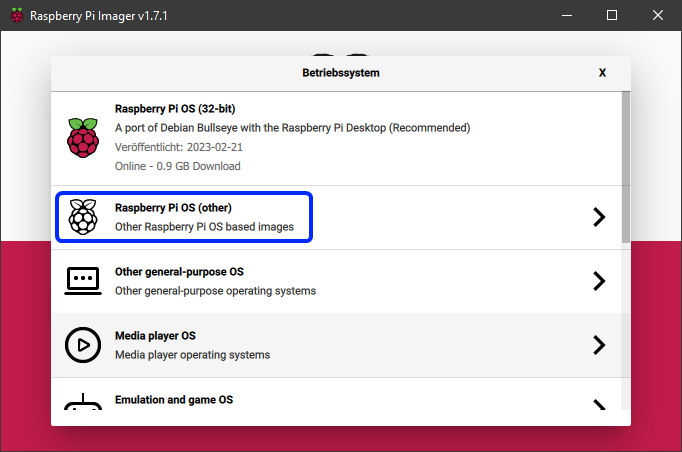
|
||||
3. Choose `Raspberry Pi OS Lite (32bit)` (or 64bit if desired).
|
||||
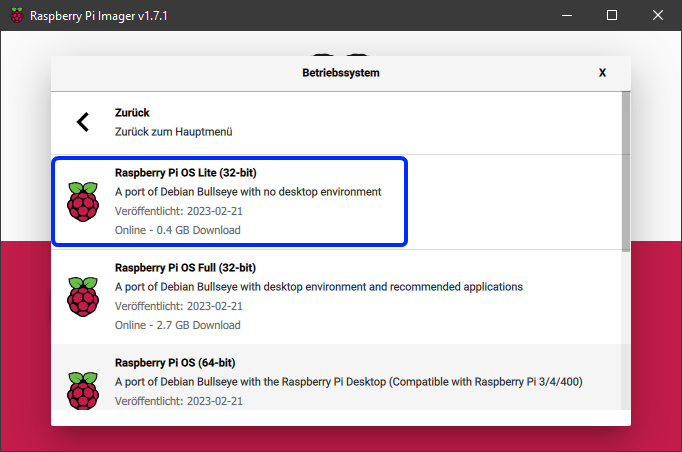
|
||||
4. Insert the microSD card into your computer's SD card reader.
|
||||
5. In the main menu of the Imager, select the correct microSD card.
|
||||
6. Click the gear icon at the bottom left of the main menu to open advanced options.
|
||||
7. Enable SSH and enter your Wi-Fi credentials.
|
||||
|
||||
!!! info
|
||||
Wi-Fi is only necessary if you want to connect to your Raspberry Pi over a wireless network. If you plan to use a wired Ethernet connection, you can skip this step. SSH is required for remote access to your Raspberry Pi, so make sure to enable it.
|
||||
|
||||
8. Click `Save` to close the advanced options menu.
|
||||
9. Click `Write` to start flashing the image to the microSD card.
|
||||
|
||||
!!! warning
|
||||
All data on the microSD card will be overwritten!
|
||||
|
||||
10. Once the flashing process is complete, safely eject the microSD card from your computer.
|
||||
11. Insert the microSD card into your Raspberry Pi.
|
||||
12. Connect your Raspberry Pi to a power source to boot it up.
|
||||
13. Wait for a few minutes to allow the Raspberry Pi to complete its initial setup.
|
||||
14. You can now connect to your Raspberry Pi via SSH using the IP address assigned by your router. The default username is `pi` and the default password is `raspberry`.
|
||||
|
||||
If you successfully connected to your Raspberry Pi via SSH, you can proceed to install KIAUH by following the instructions in the [Installation Guide](installation.md).
|
||||
@@ -1,7 +1,7 @@
|
||||
#!/usr/bin/env bash
|
||||
|
||||
#=======================================================================#
|
||||
# Copyright (C) 2020 - 2026 Dominik Willner <th33xitus@gmail.com> #
|
||||
# Copyright (C) 2020 - 2025 Dominik Willner <th33xitus@gmail.com> #
|
||||
# #
|
||||
# This file is part of KIAUH - Klipper Installation And Update Helper #
|
||||
# https://github.com/dw-0/kiauh #
|
||||
@@ -15,30 +15,18 @@ clear -x
|
||||
# make sure we have the correct permissions while running the script
|
||||
umask 022
|
||||
|
||||
# gets the path where this script is located
|
||||
KIAUH_SRCDIR=$( cd -- "$( dirname -- "${BASH_SOURCE[0]}" )" &> /dev/null && pwd)
|
||||
|
||||
# colors
|
||||
white="\033[37m"
|
||||
cyan="\033[96m"
|
||||
red="\033[91m"
|
||||
yellow="\033[93m"
|
||||
green="\033[92m"
|
||||
|
||||
#===================================================#
|
||||
#=================== UPDATE KIAUH ==================#
|
||||
#===================================================#
|
||||
|
||||
function update_kiauh() {
|
||||
echo "Updating KIAUH ..."
|
||||
status_msg "Updating KIAUH ..."
|
||||
|
||||
cd "${KIAUH_SRCDIR}"
|
||||
git reset --hard && git pull
|
||||
|
||||
echo "Update complete! Restarting..."
|
||||
sleep 1
|
||||
exec "$0" "$@" # restarts the script
|
||||
|
||||
ok_msg "Update complete! Please restart KIAUH."
|
||||
exit 0
|
||||
}
|
||||
|
||||
#===================================================#
|
||||
@@ -66,29 +54,27 @@ function kiauh_update_avail() {
|
||||
|
||||
function kiauh_update_dialog() {
|
||||
[[ ! $(kiauh_update_avail) == "true" ]] && return
|
||||
echo -e "/-------------------------------------------------------\\"
|
||||
top_border
|
||||
echo -e "|${green} New KIAUH update available! ${white}|"
|
||||
echo -e "|-------------------------------------------------------|"
|
||||
hr
|
||||
echo -e "|${green} View Changelog: https://git.io/JnmlX ${white}|"
|
||||
echo -e "| |"
|
||||
blank_line
|
||||
echo -e "|${yellow} It is recommended to keep KIAUH up to date. Updates ${white}|"
|
||||
echo -e "|${yellow} usually contain bugfixes, important changes or new ${white}|"
|
||||
echo -e "|${yellow} features. Please consider updating! ${white}|"
|
||||
echo -e "\-------------------------------------------------------/"
|
||||
bottom_border
|
||||
|
||||
local yn
|
||||
echo -ne "${cyan}###### Do you want to update now? (Y/n):${white} "
|
||||
read yn
|
||||
read -p "${cyan}###### Do you want to update now? (Y/n):${white} " yn
|
||||
while true; do
|
||||
case "${yn}" in
|
||||
Y|y|Yes|yes|"")
|
||||
update_kiauh
|
||||
do_action "update_kiauh"
|
||||
break;;
|
||||
N|n|No|no)
|
||||
break;;
|
||||
*)
|
||||
echo -e "${red}Invalid input. Please try again.${white}"
|
||||
kiauh_update_dialog;;
|
||||
deny_action "kiauh_update_dialog";;
|
||||
esac
|
||||
done
|
||||
}
|
||||
@@ -96,11 +82,11 @@ function kiauh_update_dialog() {
|
||||
function check_euid() {
|
||||
if [[ ${EUID} -eq 0 ]]; then
|
||||
echo -e "${red}"
|
||||
echo -e "/-------------------------------------------------------\\"
|
||||
top_border
|
||||
echo -e "| !!! THIS SCRIPT MUST NOT RUN AS ROOT !!! |"
|
||||
echo -e "| |"
|
||||
echo -e "| It will ask for credentials as needed. |"
|
||||
echo -e "\-------------------------------------------------------/"
|
||||
bottom_border
|
||||
echo -e "${white}"
|
||||
exit 1
|
||||
fi
|
||||
@@ -109,13 +95,13 @@ function check_euid() {
|
||||
function check_if_ratos() {
|
||||
if [[ -n $(which ratos) ]]; then
|
||||
echo -e "${red}"
|
||||
echo -e "/-------------------------------------------------------\\"
|
||||
top_border
|
||||
echo -e "| !!! RatOS 2.1 or greater detected !!! |"
|
||||
echo -e "| |"
|
||||
echo -e "| KIAUH does currently not support RatOS. |"
|
||||
echo -e "| If you have any questions, please ask for help on the |"
|
||||
echo -e "| RatRig Community Discord: https://discord.gg/ratrig |"
|
||||
echo -e "\-------------------------------------------------------/"
|
||||
bottom_border
|
||||
echo -e "${white}"
|
||||
exit 1
|
||||
fi
|
||||
|
||||
+1
-1
@@ -1,5 +1,5 @@
|
||||
# ======================================================================= #
|
||||
# Copyright (C) 2020 - 2026 Dominik Willner <th33xitus@gmail.com> #
|
||||
# Copyright (C) 2020 - 2025 Dominik Willner <th33xitus@gmail.com> #
|
||||
# #
|
||||
# This file is part of KIAUH - Klipper Installation And Update Helper #
|
||||
# https://github.com/dw-0/kiauh #
|
||||
|
||||
@@ -1,5 +1,5 @@
|
||||
# ======================================================================= #
|
||||
# Copyright (C) 2020 - 2026 Dominik Willner <th33xitus@gmail.com> #
|
||||
# Copyright (C) 2020 - 2025 Dominik Willner <th33xitus@gmail.com> #
|
||||
# #
|
||||
# This file is part of KIAUH - Klipper Installation And Update Helper #
|
||||
# https://github.com/dw-0/kiauh #
|
||||
|
||||
@@ -1,5 +1,5 @@
|
||||
# ======================================================================= #
|
||||
# Copyright (C) 2020 - 2026 Dominik Willner <th33xitus@gmail.com> #
|
||||
# Copyright (C) 2020 - 2025 Dominik Willner <th33xitus@gmail.com> #
|
||||
# #
|
||||
# This file is part of KIAUH - Klipper Installation And Update Helper #
|
||||
# https://github.com/dw-0/kiauh #
|
||||
@@ -47,7 +47,7 @@ from utils.sys_utils import (
|
||||
|
||||
def install_crowsnest() -> None:
|
||||
# Step 1: Clone crowsnest repo
|
||||
git_clone_wrapper(CROWSNEST_REPO, CROWSNEST_DIR)
|
||||
git_clone_wrapper(CROWSNEST_REPO, CROWSNEST_DIR, "master")
|
||||
|
||||
# Step 2: Install dependencies
|
||||
check_install_dependencies({"make"})
|
||||
|
||||
@@ -1,5 +1,5 @@
|
||||
# ======================================================================= #
|
||||
# Copyright (C) 2020 - 2026 Dominik Willner <th33xitus@gmail.com> #
|
||||
# Copyright (C) 2020 - 2025 Dominik Willner <th33xitus@gmail.com> #
|
||||
# #
|
||||
# This file is part of KIAUH - Klipper Installation And Update Helper #
|
||||
# https://github.com/dw-0/kiauh #
|
||||
|
||||
@@ -1,5 +1,5 @@
|
||||
# ======================================================================= #
|
||||
# Copyright (C) 2020 - 2026 Dominik Willner <th33xitus@gmail.com> #
|
||||
# Copyright (C) 2020 - 2025 Dominik Willner <th33xitus@gmail.com> #
|
||||
# #
|
||||
# This file is part of KIAUH - Klipper Installation And Update Helper #
|
||||
# https://github.com/dw-0/kiauh #
|
||||
|
||||
@@ -1,5 +1,5 @@
|
||||
# ======================================================================= #
|
||||
# Copyright (C) 2020 - 2026 Dominik Willner <th33xitus@gmail.com> #
|
||||
# Copyright (C) 2020 - 2025 Dominik Willner <th33xitus@gmail.com> #
|
||||
# #
|
||||
# This file is part of KIAUH - Klipper Installation And Update Helper #
|
||||
# https://github.com/dw-0/kiauh #
|
||||
|
||||
@@ -1,5 +1,5 @@
|
||||
# ======================================================================= #
|
||||
# Copyright (C) 2020 - 2026 Dominik Willner <th33xitus@gmail.com> #
|
||||
# Copyright (C) 2020 - 2025 Dominik Willner <th33xitus@gmail.com> #
|
||||
# #
|
||||
# This file is part of KIAUH - Klipper Installation And Update Helper #
|
||||
# https://github.com/dw-0/kiauh #
|
||||
@@ -34,7 +34,7 @@ from core.constants import CURRENT_USER
|
||||
from core.instance_manager.base_instance import SUFFIX_BLACKLIST
|
||||
from core.logger import DialogType, Logger
|
||||
from core.services.backup_service import BackupService
|
||||
from core.simple_config_parser.simple_config_parser import (
|
||||
from core.submodules.simple_config_parser.src.simple_config_parser.simple_config_parser import (
|
||||
SimpleConfigParser,
|
||||
)
|
||||
from core.types.component_status import ComponentStatus
|
||||
@@ -113,7 +113,7 @@ def check_user_groups() -> None:
|
||||
|
||||
if not get_confirm(f"Add user '{CURRENT_USER}' to group(s) now?"):
|
||||
log = "Skipped adding user to required groups. You might encounter issues."
|
||||
Logger.print_warn(log)
|
||||
Logger.warn(log)
|
||||
return
|
||||
|
||||
try:
|
||||
@@ -237,6 +237,7 @@ def install_input_shaper_deps() -> None:
|
||||
"If you agree, the following additional system packages will be installed:",
|
||||
"● python3-numpy",
|
||||
"● python3-matplotlib",
|
||||
"● libatlas-base-dev",
|
||||
"● libopenblas-dev",
|
||||
"\n\n",
|
||||
"Also, the following Python package will be installed:",
|
||||
@@ -252,6 +253,7 @@ def install_input_shaper_deps() -> None:
|
||||
apt_deps = (
|
||||
"python3-numpy",
|
||||
"python3-matplotlib",
|
||||
"libatlas-base-dev",
|
||||
"libopenblas-dev",
|
||||
)
|
||||
check_install_dependencies({*apt_deps})
|
||||
|
||||
@@ -1,5 +1,5 @@
|
||||
# ======================================================================= #
|
||||
# Copyright (C) 2020 - 2026 Dominik Willner <th33xitus@gmail.com> #
|
||||
# Copyright (C) 2020 - 2025 Dominik Willner <th33xitus@gmail.com> #
|
||||
# #
|
||||
# This file is part of KIAUH - Klipper Installation And Update Helper #
|
||||
# https://github.com/dw-0/kiauh #
|
||||
|
||||
@@ -1,5 +1,5 @@
|
||||
# ======================================================================= #
|
||||
# Copyright (C) 2020 - 2026 Dominik Willner <th33xitus@gmail.com> #
|
||||
# Copyright (C) 2020 - 2025 Dominik Willner <th33xitus@gmail.com> #
|
||||
# #
|
||||
# This file is part of KIAUH - Klipper Installation And Update Helper #
|
||||
# https://github.com/dw-0/kiauh #
|
||||
|
||||
@@ -1,5 +1,5 @@
|
||||
# ======================================================================= #
|
||||
# Copyright (C) 2020 - 2026 Dominik Willner <th33xitus@gmail.com> #
|
||||
# Copyright (C) 2020 - 2025 Dominik Willner <th33xitus@gmail.com> #
|
||||
# #
|
||||
# This file is part of KIAUH - Klipper Installation And Update Helper #
|
||||
# https://github.com/dw-0/kiauh #
|
||||
|
||||
@@ -1,5 +1,5 @@
|
||||
# ======================================================================= #
|
||||
# Copyright (C) 2020 - 2026 Dominik Willner <th33xitus@gmail.com> #
|
||||
# Copyright (C) 2020 - 2025 Dominik Willner <th33xitus@gmail.com> #
|
||||
# #
|
||||
# This file is part of KIAUH - Klipper Installation And Update Helper #
|
||||
# https://github.com/dw-0/kiauh #
|
||||
|
||||
@@ -1,5 +1,5 @@
|
||||
# ======================================================================= #
|
||||
# Copyright (C) 2020 - 2026 Dominik Willner <th33xitus@gmail.com> #
|
||||
# Copyright (C) 2020 - 2025 Dominik Willner <th33xitus@gmail.com> #
|
||||
# #
|
||||
# This file is part of KIAUH - Klipper Installation And Update Helper #
|
||||
# https://github.com/dw-0/kiauh #
|
||||
|
||||
@@ -1,5 +1,5 @@
|
||||
# ======================================================================= #
|
||||
# Copyright (C) 2020 - 2026 Dominik Willner <th33xitus@gmail.com> #
|
||||
# Copyright (C) 2020 - 2025 Dominik Willner <th33xitus@gmail.com> #
|
||||
# #
|
||||
# This file is part of KIAUH - Klipper Installation And Update Helper #
|
||||
# https://github.com/dw-0/kiauh #
|
||||
|
||||
@@ -1,5 +1,5 @@
|
||||
# ======================================================================= #
|
||||
# Copyright (C) 2020 - 2026 Dominik Willner <th33xitus@gmail.com> #
|
||||
# Copyright (C) 2020 - 2025 Dominik Willner <th33xitus@gmail.com> #
|
||||
# #
|
||||
# This file is part of KIAUH - Klipper Installation And Update Helper #
|
||||
# https://github.com/dw-0/kiauh #
|
||||
|
||||
@@ -1,5 +1,5 @@
|
||||
# ======================================================================= #
|
||||
# Copyright (C) 2020 - 2026 Dominik Willner <th33xitus@gmail.com> #
|
||||
# Copyright (C) 2020 - 2025 Dominik Willner <th33xitus@gmail.com> #
|
||||
# #
|
||||
# This file is part of KIAUH - Klipper Installation And Update Helper #
|
||||
# https://github.com/dw-0/kiauh #
|
||||
|
||||
@@ -1,5 +1,5 @@
|
||||
# ======================================================================= #
|
||||
# Copyright (C) 2020 - 2026 Dominik Willner <th33xitus@gmail.com> #
|
||||
# Copyright (C) 2020 - 2025 Dominik Willner <th33xitus@gmail.com> #
|
||||
# #
|
||||
# This file is part of KIAUH - Klipper Installation And Update Helper #
|
||||
# https://github.com/dw-0/kiauh #
|
||||
|
||||
@@ -1,5 +1,5 @@
|
||||
# ======================================================================= #
|
||||
# Copyright (C) 2020 - 2026 Dominik Willner <th33xitus@gmail.com> #
|
||||
# Copyright (C) 2020 - 2025 Dominik Willner <th33xitus@gmail.com> #
|
||||
# #
|
||||
# This file is part of KIAUH - Klipper Installation And Update Helper #
|
||||
# https://github.com/dw-0/kiauh #
|
||||
@@ -236,11 +236,9 @@ class KlipperSelectMcuConnectionMenu(BaseMenu):
|
||||
if len(self.flash_options.mcu_list) < 1:
|
||||
Logger.print_warn("No MCUs found!")
|
||||
Logger.print_warn("Make sure they are connected and repeat this step.")
|
||||
time.sleep(3)
|
||||
return
|
||||
|
||||
# if standalone is True, we only display the MCUs to the user and return
|
||||
if self.__standalone:
|
||||
if self.__standalone and len(self.flash_options.mcu_list) > 0:
|
||||
Logger.print_ok("The following MCUs were found:", prefix=False)
|
||||
for i, mcu in enumerate(self.flash_options.mcu_list):
|
||||
print(f" ● MCU #{i}: {Color.CYAN}{mcu}{Color.RST}")
|
||||
|
||||
@@ -1,5 +1,5 @@
|
||||
# ======================================================================= #
|
||||
# Copyright (C) 2020 - 2026 Dominik Willner <th33xitus@gmail.com> #
|
||||
# Copyright (C) 2020 - 2025 Dominik Willner <th33xitus@gmail.com> #
|
||||
# #
|
||||
# This file is part of KIAUH - Klipper Installation And Update Helper #
|
||||
# https://github.com/dw-0/kiauh #
|
||||
|
||||
@@ -1,5 +1,5 @@
|
||||
# ======================================================================= #
|
||||
# Copyright (C) 2020 - 2026 Dominik Willner <th33xitus@gmail.com> #
|
||||
# Copyright (C) 2020 - 2025 Dominik Willner <th33xitus@gmail.com> #
|
||||
# #
|
||||
# This file is part of KIAUH - Klipper Installation And Update Helper #
|
||||
# https://github.com/dw-0/kiauh #
|
||||
|
||||
@@ -1,5 +1,5 @@
|
||||
# ======================================================================= #
|
||||
# Copyright (C) 2020 - 2026 Dominik Willner <th33xitus@gmail.com> #
|
||||
# Copyright (C) 2020 - 2025 Dominik Willner <th33xitus@gmail.com> #
|
||||
# #
|
||||
# This file is part of KIAUH - Klipper Installation And Update Helper #
|
||||
# https://github.com/dw-0/kiauh #
|
||||
|
||||
@@ -1,5 +1,5 @@
|
||||
# ======================================================================= #
|
||||
# Copyright (C) 2020 - 2026 Dominik Willner <th33xitus@gmail.com> #
|
||||
# Copyright (C) 2020 - 2025 Dominik Willner <th33xitus@gmail.com> #
|
||||
# #
|
||||
# This file is part of KIAUH - Klipper Installation And Update Helper #
|
||||
# https://github.com/dw-0/kiauh #
|
||||
|
||||
@@ -1,5 +1,5 @@
|
||||
# ======================================================================= #
|
||||
# Copyright (C) 2020 - 2026 Dominik Willner <th33xitus@gmail.com> #
|
||||
# Copyright (C) 2020 - 2025 Dominik Willner <th33xitus@gmail.com> #
|
||||
# #
|
||||
# This file is part of KIAUH - Klipper Installation And Update Helper #
|
||||
# https://github.com/dw-0/kiauh #
|
||||
|
||||
@@ -1,5 +1,5 @@
|
||||
# ======================================================================= #
|
||||
# Copyright (C) 2020 - 2026 Dominik Willner <th33xitus@gmail.com> #
|
||||
# Copyright (C) 2020 - 2025 Dominik Willner <th33xitus@gmail.com> #
|
||||
# #
|
||||
# This file is part of KIAUH - Klipper Installation And Update Helper #
|
||||
# https://github.com/dw-0/kiauh #
|
||||
|
||||
@@ -1,5 +1,5 @@
|
||||
# ======================================================================= #
|
||||
# Copyright (C) 2020 - 2026 Dominik Willner <th33xitus@gmail.com> #
|
||||
# Copyright (C) 2020 - 2025 Dominik Willner <th33xitus@gmail.com> #
|
||||
# #
|
||||
# This file is part of KIAUH - Klipper Installation And Update Helper #
|
||||
# https://github.com/dw-0/kiauh #
|
||||
|
||||
@@ -1,5 +1,5 @@
|
||||
# ======================================================================= #
|
||||
# Copyright (C) 2020 - 2026 Dominik Willner <th33xitus@gmail.com> #
|
||||
# Copyright (C) 2020 - 2025 Dominik Willner <th33xitus@gmail.com> #
|
||||
# #
|
||||
# This file is part of KIAUH - Klipper Installation And Update Helper #
|
||||
# https://github.com/dw-0/kiauh #
|
||||
@@ -25,7 +25,7 @@ from components.moonraker import (
|
||||
from core.constants import CURRENT_USER
|
||||
from core.instance_manager.base_instance import BaseInstance
|
||||
from core.logger import Logger
|
||||
from core.simple_config_parser.simple_config_parser import (
|
||||
from core.submodules.simple_config_parser.src.simple_config_parser.simple_config_parser import (
|
||||
SimpleConfigParser,
|
||||
)
|
||||
from utils.fs_utils import create_folders
|
||||
|
||||
@@ -1,5 +1,5 @@
|
||||
# ======================================================================= #
|
||||
# Copyright (C) 2020 - 2026 Dominik Willner <th33xitus@gmail.com> #
|
||||
# Copyright (C) 2020 - 2025 Dominik Willner <th33xitus@gmail.com> #
|
||||
# #
|
||||
# This file is part of KIAUH - Klipper Installation And Update Helper #
|
||||
# https://github.com/dw-0/kiauh #
|
||||
|
||||
@@ -1,5 +1,5 @@
|
||||
# ======================================================================= #
|
||||
# Copyright (C) 2020 - 2026 Dominik Willner <th33xitus@gmail.com> #
|
||||
# Copyright (C) 2020 - 2025 Dominik Willner <th33xitus@gmail.com> #
|
||||
# #
|
||||
# This file is part of KIAUH - Klipper Installation And Update Helper #
|
||||
# https://github.com/dw-0/kiauh #
|
||||
|
||||
@@ -1,5 +1,5 @@
|
||||
# ======================================================================= #
|
||||
# Copyright (C) 2020 - 2026 Dominik Willner <th33xitus@gmail.com> #
|
||||
# Copyright (C) 2020 - 2025 Dominik Willner <th33xitus@gmail.com> #
|
||||
# #
|
||||
# This file is part of KIAUH - Klipper Installation And Update Helper #
|
||||
# https://github.com/dw-0/kiauh #
|
||||
|
||||
@@ -1,5 +1,5 @@
|
||||
# ======================================================================= #
|
||||
# Copyright (C) 2020 - 2026 Dominik Willner <th33xitus@gmail.com> #
|
||||
# Copyright (C) 2020 - 2025 Dominik Willner <th33xitus@gmail.com> #
|
||||
# #
|
||||
# This file is part of KIAUH - Klipper Installation And Update Helper #
|
||||
# https://github.com/dw-0/kiauh #
|
||||
|
||||
@@ -1,5 +1,5 @@
|
||||
# ======================================================================= #
|
||||
# Copyright (C) 2020 - 2026 Dominik Willner <th33xitus@gmail.com> #
|
||||
# Copyright (C) 2020 - 2025 Dominik Willner <th33xitus@gmail.com> #
|
||||
# #
|
||||
# This file is part of KIAUH - Klipper Installation And Update Helper #
|
||||
# https://github.com/dw-0/kiauh #
|
||||
@@ -25,7 +25,7 @@ from components.moonraker.utils.sysdeps_parser import SysDepsParser
|
||||
from components.webui_client.base_data import BaseWebClient
|
||||
from core.logger import Logger
|
||||
from core.services.backup_service import BackupService
|
||||
from core.simple_config_parser.simple_config_parser import (
|
||||
from core.submodules.simple_config_parser.src.simple_config_parser.simple_config_parser import (
|
||||
SimpleConfigParser,
|
||||
)
|
||||
from core.types.component_status import ComponentStatus
|
||||
@@ -123,7 +123,7 @@ def create_example_moonraker_conf(
|
||||
scp = SimpleConfigParser()
|
||||
scp.read_file(target)
|
||||
trusted_clients: List[str] = [
|
||||
f"{'.'.join(ip)}",
|
||||
f" {'.'.join(ip)}\n",
|
||||
*scp.getvals("authorization", "trusted_clients"),
|
||||
]
|
||||
|
||||
|
||||
@@ -1,5 +1,5 @@
|
||||
# ======================================================================= #
|
||||
# Copyright (C) 2020 - 2026 Dominik Willner <th33xitus@gmail.com> #
|
||||
# Copyright (C) 2020 - 2025 Dominik Willner <th33xitus@gmail.com> #
|
||||
# #
|
||||
# This file is part of KIAUH - Klipper Installation And Update Helper #
|
||||
# https://github.com/dw-0/kiauh #
|
||||
|
||||
@@ -1,5 +1,5 @@
|
||||
# ======================================================================= #
|
||||
# Copyright (C) 2020 - 2026 Dominik Willner <th33xitus@gmail.com> #
|
||||
# Copyright (C) 2020 - 2025 Dominik Willner <th33xitus@gmail.com> #
|
||||
# #
|
||||
# This file is part of KIAUH - Klipper Installation And Update Helper #
|
||||
# https://github.com/dw-0/kiauh #
|
||||
|
||||
@@ -1,5 +1,5 @@
|
||||
# ======================================================================= #
|
||||
# Copyright (C) 2020 - 2026 Dominik Willner <th33xitus@gmail.com> #
|
||||
# Copyright (C) 2020 - 2025 Dominik Willner <th33xitus@gmail.com> #
|
||||
# #
|
||||
# This file is part of KIAUH - Klipper Installation And Update Helper #
|
||||
# https://github.com/dw-0/kiauh #
|
||||
@@ -8,7 +8,7 @@
|
||||
# ======================================================================= #
|
||||
|
||||
|
||||
from typing import List, Optional
|
||||
from typing import List
|
||||
|
||||
from components.klipper.klipper import Klipper
|
||||
from components.moonraker.moonraker import Moonraker
|
||||
@@ -27,7 +27,6 @@ def run_client_config_removal(
|
||||
client_config: BaseWebClientConfig,
|
||||
kl_instances: List[Klipper],
|
||||
mr_instances: List[Moonraker],
|
||||
svc: Optional[BackupService] = None,
|
||||
) -> Message:
|
||||
completion_msg = Message(
|
||||
title=f"{client_config.display_name} Removal Process completed",
|
||||
@@ -37,15 +36,12 @@ def run_client_config_removal(
|
||||
if run_remove_routines(client_config.config_dir):
|
||||
completion_msg.text.append(f"● {client_config.display_name} removed")
|
||||
|
||||
if svc is None:
|
||||
svc = BackupService()
|
||||
BackupService().backup_printer_config_dir()
|
||||
|
||||
svc.backup_moonraker_conf()
|
||||
completion_msg = remove_moonraker_config_section(
|
||||
completion_msg, client_config, mr_instances
|
||||
)
|
||||
|
||||
svc.backup_printer_cfg()
|
||||
completion_msg = remove_printer_config_section(
|
||||
completion_msg, client_config, kl_instances
|
||||
)
|
||||
|
||||
@@ -1,5 +1,5 @@
|
||||
# ======================================================================= #
|
||||
# Copyright (C) 2020 - 2026 Dominik Willner <th33xitus@gmail.com> #
|
||||
# Copyright (C) 2020 - 2025 Dominik Willner <th33xitus@gmail.com> #
|
||||
# #
|
||||
# This file is part of KIAUH - Klipper Installation And Update Helper #
|
||||
# https://github.com/dw-0/kiauh #
|
||||
|
||||
@@ -1,5 +1,5 @@
|
||||
# ======================================================================= #
|
||||
# Copyright (C) 2020 - 2026 Dominik Willner <th33xitus@gmail.com> #
|
||||
# Copyright (C) 2020 - 2025 Dominik Willner <th33xitus@gmail.com> #
|
||||
# #
|
||||
# This file is part of KIAUH - Klipper Installation And Update Helper #
|
||||
# https://github.com/dw-0/kiauh #
|
||||
|
||||
@@ -1,5 +1,5 @@
|
||||
# ======================================================================= #
|
||||
# Copyright (C) 2020 - 2026 Dominik Willner <th33xitus@gmail.com> #
|
||||
# Copyright (C) 2020 - 2025 Dominik Willner <th33xitus@gmail.com> #
|
||||
# #
|
||||
# This file is part of KIAUH - Klipper Installation And Update Helper #
|
||||
# https://github.com/dw-0/kiauh #
|
||||
@@ -41,7 +41,6 @@ def run_client_removal(
|
||||
)
|
||||
mr_instances: List[Moonraker] = get_instances(Moonraker)
|
||||
kl_instances: List[Klipper] = get_instances(Klipper)
|
||||
svc = BackupService()
|
||||
|
||||
if backup_config:
|
||||
version = ""
|
||||
@@ -50,6 +49,7 @@ def run_client_removal(
|
||||
with open(src.joinpath(".version"), "r") as v:
|
||||
version = v.readlines()[0]
|
||||
|
||||
svc = BackupService()
|
||||
target_path = svc.backup_root.joinpath(f"{client.client_dir.name}_{version}")
|
||||
success = svc.backup_file(
|
||||
source_path=client.config_file,
|
||||
@@ -67,7 +67,7 @@ def run_client_removal(
|
||||
if remove_client_nginx_logs(client, kl_instances):
|
||||
completion_msg.text.append("● NGINX logs removed")
|
||||
|
||||
svc.backup_moonraker_conf()
|
||||
BackupService().backup_moonraker_conf()
|
||||
section = f"update_manager {client_name}"
|
||||
handled_instances: List[Moonraker] = remove_config_section(
|
||||
section, mr_instances
|
||||
@@ -83,7 +83,6 @@ def run_client_removal(
|
||||
client.client_config,
|
||||
kl_instances,
|
||||
mr_instances,
|
||||
svc,
|
||||
)
|
||||
if cfg_completion_msg.color == Color.GREEN:
|
||||
completion_msg.text.extend(cfg_completion_msg.text[1:])
|
||||
|
||||
@@ -1,5 +1,5 @@
|
||||
# ======================================================================= #
|
||||
# Copyright (C) 2020 - 2026 Dominik Willner <th33xitus@gmail.com> #
|
||||
# Copyright (C) 2020 - 2025 Dominik Willner <th33xitus@gmail.com> #
|
||||
# #
|
||||
# This file is part of KIAUH - Klipper Installation And Update Helper #
|
||||
# https://github.com/dw-0/kiauh #
|
||||
|
||||
@@ -1,5 +1,5 @@
|
||||
# ======================================================================= #
|
||||
# Copyright (C) 2020 - 2026 Dominik Willner <th33xitus@gmail.com> #
|
||||
# Copyright (C) 2020 - 2025 Dominik Willner <th33xitus@gmail.com> #
|
||||
# #
|
||||
# This file is part of KIAUH - Klipper Installation And Update Helper #
|
||||
# https://github.com/dw-0/kiauh #
|
||||
@@ -11,7 +11,6 @@ from __future__ import annotations
|
||||
import json
|
||||
import re
|
||||
import shutil
|
||||
from json import JSONDecodeError
|
||||
from pathlib import Path
|
||||
from subprocess import PIPE, CalledProcessError, run
|
||||
from typing import List, get_args
|
||||
@@ -33,7 +32,7 @@ from core.constants import (
|
||||
from core.logger import Logger
|
||||
from core.services.backup_service import BackupService
|
||||
from core.settings.kiauh_settings import KiauhSettings, WebUiSettings
|
||||
from core.simple_config_parser.simple_config_parser import (
|
||||
from core.submodules.simple_config_parser.src.simple_config_parser.simple_config_parser import (
|
||||
SimpleConfigParser,
|
||||
)
|
||||
from core.types.color import Color
|
||||
@@ -78,10 +77,10 @@ def get_current_client_config() -> str:
|
||||
installed = [c for c in clients if c.client_config.config_dir.exists()]
|
||||
|
||||
if not installed:
|
||||
return str(Color.apply("-", Color.CYAN))
|
||||
return Color.apply("-", Color.CYAN)
|
||||
elif len(installed) == 1:
|
||||
cfg = installed[0].client_config
|
||||
return str(Color.apply(cfg.display_name, Color.CYAN))
|
||||
return Color.apply(cfg.display_name, Color.CYAN)
|
||||
|
||||
# at this point, both client config folders exists, so we need to check
|
||||
# which are actually included in the printer.cfg of all klipper instances
|
||||
@@ -100,18 +99,18 @@ def get_current_client_config() -> str:
|
||||
|
||||
# if both are included in the same file, we have a potential conflict
|
||||
if includes_mainsail and includes_fluidd:
|
||||
return str(Color.apply("Conflict", Color.YELLOW))
|
||||
return Color.apply("Conflict", Color.YELLOW)
|
||||
|
||||
if not mainsail_includes and not fluidd_includes:
|
||||
# there are no includes at all, even though the client config folders exist
|
||||
return str(Color.apply("-", Color.CYAN))
|
||||
return Color.apply("-", Color.CYAN)
|
||||
elif len(fluidd_includes) > len(mainsail_includes):
|
||||
# there are more instances that include fluidd than mainsail
|
||||
return str(Color.apply(fluidd.client_config.display_name, Color.CYAN))
|
||||
return Color.apply(fluidd.client_config.display_name, Color.CYAN)
|
||||
else:
|
||||
# there are the same amount of non-conflicting includes for each config
|
||||
# or more instances include mainsail than fluidd
|
||||
return str(Color.apply(mainsail.client_config.display_name, Color.CYAN))
|
||||
return Color.apply(mainsail.client_config.display_name, Color.CYAN)
|
||||
|
||||
|
||||
def enable_mainsail_remotemode() -> None:
|
||||
@@ -155,32 +154,15 @@ def get_local_client_version(client: BaseWebClient) -> str | None:
|
||||
|
||||
if not client.client_dir.exists():
|
||||
return None
|
||||
if not relinfo_file.is_file() and not version_file.is_file():
|
||||
return "n/a"
|
||||
|
||||
# try to get version from release_info.json first
|
||||
if relinfo_file.is_file():
|
||||
try:
|
||||
if relinfo_file.stat().st_size == 0:
|
||||
raise JSONDecodeError("Empty file", "", 0)
|
||||
with open(relinfo_file, "r", encoding="utf-8") as f:
|
||||
data = json.load(f)
|
||||
raw_version = data.get("version")
|
||||
if raw_version is not None:
|
||||
parsed = str(raw_version).strip()
|
||||
if parsed:
|
||||
return parsed
|
||||
except (JSONDecodeError, OSError):
|
||||
Logger.print_error("Invalid 'release_info.json'")
|
||||
|
||||
# fallback to .version file
|
||||
if version_file.is_file():
|
||||
try:
|
||||
with open(version_file, "r") as f:
|
||||
line = f.readline().strip()
|
||||
return line or None
|
||||
except OSError:
|
||||
Logger.print_error("Unable to read '.version'")
|
||||
|
||||
return None
|
||||
with open(relinfo_file, "r") as f:
|
||||
return str(json.load(f)["version"])
|
||||
else:
|
||||
with open(version_file, "r") as f:
|
||||
return f.readlines()[0]
|
||||
|
||||
|
||||
def get_remote_client_version(client: BaseWebClient) -> str | None:
|
||||
@@ -445,9 +427,9 @@ def get_client_port_selection(
|
||||
while True:
|
||||
_type = "Reconfigure" if reconfigure else "Configure"
|
||||
question = f"{_type} {client.display_name} for port"
|
||||
port_input: int | None = get_number_input(question, min_value=80, default=port)
|
||||
port_input = get_number_input(question, min_value=80, default=port)
|
||||
|
||||
if port_input and port_input not in ports_in_use:
|
||||
if port_input not in ports_in_use:
|
||||
client_settings: WebUiSettings = settings[client.name]
|
||||
client_settings.port = port_input
|
||||
settings.save()
|
||||
|
||||
@@ -1,5 +1,5 @@
|
||||
# ======================================================================= #
|
||||
# Copyright (C) 2020 - 2026 Dominik Willner <th33xitus@gmail.com> #
|
||||
# Copyright (C) 2020 - 2025 Dominik Willner <th33xitus@gmail.com> #
|
||||
# #
|
||||
# This file is part of KIAUH - Klipper Installation And Update Helper #
|
||||
# https://github.com/dw-0/kiauh #
|
||||
|
||||
@@ -1,5 +1,5 @@
|
||||
# ======================================================================= #
|
||||
# Copyright (C) 2020 - 2026 Dominik Willner <th33xitus@gmail.com> #
|
||||
# Copyright (C) 2020 - 2025 Dominik Willner <th33xitus@gmail.com> #
|
||||
# #
|
||||
# This file is part of KIAUH - Klipper Installation And Update Helper #
|
||||
# https://github.com/dw-0/kiauh #
|
||||
|
||||
@@ -1,5 +1,5 @@
|
||||
# ======================================================================= #
|
||||
# Copyright (C) 2020 - 2026 Dominik Willner <th33xitus@gmail.com> #
|
||||
# Copyright (C) 2020 - 2025 Dominik Willner <th33xitus@gmail.com> #
|
||||
# #
|
||||
# This file is part of KIAUH - Klipper Installation And Update Helper #
|
||||
# https://github.com/dw-0/kiauh #
|
||||
@@ -97,7 +97,7 @@ class ClientInstallMenu(BaseMenu):
|
||||
self.message_service.set_message(message)
|
||||
|
||||
def _get_current_port(self) -> int:
|
||||
curr_port: int | None = get_nginx_listen_port(self.client.nginx_config)
|
||||
curr_port = get_nginx_listen_port(self.client.nginx_config)
|
||||
if curr_port is None:
|
||||
# if the port is not found in the config file we use
|
||||
# the default port from the kiauh settings as fallback
|
||||
|
||||
@@ -1,5 +1,5 @@
|
||||
# ======================================================================= #
|
||||
# Copyright (C) 2020 - 2026 Dominik Willner <th33xitus@gmail.com> #
|
||||
# Copyright (C) 2020 - 2025 Dominik Willner <th33xitus@gmail.com> #
|
||||
# #
|
||||
# This file is part of KIAUH - Klipper Installation And Update Helper #
|
||||
# https://github.com/dw-0/kiauh #
|
||||
|
||||
@@ -1,5 +1,5 @@
|
||||
# ======================================================================= #
|
||||
# Copyright (C) 2020 - 2026 Dominik Willner <th33xitus@gmail.com> #
|
||||
# Copyright (C) 2020 - 2025 Dominik Willner <th33xitus@gmail.com> #
|
||||
# #
|
||||
# This file is part of KIAUH - Klipper Installation And Update Helper #
|
||||
# https://github.com/dw-0/kiauh #
|
||||
|
||||
@@ -1,5 +1,5 @@
|
||||
# ======================================================================= #
|
||||
# Copyright (C) 2020 - 2026 Dominik Willner <th33xitus@gmail.com> #
|
||||
# Copyright (C) 2020 - 2025 Dominik Willner <th33xitus@gmail.com> #
|
||||
# #
|
||||
# This file is part of KIAUH - Klipper Installation And Update Helper #
|
||||
# https://github.com/dw-0/kiauh #
|
||||
|
||||
@@ -1,5 +1,5 @@
|
||||
# ======================================================================= #
|
||||
# Copyright (C) 2020 - 2026 Dominik Willner <th33xitus@gmail.com> #
|
||||
# Copyright (C) 2020 - 2025 Dominik Willner <th33xitus@gmail.com> #
|
||||
# #
|
||||
# This file is part of KIAUH - Klipper Installation And Update Helper #
|
||||
# https://github.com/dw-0/kiauh #
|
||||
|
||||
@@ -1,5 +1,5 @@
|
||||
# ======================================================================= #
|
||||
# Copyright (C) 2020 - 2026 Dominik Willner <th33xitus@gmail.com> #
|
||||
# Copyright (C) 2020 - 2025 Dominik Willner <th33xitus@gmail.com> #
|
||||
# #
|
||||
# This file is part of KIAUH - Klipper Installation And Update Helper #
|
||||
# https://github.com/dw-0/kiauh #
|
||||
|
||||
@@ -1,5 +1,5 @@
|
||||
# ======================================================================= #
|
||||
# Copyright (C) 2020 - 2026 Dominik Willner <th33xitus@gmail.com> #
|
||||
# Copyright (C) 2020 - 2025 Dominik Willner <th33xitus@gmail.com> #
|
||||
# #
|
||||
# This file is part of KIAUH - Klipper Installation And Update Helper #
|
||||
# https://github.com/dw-0/kiauh #
|
||||
|
||||
@@ -1,5 +1,5 @@
|
||||
# ======================================================================= #
|
||||
# Copyright (C) 2020 - 2026 Dominik Willner <th33xitus@gmail.com> #
|
||||
# Copyright (C) 2020 - 2025 Dominik Willner <th33xitus@gmail.com> #
|
||||
# #
|
||||
# This file is part of KIAUH - Klipper Installation And Update Helper #
|
||||
# https://github.com/dw-0/kiauh #
|
||||
|
||||
@@ -1,5 +1,5 @@
|
||||
# ======================================================================= #
|
||||
# Copyright (C) 2020 - 2026 Dominik Willner <th33xitus@gmail.com> #
|
||||
# Copyright (C) 2020 - 2025 Dominik Willner <th33xitus@gmail.com> #
|
||||
# #
|
||||
# This file is part of KIAUH - Klipper Installation And Update Helper #
|
||||
# https://github.com/dw-0/kiauh #
|
||||
|
||||
@@ -1,5 +1,5 @@
|
||||
# ======================================================================= #
|
||||
# Copyright (C) 2020 - 2026 Dominik Willner <th33xitus@gmail.com> #
|
||||
# Copyright (C) 2020 - 2025 Dominik Willner <th33xitus@gmail.com> #
|
||||
# #
|
||||
# This file is part of KIAUH - Klipper Installation And Update Helper #
|
||||
# https://github.com/dw-0/kiauh #
|
||||
@@ -58,7 +58,7 @@ class BackupMenu(BaseMenu):
|
||||
|
||||
def print_menu(self) -> None:
|
||||
line1 = Color.apply(
|
||||
"INFO: Backups are located in '~/kiauh_backups'", Color.YELLOW
|
||||
"INFO: Backups are located in '~/kiauh-backups'", Color.YELLOW
|
||||
)
|
||||
menu = textwrap.dedent(
|
||||
f"""
|
||||
|
||||
@@ -1,5 +1,5 @@
|
||||
# ======================================================================= #
|
||||
# Copyright (C) 2020 - 2026 Dominik Willner <th33xitus@gmail.com> #
|
||||
# Copyright (C) 2020 - 2025 Dominik Willner <th33xitus@gmail.com> #
|
||||
# #
|
||||
# This file is part of KIAUH - Klipper Installation And Update Helper #
|
||||
# https://github.com/dw-0/kiauh #
|
||||
|
||||
@@ -1,5 +1,5 @@
|
||||
# ======================================================================= #
|
||||
# Copyright (C) 2020 - 2026 Dominik Willner <th33xitus@gmail.com> #
|
||||
# Copyright (C) 2020 - 2025 Dominik Willner <th33xitus@gmail.com> #
|
||||
# #
|
||||
# This file is part of KIAUH - Klipper Installation And Update Helper #
|
||||
# https://github.com/dw-0/kiauh #
|
||||
|
||||
@@ -1,5 +1,5 @@
|
||||
# ======================================================================= #
|
||||
# Copyright (C) 2020 - 2026 Dominik Willner <th33xitus@gmail.com> #
|
||||
# Copyright (C) 2020 - 2025 Dominik Willner <th33xitus@gmail.com> #
|
||||
# #
|
||||
# This file is part of KIAUH - Klipper Installation And Update Helper #
|
||||
# https://github.com/dw-0/kiauh #
|
||||
@@ -95,8 +95,8 @@ class MainMenu(BaseMenu):
|
||||
status_data: ComponentStatus = status_fn(*args)
|
||||
code: int = status_data.status
|
||||
status: StatusText = StatusMap[code]
|
||||
owner: str = trunc_string(status_data.owner, 23) if status_data.owner else '-'
|
||||
repo: str = trunc_string(status_data.repo, 23) if status_data.repo else '-'
|
||||
owner: str = trunc_string(status_data.owner, 23)
|
||||
repo: str = trunc_string(status_data.repo, 23)
|
||||
instance_count: int = status_data.instances
|
||||
|
||||
count_txt: str = ""
|
||||
|
||||
@@ -1,5 +1,5 @@
|
||||
# ======================================================================= #
|
||||
# Copyright (C) 2020 - 2026 Dominik Willner <th33xitus@gmail.com> #
|
||||
# Copyright (C) 2020 - 2025 Dominik Willner <th33xitus@gmail.com> #
|
||||
# #
|
||||
# This file is part of KIAUH - Klipper Installation And Update Helper #
|
||||
# https://github.com/dw-0/kiauh #
|
||||
|
||||
@@ -1,5 +1,5 @@
|
||||
# ======================================================================= #
|
||||
# Copyright (C) 2020 - 2026 Dominik Willner <th33xitus@gmail.com> #
|
||||
# Copyright (C) 2020 - 2025 Dominik Willner <th33xitus@gmail.com> #
|
||||
# #
|
||||
# This file is part of KIAUH - Klipper Installation And Update Helper #
|
||||
# https://github.com/dw-0/kiauh #
|
||||
|
||||
@@ -1,5 +1,5 @@
|
||||
# ======================================================================= #
|
||||
# Copyright (C) 2020 - 2026 Dominik Willner <th33xitus@gmail.com> #
|
||||
# Copyright (C) 2020 - 2025 Dominik Willner <th33xitus@gmail.com> #
|
||||
# #
|
||||
# This file is part of KIAUH - Klipper Installation And Update Helper #
|
||||
# https://github.com/dw-0/kiauh #
|
||||
@@ -100,11 +100,11 @@ class SettingsMenu(BaseMenu):
|
||||
def trim_repo_url(repo: str) -> str:
|
||||
return repo.replace(".git", "").replace("https://", "").replace("git@", "")
|
||||
|
||||
if klipper_status.repo:
|
||||
if not klipper_status.repo == "-":
|
||||
url = trim_repo_url(klipper_status.repo_url)
|
||||
self.kl_repo_url = Color.apply(url, Color.CYAN)
|
||||
self.kl_branch = Color.apply(klipper_status.branch, Color.CYAN)
|
||||
if moonraker_status.repo:
|
||||
if not moonraker_status.repo == "-":
|
||||
url = trim_repo_url(moonraker_status.repo_url)
|
||||
self.mr_repo_url = Color.apply(url, Color.CYAN)
|
||||
self.mr_branch = Color.apply(moonraker_status.branch, Color.CYAN)
|
||||
|
||||
@@ -1,5 +1,5 @@
|
||||
# ======================================================================= #
|
||||
# Copyright (C) 2020 - 2026 Dominik Willner <th33xitus@gmail.com> #
|
||||
# Copyright (C) 2020 - 2025 Dominik Willner <th33xitus@gmail.com> #
|
||||
# #
|
||||
# This file is part of KIAUH - Klipper Installation And Update Helper #
|
||||
# https://github.com/dw-0/kiauh #
|
||||
@@ -251,23 +251,20 @@ class UpdateMenu(BaseMenu):
|
||||
self._set_status_data("klipperscreen", get_klipperscreen_status)
|
||||
self._set_status_data("crowsnest", get_crowsnest_status)
|
||||
|
||||
self._fetch_system_package_update_status()
|
||||
|
||||
def _fetch_system_package_update_status(self) -> None:
|
||||
update_system_package_lists(silent=True)
|
||||
self.packages = get_upgradable_packages()
|
||||
self.package_count = len(self.packages)
|
||||
|
||||
def _format_local_status(self, local_version, remote_version) -> str:
|
||||
color = Color.RED
|
||||
if local_version is None:
|
||||
if not local_version:
|
||||
color = Color.RED
|
||||
elif local_version == remote_version:
|
||||
color = Color.GREEN
|
||||
elif local_version != remote_version:
|
||||
color = Color.YELLOW
|
||||
|
||||
return str(Color.apply(local_version or '-', color))
|
||||
return Color.apply(local_version or "-", color)
|
||||
|
||||
def _set_status_data(self, name: str, status_fn: Callable, *args) -> None:
|
||||
comp_status: ComponentStatus = status_fn(*args)
|
||||
@@ -293,13 +290,7 @@ class UpdateMenu(BaseMenu):
|
||||
return self.status_data[name]["installed"]
|
||||
|
||||
def _is_update_available(self, name: str) -> bool:
|
||||
local = self.status_data[name]["local"]
|
||||
remote = self.status_data[name]["remote"]
|
||||
|
||||
if local is None or remote is None:
|
||||
return False
|
||||
|
||||
return local != remote
|
||||
return self.status_data[name]["local"] != self.status_data[name]["remote"]
|
||||
|
||||
def _run_update_routine(self, name: str, update_fn: Callable, *args) -> None:
|
||||
display_name = self.status_data[name]["display_name"]
|
||||
@@ -315,27 +306,6 @@ class UpdateMenu(BaseMenu):
|
||||
|
||||
update_fn(*args)
|
||||
|
||||
self._refresh_component_status(name)
|
||||
|
||||
def _refresh_component_status(self, name: str) -> None:
|
||||
"""Refresh the status data for a component after an update."""
|
||||
if name == "klipper":
|
||||
self._set_status_data("klipper", get_klipper_status)
|
||||
elif name == "moonraker":
|
||||
self._set_status_data("moonraker", get_moonraker_status)
|
||||
elif name == "mainsail":
|
||||
self._set_status_data("mainsail", get_client_status, self.mainsail_data, True)
|
||||
elif name == "mainsail_config":
|
||||
self._set_status_data("mainsail_config", get_client_config_status, self.mainsail_data)
|
||||
elif name == "fluidd":
|
||||
self._set_status_data("fluidd", get_client_status, self.fluidd_data, True)
|
||||
elif name == "fluidd_config":
|
||||
self._set_status_data("fluidd_config", get_client_config_status, self.fluidd_data)
|
||||
elif name == "klipperscreen":
|
||||
self._set_status_data("klipperscreen", get_klipperscreen_status)
|
||||
elif name == "crowsnest":
|
||||
self._set_status_data("crowsnest", get_crowsnest_status)
|
||||
|
||||
def _run_system_updates(self) -> None:
|
||||
if not self.packages:
|
||||
Logger.print_info("No system upgrades available!")
|
||||
@@ -343,20 +313,15 @@ class UpdateMenu(BaseMenu):
|
||||
|
||||
try:
|
||||
pkgs: str = ", ".join(self.packages)
|
||||
|
||||
Logger.print_dialog(
|
||||
DialogType.CUSTOM,
|
||||
["The following packages will be upgraded:", "\n\n", pkgs],
|
||||
custom_title="UPGRADABLE SYSTEM UPDATES",
|
||||
)
|
||||
|
||||
if not get_confirm("Upgrade packages?"):
|
||||
if not get_confirm("Continue?"):
|
||||
return
|
||||
|
||||
Logger.print_status("Upgrading system packages ...")
|
||||
|
||||
upgrade_system_packages(self.packages)
|
||||
self._fetch_system_package_update_status()
|
||||
except Exception as e:
|
||||
Logger.print_error(f"Error upgrading system packages:\n{e}")
|
||||
raise
|
||||
|
||||
@@ -1,5 +1,5 @@
|
||||
# ======================================================================= #
|
||||
# Copyright (C) 2020 - 2026 Dominik Willner <th33xitus@gmail.com> #
|
||||
# Copyright (C) 2020 - 2025 Dominik Willner <th33xitus@gmail.com> #
|
||||
# #
|
||||
# This file is part of KIAUH - Klipper Installation And Update Helper #
|
||||
# https://github.com/dw-0/kiauh #
|
||||
@@ -22,7 +22,6 @@ from utils.instance_utils import get_instances
|
||||
class BackupService:
|
||||
def __init__(self):
|
||||
self._backup_root = Path.home().joinpath("kiauh_backups")
|
||||
self._timestamp = datetime.now().strftime("%Y%m%d-%H%M%S")
|
||||
|
||||
@property
|
||||
def backup_root(self) -> Path:
|
||||
@@ -30,7 +29,7 @@ class BackupService:
|
||||
|
||||
@property
|
||||
def timestamp(self) -> str:
|
||||
return self._timestamp
|
||||
return datetime.now().strftime("%Y%m%d-%H%M%S")
|
||||
|
||||
################################################
|
||||
# GENERIC BACKUP METHODS
|
||||
@@ -63,21 +62,16 @@ class BackupService:
|
||||
target_name
|
||||
or f"{source_path.stem}_{self.timestamp}{source_path.suffix}"
|
||||
)
|
||||
|
||||
backup_dir = self._backup_root
|
||||
if target_path is not None:
|
||||
backup_dir = self._backup_root.joinpath(target_path)
|
||||
backup_path = self._backup_root.joinpath(target_path, filename)
|
||||
else:
|
||||
backup_path = self._backup_root.joinpath(filename)
|
||||
|
||||
backup_dir.mkdir(parents=True, exist_ok=True)
|
||||
target_path = backup_dir.joinpath(filename)
|
||||
if target_path.exists():
|
||||
Logger.print_info(f"File '{target_path}' already exists. Skipping ...")
|
||||
return True
|
||||
|
||||
shutil.copy2(source_path, target_path)
|
||||
backup_path.mkdir(parents=True, exist_ok=True)
|
||||
shutil.copy2(source_path, backup_path)
|
||||
|
||||
Logger.print_ok(
|
||||
f"Successfully backed up '{source_path}' to '{target_path}'"
|
||||
f"Successfully backed up '{source_path}' to '{backup_path}'"
|
||||
)
|
||||
return True
|
||||
|
||||
@@ -115,27 +109,7 @@ class BackupService:
|
||||
else:
|
||||
backup_path = self._backup_root.joinpath(backup_dir_name)
|
||||
|
||||
if backup_path.exists():
|
||||
Logger.print_info(f"Reusing existing backup directory '{backup_path}'")
|
||||
for item in source_path.rglob("*"):
|
||||
relative_path = item.relative_to(source_path)
|
||||
target_item = backup_path.joinpath(relative_path)
|
||||
if item.is_file():
|
||||
if not target_item.exists():
|
||||
target_item.parent.mkdir(parents=True, exist_ok=True)
|
||||
shutil.copy2(item, target_item)
|
||||
else:
|
||||
Logger.print_info(f"File '{target_item}' already exists. Skipping...")
|
||||
elif item.is_dir():
|
||||
target_item.mkdir(parents=True, exist_ok=True)
|
||||
else:
|
||||
shutil.copytree(
|
||||
source_path,
|
||||
backup_path,
|
||||
dirs_exist_ok=True,
|
||||
symlinks=True,
|
||||
ignore_dangling_symlinks=True,
|
||||
)
|
||||
shutil.copytree(source_path, backup_path)
|
||||
|
||||
Logger.print_ok(
|
||||
f"Successfully backed up '{source_path}' to '{backup_path}'"
|
||||
@@ -151,29 +125,27 @@ class BackupService:
|
||||
################################################
|
||||
|
||||
def backup_printer_cfg(self):
|
||||
"""Backup printer.cfg files of all Klipper instances.
|
||||
Files are backed up to:
|
||||
{backup_root}/{instance_data_dir_name}/printer_{timestamp}.cfg
|
||||
"""
|
||||
klipper_instances: List[Klipper] = get_instances(Klipper)
|
||||
for instance in klipper_instances:
|
||||
target_path: Path = self._backup_root.joinpath(instance.data_dir.name)
|
||||
target_path: Path = self._backup_root.joinpath(
|
||||
instance.data_dir.name, f"config_{self.timestamp}"
|
||||
)
|
||||
self.backup_file(
|
||||
source_path=instance.cfg_file,
|
||||
target_path=target_path,
|
||||
target_name=instance.cfg_file.name,
|
||||
)
|
||||
|
||||
def backup_moonraker_conf(self):
|
||||
"""Backup moonraker.conf files of all Moonraker instances.
|
||||
Files are backed up to:
|
||||
{backup_root}/{instance_data_dir_name}/moonraker_{timestamp}.conf
|
||||
"""
|
||||
moonraker_instances: List[Moonraker] = get_instances(Moonraker)
|
||||
for instance in moonraker_instances:
|
||||
target_path: Path = self._backup_root.joinpath(instance.data_dir.name)
|
||||
target_path: Path = self._backup_root.joinpath(
|
||||
instance.data_dir.name, f"config_{self.timestamp}"
|
||||
)
|
||||
self.backup_file(
|
||||
source_path=instance.cfg_file,
|
||||
target_path=target_path,
|
||||
target_name=instance.cfg_file.name,
|
||||
)
|
||||
|
||||
def backup_printer_config_dir(self) -> None:
|
||||
|
||||
@@ -1,5 +1,5 @@
|
||||
# ======================================================================= #
|
||||
# Copyright (C) 2020 - 2026 Dominik Willner <th33xitus@gmail.com> #
|
||||
# Copyright (C) 2020 - 2025 Dominik Willner <th33xitus@gmail.com> #
|
||||
# #
|
||||
# This file is part of KIAUH - Klipper Installation And Update Helper #
|
||||
# https://github.com/dw-0/kiauh #
|
||||
|
||||
@@ -1,5 +1,5 @@
|
||||
# ======================================================================= #
|
||||
# Copyright (C) 2020 - 2026 Dominik Willner <th33xitus@gmail.com> #
|
||||
# Copyright (C) 2020 - 2025 Dominik Willner <th33xitus@gmail.com> #
|
||||
# #
|
||||
# This file is part of KIAUH - Klipper Installation And Update Helper #
|
||||
# https://github.com/dw-0/kiauh #
|
||||
@@ -16,7 +16,7 @@ from components.klipper import KLIPPER_REPO_URL
|
||||
from components.moonraker import MOONRAKER_REPO_URL
|
||||
from core.logger import DialogType, Logger
|
||||
from core.services.backup_service import BackupService
|
||||
from core.simple_config_parser.simple_config_parser import (
|
||||
from core.submodules.simple_config_parser.src.simple_config_parser.simple_config_parser import (
|
||||
SimpleConfigParser,
|
||||
)
|
||||
from utils.input_utils import get_confirm
|
||||
@@ -254,34 +254,32 @@ class KiauhSettings:
|
||||
section: str,
|
||||
option: str,
|
||||
getter: Callable[[str, str, T | None], T],
|
||||
fallback: T | None = None,
|
||||
fallback: T = None,
|
||||
silent: bool = False,
|
||||
) -> T | None:
|
||||
) -> T:
|
||||
if not self.__check_option_exists(section, option, fallback, silent):
|
||||
return fallback
|
||||
return getter(section, option, fallback)
|
||||
|
||||
def __set_repo_state(self, section: str, repos: List[str]) -> List[Repository]:
|
||||
_repos: List[Repository] = []
|
||||
for raw in repos:
|
||||
line = raw.strip()
|
||||
|
||||
if not line or line.startswith("#") or line.startswith(";"):
|
||||
continue
|
||||
|
||||
for repo in repos:
|
||||
try:
|
||||
if "," in line:
|
||||
url_part, branch_part = line.split(",")
|
||||
url = url_part.strip()
|
||||
branch = branch_part.strip() or "master"
|
||||
if repo.strip().startswith("#") or repo.strip().startswith(";"):
|
||||
continue
|
||||
if "," in repo:
|
||||
url, branch = repo.strip().split(",")
|
||||
|
||||
if not branch:
|
||||
branch = "master"
|
||||
else:
|
||||
url = line
|
||||
url = repo.strip()
|
||||
branch = "master"
|
||||
|
||||
# url must not be empty otherwise it's considered
|
||||
# as an unrecoverable, invalid configuration
|
||||
if not url:
|
||||
raise InvalidValueError(section, "repositories", line)
|
||||
raise InvalidValueError(section, "repositories", repo)
|
||||
|
||||
_repos.append(Repository(url.strip(), branch.strip()))
|
||||
|
||||
|
||||
@@ -1,19 +0,0 @@
|
||||
# Simple Config Parser
|
||||
|
||||
A custom config parser inspired by Python's configparser module.
|
||||
Specialized for handling Klipper style config files.
|
||||
|
||||
---
|
||||
|
||||
### When parsing a config file, it will be split into the following elements:
|
||||
- Header: All lines before the first section
|
||||
- Section: A section is defined by a line starting with a `[` and ending with a `]`
|
||||
- Option: A line starting with a word, followed by a `:` or `=` and a value
|
||||
- Option Block: A line starting with a word, followed by a `:` or `=` and a newline
|
||||
- The word `gcode` is excluded from being treated as an option block
|
||||
- Gcode Block: A line starting with the word `gcode`, followed by a `:` or `=` and a newline
|
||||
- All indented lines following the gcode line are considered part of the gcode block
|
||||
- Comment: A line starting with a `#` or `;`
|
||||
- Blank: A line containing only whitespace characters
|
||||
- SaveConfig Block: Klippers auto-generated SAVE_CONFIG section that can be found at the very end of the config file
|
||||
|
||||
@@ -1,646 +0,0 @@
|
||||
# ======================================================================= #
|
||||
# Copyright (C) 2025 Dominik Willner <th33xitus@gmail.com> #
|
||||
# #
|
||||
# https://github.com/dw-0/simple-config-parser #
|
||||
# #
|
||||
# This file may be distributed under the terms of the GNU GPLv3 license #
|
||||
# ======================================================================= #
|
||||
|
||||
from __future__ import annotations
|
||||
|
||||
import re
|
||||
from dataclasses import dataclass, field
|
||||
from enum import Enum
|
||||
from pathlib import Path
|
||||
from typing import Any, Callable, Dict, List, Set, Union
|
||||
|
||||
# definition of section line:
|
||||
# - the line MUST start with an opening square bracket - it is the first section marker
|
||||
# - the section marker MUST be followed by at least one character - it is the section name
|
||||
# - the section name MUST be followed by a closing square bracket - it is the second section marker
|
||||
# - the second section marker MAY be followed by any amount of whitespace characters
|
||||
# - the second section marker MAY be followed by a # or ; - it is the comment marker
|
||||
# - the inline comment MAY be of any length and character
|
||||
SECTION_RE = re.compile(r"^\[(\S.*\S|\S)]\s*([#;].*)?$")
|
||||
|
||||
# definition of option line:
|
||||
# - the line MUST start with a word - it is the option name
|
||||
# - the option name MUST be followed by a colon or an equal sign - it is the separator
|
||||
# - the separator MUST be followed by a value
|
||||
# - the separator MAY have any amount of leading or trailing whitespaces
|
||||
# - the separator MUST NOT be directly followed by a colon or equal sign
|
||||
# - the value MAY be of any length and character
|
||||
# - the value MAY contain any amount of trailing whitespaces
|
||||
# - the value MAY be followed by a # or ; - it is the comment marker
|
||||
# - the inline comment MAY be of any length and character
|
||||
OPTION_RE = re.compile(r"^([^;#:=\s]+)\s?[:=]\s*([^;#:=\s][^;#]*?)\s*([#;].*)?$")
|
||||
|
||||
# definition of options block start line:
|
||||
# - the line MUST start with a word - it is the option name
|
||||
# - the option name MUST NOT be "gcode"
|
||||
# - the option name MUST be followed by a colon or an equal sign - it is the separator
|
||||
# - the separator MUST NOT be followed by a value
|
||||
# - the separator MAY have any amount of leading or trailing whitespaces
|
||||
# - the separator MUST NOT be directly followed by a colon or equal sign
|
||||
# - the separator MAY be followed by a # or ; - it is the comment marker
|
||||
# - the inline comment MAY be of any length and character
|
||||
OPTIONS_BLOCK_START_RE = re.compile(
|
||||
r"^(?!\s*gcode\s*[:=])([^;#:=\s]+)\s*[:=]\s*([#;].*)?$"
|
||||
)
|
||||
|
||||
# definition of gcode block start line:
|
||||
# - the line MUST start with the word "gcode"
|
||||
# - the word "gcode" MUST be followed by a colon or an equal sign - it is the separator
|
||||
# - the separator MUST NOT be followed by a value
|
||||
# - the separator MAY have any amount of leading or trailing whitespaces
|
||||
# - the separator MUST NOT be directly followed by a colon or equal sign
|
||||
# - the separator MAY be followed by a # or ; - it is the comment marker
|
||||
# - the inline comment MAY be of any length and character
|
||||
GCODE_BLOCK_START_RE = re.compile(r"^\s*gcode\s*[:=]\s*(?:[#;].*)?$")
|
||||
|
||||
# definition of comment line:
|
||||
# - the line MAY start with any amount of whitespace characters
|
||||
# - the line MUST contain a # or ; - it is the comment marker
|
||||
# - the comment marker MAY be followed by any amount of whitespace characters
|
||||
# - the comment MAY be of any length and character
|
||||
LINE_COMMENT_RE = re.compile(r"^\s*[#;].*")
|
||||
|
||||
# definition of empty line:
|
||||
# - the line MUST contain only whitespace characters
|
||||
EMPTY_LINE_RE = re.compile(r"^\s*$")
|
||||
|
||||
SAVE_CONFIG_START_RE = re.compile(r"^#\*# <-+ SAVE_CONFIG -+>$")
|
||||
SAVE_CONFIG_CONTENT_RE = re.compile(r"^#\*#.*$")
|
||||
|
||||
BOOLEAN_STATES = {
|
||||
"1": True,
|
||||
"yes": True,
|
||||
"true": True,
|
||||
"on": True,
|
||||
"0": False,
|
||||
"no": False,
|
||||
"false": False,
|
||||
"off": False,
|
||||
}
|
||||
|
||||
|
||||
class LineType(Enum):
|
||||
OPTION = "option"
|
||||
OPTION_BLOCK = "option_block"
|
||||
COMMENT = "comment"
|
||||
BLANK = "blank"
|
||||
|
||||
|
||||
_UNSET = object()
|
||||
|
||||
|
||||
class NoSectionError(Exception):
|
||||
"""Raised when a section is not defined"""
|
||||
|
||||
def __init__(self, section: str):
|
||||
msg = f"Section '{section}' is not defined"
|
||||
super().__init__(msg)
|
||||
|
||||
|
||||
class DuplicateSectionError(Exception):
|
||||
"""Raised when a section is defined more than once"""
|
||||
|
||||
def __init__(self, section: str):
|
||||
msg = f"Section '{section}' is defined more than once"
|
||||
super().__init__(msg)
|
||||
|
||||
|
||||
class NoOptionError(Exception):
|
||||
"""Raised when an option is not defined in a section"""
|
||||
|
||||
def __init__(self, option: str, section: str):
|
||||
msg = f"Option '{option}' in section '{section}' is not defined"
|
||||
super().__init__(msg)
|
||||
|
||||
|
||||
class UnknownLineError(Exception):
|
||||
"""Raised when a line is not recognized as any known type"""
|
||||
|
||||
def __init__(self, line: str):
|
||||
msg = f"Unknown line: '{line}'"
|
||||
super().__init__(msg)
|
||||
|
||||
|
||||
@dataclass
|
||||
class Option:
|
||||
"""Dataclass representing a (pseudo) config option"""
|
||||
|
||||
name: str
|
||||
raw: str
|
||||
value: str
|
||||
|
||||
|
||||
@dataclass
|
||||
class MultiLineOption:
|
||||
"""Dataclass representing a multi-line config option"""
|
||||
|
||||
name: str
|
||||
raw: str
|
||||
values: List[MLOptionValue] = field(default_factory=list)
|
||||
|
||||
|
||||
@dataclass
|
||||
class MLOptionValue:
|
||||
"""Dataclass representing a value in a multi-line option"""
|
||||
|
||||
raw: str
|
||||
indent: int
|
||||
value: str
|
||||
|
||||
|
||||
@dataclass
|
||||
class Gcode:
|
||||
"""Dataclass representing a gcode block"""
|
||||
|
||||
name: str
|
||||
raw: str
|
||||
gcode: List[str] = field(default_factory=list)
|
||||
|
||||
|
||||
@dataclass
|
||||
class BlankLine:
|
||||
"""Dataclass representing a blank line"""
|
||||
|
||||
raw: str = "\n"
|
||||
|
||||
|
||||
@dataclass
|
||||
class CommentLine:
|
||||
"""Dataclass representing a comment line"""
|
||||
|
||||
raw: str
|
||||
|
||||
|
||||
SectionItem = Union[Option, MultiLineOption, Gcode, BlankLine, CommentLine]
|
||||
|
||||
|
||||
@dataclass
|
||||
class Section:
|
||||
"""Dataclass representing a config section"""
|
||||
|
||||
name: str
|
||||
raw: str
|
||||
items: List[SectionItem] = field(default_factory=list)
|
||||
|
||||
|
||||
# noinspection PyMethodMayBeStatic
|
||||
class SimpleConfigParser:
|
||||
"""A customized config parser targeted at handling Klipper style config files"""
|
||||
|
||||
def __init__(self) -> None:
|
||||
self.config: Dict = {}
|
||||
|
||||
self._header: List[str] = []
|
||||
self._save_config_block: List[str] = []
|
||||
self._config: List[Section] = []
|
||||
self._curr_sect: Union[Section, None] = None
|
||||
self._curr_ml_opt: Union[MultiLineOption, None] = None
|
||||
self._curr_gcode: Union[Gcode, None] = None
|
||||
|
||||
def _match_section(self, line: str) -> bool:
|
||||
"""Whether the given line matches the definition of a section"""
|
||||
return SECTION_RE.match(line) is not None
|
||||
|
||||
def _match_option(self, line: str) -> bool:
|
||||
"""Whether the given line matches the definition of an option"""
|
||||
return OPTION_RE.match(line) is not None
|
||||
|
||||
def _match_options_block_start(self, line: str) -> bool:
|
||||
"""Whether the given line matches the definition of a multiline option"""
|
||||
return OPTIONS_BLOCK_START_RE.match(line) is not None
|
||||
|
||||
def _match_gcode_block_start(self, line: str) -> bool:
|
||||
"""Whether the given line matches the definition of a gcode block start"""
|
||||
return GCODE_BLOCK_START_RE.match(line) is not None
|
||||
|
||||
def _match_save_config_start(self, line: str) -> bool:
|
||||
"""Whether the given line matches the definition of a save config start"""
|
||||
return SAVE_CONFIG_START_RE.match(line) is not None
|
||||
|
||||
def _match_save_config_content(self, line: str) -> bool:
|
||||
"""Whether the given line matches the definition of a save config content"""
|
||||
return SAVE_CONFIG_CONTENT_RE.match(line) is not None
|
||||
|
||||
def _match_line_comment(self, line: str) -> bool:
|
||||
"""Whether the given line matches the definition of a comment"""
|
||||
return LINE_COMMENT_RE.match(line) is not None
|
||||
|
||||
def _match_empty_line(self, line: str) -> bool:
|
||||
"""Wheter or not the given line matches the definition of an empty line"""
|
||||
return EMPTY_LINE_RE.match(line) is not None
|
||||
|
||||
def _parse_line(self, line: str) -> None:
|
||||
"""Parses a line and determines its type"""
|
||||
if self._curr_sect is None and not self._match_section(line):
|
||||
# we are at the beginning of the file, so we consider the part
|
||||
# up to the first section as the file header and store it separately
|
||||
self._header.append(line)
|
||||
return
|
||||
|
||||
if self._match_section(line):
|
||||
self._reset_special_items()
|
||||
|
||||
sect_name: str = SECTION_RE.match(line).group(1)
|
||||
sect = Section(name=sect_name, raw=line)
|
||||
self._curr_sect = sect
|
||||
self._config.append(sect)
|
||||
return
|
||||
|
||||
if self._match_option(line):
|
||||
self._reset_special_items()
|
||||
|
||||
name: str = OPTION_RE.match(line).group(1)
|
||||
val: str = OPTION_RE.match(line).group(2)
|
||||
opt = Option(
|
||||
name=name,
|
||||
raw=line,
|
||||
value=val,
|
||||
)
|
||||
self._curr_sect.items.append(opt)
|
||||
return
|
||||
|
||||
if self._match_options_block_start(line):
|
||||
self._reset_special_items()
|
||||
|
||||
name: str = OPTIONS_BLOCK_START_RE.match(line).group(1)
|
||||
ml_opt = MultiLineOption(
|
||||
name=name,
|
||||
raw=line,
|
||||
)
|
||||
self._curr_ml_opt = ml_opt
|
||||
self._curr_sect.items.append(ml_opt)
|
||||
return
|
||||
|
||||
if self._curr_ml_opt is not None:
|
||||
# we are in an option block, so we consecutively add values
|
||||
# to the current multiline option until we hit a different line type
|
||||
|
||||
if "#" in line:
|
||||
value = line.split("#", 1)[0].strip()
|
||||
elif ";" in line:
|
||||
value = line.split(";", 1)[0].strip()
|
||||
else:
|
||||
value = line.strip()
|
||||
|
||||
ml_value = MLOptionValue(
|
||||
raw=line,
|
||||
indent=self._get_indent(line),
|
||||
value=value,
|
||||
)
|
||||
self._curr_ml_opt.values.append(ml_value)
|
||||
return
|
||||
|
||||
if self._match_gcode_block_start(line):
|
||||
self._curr_gcode = Gcode(
|
||||
name="gcode",
|
||||
raw=line,
|
||||
)
|
||||
self._curr_sect.items.append(self._curr_gcode)
|
||||
return
|
||||
|
||||
if self._curr_gcode is not None:
|
||||
# we are in a gcode block, so we add any following line
|
||||
# without further checks to the gcode block
|
||||
self._curr_gcode.gcode.append(line)
|
||||
return
|
||||
|
||||
if self._match_save_config_start(line):
|
||||
self._reset_special_items()
|
||||
self._save_config_block.append(line)
|
||||
return
|
||||
|
||||
if self._match_save_config_content(line):
|
||||
self._reset_special_items()
|
||||
self._save_config_block.append(line)
|
||||
return
|
||||
|
||||
if self._match_empty_line(line):
|
||||
self._reset_special_items()
|
||||
self._curr_sect.items.append(BlankLine(raw=line))
|
||||
return
|
||||
|
||||
if self._match_line_comment(line):
|
||||
self._reset_special_items()
|
||||
self._curr_sect.items.append(CommentLine(raw=line))
|
||||
return
|
||||
|
||||
def _reset_special_items(self) -> None:
|
||||
"""Reset special items like current multine option and gcode block"""
|
||||
self._curr_ml_opt = None
|
||||
self._curr_gcode = None
|
||||
|
||||
def _get_indent(self, line: str) -> int:
|
||||
"""Return the indentation level of a line"""
|
||||
return len(line) - len(line.lstrip())
|
||||
|
||||
def read_file(self, file: Path) -> None:
|
||||
"""Read and parse a config file"""
|
||||
self._config = []
|
||||
with open(file, "r", encoding="utf-8") as file:
|
||||
for line in file:
|
||||
self._parse_line(line)
|
||||
|
||||
def write_file(self, path: str | Path) -> None:
|
||||
"""Write the config to a file"""
|
||||
if path is None:
|
||||
raise ValueError("File path cannot be None")
|
||||
|
||||
# first write the header
|
||||
content: List[str] = list(self._header)
|
||||
|
||||
# then write all sections
|
||||
for i in self._config:
|
||||
content.append(i.raw)
|
||||
for item in i.items:
|
||||
content.append(item.raw)
|
||||
if isinstance(item, MultiLineOption):
|
||||
content.extend(val.raw for val in item.values)
|
||||
elif isinstance(item, Gcode):
|
||||
content.extend(item.gcode)
|
||||
|
||||
# then write the save config block
|
||||
content.extend(self._save_config_block)
|
||||
|
||||
# ensure file ends with a newline
|
||||
if content and not content[-1].endswith("\n"):
|
||||
content.append("\n")
|
||||
|
||||
with open(path, "w", encoding="utf-8", newline="\n") as f:
|
||||
f.writelines(content)
|
||||
|
||||
def get_sections(self) -> Set[str]:
|
||||
"""Return a set of all section names"""
|
||||
return {s.name for s in self._config} if self._config else set()
|
||||
|
||||
def has_section(self, section: str) -> bool:
|
||||
"""Check if a section exists"""
|
||||
return section in self.get_sections()
|
||||
|
||||
def add_section(self, section: str) -> Section:
|
||||
"""Add a new section to the config"""
|
||||
if section in self.get_sections():
|
||||
raise DuplicateSectionError(section)
|
||||
|
||||
if not self._config:
|
||||
new_sect = Section(name=section, raw=f"[{section}]\n")
|
||||
self._config.append(new_sect)
|
||||
return new_sect
|
||||
|
||||
last_sect: Section = self._config[-1]
|
||||
if not last_sect.items or (
|
||||
last_sect.items and not isinstance(last_sect.items[-1], BlankLine)
|
||||
):
|
||||
last_sect.items.append(BlankLine())
|
||||
|
||||
new_sect = Section(name=section, raw=f"[{section}]\n")
|
||||
self._config.append(new_sect)
|
||||
return new_sect
|
||||
|
||||
def remove_section(self, section: str) -> None:
|
||||
"""Remove a section from the config
|
||||
|
||||
This will remove ALL occurences of sections with the given name.
|
||||
"""
|
||||
self._config = [s for s in self._config if s.name != section]
|
||||
|
||||
def get_options(self, section: str) -> Set[str]:
|
||||
"""Return a set of all option names for a given section"""
|
||||
sections: List[Section] = [s for s in self._config if s.name == section]
|
||||
all_items: List[SectionItem] = [
|
||||
item for section in sections for item in section.items
|
||||
]
|
||||
|
||||
return {o.name for o in all_items if isinstance(o, (Option, MultiLineOption))}
|
||||
|
||||
def has_option(self, section: str, option: str) -> bool:
|
||||
"""Check if an option exists in a section"""
|
||||
return self.has_section(section) and option in self.get_options(section)
|
||||
|
||||
def set_option(self, section: str, option: str, value: str | List[str]) -> None:
|
||||
"""
|
||||
Set the value of an option in a section. If the section does not exist,
|
||||
it is created. If the option does not exist, it is created.
|
||||
"""
|
||||
|
||||
# when adding options, we add them to the first matching section
|
||||
# if the section does not exist, we create it
|
||||
section: Section = (
|
||||
self.add_section(section)
|
||||
if not self.has_section(section)
|
||||
else next(s for s in self._config if s.name == section)
|
||||
)
|
||||
|
||||
opt = self._find_option_by_name(option, section=section)
|
||||
if opt is None:
|
||||
if isinstance(value, list):
|
||||
indent = 4
|
||||
_opt = MultiLineOption(
|
||||
name=option,
|
||||
raw=f"{option}:\n",
|
||||
values=[
|
||||
MLOptionValue(
|
||||
raw=f"{' ' * indent}{val}\n",
|
||||
indent=indent,
|
||||
value=val,
|
||||
)
|
||||
for val in value
|
||||
],
|
||||
)
|
||||
else:
|
||||
_opt = Option(
|
||||
name=option,
|
||||
raw=f"{option}: {value}\n",
|
||||
value=value,
|
||||
)
|
||||
|
||||
last_opt_idx: int = 0
|
||||
for idx, item in enumerate(section.items):
|
||||
if isinstance(item, (Option, MultiLineOption)):
|
||||
last_opt_idx = idx
|
||||
# insert the new option after the last existing option
|
||||
section.items.insert(last_opt_idx + 1, _opt)
|
||||
|
||||
elif opt and isinstance(opt, Option) and isinstance(value, str):
|
||||
curr_val = opt.value
|
||||
new_val = value
|
||||
opt.value = new_val
|
||||
opt.raw = opt.raw.replace(curr_val, new_val)
|
||||
|
||||
elif opt and isinstance(opt, MultiLineOption) and isinstance(value, list):
|
||||
# note: we completely replace the existing values
|
||||
# so any existing indentation, comments, etc. will be lost
|
||||
indent = 4
|
||||
opt.values = [
|
||||
MLOptionValue(
|
||||
raw=f"{' ' * indent}{val}\n",
|
||||
indent=indent,
|
||||
value=val,
|
||||
)
|
||||
for val in value
|
||||
]
|
||||
|
||||
def _find_section_by_name(
|
||||
self, sect_name: str
|
||||
) -> Union[None, Section, List[Section]]:
|
||||
"""Find a section by name"""
|
||||
_sects = [s for s in self._config if s.name == sect_name]
|
||||
if len(_sects) > 1:
|
||||
return _sects
|
||||
elif len(_sects) == 1:
|
||||
return _sects[0]
|
||||
else:
|
||||
return None
|
||||
|
||||
def _find_option_by_name(
|
||||
self,
|
||||
opt_name: str,
|
||||
section: Union[Section, None] = None,
|
||||
sections: Union[List[Section], None] = None,
|
||||
) -> Union[None, Option, MultiLineOption]:
|
||||
"""Find an option or multi-line option by name in a section"""
|
||||
|
||||
# if a single section is provided, search its items for the option
|
||||
if section is not None:
|
||||
for item in section.items:
|
||||
if (
|
||||
isinstance(item, (Option, MultiLineOption))
|
||||
and item.name == opt_name
|
||||
):
|
||||
return item
|
||||
|
||||
# if multiple sections with the same name are provided, merge their
|
||||
# items and search for the option
|
||||
if sections is not None:
|
||||
all_items: List[SectionItem] = [
|
||||
item for sect in sections for item in sect.items
|
||||
]
|
||||
for item in all_items:
|
||||
if (
|
||||
isinstance(item, (Option, MultiLineOption))
|
||||
and item.name == opt_name
|
||||
):
|
||||
return item
|
||||
|
||||
return None
|
||||
|
||||
def remove_option(self, section: str, option: str) -> None:
|
||||
"""Remove an option from a section
|
||||
|
||||
This will remove the option from ALL occurences of sections with the given name.
|
||||
Other non-option items (comments, blank lines, etc.) are preserved.
|
||||
"""
|
||||
sections: List[Section] = [s for s in self._config if s.name == section]
|
||||
if not sections:
|
||||
return
|
||||
|
||||
for sect in sections:
|
||||
sect.items = [
|
||||
item
|
||||
for item in sect.items
|
||||
if not (
|
||||
isinstance(item, (Option, MultiLineOption)) and item.name == option
|
||||
)
|
||||
]
|
||||
|
||||
def _get_option(
|
||||
self, section: str, option: str
|
||||
) -> Union[Option, MultiLineOption, None]:
|
||||
"""Internal helper to resolve an option or multi-line option."""
|
||||
if section not in self.get_sections():
|
||||
raise NoSectionError(section)
|
||||
if option not in self.get_options(section):
|
||||
raise NoOptionError(option, section)
|
||||
sects: List[Section] = [s for s in self._config if s.name == section]
|
||||
return (
|
||||
self._find_option_by_name(option, sections=sects)
|
||||
if len(sects) > 1
|
||||
else self._find_option_by_name(option, section=sects[0])
|
||||
)
|
||||
|
||||
def getval(self, section: str, option: str, fallback: str | _UNSET = _UNSET) -> str:
|
||||
"""
|
||||
Return the value of the given option in the given section
|
||||
|
||||
If the key is not found and 'fallback' is provided, it is used as
|
||||
a fallback value.
|
||||
"""
|
||||
try:
|
||||
opt = self._get_option(section, option)
|
||||
if not isinstance(opt, Option):
|
||||
raise NoOptionError(option, section)
|
||||
|
||||
return opt.value if opt else ""
|
||||
|
||||
except (NoSectionError, NoOptionError):
|
||||
if fallback is _UNSET:
|
||||
raise
|
||||
return fallback
|
||||
|
||||
def getvals(
|
||||
self, section: str, option: str, fallback: List[str] | _UNSET = _UNSET
|
||||
) -> List[str]:
|
||||
"""
|
||||
Return the values of the given multi-line option in the given section
|
||||
|
||||
If the key is not found and 'fallback' is provided, it is used as
|
||||
a fallback value.
|
||||
"""
|
||||
try:
|
||||
opt = self._get_option(section, option)
|
||||
if not isinstance(opt, MultiLineOption):
|
||||
raise NoOptionError(option, section)
|
||||
|
||||
return [v.value for v in opt.values] if opt else []
|
||||
|
||||
except (NoSectionError, NoOptionError):
|
||||
if fallback is _UNSET:
|
||||
raise
|
||||
return fallback
|
||||
|
||||
def getint(self, section: str, option: str, fallback: int | _UNSET = _UNSET) -> int:
|
||||
"""Return the value of the given option in the given section as an int"""
|
||||
return self._get_conv(section, option, int, fallback=fallback)
|
||||
|
||||
def getfloat(
|
||||
self, section: str, option: str, fallback: float | _UNSET = _UNSET
|
||||
) -> float:
|
||||
"""Return the value of the given option in the given section as a float"""
|
||||
return self._get_conv(section, option, float, fallback=fallback)
|
||||
|
||||
def getboolean(
|
||||
self, section: str, option: str, fallback: bool | _UNSET = _UNSET
|
||||
) -> bool:
|
||||
"""Return the value of the given option in the given section as a boolean"""
|
||||
return self._get_conv(
|
||||
section, option, self._convert_to_boolean, fallback=fallback
|
||||
)
|
||||
|
||||
def _convert_to_boolean(self, value: str) -> bool:
|
||||
"""Convert a string to a boolean"""
|
||||
if isinstance(value, bool):
|
||||
return value
|
||||
if value.lower() not in BOOLEAN_STATES:
|
||||
raise ValueError("Not a boolean: %s" % value)
|
||||
return BOOLEAN_STATES[value.lower()]
|
||||
|
||||
def _get_conv(
|
||||
self,
|
||||
section: str,
|
||||
option: str,
|
||||
conv: Callable[[str], int | float | bool],
|
||||
fallback: Any = _UNSET,
|
||||
) -> int | float | bool:
|
||||
"""Return the value of the given option in the given section as a converted value"""
|
||||
try:
|
||||
return conv(self.getval(section, option, fallback))
|
||||
except (ValueError, TypeError, AttributeError) as e:
|
||||
if fallback is not _UNSET:
|
||||
return fallback
|
||||
raise ValueError(
|
||||
f"Cannot convert {self.getval(section, option)} to {conv.__name__}"
|
||||
) from e
|
||||
@@ -1,14 +0,0 @@
|
||||
# Header line
|
||||
# Another header comment
|
||||
[toolhead]
|
||||
option_a: 1
|
||||
option_b: true
|
||||
|
||||
[gcode_macro test]
|
||||
gcode: # start gcode block
|
||||
G28 ; home all
|
||||
M118 Done ; echo
|
||||
G1 X10 Y10 F3000
|
||||
|
||||
|
||||
|
||||
-16
@@ -1,16 +0,0 @@
|
||||
gcode:
|
||||
gcode:
|
||||
gcode: # comment
|
||||
gcode: ; comment
|
||||
gcode :
|
||||
gcode :
|
||||
gcode : # comment
|
||||
gcode : ; comment
|
||||
gcode=
|
||||
gcode=
|
||||
gcode= # comment
|
||||
gcode= ; comment
|
||||
gcode =
|
||||
gcode =
|
||||
gcode = # comment
|
||||
gcode = ; comment
|
||||
-39
@@ -1,39 +0,0 @@
|
||||
type: jsonfile
|
||||
path: /dev/shm/drying_box.json
|
||||
baud: 250000
|
||||
minimum_cruise_ratio: 0.5
|
||||
square_corner_velocity: 5.0
|
||||
full_steps_per_rotation: 200
|
||||
position_min: 0
|
||||
homing_speed: 5.0
|
||||
# baud: 250000
|
||||
# minimum_cruise_ratio: 0.5
|
||||
# square_corner_velocity: 5.0
|
||||
# full_steps_per_rotation: 200
|
||||
# position_min: 0
|
||||
# homing_speed: 5.0
|
||||
|
||||
option:
|
||||
option :
|
||||
option :
|
||||
option=
|
||||
option =
|
||||
option =
|
||||
|
||||
|
||||
### this is a comment
|
||||
; this is also a comment
|
||||
;
|
||||
#
|
||||
homing_speed::
|
||||
homing_speed::
|
||||
homing_speed ::
|
||||
homing_speed ::
|
||||
homing_speed==
|
||||
homing_speed==
|
||||
homing_speed ==
|
||||
homing_speed ==
|
||||
homing_speed :=
|
||||
homing_speed :=
|
||||
homing_speed =:
|
||||
homing_speed =:
|
||||
-39
@@ -1,39 +0,0 @@
|
||||
# ======================================================================= #
|
||||
# Copyright (C) 2024 Dominik Willner <th33xitus@gmail.com> #
|
||||
# #
|
||||
# https://github.com/dw-0/simple-config-parser #
|
||||
# #
|
||||
# This file may be distributed under the terms of the GNU GPLv3 license #
|
||||
# ======================================================================= #
|
||||
|
||||
from pathlib import Path
|
||||
|
||||
import pytest
|
||||
|
||||
from core.simple_config_parser.simple_config_parser import SimpleConfigParser
|
||||
from core.simple_config_parser.tests.utils import load_testdata_from_file
|
||||
|
||||
BASE_DIR = Path(__file__).parent.joinpath("test_data")
|
||||
MATCHING_TEST_DATA_PATH = BASE_DIR.joinpath("matching_data.txt")
|
||||
NON_MATCHING_TEST_DATA_PATH = BASE_DIR.joinpath("non_matching_data.txt")
|
||||
|
||||
|
||||
@pytest.fixture
|
||||
def parser():
|
||||
return SimpleConfigParser()
|
||||
|
||||
|
||||
@pytest.mark.parametrize("line", load_testdata_from_file(MATCHING_TEST_DATA_PATH))
|
||||
def test_match_gcode_block_start(parser, line):
|
||||
"""Test that a line matches the definition of an options block start"""
|
||||
assert parser._match_gcode_block_start(line) is True, (
|
||||
f"Expected line '{line}' to match gcode block start definition!"
|
||||
)
|
||||
|
||||
|
||||
@pytest.mark.parametrize("line", load_testdata_from_file(NON_MATCHING_TEST_DATA_PATH))
|
||||
def test_non_matching_gcode_block_start(parser, line):
|
||||
"""Test that a line does not match the definition of an options block start"""
|
||||
assert parser._match_gcode_block_start(line) is False, (
|
||||
f"Expected line '{line}' to not match gcode block start definition!"
|
||||
)
|
||||
@@ -1,221 +0,0 @@
|
||||
# ======================================================================= #
|
||||
# Copyright (C) 2024 Dominik Willner <th33xitus@gmail.com> #
|
||||
# #
|
||||
# https://github.com/dw-0/simple-config-parser #
|
||||
# #
|
||||
# This file may be distributed under the terms of the GNU GPLv3 license #
|
||||
# ======================================================================= #
|
||||
from pathlib import Path
|
||||
from typing import List
|
||||
|
||||
import pytest
|
||||
|
||||
from core.simple_config_parser.simple_config_parser import (
|
||||
BlankLine,
|
||||
CommentLine,
|
||||
MLOptionValue,
|
||||
MultiLineOption,
|
||||
Option,
|
||||
Section,
|
||||
SimpleConfigParser,
|
||||
)
|
||||
|
||||
ASSETS_DIR = Path(__file__).parent.parent / "assets"
|
||||
TEST_CFG = ASSETS_DIR / "test_config_1.cfg"
|
||||
|
||||
|
||||
@pytest.fixture()
|
||||
def parser() -> SimpleConfigParser:
|
||||
p = SimpleConfigParser()
|
||||
p.read_file(TEST_CFG)
|
||||
return p
|
||||
|
||||
|
||||
# ----------------------------- Helper utils ----------------------------- #
|
||||
|
||||
|
||||
def _get_section(p: SimpleConfigParser, name: str) -> Section:
|
||||
sect = [s for s in p._config if s.name == name]
|
||||
assert sect, f"Section '{name}' not found"
|
||||
return sect[0]
|
||||
|
||||
|
||||
def _get_option(sect: Section, name: str):
|
||||
for item in sect.items:
|
||||
if isinstance(item, (Option, MultiLineOption)) and item.name == name:
|
||||
return item
|
||||
return None
|
||||
|
||||
|
||||
# ------------------------------ Basic parsing --------------------------- #
|
||||
|
||||
|
||||
def test_header_lines_preserved(parser: SimpleConfigParser):
|
||||
# Lines before first section become header; ensure we captured them
|
||||
assert parser._header, "Header should not be empty"
|
||||
# The first section name should not appear inside header lines
|
||||
assert all("[section_1]" not in ln for ln in parser._header)
|
||||
# Ensure comments retained verbatim
|
||||
assert any("a comment at the very top" in ln for ln in parser._header)
|
||||
|
||||
|
||||
def test_section_names(parser: SimpleConfigParser):
|
||||
expected = {"section_1", "section_2", "section_3", "section_4", "section number 5"}
|
||||
assert parser.get_sections() == expected
|
||||
|
||||
|
||||
def test_section_raw_line(parser: SimpleConfigParser):
|
||||
s2 = _get_section(parser, "section_2")
|
||||
assert s2.raw.startswith("[section_2]")
|
||||
assert "; comment" in s2.raw
|
||||
|
||||
|
||||
def test_single_line_option_parsing(parser: SimpleConfigParser):
|
||||
s1 = _get_section(parser, "section_1")
|
||||
opt = _get_option(s1, "option_1")
|
||||
assert isinstance(opt, Option)
|
||||
assert opt.name == "option_1"
|
||||
assert opt.value == "value_1"
|
||||
assert opt.raw.strip() == "option_1: value_1"
|
||||
|
||||
|
||||
def test_other_single_line_option_values(parser: SimpleConfigParser):
|
||||
s1 = _get_section(parser, "section_1")
|
||||
bool_opt = _get_option(s1, "option_1_1")
|
||||
int_opt = _get_option(s1, "option_1_2")
|
||||
float_opt = _get_option(s1, "option_1_3")
|
||||
assert isinstance(bool_opt, Option) and bool_opt.value == "True"
|
||||
assert isinstance(int_opt, Option) and int_opt.value.startswith("5")
|
||||
assert isinstance(float_opt, Option) and float_opt.value.startswith("1.123")
|
||||
|
||||
|
||||
def test_comment_and_blank_lines_preserved(parser: SimpleConfigParser):
|
||||
s4 = _get_section(parser, "section_4")
|
||||
# Expect first item is a comment line, followed by an option
|
||||
assert any(isinstance(i, CommentLine) for i in s4.items), "Comment line missing"
|
||||
# Ensure at least one blank line exists in some section
|
||||
assert any(isinstance(i, BlankLine) for s in parser._config for i in s.items), (
|
||||
"No blank lines parsed"
|
||||
)
|
||||
|
||||
|
||||
def test_multiline_option_parsing(parser: SimpleConfigParser):
|
||||
s5 = _get_section(parser, "section number 5")
|
||||
ml = _get_option(s5, "multi_option")
|
||||
assert isinstance(ml, MultiLineOption), "multi_option should be a MultiLineOption"
|
||||
# Raw line ends with ':'
|
||||
assert ml.raw.strip().startswith("multi_option:")
|
||||
values: List[MLOptionValue] = ml.values
|
||||
# Ensure values captured (includes comment lines inside block)
|
||||
assert len(values) >= 4
|
||||
trimmed_values = [v.value for v in values]
|
||||
# Comments are stripped from value field; original raw retains them
|
||||
assert trimmed_values[0] == "" or "multi-line" not in trimmed_values[0], (
|
||||
"First value should be empty or comment stripped"
|
||||
)
|
||||
assert "value_5_1" in trimmed_values
|
||||
assert any("value_5_2" == v for v in trimmed_values)
|
||||
assert any("value_5_3" == v for v in trimmed_values)
|
||||
# Indentation should be consistent (4 spaces in test data)
|
||||
assert all(v.indent == 4 for v in values), "Indentation should be 4 spaces"
|
||||
|
||||
|
||||
def test_option_after_multiline_block(parser: SimpleConfigParser):
|
||||
s5 = _get_section(parser, "section number 5")
|
||||
opt = _get_option(s5, "option_5_1")
|
||||
assert isinstance(opt, Option)
|
||||
assert opt.value == "value_5_1"
|
||||
|
||||
|
||||
def test_getval_and_conversions(parser: SimpleConfigParser):
|
||||
assert parser.getval("section_1", "option_1") == "value_1"
|
||||
assert parser.getboolean("section_1", "option_1_1") is True
|
||||
assert parser.getint("section_1", "option_1_2") == 5
|
||||
assert abs(parser.getfloat("section_1", "option_1_3") - 1.123) < 1e-9
|
||||
|
||||
|
||||
def test_getval_fallback(parser: SimpleConfigParser):
|
||||
assert parser.getval("missing_section", "missing", fallback="fb") == "fb"
|
||||
assert parser.getint("missing_section", "missing", fallback=42) == 42
|
||||
|
||||
|
||||
def test_getvals_on_multiline_option(parser: SimpleConfigParser):
|
||||
vals = parser.getvals("section number 5", "multi_option")
|
||||
# Should not include inline comments, should capture cleaned values
|
||||
assert any(v == "value_5_2" for v in vals)
|
||||
|
||||
|
||||
def test_round_trip_write(tmp_path: Path, parser: SimpleConfigParser):
|
||||
out_file = tmp_path / "round_trip.cfg"
|
||||
parser.write_file(out_file)
|
||||
original = TEST_CFG.read_text(encoding="utf-8")
|
||||
written = out_file.read_text(encoding="utf-8")
|
||||
# Files should match exactly (parser aims for perfect reproduction)
|
||||
assert original == written, "Round-trip file content mismatch"
|
||||
|
||||
|
||||
def test_set_option_adds_and_updates(parser: SimpleConfigParser):
|
||||
# Add new option
|
||||
parser.set_option("section_3", "new_opt", "some_value")
|
||||
s3 = _get_section(parser, "section_3")
|
||||
new_opt = _get_option(s3, "new_opt")
|
||||
assert isinstance(new_opt, Option) and new_opt.value == "some_value"
|
||||
# Update existing option value
|
||||
parser.set_option("section_3", "new_opt", "other")
|
||||
new_opt_after = _get_option(s3, "new_opt")
|
||||
assert new_opt_after.value == "other"
|
||||
|
||||
|
||||
def test_set_option_multiline(parser: SimpleConfigParser):
|
||||
parser.set_option("section_2", "multi_new", ["a", "b", "c"])
|
||||
s2 = _get_section(parser, "section_2")
|
||||
ml = _get_option(s2, "multi_new")
|
||||
assert isinstance(ml, MultiLineOption)
|
||||
assert [v.value for v in ml.values] == ["a", "b", "c"]
|
||||
|
||||
|
||||
def test_remove_section(parser: SimpleConfigParser):
|
||||
parser.remove_section("section_4")
|
||||
assert "section_4" not in parser.get_sections()
|
||||
|
||||
|
||||
def test_remove_option(parser: SimpleConfigParser):
|
||||
parser.remove_option("section_1", "option_1")
|
||||
s1 = _get_section(parser, "section_1")
|
||||
assert _get_option(s1, "option_1") is None
|
||||
|
||||
|
||||
def test_multiline_option_comment_stripping(parser: SimpleConfigParser):
|
||||
# Ensure inline comments removed from value attribute but remain in raw
|
||||
s5 = _get_section(parser, "section number 5")
|
||||
ml = _get_option(s5, "multi_option")
|
||||
assert isinstance(ml, MultiLineOption)
|
||||
raw_with_comment = [v.raw for v in ml.values if "; here is a comment" in v.raw]
|
||||
assert raw_with_comment, "Expected raw line with inline comment"
|
||||
# Corresponding cleaned value should not contain the comment part
|
||||
cleaned_match = [v.value for v in ml.values if v.value == "value_5_2"]
|
||||
assert cleaned_match, "Expected cleaned value 'value_5_2' without comment"
|
||||
|
||||
|
||||
def test_blank_lines_between_sections(parser: SimpleConfigParser):
|
||||
# Ensure at least one blank line exists before section_2 (from original file structure)
|
||||
idx_section_1 = [i for i, s in enumerate(parser._config) if s.name == "section_1"][
|
||||
0
|
||||
]
|
||||
idx_section_2 = [i for i, s in enumerate(parser._config) if s.name == "section_2"][
|
||||
0
|
||||
]
|
||||
# Collect lines after section_1 items end until next section raw
|
||||
assert idx_section_2 == idx_section_1 + 1, "Sections not consecutive as expected"
|
||||
# Validate section_2 has a preceding blank line inside previous section or header logic
|
||||
s1 = _get_section(parser, "section_1")
|
||||
assert any(isinstance(i, BlankLine) for i in s1.items), (
|
||||
"Expected blank line at end of section_1"
|
||||
)
|
||||
|
||||
|
||||
def test_write_preserves_trailing_newline(tmp_path: Path, parser: SimpleConfigParser):
|
||||
out_file = tmp_path / "ensure_newline.cfg"
|
||||
parser.write_file(out_file)
|
||||
content = out_file.read_bytes()
|
||||
assert content.endswith(b"\n"), "Written file must end with newline"
|
||||
@@ -1,65 +0,0 @@
|
||||
# ======================================================================= #
|
||||
# Tests: Verhalten beim Aktualisieren von Multiline-Optionen #
|
||||
# ======================================================================= #
|
||||
from pathlib import Path
|
||||
|
||||
from core.simple_config_parser.simple_config_parser import (
|
||||
BlankLine,
|
||||
MultiLineOption,
|
||||
SimpleConfigParser,
|
||||
)
|
||||
|
||||
ASSETS_DIR = Path(__file__).parent.parent / "assets"
|
||||
TEST_CFG = ASSETS_DIR / "test_config_1.cfg"
|
||||
|
||||
|
||||
def test_update_existing_multiline_option_replaces_values_and_drops_comments(tmp_path):
|
||||
parser = SimpleConfigParser()
|
||||
parser.read_file(TEST_CFG)
|
||||
|
||||
assert parser.getvals("section number 5", "multi_option")
|
||||
orig_values = parser.getvals("section number 5", "multi_option")
|
||||
assert "value_5_2" in orig_values
|
||||
|
||||
new_values = ["alpha", "beta", "gamma"]
|
||||
parser.set_option("section number 5", "multi_option", new_values)
|
||||
|
||||
updated = parser.getvals("section number 5", "multi_option")
|
||||
assert updated == new_values
|
||||
|
||||
sect = [s for s in parser._config if s.name == "section number 5"][0]
|
||||
ml = [
|
||||
i
|
||||
for i in sect.items
|
||||
if isinstance(i, MultiLineOption) and i.name == "multi_option"
|
||||
][0]
|
||||
assert all("value_5_2" not in v.value for v in ml.values)
|
||||
# Nach komplettem Replace keine alten Inline-Kommentare mehr
|
||||
assert all("; here is a comment" not in v.raw for v in ml.values)
|
||||
|
||||
out_file = tmp_path / "updated_multiline.cfg"
|
||||
parser.write_file(out_file)
|
||||
assert out_file.read_text(encoding="utf-8").endswith("\n")
|
||||
|
||||
|
||||
def test_add_section_inserts_blank_line_if_needed():
|
||||
parser = SimpleConfigParser()
|
||||
parser.read_file(TEST_CFG)
|
||||
|
||||
last_before = parser._config[-1]
|
||||
had_blank_before = bool(last_before.items) and isinstance(
|
||||
last_before.items[-1], BlankLine
|
||||
)
|
||||
|
||||
parser.add_section("new_last_section")
|
||||
assert parser.has_section("new_last_section")
|
||||
|
||||
# Vorherige letzte Section wurde ggf. um eine BlankLine erweitert
|
||||
prev_last = [s for s in parser._config if s.name == last_before.name][0]
|
||||
if not had_blank_before:
|
||||
assert isinstance(prev_last.items[-2], BlankLine) or isinstance(
|
||||
prev_last.items[-1], BlankLine
|
||||
)
|
||||
else:
|
||||
# Falls bereits BlankLine vorhanden war, bleibt sie bestehen
|
||||
assert isinstance(prev_last.items[-1], BlankLine)
|
||||
@@ -1,27 +0,0 @@
|
||||
from pathlib import Path
|
||||
|
||||
from core.simple_config_parser.simple_config_parser import Gcode, SimpleConfigParser
|
||||
|
||||
ASSETS = Path(__file__).parent.parent / "assets"
|
||||
GCODE_FILE = ASSETS / "test_gcode.cfg"
|
||||
|
||||
|
||||
def test_gcode_block_parsing():
|
||||
parser = SimpleConfigParser()
|
||||
parser.read_file(GCODE_FILE)
|
||||
|
||||
assert "gcode_macro test" in parser.get_sections()
|
||||
sect = [s for s in parser._config if s.name == "gcode_macro test"][0]
|
||||
gcode_items = [i for i in sect.items if isinstance(i, Gcode)]
|
||||
assert gcode_items, "No Gcode block found in section"
|
||||
|
||||
gc = gcode_items[0]
|
||||
assert gc.raw.strip().startswith("gcode:")
|
||||
assert any("G28" in ln for ln in gc.gcode)
|
||||
assert any("M118" in ln for ln in gc.gcode)
|
||||
assert all(ln.startswith(" ") or ln == "\n" for ln in gc.gcode if ln.strip())
|
||||
|
||||
tmp_out = GCODE_FILE.parent / "tmp_gcode_roundtrip.cfg"
|
||||
parser.write_file(tmp_out)
|
||||
assert tmp_out.read_text(encoding="utf-8") == GCODE_FILE.read_text(encoding="utf-8")
|
||||
tmp_out.unlink()
|
||||
@@ -1,110 +0,0 @@
|
||||
# ======================================================================= #
|
||||
# Copyright (C) 2024 Dominik Willner <th33xitus@gmail.com> #
|
||||
# #
|
||||
# https://github.com/dw-0/simple-config-parser #
|
||||
# #
|
||||
# This file may be distributed under the terms of the GNU GPLv3 license #
|
||||
# ======================================================================= #
|
||||
|
||||
import pytest
|
||||
|
||||
from core.simple_config_parser.simple_config_parser import (
|
||||
MultiLineOption,
|
||||
NoOptionError,
|
||||
NoSectionError,
|
||||
SimpleConfigParser,
|
||||
)
|
||||
|
||||
|
||||
def test_get_options(parser: SimpleConfigParser):
|
||||
expected_options = {
|
||||
"section_1": {"option_1", "option_1_1", "option_1_2", "option_1_3"},
|
||||
"section_2": {"option_2"},
|
||||
"section_3": {"option_3"},
|
||||
"section_4": {"option_4"},
|
||||
"section number 5": {"option_5", "multi_option", "option_5_1"},
|
||||
}
|
||||
for sect, opts in expected_options.items():
|
||||
assert opts.issubset(parser.get_options(sect))
|
||||
|
||||
|
||||
def test_has_option(parser):
|
||||
assert parser.has_option("section_1", "option_1") is True
|
||||
assert parser.has_option("section_1", "option_128") is False
|
||||
assert parser.has_option("section_128", "option_1") is False
|
||||
|
||||
|
||||
def test_getval(parser):
|
||||
assert parser.getval("section_1", "option_1") == "value_1"
|
||||
assert parser.getval("section_3", "option_3") == "value_3"
|
||||
assert parser.getval("section_4", "option_4") == "value_4"
|
||||
assert parser.getval("section number 5", "option_5") == "this.is.value-5"
|
||||
assert parser.getval("section number 5", "option_5_1") == "value_5_1"
|
||||
assert parser.getval("section_2", "option_2") == "value_2"
|
||||
|
||||
|
||||
def test_getvals_multiline(parser):
|
||||
vals = parser.getvals("section number 5", "multi_option")
|
||||
assert isinstance(vals, list) and len(vals) >= 3
|
||||
assert "value_5_2" in vals
|
||||
|
||||
|
||||
def test_getval_fallback(parser):
|
||||
assert parser.getval("section_1", "option_128", fallback="fallback") == "fallback"
|
||||
with pytest.raises(NoOptionError):
|
||||
parser.getval("section_1", "option_128")
|
||||
|
||||
|
||||
def test_getval_exceptions(parser):
|
||||
with pytest.raises(NoSectionError):
|
||||
parser.getval("section_128", "option_1")
|
||||
with pytest.raises(NoOptionError):
|
||||
parser.getval("section_1", "option_128")
|
||||
|
||||
|
||||
def test_type_conversions(parser):
|
||||
assert parser.getint("section_1", "option_1_2") == 5
|
||||
assert pytest.approx(parser.getfloat("section_1", "option_1_3"), rel=1e-9) == 1.123
|
||||
assert parser.getboolean("section_1", "option_1_1") is True
|
||||
|
||||
|
||||
def test_type_conversion_errors(parser):
|
||||
with pytest.raises(ValueError):
|
||||
parser.getint("section_1", "option_1")
|
||||
with pytest.raises(ValueError):
|
||||
parser.getboolean("section_1", "option_1")
|
||||
with pytest.raises(ValueError):
|
||||
parser.getfloat("section_1", "option_1")
|
||||
|
||||
|
||||
def test_type_conversion_fallbacks(parser):
|
||||
assert parser.getint("section_1", "missing", fallback=99) == 99
|
||||
assert parser.getfloat("section_1", "missing", fallback=3.14) == 3.14
|
||||
assert parser.getboolean("section_1", "missing", fallback=False) is False
|
||||
|
||||
|
||||
def test_set_option_creates_and_updates(parser):
|
||||
parser.set_option("section_1", "new_option", "nv")
|
||||
assert parser.getval("section_1", "new_option") == "nv"
|
||||
parser.set_option("section_1", "new_option", "nv2")
|
||||
assert parser.getval("section_1", "new_option") == "nv2"
|
||||
|
||||
|
||||
def test_set_multiline_option(parser):
|
||||
parser.set_option("section_2", "array_option", ["value_1", "value_2", "value_3"])
|
||||
vals = parser.getvals("section_2", "array_option")
|
||||
assert vals == ["value_1", "value_2", "value_3"]
|
||||
# Prüfe Typ
|
||||
sect = [s for s in parser._config if s.name == "section_2"][0]
|
||||
ml = [
|
||||
i
|
||||
for i in sect.items
|
||||
if isinstance(i, MultiLineOption) and i.name == "array_option"
|
||||
][0]
|
||||
assert isinstance(ml, MultiLineOption)
|
||||
assert ml.raw == "array_option:\n"
|
||||
|
||||
|
||||
def test_remove_option(parser):
|
||||
parser.remove_option("section_1", "option_1")
|
||||
assert not parser.has_option("section_1", "option_1")
|
||||
@@ -1,38 +0,0 @@
|
||||
# ======================================================================= #
|
||||
# Copyright (C) 2024 Dominik Willner <th33xitus@gmail.com> #
|
||||
# #
|
||||
# https://github.com/dw-0/simple-config-parser #
|
||||
# #
|
||||
# This file may be distributed under the terms of the GNU GPLv3 license #
|
||||
# ======================================================================= #
|
||||
from pathlib import Path
|
||||
|
||||
from core.simple_config_parser.simple_config_parser import Section, SimpleConfigParser
|
||||
|
||||
BASE_DIR = Path(__file__).parent.parent / "assets"
|
||||
TEST_DATA_PATH = BASE_DIR / "test_config_1.cfg"
|
||||
|
||||
|
||||
def test_read_file_sections_and_header():
|
||||
parser = SimpleConfigParser()
|
||||
parser.read_file(TEST_DATA_PATH)
|
||||
|
||||
# Header erhalten
|
||||
assert parser._header, "Header darf nicht leer sein"
|
||||
assert any("a comment at the very top" in ln for ln in parser._header)
|
||||
|
||||
# Sektionen korrekt eingelesen
|
||||
expected = {"section_1", "section_2", "section_3", "section_4", "section number 5"}
|
||||
assert parser.get_sections() == expected
|
||||
|
||||
# Reihenfolge bleibt erhalten
|
||||
assert [s.name for s in parser._config] == [
|
||||
"section_1",
|
||||
"section_2",
|
||||
"section_3",
|
||||
"section_4",
|
||||
"section number 5",
|
||||
]
|
||||
|
||||
# Jede Section ist ein Section-Dataclass
|
||||
assert all(isinstance(s, Section) for s in parser._config)
|
||||
@@ -1,100 +0,0 @@
|
||||
# ======================================================================= #
|
||||
# Copyright (C) 2024 Dominik Willner <th33xitus@gmail.com> #
|
||||
# #
|
||||
# https://github.com/dw-0/simple-config-parser #
|
||||
# #
|
||||
# This file may be distributed under the terms of the GNU GPLv3 license #
|
||||
# ======================================================================= #
|
||||
from pathlib import Path
|
||||
|
||||
import pytest
|
||||
|
||||
from core.simple_config_parser.simple_config_parser import SimpleConfigParser
|
||||
|
||||
BASE_DIR = Path(__file__).parent.parent / "assets"
|
||||
TEST_DATA_PATH = BASE_DIR / "test_config_1.cfg"
|
||||
|
||||
|
||||
def test_write_file_exception():
|
||||
parser = SimpleConfigParser()
|
||||
with pytest.raises(ValueError):
|
||||
parser.write_file(None) # noqa: intentionally invalid
|
||||
|
||||
|
||||
def test_write_to_file(tmp_path):
|
||||
tmp_file = Path(tmp_path) / "tmp_config.cfg"
|
||||
parser1 = SimpleConfigParser()
|
||||
parser1.read_file(TEST_DATA_PATH)
|
||||
parser1.write_file(tmp_file)
|
||||
|
||||
parser2 = SimpleConfigParser()
|
||||
parser2.read_file(tmp_file)
|
||||
|
||||
assert tmp_file.exists()
|
||||
# gleiche Sections & Round-Trip identisch
|
||||
assert parser2.get_sections() == parser1.get_sections()
|
||||
assert tmp_file.read_text(encoding="utf-8") == TEST_DATA_PATH.read_text(
|
||||
encoding="utf-8"
|
||||
)
|
||||
|
||||
|
||||
def test_remove_option_and_write(tmp_path):
|
||||
test_dir = BASE_DIR / "write_tests" / "remove_option"
|
||||
input_file = test_dir / "input.cfg"
|
||||
expected_file = test_dir / "expected.cfg"
|
||||
output_file = Path(tmp_path) / "output.cfg"
|
||||
|
||||
parser = SimpleConfigParser()
|
||||
parser.read_file(input_file)
|
||||
parser.remove_option("section_1", "option_to_remove")
|
||||
parser.write_file(output_file)
|
||||
|
||||
assert output_file.read_text(encoding="utf-8") == expected_file.read_text(
|
||||
encoding="utf-8"
|
||||
)
|
||||
|
||||
parser2 = SimpleConfigParser()
|
||||
parser2.read_file(output_file)
|
||||
assert not parser2.has_option("section_1", "option_to_remove")
|
||||
|
||||
|
||||
def test_remove_section_and_write(tmp_path):
|
||||
test_dir = BASE_DIR / "write_tests" / "remove_section"
|
||||
input_file = test_dir / "input.cfg"
|
||||
expected_file = test_dir / "expected.cfg"
|
||||
output_file = Path(tmp_path) / "output.cfg"
|
||||
|
||||
parser = SimpleConfigParser()
|
||||
parser.read_file(input_file)
|
||||
parser.remove_section("section_to_remove")
|
||||
parser.write_file(output_file)
|
||||
|
||||
assert output_file.read_text(encoding="utf-8") == expected_file.read_text(
|
||||
encoding="utf-8"
|
||||
)
|
||||
|
||||
parser2 = SimpleConfigParser()
|
||||
parser2.read_file(output_file)
|
||||
assert not parser2.has_section("section_to_remove")
|
||||
assert {"section_1", "section_2"}.issubset(parser2.get_sections())
|
||||
|
||||
|
||||
def test_add_option_and_write(tmp_path):
|
||||
test_dir = BASE_DIR / "write_tests" / "add_option"
|
||||
input_file = test_dir / "input.cfg"
|
||||
expected_file = test_dir / "expected.cfg"
|
||||
output_file = Path(tmp_path) / "output.cfg"
|
||||
|
||||
parser = SimpleConfigParser()
|
||||
parser.read_file(input_file)
|
||||
parser.set_option("section_1", "new_option", "new_value")
|
||||
parser.write_file(output_file)
|
||||
|
||||
assert output_file.read_text(encoding="utf-8") == expected_file.read_text(
|
||||
encoding="utf-8"
|
||||
)
|
||||
|
||||
parser2 = SimpleConfigParser()
|
||||
parser2.read_file(output_file)
|
||||
assert parser2.has_option("section_1", "new_option")
|
||||
assert parser2.getval("section_1", "new_option") == "new_value"
|
||||
@@ -1,67 +0,0 @@
|
||||
# ======================================================================= #
|
||||
# Copyright (C) 2024 Dominik Willner <th33xitus@gmail.com> #
|
||||
# #
|
||||
# https://github.com/dw-0/simple-config-parser #
|
||||
# #
|
||||
# This file may be distributed under the terms of the GNU GPLv3 license #
|
||||
# ======================================================================= #
|
||||
from pathlib import Path
|
||||
|
||||
import pytest
|
||||
|
||||
from core.simple_config_parser.simple_config_parser import SimpleConfigParser
|
||||
|
||||
BASE_DIR = Path(__file__).parent.parent / "assets"
|
||||
TEST_DATA_PATH = BASE_DIR / "test_config_1.cfg"
|
||||
|
||||
|
||||
@pytest.fixture
|
||||
def parser():
|
||||
p = SimpleConfigParser()
|
||||
p.read_file(TEST_DATA_PATH)
|
||||
return p
|
||||
|
||||
|
||||
def test_get_int_conv(parser):
|
||||
assert parser.getint("section_1", "option_1_2") == 5
|
||||
|
||||
|
||||
def test_get_float_conv(parser):
|
||||
assert pytest.approx(parser.getfloat("section_1", "option_1_3"), rel=1e-9) == 1.123
|
||||
|
||||
|
||||
def test_get_bool_conv(parser):
|
||||
assert parser.getboolean("section_1", "option_1_1") is True
|
||||
|
||||
|
||||
def test_get_int_conv_fallback(parser):
|
||||
assert parser.getint("section_1", "missing", fallback=128) == 128
|
||||
with pytest.raises(Exception):
|
||||
parser.getint("section_1", "missing")
|
||||
|
||||
|
||||
def test_get_float_conv_fallback(parser):
|
||||
assert parser.getfloat("section_1", "missing", fallback=1.234) == 1.234
|
||||
with pytest.raises(Exception):
|
||||
parser.getfloat("section_1", "missing")
|
||||
|
||||
|
||||
def test_get_bool_conv_fallback(parser):
|
||||
assert parser.getboolean("section_1", "missing", fallback=True) is True
|
||||
with pytest.raises(Exception):
|
||||
parser.getboolean("section_1", "missing")
|
||||
|
||||
|
||||
def test_get_int_conv_exception(parser):
|
||||
with pytest.raises(ValueError):
|
||||
parser.getint("section_1", "option_1")
|
||||
|
||||
|
||||
def test_get_float_conv_exception(parser):
|
||||
with pytest.raises(ValueError):
|
||||
parser.getfloat("section_1", "option_1")
|
||||
|
||||
|
||||
def test_get_bool_conv_exception(parser):
|
||||
with pytest.raises(ValueError):
|
||||
parser.getboolean("section_1", "option_1")
|
||||
@@ -0,0 +1,13 @@
|
||||
# see https://editorconfig.org/
|
||||
root = true
|
||||
|
||||
[*]
|
||||
end_of_line = lf
|
||||
trim_trailing_whitespace = true
|
||||
indent_style = space
|
||||
insert_final_newline = true
|
||||
indent_size = 4
|
||||
charset = utf-8
|
||||
|
||||
[*.py]
|
||||
max_line_length = 88
|
||||
@@ -0,0 +1,13 @@
|
||||
*.py[cod]
|
||||
*.pyc
|
||||
__pycache__
|
||||
.pytest_cache/
|
||||
|
||||
.idea/
|
||||
.vscode/
|
||||
|
||||
.venv*/
|
||||
venv*/
|
||||
|
||||
.coverage
|
||||
htmlcov/
|
||||
@@ -0,0 +1,674 @@
|
||||
GNU GENERAL PUBLIC LICENSE
|
||||
Version 3, 29 June 2007
|
||||
|
||||
Copyright (C) 2007 Free Software Foundation, Inc. <https://fsf.org/>
|
||||
Everyone is permitted to copy and distribute verbatim copies
|
||||
of this license document, but changing it is not allowed.
|
||||
|
||||
Preamble
|
||||
|
||||
The GNU General Public License is a free, copyleft license for
|
||||
software and other kinds of works.
|
||||
|
||||
The licenses for most software and other practical works are designed
|
||||
to take away your freedom to share and change the works. By contrast,
|
||||
the GNU General Public License is intended to guarantee your freedom to
|
||||
share and change all versions of a program--to make sure it remains free
|
||||
software for all its users. We, the Free Software Foundation, use the
|
||||
GNU General Public License for most of our software; it applies also to
|
||||
any other work released this way by its authors. You can apply it to
|
||||
your programs, too.
|
||||
|
||||
When we speak of free software, we are referring to freedom, not
|
||||
price. Our General Public Licenses are designed to make sure that you
|
||||
have the freedom to distribute copies of free software (and charge for
|
||||
them if you wish), that you receive source code or can get it if you
|
||||
want it, that you can change the software or use pieces of it in new
|
||||
free programs, and that you know you can do these things.
|
||||
|
||||
To protect your rights, we need to prevent others from denying you
|
||||
these rights or asking you to surrender the rights. Therefore, you have
|
||||
certain responsibilities if you distribute copies of the software, or if
|
||||
you modify it: responsibilities to respect the freedom of others.
|
||||
|
||||
For example, if you distribute copies of such a program, whether
|
||||
gratis or for a fee, you must pass on to the recipients the same
|
||||
freedoms that you received. You must make sure that they, too, receive
|
||||
or can get the source code. And you must show them these terms so they
|
||||
know their rights.
|
||||
|
||||
Developers that use the GNU GPL protect your rights with two steps:
|
||||
(1) assert copyright on the software, and (2) offer you this License
|
||||
giving you legal permission to copy, distribute and/or modify it.
|
||||
|
||||
For the developers' and authors' protection, the GPL clearly explains
|
||||
that there is no warranty for this free software. For both users' and
|
||||
authors' sake, the GPL requires that modified versions be marked as
|
||||
changed, so that their problems will not be attributed erroneously to
|
||||
authors of previous versions.
|
||||
|
||||
Some devices are designed to deny users access to install or run
|
||||
modified versions of the software inside them, although the manufacturer
|
||||
can do so. This is fundamentally incompatible with the aim of
|
||||
protecting users' freedom to change the software. The systematic
|
||||
pattern of such abuse occurs in the area of products for individuals to
|
||||
use, which is precisely where it is most unacceptable. Therefore, we
|
||||
have designed this version of the GPL to prohibit the practice for those
|
||||
products. If such problems arise substantially in other domains, we
|
||||
stand ready to extend this provision to those domains in future versions
|
||||
of the GPL, as needed to protect the freedom of users.
|
||||
|
||||
Finally, every program is threatened constantly by software patents.
|
||||
States should not allow patents to restrict development and use of
|
||||
software on general-purpose computers, but in those that do, we wish to
|
||||
avoid the special danger that patents applied to a free program could
|
||||
make it effectively proprietary. To prevent this, the GPL assures that
|
||||
patents cannot be used to render the program non-free.
|
||||
|
||||
The precise terms and conditions for copying, distribution and
|
||||
modification follow.
|
||||
|
||||
TERMS AND CONDITIONS
|
||||
|
||||
0. Definitions.
|
||||
|
||||
"This License" refers to version 3 of the GNU General Public License.
|
||||
|
||||
"Copyright" also means copyright-like laws that apply to other kinds of
|
||||
works, such as semiconductor masks.
|
||||
|
||||
"The Program" refers to any copyrightable work licensed under this
|
||||
License. Each licensee is addressed as "you". "Licensees" and
|
||||
"recipients" may be individuals or organizations.
|
||||
|
||||
To "modify" a work means to copy from or adapt all or part of the work
|
||||
in a fashion requiring copyright permission, other than the making of an
|
||||
exact copy. The resulting work is called a "modified version" of the
|
||||
earlier work or a work "based on" the earlier work.
|
||||
|
||||
A "covered work" means either the unmodified Program or a work based
|
||||
on the Program.
|
||||
|
||||
To "propagate" a work means to do anything with it that, without
|
||||
permission, would make you directly or secondarily liable for
|
||||
infringement under applicable copyright law, except executing it on a
|
||||
computer or modifying a private copy. Propagation includes copying,
|
||||
distribution (with or without modification), making available to the
|
||||
public, and in some countries other activities as well.
|
||||
|
||||
To "convey" a work means any kind of propagation that enables other
|
||||
parties to make or receive copies. Mere interaction with a user through
|
||||
a computer network, with no transfer of a copy, is not conveying.
|
||||
|
||||
An interactive user interface displays "Appropriate Legal Notices"
|
||||
to the extent that it includes a convenient and prominently visible
|
||||
feature that (1) displays an appropriate copyright notice, and (2)
|
||||
tells the user that there is no warranty for the work (except to the
|
||||
extent that warranties are provided), that licensees may convey the
|
||||
work under this License, and how to view a copy of this License. If
|
||||
the interface presents a list of user commands or options, such as a
|
||||
menu, a prominent item in the list meets this criterion.
|
||||
|
||||
1. Source Code.
|
||||
|
||||
The "source code" for a work means the preferred form of the work
|
||||
for making modifications to it. "Object code" means any non-source
|
||||
form of a work.
|
||||
|
||||
A "Standard Interface" means an interface that either is an official
|
||||
standard defined by a recognized standards body, or, in the case of
|
||||
interfaces specified for a particular programming language, one that
|
||||
is widely used among developers working in that language.
|
||||
|
||||
The "System Libraries" of an executable work include anything, other
|
||||
than the work as a whole, that (a) is included in the normal form of
|
||||
packaging a Major Component, but which is not part of that Major
|
||||
Component, and (b) serves only to enable use of the work with that
|
||||
Major Component, or to implement a Standard Interface for which an
|
||||
implementation is available to the public in source code form. A
|
||||
"Major Component", in this context, means a major essential component
|
||||
(kernel, window system, and so on) of the specific operating system
|
||||
(if any) on which the executable work runs, or a compiler used to
|
||||
produce the work, or an object code interpreter used to run it.
|
||||
|
||||
The "Corresponding Source" for a work in object code form means all
|
||||
the source code needed to generate, install, and (for an executable
|
||||
work) run the object code and to modify the work, including scripts to
|
||||
control those activities. However, it does not include the work's
|
||||
System Libraries, or general-purpose tools or generally available free
|
||||
programs which are used unmodified in performing those activities but
|
||||
which are not part of the work. For example, Corresponding Source
|
||||
includes interface definition files associated with source files for
|
||||
the work, and the source code for shared libraries and dynamically
|
||||
linked subprograms that the work is specifically designed to require,
|
||||
such as by intimate data communication or control flow between those
|
||||
subprograms and other parts of the work.
|
||||
|
||||
The Corresponding Source need not include anything that users
|
||||
can regenerate automatically from other parts of the Corresponding
|
||||
Source.
|
||||
|
||||
The Corresponding Source for a work in source code form is that
|
||||
same work.
|
||||
|
||||
2. Basic Permissions.
|
||||
|
||||
All rights granted under this License are granted for the term of
|
||||
copyright on the Program, and are irrevocable provided the stated
|
||||
conditions are met. This License explicitly affirms your unlimited
|
||||
permission to run the unmodified Program. The output from running a
|
||||
covered work is covered by this License only if the output, given its
|
||||
content, constitutes a covered work. This License acknowledges your
|
||||
rights of fair use or other equivalent, as provided by copyright law.
|
||||
|
||||
You may make, run and propagate covered works that you do not
|
||||
convey, without conditions so long as your license otherwise remains
|
||||
in force. You may convey covered works to others for the sole purpose
|
||||
of having them make modifications exclusively for you, or provide you
|
||||
with facilities for running those works, provided that you comply with
|
||||
the terms of this License in conveying all material for which you do
|
||||
not control copyright. Those thus making or running the covered works
|
||||
for you must do so exclusively on your behalf, under your direction
|
||||
and control, on terms that prohibit them from making any copies of
|
||||
your copyrighted material outside their relationship with you.
|
||||
|
||||
Conveying under any other circumstances is permitted solely under
|
||||
the conditions stated below. Sublicensing is not allowed; section 10
|
||||
makes it unnecessary.
|
||||
|
||||
3. Protecting Users' Legal Rights From Anti-Circumvention Law.
|
||||
|
||||
No covered work shall be deemed part of an effective technological
|
||||
measure under any applicable law fulfilling obligations under article
|
||||
11 of the WIPO copyright treaty adopted on 20 December 1996, or
|
||||
similar laws prohibiting or restricting circumvention of such
|
||||
measures.
|
||||
|
||||
When you convey a covered work, you waive any legal power to forbid
|
||||
circumvention of technological measures to the extent such circumvention
|
||||
is effected by exercising rights under this License with respect to
|
||||
the covered work, and you disclaim any intention to limit operation or
|
||||
modification of the work as a means of enforcing, against the work's
|
||||
users, your or third parties' legal rights to forbid circumvention of
|
||||
technological measures.
|
||||
|
||||
4. Conveying Verbatim Copies.
|
||||
|
||||
You may convey verbatim copies of the Program's source code as you
|
||||
receive it, in any medium, provided that you conspicuously and
|
||||
appropriately publish on each copy an appropriate copyright notice;
|
||||
keep intact all notices stating that this License and any
|
||||
non-permissive terms added in accord with section 7 apply to the code;
|
||||
keep intact all notices of the absence of any warranty; and give all
|
||||
recipients a copy of this License along with the Program.
|
||||
|
||||
You may charge any price or no price for each copy that you convey,
|
||||
and you may offer support or warranty protection for a fee.
|
||||
|
||||
5. Conveying Modified Source Versions.
|
||||
|
||||
You may convey a work based on the Program, or the modifications to
|
||||
produce it from the Program, in the form of source code under the
|
||||
terms of section 4, provided that you also meet all of these conditions:
|
||||
|
||||
a) The work must carry prominent notices stating that you modified
|
||||
it, and giving a relevant date.
|
||||
|
||||
b) The work must carry prominent notices stating that it is
|
||||
released under this License and any conditions added under section
|
||||
7. This requirement modifies the requirement in section 4 to
|
||||
"keep intact all notices".
|
||||
|
||||
c) You must license the entire work, as a whole, under this
|
||||
License to anyone who comes into possession of a copy. This
|
||||
License will therefore apply, along with any applicable section 7
|
||||
additional terms, to the whole of the work, and all its parts,
|
||||
regardless of how they are packaged. This License gives no
|
||||
permission to license the work in any other way, but it does not
|
||||
invalidate such permission if you have separately received it.
|
||||
|
||||
d) If the work has interactive user interfaces, each must display
|
||||
Appropriate Legal Notices; however, if the Program has interactive
|
||||
interfaces that do not display Appropriate Legal Notices, your
|
||||
work need not make them do so.
|
||||
|
||||
A compilation of a covered work with other separate and independent
|
||||
works, which are not by their nature extensions of the covered work,
|
||||
and which are not combined with it such as to form a larger program,
|
||||
in or on a volume of a storage or distribution medium, is called an
|
||||
"aggregate" if the compilation and its resulting copyright are not
|
||||
used to limit the access or legal rights of the compilation's users
|
||||
beyond what the individual works permit. Inclusion of a covered work
|
||||
in an aggregate does not cause this License to apply to the other
|
||||
parts of the aggregate.
|
||||
|
||||
6. Conveying Non-Source Forms.
|
||||
|
||||
You may convey a covered work in object code form under the terms
|
||||
of sections 4 and 5, provided that you also convey the
|
||||
machine-readable Corresponding Source under the terms of this License,
|
||||
in one of these ways:
|
||||
|
||||
a) Convey the object code in, or embodied in, a physical product
|
||||
(including a physical distribution medium), accompanied by the
|
||||
Corresponding Source fixed on a durable physical medium
|
||||
customarily used for software interchange.
|
||||
|
||||
b) Convey the object code in, or embodied in, a physical product
|
||||
(including a physical distribution medium), accompanied by a
|
||||
written offer, valid for at least three years and valid for as
|
||||
long as you offer spare parts or customer support for that product
|
||||
model, to give anyone who possesses the object code either (1) a
|
||||
copy of the Corresponding Source for all the software in the
|
||||
product that is covered by this License, on a durable physical
|
||||
medium customarily used for software interchange, for a price no
|
||||
more than your reasonable cost of physically performing this
|
||||
conveying of source, or (2) access to copy the
|
||||
Corresponding Source from a network server at no charge.
|
||||
|
||||
c) Convey individual copies of the object code with a copy of the
|
||||
written offer to provide the Corresponding Source. This
|
||||
alternative is allowed only occasionally and noncommercially, and
|
||||
only if you received the object code with such an offer, in accord
|
||||
with subsection 6b.
|
||||
|
||||
d) Convey the object code by offering access from a designated
|
||||
place (gratis or for a charge), and offer equivalent access to the
|
||||
Corresponding Source in the same way through the same place at no
|
||||
further charge. You need not require recipients to copy the
|
||||
Corresponding Source along with the object code. If the place to
|
||||
copy the object code is a network server, the Corresponding Source
|
||||
may be on a different server (operated by you or a third party)
|
||||
that supports equivalent copying facilities, provided you maintain
|
||||
clear directions next to the object code saying where to find the
|
||||
Corresponding Source. Regardless of what server hosts the
|
||||
Corresponding Source, you remain obligated to ensure that it is
|
||||
available for as long as needed to satisfy these requirements.
|
||||
|
||||
e) Convey the object code using peer-to-peer transmission, provided
|
||||
you inform other peers where the object code and Corresponding
|
||||
Source of the work are being offered to the general public at no
|
||||
charge under subsection 6d.
|
||||
|
||||
A separable portion of the object code, whose source code is excluded
|
||||
from the Corresponding Source as a System Library, need not be
|
||||
included in conveying the object code work.
|
||||
|
||||
A "User Product" is either (1) a "consumer product", which means any
|
||||
tangible personal property which is normally used for personal, family,
|
||||
or household purposes, or (2) anything designed or sold for incorporation
|
||||
into a dwelling. In determining whether a product is a consumer product,
|
||||
doubtful cases shall be resolved in favor of coverage. For a particular
|
||||
product received by a particular user, "normally used" refers to a
|
||||
typical or common use of that class of product, regardless of the status
|
||||
of the particular user or of the way in which the particular user
|
||||
actually uses, or expects or is expected to use, the product. A product
|
||||
is a consumer product regardless of whether the product has substantial
|
||||
commercial, industrial or non-consumer uses, unless such uses represent
|
||||
the only significant mode of use of the product.
|
||||
|
||||
"Installation Information" for a User Product means any methods,
|
||||
procedures, authorization keys, or other information required to install
|
||||
and execute modified versions of a covered work in that User Product from
|
||||
a modified version of its Corresponding Source. The information must
|
||||
suffice to ensure that the continued functioning of the modified object
|
||||
code is in no case prevented or interfered with solely because
|
||||
modification has been made.
|
||||
|
||||
If you convey an object code work under this section in, or with, or
|
||||
specifically for use in, a User Product, and the conveying occurs as
|
||||
part of a transaction in which the right of possession and use of the
|
||||
User Product is transferred to the recipient in perpetuity or for a
|
||||
fixed term (regardless of how the transaction is characterized), the
|
||||
Corresponding Source conveyed under this section must be accompanied
|
||||
by the Installation Information. But this requirement does not apply
|
||||
if neither you nor any third party retains the ability to install
|
||||
modified object code on the User Product (for example, the work has
|
||||
been installed in ROM).
|
||||
|
||||
The requirement to provide Installation Information does not include a
|
||||
requirement to continue to provide support service, warranty, or updates
|
||||
for a work that has been modified or installed by the recipient, or for
|
||||
the User Product in which it has been modified or installed. Access to a
|
||||
network may be denied when the modification itself materially and
|
||||
adversely affects the operation of the network or violates the rules and
|
||||
protocols for communication across the network.
|
||||
|
||||
Corresponding Source conveyed, and Installation Information provided,
|
||||
in accord with this section must be in a format that is publicly
|
||||
documented (and with an implementation available to the public in
|
||||
source code form), and must require no special password or key for
|
||||
unpacking, reading or copying.
|
||||
|
||||
7. Additional Terms.
|
||||
|
||||
"Additional permissions" are terms that supplement the terms of this
|
||||
License by making exceptions from one or more of its conditions.
|
||||
Additional permissions that are applicable to the entire Program shall
|
||||
be treated as though they were included in this License, to the extent
|
||||
that they are valid under applicable law. If additional permissions
|
||||
apply only to part of the Program, that part may be used separately
|
||||
under those permissions, but the entire Program remains governed by
|
||||
this License without regard to the additional permissions.
|
||||
|
||||
When you convey a copy of a covered work, you may at your option
|
||||
remove any additional permissions from that copy, or from any part of
|
||||
it. (Additional permissions may be written to require their own
|
||||
removal in certain cases when you modify the work.) You may place
|
||||
additional permissions on material, added by you to a covered work,
|
||||
for which you have or can give appropriate copyright permission.
|
||||
|
||||
Notwithstanding any other provision of this License, for material you
|
||||
add to a covered work, you may (if authorized by the copyright holders of
|
||||
that material) supplement the terms of this License with terms:
|
||||
|
||||
a) Disclaiming warranty or limiting liability differently from the
|
||||
terms of sections 15 and 16 of this License; or
|
||||
|
||||
b) Requiring preservation of specified reasonable legal notices or
|
||||
author attributions in that material or in the Appropriate Legal
|
||||
Notices displayed by works containing it; or
|
||||
|
||||
c) Prohibiting misrepresentation of the origin of that material, or
|
||||
requiring that modified versions of such material be marked in
|
||||
reasonable ways as different from the original version; or
|
||||
|
||||
d) Limiting the use for publicity purposes of names of licensors or
|
||||
authors of the material; or
|
||||
|
||||
e) Declining to grant rights under trademark law for use of some
|
||||
trade names, trademarks, or service marks; or
|
||||
|
||||
f) Requiring indemnification of licensors and authors of that
|
||||
material by anyone who conveys the material (or modified versions of
|
||||
it) with contractual assumptions of liability to the recipient, for
|
||||
any liability that these contractual assumptions directly impose on
|
||||
those licensors and authors.
|
||||
|
||||
All other non-permissive additional terms are considered "further
|
||||
restrictions" within the meaning of section 10. If the Program as you
|
||||
received it, or any part of it, contains a notice stating that it is
|
||||
governed by this License along with a term that is a further
|
||||
restriction, you may remove that term. If a license document contains
|
||||
a further restriction but permits relicensing or conveying under this
|
||||
License, you may add to a covered work material governed by the terms
|
||||
of that license document, provided that the further restriction does
|
||||
not survive such relicensing or conveying.
|
||||
|
||||
If you add terms to a covered work in accord with this section, you
|
||||
must place, in the relevant source files, a statement of the
|
||||
additional terms that apply to those files, or a notice indicating
|
||||
where to find the applicable terms.
|
||||
|
||||
Additional terms, permissive or non-permissive, may be stated in the
|
||||
form of a separately written license, or stated as exceptions;
|
||||
the above requirements apply either way.
|
||||
|
||||
8. Termination.
|
||||
|
||||
You may not propagate or modify a covered work except as expressly
|
||||
provided under this License. Any attempt otherwise to propagate or
|
||||
modify it is void, and will automatically terminate your rights under
|
||||
this License (including any patent licenses granted under the third
|
||||
paragraph of section 11).
|
||||
|
||||
However, if you cease all violation of this License, then your
|
||||
license from a particular copyright holder is reinstated (a)
|
||||
provisionally, unless and until the copyright holder explicitly and
|
||||
finally terminates your license, and (b) permanently, if the copyright
|
||||
holder fails to notify you of the violation by some reasonable means
|
||||
prior to 60 days after the cessation.
|
||||
|
||||
Moreover, your license from a particular copyright holder is
|
||||
reinstated permanently if the copyright holder notifies you of the
|
||||
violation by some reasonable means, this is the first time you have
|
||||
received notice of violation of this License (for any work) from that
|
||||
copyright holder, and you cure the violation prior to 30 days after
|
||||
your receipt of the notice.
|
||||
|
||||
Termination of your rights under this section does not terminate the
|
||||
licenses of parties who have received copies or rights from you under
|
||||
this License. If your rights have been terminated and not permanently
|
||||
reinstated, you do not qualify to receive new licenses for the same
|
||||
material under section 10.
|
||||
|
||||
9. Acceptance Not Required for Having Copies.
|
||||
|
||||
You are not required to accept this License in order to receive or
|
||||
run a copy of the Program. Ancillary propagation of a covered work
|
||||
occurring solely as a consequence of using peer-to-peer transmission
|
||||
to receive a copy likewise does not require acceptance. However,
|
||||
nothing other than this License grants you permission to propagate or
|
||||
modify any covered work. These actions infringe copyright if you do
|
||||
not accept this License. Therefore, by modifying or propagating a
|
||||
covered work, you indicate your acceptance of this License to do so.
|
||||
|
||||
10. Automatic Licensing of Downstream Recipients.
|
||||
|
||||
Each time you convey a covered work, the recipient automatically
|
||||
receives a license from the original licensors, to run, modify and
|
||||
propagate that work, subject to this License. You are not responsible
|
||||
for enforcing compliance by third parties with this License.
|
||||
|
||||
An "entity transaction" is a transaction transferring control of an
|
||||
organization, or substantially all assets of one, or subdividing an
|
||||
organization, or merging organizations. If propagation of a covered
|
||||
work results from an entity transaction, each party to that
|
||||
transaction who receives a copy of the work also receives whatever
|
||||
licenses to the work the party's predecessor in interest had or could
|
||||
give under the previous paragraph, plus a right to possession of the
|
||||
Corresponding Source of the work from the predecessor in interest, if
|
||||
the predecessor has it or can get it with reasonable efforts.
|
||||
|
||||
You may not impose any further restrictions on the exercise of the
|
||||
rights granted or affirmed under this License. For example, you may
|
||||
not impose a license fee, royalty, or other charge for exercise of
|
||||
rights granted under this License, and you may not initiate litigation
|
||||
(including a cross-claim or counterclaim in a lawsuit) alleging that
|
||||
any patent claim is infringed by making, using, selling, offering for
|
||||
sale, or importing the Program or any portion of it.
|
||||
|
||||
11. Patents.
|
||||
|
||||
A "contributor" is a copyright holder who authorizes use under this
|
||||
License of the Program or a work on which the Program is based. The
|
||||
work thus licensed is called the contributor's "contributor version".
|
||||
|
||||
A contributor's "essential patent claims" are all patent claims
|
||||
owned or controlled by the contributor, whether already acquired or
|
||||
hereafter acquired, that would be infringed by some manner, permitted
|
||||
by this License, of making, using, or selling its contributor version,
|
||||
but do not include claims that would be infringed only as a
|
||||
consequence of further modification of the contributor version. For
|
||||
purposes of this definition, "control" includes the right to grant
|
||||
patent sublicenses in a manner consistent with the requirements of
|
||||
this License.
|
||||
|
||||
Each contributor grants you a non-exclusive, worldwide, royalty-free
|
||||
patent license under the contributor's essential patent claims, to
|
||||
make, use, sell, offer for sale, import and otherwise run, modify and
|
||||
propagate the contents of its contributor version.
|
||||
|
||||
In the following three paragraphs, a "patent license" is any express
|
||||
agreement or commitment, however denominated, not to enforce a patent
|
||||
(such as an express permission to practice a patent or covenant not to
|
||||
sue for patent infringement). To "grant" such a patent license to a
|
||||
party means to make such an agreement or commitment not to enforce a
|
||||
patent against the party.
|
||||
|
||||
If you convey a covered work, knowingly relying on a patent license,
|
||||
and the Corresponding Source of the work is not available for anyone
|
||||
to copy, free of charge and under the terms of this License, through a
|
||||
publicly available network server or other readily accessible means,
|
||||
then you must either (1) cause the Corresponding Source to be so
|
||||
available, or (2) arrange to deprive yourself of the benefit of the
|
||||
patent license for this particular work, or (3) arrange, in a manner
|
||||
consistent with the requirements of this License, to extend the patent
|
||||
license to downstream recipients. "Knowingly relying" means you have
|
||||
actual knowledge that, but for the patent license, your conveying the
|
||||
covered work in a country, or your recipient's use of the covered work
|
||||
in a country, would infringe one or more identifiable patents in that
|
||||
country that you have reason to believe are valid.
|
||||
|
||||
If, pursuant to or in connection with a single transaction or
|
||||
arrangement, you convey, or propagate by procuring conveyance of, a
|
||||
covered work, and grant a patent license to some of the parties
|
||||
receiving the covered work authorizing them to use, propagate, modify
|
||||
or convey a specific copy of the covered work, then the patent license
|
||||
you grant is automatically extended to all recipients of the covered
|
||||
work and works based on it.
|
||||
|
||||
A patent license is "discriminatory" if it does not include within
|
||||
the scope of its coverage, prohibits the exercise of, or is
|
||||
conditioned on the non-exercise of one or more of the rights that are
|
||||
specifically granted under this License. You may not convey a covered
|
||||
work if you are a party to an arrangement with a third party that is
|
||||
in the business of distributing software, under which you make payment
|
||||
to the third party based on the extent of your activity of conveying
|
||||
the work, and under which the third party grants, to any of the
|
||||
parties who would receive the covered work from you, a discriminatory
|
||||
patent license (a) in connection with copies of the covered work
|
||||
conveyed by you (or copies made from those copies), or (b) primarily
|
||||
for and in connection with specific products or compilations that
|
||||
contain the covered work, unless you entered into that arrangement,
|
||||
or that patent license was granted, prior to 28 March 2007.
|
||||
|
||||
Nothing in this License shall be construed as excluding or limiting
|
||||
any implied license or other defenses to infringement that may
|
||||
otherwise be available to you under applicable patent law.
|
||||
|
||||
12. No Surrender of Others' Freedom.
|
||||
|
||||
If conditions are imposed on you (whether by court order, agreement or
|
||||
otherwise) that contradict the conditions of this License, they do not
|
||||
excuse you from the conditions of this License. If you cannot convey a
|
||||
covered work so as to satisfy simultaneously your obligations under this
|
||||
License and any other pertinent obligations, then as a consequence you may
|
||||
not convey it at all. For example, if you agree to terms that obligate you
|
||||
to collect a royalty for further conveying from those to whom you convey
|
||||
the Program, the only way you could satisfy both those terms and this
|
||||
License would be to refrain entirely from conveying the Program.
|
||||
|
||||
13. Use with the GNU Affero General Public License.
|
||||
|
||||
Notwithstanding any other provision of this License, you have
|
||||
permission to link or combine any covered work with a work licensed
|
||||
under version 3 of the GNU Affero General Public License into a single
|
||||
combined work, and to convey the resulting work. The terms of this
|
||||
License will continue to apply to the part which is the covered work,
|
||||
but the special requirements of the GNU Affero General Public License,
|
||||
section 13, concerning interaction through a network will apply to the
|
||||
combination as such.
|
||||
|
||||
14. Revised Versions of this License.
|
||||
|
||||
The Free Software Foundation may publish revised and/or new versions of
|
||||
the GNU General Public License from time to time. Such new versions will
|
||||
be similar in spirit to the present version, but may differ in detail to
|
||||
address new problems or concerns.
|
||||
|
||||
Each version is given a distinguishing version number. If the
|
||||
Program specifies that a certain numbered version of the GNU General
|
||||
Public License "or any later version" applies to it, you have the
|
||||
option of following the terms and conditions either of that numbered
|
||||
version or of any later version published by the Free Software
|
||||
Foundation. If the Program does not specify a version number of the
|
||||
GNU General Public License, you may choose any version ever published
|
||||
by the Free Software Foundation.
|
||||
|
||||
If the Program specifies that a proxy can decide which future
|
||||
versions of the GNU General Public License can be used, that proxy's
|
||||
public statement of acceptance of a version permanently authorizes you
|
||||
to choose that version for the Program.
|
||||
|
||||
Later license versions may give you additional or different
|
||||
permissions. However, no additional obligations are imposed on any
|
||||
author or copyright holder as a result of your choosing to follow a
|
||||
later version.
|
||||
|
||||
15. Disclaimer of Warranty.
|
||||
|
||||
THERE IS NO WARRANTY FOR THE PROGRAM, TO THE EXTENT PERMITTED BY
|
||||
APPLICABLE LAW. EXCEPT WHEN OTHERWISE STATED IN WRITING THE COPYRIGHT
|
||||
HOLDERS AND/OR OTHER PARTIES PROVIDE THE PROGRAM "AS IS" WITHOUT WARRANTY
|
||||
OF ANY KIND, EITHER EXPRESSED OR IMPLIED, INCLUDING, BUT NOT LIMITED TO,
|
||||
THE IMPLIED WARRANTIES OF MERCHANTABILITY AND FITNESS FOR A PARTICULAR
|
||||
PURPOSE. THE ENTIRE RISK AS TO THE QUALITY AND PERFORMANCE OF THE PROGRAM
|
||||
IS WITH YOU. SHOULD THE PROGRAM PROVE DEFECTIVE, YOU ASSUME THE COST OF
|
||||
ALL NECESSARY SERVICING, REPAIR OR CORRECTION.
|
||||
|
||||
16. Limitation of Liability.
|
||||
|
||||
IN NO EVENT UNLESS REQUIRED BY APPLICABLE LAW OR AGREED TO IN WRITING
|
||||
WILL ANY COPYRIGHT HOLDER, OR ANY OTHER PARTY WHO MODIFIES AND/OR CONVEYS
|
||||
THE PROGRAM AS PERMITTED ABOVE, BE LIABLE TO YOU FOR DAMAGES, INCLUDING ANY
|
||||
GENERAL, SPECIAL, INCIDENTAL OR CONSEQUENTIAL DAMAGES ARISING OUT OF THE
|
||||
USE OR INABILITY TO USE THE PROGRAM (INCLUDING BUT NOT LIMITED TO LOSS OF
|
||||
DATA OR DATA BEING RENDERED INACCURATE OR LOSSES SUSTAINED BY YOU OR THIRD
|
||||
PARTIES OR A FAILURE OF THE PROGRAM TO OPERATE WITH ANY OTHER PROGRAMS),
|
||||
EVEN IF SUCH HOLDER OR OTHER PARTY HAS BEEN ADVISED OF THE POSSIBILITY OF
|
||||
SUCH DAMAGES.
|
||||
|
||||
17. Interpretation of Sections 15 and 16.
|
||||
|
||||
If the disclaimer of warranty and limitation of liability provided
|
||||
above cannot be given local legal effect according to their terms,
|
||||
reviewing courts shall apply local law that most closely approximates
|
||||
an absolute waiver of all civil liability in connection with the
|
||||
Program, unless a warranty or assumption of liability accompanies a
|
||||
copy of the Program in return for a fee.
|
||||
|
||||
END OF TERMS AND CONDITIONS
|
||||
|
||||
How to Apply These Terms to Your New Programs
|
||||
|
||||
If you develop a new program, and you want it to be of the greatest
|
||||
possible use to the public, the best way to achieve this is to make it
|
||||
free software which everyone can redistribute and change under these terms.
|
||||
|
||||
To do so, attach the following notices to the program. It is safest
|
||||
to attach them to the start of each source file to most effectively
|
||||
state the exclusion of warranty; and each file should have at least
|
||||
the "copyright" line and a pointer to where the full notice is found.
|
||||
|
||||
<one line to give the program's name and a brief idea of what it does.>
|
||||
Copyright (C) <year> <name of author>
|
||||
|
||||
This program is free software: you can redistribute it and/or modify
|
||||
it under the terms of the GNU General Public License as published by
|
||||
the Free Software Foundation, either version 3 of the License, or
|
||||
(at your option) any later version.
|
||||
|
||||
This program is distributed in the hope that it will be useful,
|
||||
but WITHOUT ANY WARRANTY; without even the implied warranty of
|
||||
MERCHANTABILITY or FITNESS FOR A PARTICULAR PURPOSE. See the
|
||||
GNU General Public License for more details.
|
||||
|
||||
You should have received a copy of the GNU General Public License
|
||||
along with this program. If not, see <https://www.gnu.org/licenses/>.
|
||||
|
||||
Also add information on how to contact you by electronic and paper mail.
|
||||
|
||||
If the program does terminal interaction, make it output a short
|
||||
notice like this when it starts in an interactive mode:
|
||||
|
||||
<program> Copyright (C) <year> <name of author>
|
||||
This program comes with ABSOLUTELY NO WARRANTY; for details type `show w'.
|
||||
This is free software, and you are welcome to redistribute it
|
||||
under certain conditions; type `show c' for details.
|
||||
|
||||
The hypothetical commands `show w' and `show c' should show the appropriate
|
||||
parts of the General Public License. Of course, your program's commands
|
||||
might be different; for a GUI interface, you would use an "about box".
|
||||
|
||||
You should also get your employer (if you work as a programmer) or school,
|
||||
if any, to sign a "copyright disclaimer" for the program, if necessary.
|
||||
For more information on this, and how to apply and follow the GNU GPL, see
|
||||
<https://www.gnu.org/licenses/>.
|
||||
|
||||
The GNU General Public License does not permit incorporating your program
|
||||
into proprietary programs. If your program is a subroutine library, you
|
||||
may consider it more useful to permit linking proprietary applications with
|
||||
the library. If this is what you want to do, use the GNU Lesser General
|
||||
Public License instead of this License. But first, please read
|
||||
<https://www.gnu.org/licenses/why-not-lgpl.html>.
|
||||
@@ -0,0 +1,51 @@
|
||||
# Simple Config Parser
|
||||
|
||||
A custom config parser inspired by Python's configparser module.
|
||||
Specialized for handling Klipper style config files.
|
||||
|
||||
---
|
||||
|
||||
### When parsing a config file, it will be split into the following elements:
|
||||
- Header: All lines before the first section
|
||||
- Section: A section is defined by a line starting with a `[` and ending with a `]`
|
||||
- Option: A line starting with a word, followed by a `:` or `=` and a value
|
||||
- Option Block: A line starting with a word, followed by a `:` or `=` and a newline
|
||||
- Comment: A line starting with a `#` or `;`
|
||||
- Blank: A line containing only whitespace characters
|
||||
- SaveConfig: Klippers auto-generated SAVE_CONFIG section that can be found at the very end of the config file
|
||||
|
||||
---
|
||||
|
||||
### Internally, the config is stored as a dictionary of sections, each containing a header and a list of elements:
|
||||
```python
|
||||
config = {
|
||||
"section_name": {
|
||||
"header": "[section_name]\n",
|
||||
"elements": [
|
||||
{
|
||||
"type": "comment",
|
||||
"content": "# This is a comment\n"
|
||||
},
|
||||
{
|
||||
"type": "option",
|
||||
"name": "option1",
|
||||
"value": "value1",
|
||||
"raw": "option1: value1\n"
|
||||
},
|
||||
{
|
||||
"type": "blank",
|
||||
"content": "\n"
|
||||
},
|
||||
{
|
||||
"type": "option_block",
|
||||
"name": "option2",
|
||||
"value": [
|
||||
"value2",
|
||||
"value3"
|
||||
],
|
||||
"raw": "option2:"
|
||||
}
|
||||
]
|
||||
}
|
||||
}
|
||||
```
|
||||
@@ -0,0 +1,66 @@
|
||||
[project]
|
||||
name = "simple-config-parser"
|
||||
version = "0.0.1"
|
||||
description = "A simple config parser for Python"
|
||||
authors = [
|
||||
{name = "Dominik Willner", email = "th33xitus@gmail.com"},
|
||||
]
|
||||
readme = "README.md"
|
||||
license = {text = "GPL-3.0-only"}
|
||||
requires-python = ">=3.8"
|
||||
|
||||
[project.urls]
|
||||
homepage = "https://github.com/dw-0/simple-config-parser"
|
||||
repository = "https://github.com/dw-0/simple-config-parser"
|
||||
documentation = "https://github.com/dw-0/simple-config-parser"
|
||||
|
||||
[project.optional-dependencies]
|
||||
dev=["ruff"]
|
||||
|
||||
[tool.ruff]
|
||||
required-version = ">=0.3.4"
|
||||
respect-gitignore = true
|
||||
exclude = [".git",".github", "./docs"]
|
||||
line-length = 88
|
||||
indent-width = 4
|
||||
output-format = "full"
|
||||
|
||||
[tool.ruff.format]
|
||||
indent-style = "space"
|
||||
line-ending = "lf"
|
||||
quote-style = "double"
|
||||
|
||||
[tool.ruff.lint]
|
||||
extend-select = ["I"]
|
||||
|
||||
[tool.pytest.ini_options]
|
||||
minversion = "8.2.1"
|
||||
testpaths = ["tests/**/*.py"]
|
||||
addopts = "-svvv --cov --cov-config=pyproject.toml --cov-report=html"
|
||||
|
||||
[tool.coverage.run]
|
||||
branch = true
|
||||
source = ["src.simple_config_parser"]
|
||||
|
||||
[tool.coverage.report]
|
||||
# Regexes for lines to exclude from consideration
|
||||
exclude_also = [
|
||||
# Don't complain about missing debug-only code:
|
||||
"def __repr__",
|
||||
"if self\\.debug",
|
||||
|
||||
# Don't complain if tests don't hit defensive assertion code:
|
||||
"raise AssertionError",
|
||||
"raise NotImplementedError",
|
||||
|
||||
# Don't complain if non-runnable code isn't run:
|
||||
"if 0:",
|
||||
"if __name__ == .__main__.:",
|
||||
|
||||
# Don't complain about abstract methods, they aren't run:
|
||||
"@(abc\\.)?abstractmethod",
|
||||
]
|
||||
|
||||
[tool.coverage.html]
|
||||
title = "SimpleConfigParser Coverage Report"
|
||||
directory = "htmlcov"
|
||||
@@ -0,0 +1,3 @@
|
||||
ruff >= 0.3.4
|
||||
pytest >= 8.2.1
|
||||
pytest-cov >= 5.0.0
|
||||
@@ -0,0 +1,74 @@
|
||||
# ======================================================================= #
|
||||
# Copyright (C) 2024 Dominik Willner <th33xitus@gmail.com> #
|
||||
# #
|
||||
# https://github.com/dw-0/simple-config-parser #
|
||||
# #
|
||||
# This file may be distributed under the terms of the GNU GPLv3 license #
|
||||
# ======================================================================= #
|
||||
import re
|
||||
from enum import Enum
|
||||
|
||||
# definition of section line:
|
||||
# - then line MUST start with an opening square bracket - it is the first section marker
|
||||
# - the section marker MUST be followed by at least one character - it is the section name
|
||||
# - the section name MUST be followed by a closing square bracket - it is the second section marker
|
||||
# - the second section marker MAY be followed by any amount of whitespace characters
|
||||
# - the second section marker MAY be followed by a # or ; - it is the comment marker
|
||||
# - the inline comment MAY be of any length and character
|
||||
SECTION_RE = re.compile(r"^\[(\S.*\S|\S)]\s*([#;].*)?$")
|
||||
|
||||
# definition of option line:
|
||||
# - the line MUST start with a word - it is the option name
|
||||
# - the option name MUST be followed by a colon or an equal sign - it is the separator
|
||||
# - the separator MUST be followed by a value
|
||||
# - the separator MAY have any amount of leading or trailing whitespaces
|
||||
# - the separator MUST NOT be directly followed by a colon or equal sign
|
||||
# - the value MAY be of any length and character
|
||||
# - the value MAY contain any amount of trailing whitespaces
|
||||
# - the value MAY be followed by a # or ; - it is the comment marker
|
||||
# - the inline comment MAY be of any length and character
|
||||
OPTION_RE = re.compile(r"^([^;#:=\s]+)\s?[:=]\s*([^;#:=\s][^;#]*?)\s*([#;].*)?$")
|
||||
# definition of options block start line:
|
||||
# - the line MUST start with a word - it is the option name
|
||||
# - the option name MUST be followed by a colon or an equal sign - it is the separator
|
||||
# - the separator MUST NOT be followed by a value
|
||||
# - the separator MAY have any amount of leading or trailing whitespaces
|
||||
# - the separator MUST NOT be directly followed by a colon or equal sign
|
||||
# - the separator MAY be followed by a # or ; - it is the comment marker
|
||||
# - the inline comment MAY be of any length and character
|
||||
OPTIONS_BLOCK_START_RE = re.compile(r"^([^;#:=\s]+)\s*[:=]\s*([#;].*)?$")
|
||||
|
||||
# definition of comment line:
|
||||
# - the line MAY start with any amount of whitespace characters
|
||||
# - the line MUST contain a # or ; - it is the comment marker
|
||||
# - the comment marker MAY be followed by any amount of whitespace characters
|
||||
# - the comment MAY be of any length and character
|
||||
LINE_COMMENT_RE = re.compile(r"^\s*[#;].*")
|
||||
|
||||
# definition of empty line:
|
||||
# - the line MUST contain only whitespace characters
|
||||
EMPTY_LINE_RE = re.compile(r"^\s*$")
|
||||
|
||||
SAVE_CONFIG_START_RE = re.compile(r"^#\*# <-+ SAVE_CONFIG -+>$")
|
||||
SAVE_CONFIG_CONTENT_RE = re.compile(r"^#\*#.*$")
|
||||
|
||||
BOOLEAN_STATES = {
|
||||
"1": True,
|
||||
"yes": True,
|
||||
"true": True,
|
||||
"on": True,
|
||||
"0": False,
|
||||
"no": False,
|
||||
"false": False,
|
||||
"off": False,
|
||||
}
|
||||
|
||||
HEADER_IDENT = "#_header"
|
||||
|
||||
INDENT = " " * 4
|
||||
|
||||
class LineType(Enum):
|
||||
OPTION = "option"
|
||||
OPTION_BLOCK = "option_block"
|
||||
COMMENT = "comment"
|
||||
BLANK = "blank"
|
||||
Some files were not shown because too many files have changed in this diff Show More
Reference in New Issue
Block a user