mirror of
https://github.com/Laxilef/OTGateway.git
synced 2026-03-20 09:18:39 +05:00


Features
- Hot water temperature control
- Heating temperature control
- Smart heating temperature control modes:
- PID
- Equithermic curves - adjusts the temperature based on indoor and outdoor temperatures
- Hysteresis setting (for accurate maintenance of room temperature)
- Ability to connect an external sensor to monitor outdoor temperature (DS18B20)
- Diagnostics:
- The process of heating the coolant for heating: works / does not work
- The process of heating water for hot water: working / not working
- Display of boiler errors
- Burner status: on/off
- Burner modulation level in percent
- Pressure in the heating system
- Gateway status (depending on errors and connection status)
- Boiler connection status via OpenTherm interface
- The current temperature of the heat carrier (usually the return heat carrier)
- Set coolant temperature (depending on the selected mode)
- Current hot water temperature
- Auto tuning of PID and Equitherm parameters (in development)
- Home Assistant integration via MQTT. The ability to create any automation for the boiler!
Compatible Open Therm Adapters
- Ihor Melnyk OpenTherm Adapter
- OpenTherm master shield for Wemos/Lolin
- And others. It's just that the adapter must implement the schema
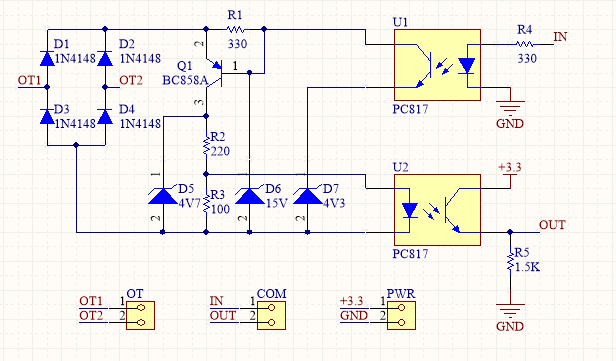
Quick Start
Dependencies
- ArduinoJson
- TelnetStream
- EEManager
- ESP8266Scheduler
- NTPClient
- PubSubClient
- GyverFilters
- MultiMap
- WiFiManager
Settings
- Connect to OpenTherm Gateway hotspot
- Open configuration page in browser: 192.168.4.1
- Set up a connection to your wifi network
- Set up a connection to your MQTT server
After connecting to your wifi network, you can go to the setup page at the address that esp8266 received. The OTGateway device will be automatically added to homeassistant if MQTT server ip, login and password are correct.
HomeAsssistant settings
Debug
To display DEBUG messages you must enable debug in settings (switch is disabled by default). You can connect via Telnet to read messages. IP: esp8266 ip, port: 23