mirror of
https://github.com/dw-0/kiauh.git
synced 2025-12-15 03:24:29 +05:00
Compare commits
2 Commits
| Author | SHA1 | Date | |
|---|---|---|---|

|
1f08537bcf | ||
|
|
393822b8b6 |
@@ -11,5 +11,5 @@ end_of_line = lf
|
|||||||
[*.py]
|
[*.py]
|
||||||
max_line_length = 88
|
max_line_length = 88
|
||||||
|
|
||||||
[*.{sh,yml,yaml,json}]
|
[*.{sh,yml,yaml,json,md}]
|
||||||
indent_size = 2
|
indent_size = 2
|
||||||
31
.github/workflows/deploy-docs.yml
vendored
Normal file
31
.github/workflows/deploy-docs.yml
vendored
Normal file
@@ -0,0 +1,31 @@
|
|||||||
|
name: Deploy Documentation
|
||||||
|
on:
|
||||||
|
workflow_dispatch:
|
||||||
|
push:
|
||||||
|
branches:
|
||||||
|
- docs
|
||||||
|
permissions:
|
||||||
|
contents: write
|
||||||
|
jobs:
|
||||||
|
deploy:
|
||||||
|
runs-on: ubuntu-latest
|
||||||
|
steps:
|
||||||
|
- uses: actions/checkout@v4
|
||||||
|
- name: Configure Git Credentials
|
||||||
|
run: |
|
||||||
|
git config user.name github-actions[bot]
|
||||||
|
git config user.email 41898282+github-actions[bot]@users.noreply.github.com
|
||||||
|
- uses: actions/setup-python@v5
|
||||||
|
with:
|
||||||
|
python-version: 3.x
|
||||||
|
- run: echo "cache_id=$(date --utc '+%V')" >> $GITHUB_ENV
|
||||||
|
- uses: actions/cache@v4
|
||||||
|
with:
|
||||||
|
key: mkdocs-material-${{ env.cache_id }}
|
||||||
|
path: .cache
|
||||||
|
restore-keys: |
|
||||||
|
mkdocs-material-
|
||||||
|
- name: Install dependencies
|
||||||
|
run: pip install -r requirements.txt
|
||||||
|
- name: Build and deploy documentation
|
||||||
|
run: mkdocs gh-deploy --force
|
||||||
1
.gitignore
vendored
1
.gitignore
vendored
@@ -10,4 +10,3 @@ __pycache__
|
|||||||
*.code-workspace
|
*.code-workspace
|
||||||
*.iml
|
*.iml
|
||||||
kiauh.cfg
|
kiauh.cfg
|
||||||
klipper_repos.txt
|
|
||||||
|
|||||||
15
.shellcheckrc
Normal file
15
.shellcheckrc
Normal file
@@ -0,0 +1,15 @@
|
|||||||
|
source=scripts
|
||||||
|
|
||||||
|
enable=avoid-nullary-conditions
|
||||||
|
enable=deprecate-which
|
||||||
|
enable=quote-safe-variables
|
||||||
|
enable=require-variable-braces
|
||||||
|
enable=require-double-brackets
|
||||||
|
|
||||||
|
# SC2162: `read` without `-r` will mangle backslashes.
|
||||||
|
# https://github.com/koalaman/shellcheck/wiki/SC2162
|
||||||
|
disable=SC2162
|
||||||
|
|
||||||
|
# SC2164: Use `cd ... || exit` in case `cd` fails
|
||||||
|
# https://github.com/koalaman/shellcheck/wiki/SC2164
|
||||||
|
disable=SC2164
|
||||||
6
Dockerfile
Normal file
6
Dockerfile
Normal file
@@ -0,0 +1,6 @@
|
|||||||
|
FROM squidfunk/mkdocs-material:latest
|
||||||
|
|
||||||
|
# Install additional plugins required by our mkdocs configuration
|
||||||
|
RUN pip install \
|
||||||
|
mkdocs-git-revision-date-localized-plugin \
|
||||||
|
mkdocstrings[python]
|
||||||
93
README.md
93
README.md
@@ -1,6 +1,8 @@
|
|||||||
<p align="center">
|
<p align="center">
|
||||||
<img src="docs/assets/logo-large.png" alt="KIAUH Logo" height="181">
|
<a>
|
||||||
|
<img src="https://raw.githubusercontent.com/dw-0/kiauh/master/resources/screenshots/kiauh.png" alt="KIAUH logo" height="181">
|
||||||
<h1 align="center">Klipper Installation And Update Helper</h1>
|
<h1 align="center">Klipper Installation And Update Helper</h1>
|
||||||
|
</a>
|
||||||
</p>
|
</p>
|
||||||
|
|
||||||
<p align="center">
|
<p align="center">
|
||||||
@@ -25,100 +27,75 @@
|
|||||||
</h2>
|
</h2>
|
||||||
|
|
||||||
### 📋 Prerequisites
|
### 📋 Prerequisites
|
||||||
|
KIAUH is a script that assists you in installing Klipper on a Linux operating system that has
|
||||||
KIAUH is a script that assists you in installing Klipper on a Linux operating
|
already been flashed to your Raspberry Pi's (or other SBC's) SD card. As a result, you must ensure
|
||||||
system that has
|
that you have a functional Linux system on hand. `Raspberry Pi OS Lite (either 32bit or 64bit)` is a recommended Linux image
|
||||||
already been flashed to your Raspberry Pi's (or other SBC's) SD card. As a
|
if you are using a Raspberry Pi. The [official Raspberry Pi Imager](https://www.raspberrypi.com/software/)
|
||||||
result, you must ensure
|
|
||||||
that you have a functional Linux system on hand.
|
|
||||||
`Raspberry Pi OS Lite (either 32bit or 64bit)` is a recommended Linux image
|
|
||||||
if you are using a Raspberry Pi.
|
|
||||||
The [official Raspberry Pi Imager](https://www.raspberrypi.com/software/)
|
|
||||||
is the simplest way to flash an image like this to an SD card.
|
is the simplest way to flash an image like this to an SD card.
|
||||||
|
|
||||||
* Once you have downloaded, installed and launched the Raspberry Pi Imager,
|
* Once you have downloaded, installed and launched the Raspberry Pi Imager,
|
||||||
select `Choose OS -> Raspberry Pi OS (other)`: \
|
select `Choose OS -> Raspberry Pi OS (other)`: \
|
||||||
|
|
||||||
<p align="center">
|
<p align="center">
|
||||||
<img src="docs/assets/rpi_imager1.png" alt="KIAUH logo" height="350">
|
<img src="https://raw.githubusercontent.com/dw-0/kiauh/master/resources/screenshots/rpi_imager1.png" alt="KIAUH logo" height="350">
|
||||||
</p>
|
</p>
|
||||||
|
|
||||||
* Then select `Raspberry Pi OS Lite (32bit)` (or 64bit if you want to use that
|
* Then select `Raspberry Pi OS Lite (32bit)` (or 64bit if you want to use that instead):
|
||||||
instead):
|
|
||||||
|
|
||||||
<p align="center">
|
<p align="center">
|
||||||
<img src="docs/assets/rpi_imager2.png" alt="KIAUH logo" height="350">
|
<img src="https://raw.githubusercontent.com/dw-0/kiauh/master/resources/screenshots/rpi_imager2.png" alt="KIAUH logo" height="350">
|
||||||
</p>
|
</p>
|
||||||
|
|
||||||
* Back in the Raspberry Pi Imager's main menu, select the corresponding SD card
|
* Back in the Raspberry Pi Imager's main menu, select the corresponding SD card to which
|
||||||
to which
|
you want to flash the image.
|
||||||
you want to flash the image.
|
|
||||||
|
|
||||||
* Make sure to go into the Advanced Option (the cog icon in the lower left
|
* Make sure to go into the Advanced Option (the cog icon in the lower left corner of the main menu)
|
||||||
corner of the main menu)
|
and enable SSH and configure Wi-Fi.
|
||||||
and enable SSH and configure Wi-Fi.
|
|
||||||
|
|
||||||
* If you need more help for using the Raspberry Pi Imager, please visit
|
* If you need more help for using the Raspberry Pi Imager, please visit the [official documentation](https://www.raspberrypi.com/documentation/computers/getting-started.html).
|
||||||
the [official documentation](https://www.raspberrypi.com/documentation/computers/getting-started.html).
|
|
||||||
|
|
||||||
These steps **only** apply if you are actually using a Raspberry Pi. In case you
|
These steps **only** apply if you are actually using a Raspberry Pi. In case you want
|
||||||
want
|
to use a different SBC (like an Orange Pi or any other Pi derivates), please look up on how to get an appropriate Linux image flashed
|
||||||
to use a different SBC (like an Orange Pi or any other Pi derivates), please
|
to the SD card before proceeding further (usually done with Balena Etcher in those cases). Also make sure that KIAUH will be able to run
|
||||||
look up on how to get an appropriate Linux image flashed
|
and operate on the Linux Distribution you are going to flash. You likely will have the most success with
|
||||||
to the SD card before proceeding further (usually done with Balena Etcher in
|
distributions based on Debian 11 Bullseye. Read the notes further down below in this document.
|
||||||
those cases). Also make sure that KIAUH will be able to run
|
|
||||||
and operate on the Linux Distribution you are going to flash. You likely will
|
|
||||||
have the most success with
|
|
||||||
distributions based on Debian 11 Bullseye. Read the notes further down below in
|
|
||||||
this document.
|
|
||||||
|
|
||||||
### 💾 Download and use KIAUH
|
### 💾 Download and use KIAUH
|
||||||
|
|
||||||
**📢 Disclaimer: Usage of this script happens at your own risk!**
|
**📢 Disclaimer: Usage of this script happens at your own risk!**
|
||||||
|
|
||||||
* **Step 1:** \
|
* **Step 1:** \
|
||||||
To download this script, it is necessary to have git installed. If you don't
|
To download this script, it is necessary to have git installed. If you don't have git already installed, or if you are unsure, run the following command:
|
||||||
have git already installed, or if you are unsure, run the following command:
|
|
||||||
|
|
||||||
```shell
|
```shell
|
||||||
sudo apt-get update && sudo apt-get install git -y
|
sudo apt-get update && sudo apt-get install git -y
|
||||||
```
|
```
|
||||||
|
|
||||||
* **Step 2:** \
|
* **Step 2:** \
|
||||||
Once git is installed, use the following command to download KIAUH into your
|
Once git is installed, use the following command to download KIAUH into your home-directory:
|
||||||
home-directory:
|
|
||||||
|
|
||||||
```shell
|
```shell
|
||||||
cd ~ && git clone https://github.com/dw-0/kiauh.git
|
cd ~ && git clone https://github.com/dw-0/kiauh.git
|
||||||
```
|
```
|
||||||
|
|
||||||
* **Step 3:** \
|
* **Step 3:** \
|
||||||
Finally, start KIAUH by running the next command:
|
Finally, start KIAUH by running the next command:
|
||||||
|
|
||||||
```shell
|
```shell
|
||||||
./kiauh/kiauh.sh
|
./kiauh/kiauh.sh
|
||||||
```
|
```
|
||||||
|
|
||||||
* **Step 4:** \
|
* **Step 4:** \
|
||||||
You should now find yourself in the main menu of KIAUH. You will see several
|
You should now find yourself in the main menu of KIAUH. You will see several actions to choose from depending
|
||||||
actions to choose from depending
|
on what you want to do. To choose an action, simply type the corresponding number into the "Perform action"
|
||||||
on what you want to do. To choose an action, simply type the corresponding
|
prompt and confirm by hitting ENTER.
|
||||||
number into the "Perform action"
|
|
||||||
prompt and confirm by hitting ENTER.
|
|
||||||
|
|
||||||
<hr>
|
<hr>
|
||||||
|
|
||||||
<h2 align="center">❗ Notes ❗</h2>
|
<h2 align="center">❗ Notes ❗</h2>
|
||||||
|
|
||||||
### **📋 Please see the [Changelog](docs/changelog.md) for possible important
|
### **📋 Please see the [Changelog](docs/changelog.md) for possible important changes!**
|
||||||
|
|
||||||
changes!**
|
|
||||||
|
|
||||||
- Mainly tested on Raspberry Pi OS Lite (Debian 10 Buster / Debian 11 Bullseye)
|
- Mainly tested on Raspberry Pi OS Lite (Debian 10 Buster / Debian 11 Bullseye)
|
||||||
- Other Debian based distributions (like Ubuntu 20 to 22) likely work too
|
- Other Debian based distributions (like Ubuntu 20 to 22) likely work too
|
||||||
- Reported to work on Armbian as well but not tested in detail
|
- Reported to work on Armbian as well but not tested in detail
|
||||||
- During the use of this script you will be asked for your sudo password. There
|
- During the use of this script you will be asked for your sudo password. There are several functions involved which need sudo privileges.
|
||||||
are several functions involved which need sudo privileges.
|
|
||||||
|
|
||||||
<hr>
|
<hr>
|
||||||
|
|
||||||
@@ -223,17 +200,13 @@ changes!**
|
|||||||
|
|
||||||
<h2 align="center">✨ Credits ✨</h2>
|
<h2 align="center">✨ Credits ✨</h2>
|
||||||
|
|
||||||
* A big thank you to [lixxbox](https://github.com/lixxbox) for that awesome
|
* A big thank you to [lixxbox](https://github.com/lixxbox) for that awesome KIAUH-Logo!
|
||||||
KIAUH-Logo!
|
* Also, a big thank you to everyone who supported my work with a [Ko-fi](https://ko-fi.com/dw__0) !
|
||||||
* Also, a big thank you to everyone who supported my work with
|
* Last but not least: Thank you to all contributors and members of the Klipper Community who like and share this project!
|
||||||
a [Ko-fi](https://ko-fi.com/dw__0) !
|
|
||||||
* Last but not least: Thank you to all contributors and members of the Klipper
|
|
||||||
Community who like and share this project!
|
|
||||||
|
|
||||||
<hr>
|
<hr>
|
||||||
|
|
||||||
<h4 align="center">A special thank you to JetBrains for sponsoring this project
|
<h4 align="center">A special thank you to JetBrains for sponsoring this project with their incredible software!</h4>
|
||||||
with their incredible software!</h4>
|
|
||||||
<p align="center">
|
<p align="center">
|
||||||
<a href="https://www.jetbrains.com/community/opensource/#support" target="_blank">
|
<a href="https://www.jetbrains.com/community/opensource/#support" target="_blank">
|
||||||
<img src="https://resources.jetbrains.com/storage/products/company/brand/logos/jb_beam.png" alt="JetBrains Logo (Main) logo." height="128">
|
<img src="https://resources.jetbrains.com/storage/products/company/brand/logos/jb_beam.png" alt="JetBrains Logo (Main) logo." height="128">
|
||||||
|
|||||||
8
docker-compose.yml
Normal file
8
docker-compose.yml
Normal file
@@ -0,0 +1,8 @@
|
|||||||
|
services:
|
||||||
|
mkdocs:
|
||||||
|
build: .
|
||||||
|
ports:
|
||||||
|
- "8000:8000"
|
||||||
|
volumes:
|
||||||
|
- ./:/docs
|
||||||
|
command: serve --dev-addr=0.0.0.0:8000
|
||||||
@@ -1,549 +0,0 @@
|
|||||||
## Changelog
|
|
||||||
|
|
||||||
This document covers possible important changes to KIAUH.
|
|
||||||
|
|
||||||
### 2025-10-10 (v6.0.0)
|
|
||||||
|
|
||||||
KIAUH has now reached version 6! The majority of the changes mentioned in the
|
|
||||||
previous changelog are now available in the final version.
|
|
||||||
Most notible are the following changes:
|
|
||||||
|
|
||||||
- The dialog for selecting between v5 and v6 is gone and all v5 code was
|
|
||||||
removed. V6 is the new default
|
|
||||||
- You can add/remove alternative repositories for Klipper and Moonraker from
|
|
||||||
within KIAUH, no need to manually edit any file
|
|
||||||
- You can store and load firmware configurations for Klipper during the firmware
|
|
||||||
compilation process
|
|
||||||
- Spoolman is available as an extension, it does not use the bare-metal
|
|
||||||
installation anymore, instead it uses the Docker Container approach
|
|
||||||
- OctoApp is available as an extension
|
|
||||||
- OctoPrint support was NOT killed. OctoPrint is available as an extension
|
|
||||||
- I probably forgot to mention some other changes, but the idea is to create
|
|
||||||
official docs for KIAUH where the new changelog will live in the future and
|
|
||||||
available features and mechanics are explained in detail
|
|
||||||
|
|
||||||
If you really want to use v5, there is a v5 branch available in the repository.
|
|
||||||
Keep in mind that v5 will not be updated anymore.
|
|
||||||
|
|
||||||
### 2024-08-31 (v6.0.0-alpha.1)
|
|
||||||
|
|
||||||
Long time no see, but here we are again!
|
|
||||||
A lot has happened in the background, but now it is time to take it out into the
|
|
||||||
wild.
|
|
||||||
|
|
||||||
#### KIAUH has now reached version 6! Well, at least in an alpha state...
|
|
||||||
|
|
||||||
The project has seen a complete rewrite of the script from scratch in Python.
|
|
||||||
It requires Python 3.8 or newer to run. Because this update is still in an alpha
|
|
||||||
state, bugs may or will occur.
|
|
||||||
During startup, you will be asked if you want to start the new version 6 or the
|
|
||||||
old version 5.
|
|
||||||
As long as version 6 is in a pre-release state, version 5 will still be
|
|
||||||
available. If there are any critical issues
|
|
||||||
with the new version that were overlooked, you can always switch back to the old
|
|
||||||
version.
|
|
||||||
|
|
||||||
In case you selected not to get asked about which version to start (option 3 or
|
|
||||||
4 in the startup dialog) and you want to
|
|
||||||
revert that decision, you will find a line called `version_to_launch=` within
|
|
||||||
the `.kiauh.ini` file in your home directory.
|
|
||||||
Just delete that line, save the file and restart KIAUH. KIAUH will then ask you
|
|
||||||
again which version you want to start.
|
|
||||||
|
|
||||||
Here is a list of the most important changes to KIAUH in regard to version 6:
|
|
||||||
|
|
||||||
- The majority of features available in KIAUH v5 are still available; they just
|
|
||||||
got migrated from Bash to Python.
|
|
||||||
- It is now possible to add new/remove instances to/from existing multi-instance
|
|
||||||
installations of Klipper and Moonraker
|
|
||||||
- KIAUH now has an Extension-System. This allows contributors to add new
|
|
||||||
installers to KIAUH without having to modify the main script.
|
|
||||||
- You will now find some of the features that were previously available in
|
|
||||||
the Installer-Menu in the Extensions-Menu.
|
|
||||||
- The current extensions are:
|
|
||||||
- G-Code Shell Command (previously found in the Advanced-Menu)
|
|
||||||
- Mainsail Theme Installer (previously found in the Advanced-Menu)
|
|
||||||
- Klipper-Backup (new in v6!)
|
|
||||||
- Moonraker Telegram Bot (previously found in the Installer-Menu)
|
|
||||||
- PrettyGCode for Klipper (previously found in the Installer-Menu)
|
|
||||||
- Obico for Klipper (previously found in the Installer-Menu)
|
|
||||||
- The following additional extensions are planned, but not yet available:
|
|
||||||
- Spoolman (available in v5 in the Installer-Menu)
|
|
||||||
- OctoApp (available in v5 in the Installer-Menu)
|
|
||||||
- KIAUH has its own config file now
|
|
||||||
- The file has some default values for the currently supported options
|
|
||||||
- There might be more options in the future
|
|
||||||
- It is located in KIAUH's root directory and is called `default.kiauh.cfg`
|
|
||||||
- DO NOT EDIT the default file directly, instead make a copy of it and
|
|
||||||
call it `kiauh.cfg`
|
|
||||||
- Settings changed via the Advanced-Menu will be written to the
|
|
||||||
`kiauh.cfg`
|
|
||||||
- Support for OctoPrint was removed
|
|
||||||
|
|
||||||
Feel free to give version 6 a try and report any bugs or issues you encounter!
|
|
||||||
Every feedback is appreciated.
|
|
||||||
|
|
||||||
### 2023-06-17
|
|
||||||
|
|
||||||
KIAUH has now added support for installing Mobileraker's companion!
|
|
||||||
Mobileraker is a free and Open Source Android and iOS App for Klipper, utilizing
|
|
||||||
the Moonraker API, allowing you
|
|
||||||
to control your printer. Thank you to [Clon1998](https://github.com/Clon1998)
|
|
||||||
for adding this feature!
|
|
||||||
|
|
||||||
### 2023-02-03
|
|
||||||
|
|
||||||
The installer for MJPG-Streamer got replaced by crowsnest. It is an improved
|
|
||||||
webcam service, utilizing ustreamer.
|
|
||||||
Please have a look here for additional info about crowsnest and how to configure
|
|
||||||
it: https://github.com/mainsail-crew/crowsnest \
|
|
||||||
It's unsure if the previous MJPG-Streamer installer will be updated and make its
|
|
||||||
way back into KIAUH.
|
|
||||||
A big thanks to [KwadFan](https://github.com/KwadFan) for writing the crowsnest
|
|
||||||
implementation.
|
|
||||||
|
|
||||||
### 2022-10-31
|
|
||||||
|
|
||||||
Some functions got updated, though not all of them.
|
|
||||||
|
|
||||||
The following functions are still currently unavailable:
|
|
||||||
|
|
||||||
- Installation of: MJPG-Streamer
|
|
||||||
- All backup functions and the Log-Upload
|
|
||||||
|
|
||||||
### 2022-10-20
|
|
||||||
|
|
||||||
KIAUH has now reached major version 5 !
|
|
||||||
|
|
||||||
Recently Moonraker introduced some changes which makes it necessary to change
|
|
||||||
the folder structure of printer setups.
|
|
||||||
If you are interested in the details, check out this
|
|
||||||
PR: https://github.com/Arksine/moonraker/pull/491 \
|
|
||||||
Although Moonraker has some mechanics available to migrate existing setups to
|
|
||||||
the new file structure with the use of symlinks, fresh and clean installs
|
|
||||||
should be considered.
|
|
||||||
|
|
||||||
The version jump of KIAUH to v5 is a breaking change due to those major changes!
|
|
||||||
That means v4 and v5 are not compatible with each other!
|
|
||||||
This is also the reason why you will currently be greeted by a yellow
|
|
||||||
notification in the main menu of KIAUH leading to this changelog.
|
|
||||||
I decided to disable a few functions of the script and focus on releasing the
|
|
||||||
required changes to the core components of this script.
|
|
||||||
I will work on updating the other parts of the script piece by piece during the
|
|
||||||
next days/weeks.
|
|
||||||
So I am already sorry in advance if one of your desired components you wanted to
|
|
||||||
install or use temporarily cannot be installed or used right now.
|
|
||||||
|
|
||||||
The following functions are currently unavailable:
|
|
||||||
|
|
||||||
- Installation of: KlipperScreen, Obico, Octoprint, MJPG-Streamer, Telegram Bot
|
|
||||||
and PrettyGCode
|
|
||||||
- All backup functions and the Log-Upload
|
|
||||||
|
|
||||||
**So what is working?**\
|
|
||||||
Installation of Klipper, Moonraker, Mainsail and Fluidd. Both, single and
|
|
||||||
multi-instance setups work!\
|
|
||||||
As already said, the rest will follow in the near future. Updating and removal
|
|
||||||
of already installed components should continue to work.
|
|
||||||
|
|
||||||
**What was removed?**\
|
|
||||||
The option to change Klippers configuration directory got removed. From now on
|
|
||||||
it will not be possible anymore to change
|
|
||||||
the configuration directory from within KIAUH and the new filestructure is
|
|
||||||
enforced.
|
|
||||||
|
|
||||||
**What if I don't have an existing Klipper/Moonraker install right now?**\
|
|
||||||
Nothing important to think about, install Klipper and Moonraker. KIAUH will
|
|
||||||
install both of them with the new filestructure.
|
|
||||||
|
|
||||||
**What if I have an existing Klipper/Moonraker install?**\
|
|
||||||
First of all: Backups! Please copy all of your config files and the Moonraker
|
|
||||||
database (it is a hidden folder, usually `~/.moonraker_database`) to a safe
|
|
||||||
location.
|
|
||||||
After that, uninstall Klipper and Moonraker with KIAUH. You can then proceed and
|
|
||||||
re-install both of them with KIAUH again. It is important that you are on KIAUH
|
|
||||||
v5 for that!
|
|
||||||
Once everything is installed again, you need to manually copy your configuration
|
|
||||||
files from the old `~/klipper_config` folder to the new `~/printer_data/config`
|
|
||||||
folder.
|
|
||||||
Previous, by Moonraker created symlinks to folder of the old filestructure will
|
|
||||||
not work anymore, you need to move the files to their new location now!
|
|
||||||
Do the same with the two files inside of `~/.moonraker_database`. Move/copy them
|
|
||||||
into `~/printer_data/database`. If `~/printer_data/database` is already
|
|
||||||
populated with a `data.mdb` and `lock.mdb`
|
|
||||||
delete them or simply overwrite them. Nothing should be lost as those should be
|
|
||||||
empty database files. Anyway, you made backups, right?
|
|
||||||
You can now proceed and restart Moonraker. Either from within Mainsail or
|
|
||||||
Fluidd, or use SSH and execute `sudo systemctl restart moonraker`.
|
|
||||||
If everything went smooth, you should be good to go again. If you see some
|
|
||||||
Moonraker warnings about deprecated options in the `moonraker.conf`, go ahead
|
|
||||||
and resolve them.
|
|
||||||
I will not cover them in detail here. A good source is the Moonraker
|
|
||||||
documentation: https://moonraker.readthedocs.io/en/latest/configuration/
|
|
||||||
|
|
||||||
**What if I have an existing Klipper/Moonraker multi-instance install?**\
|
|
||||||
Pretty much the same steps that are required for single instance installs apply
|
|
||||||
to multi-instance setups. So please go ahead and read the previous paragraph if
|
|
||||||
you didn't already.
|
|
||||||
Make backups of everything first. Then remove and install the desired amount of
|
|
||||||
Klipper and Moonraker instances again.
|
|
||||||
Now you need to move all config and database files to their new locations.\
|
|
||||||
Example with an instance called `printer_1`:\
|
|
||||||
The config files go from `~/klipper_config/printer_1` to
|
|
||||||
`~/printer_1_data/config`.
|
|
||||||
The database files go from `~/.moonraker_database_1` to
|
|
||||||
`~/printer_1_data/database`.
|
|
||||||
Now restart all Moonraker services. You can restart all of them at once if you
|
|
||||||
launch KIAUH, and in the main menu type `restart moonraker` and hit Enter.
|
|
||||||
|
|
||||||
I hope I have covered the most important things. In case you need further
|
|
||||||
support, the official Klipper Discord is a good place to ask for help.
|
|
||||||
|
|
||||||
### 2022-08-15
|
|
||||||
|
|
||||||
Support for "Obico for Klipper" was added! Huge thanks
|
|
||||||
to [kennethjiang](https://github.com/kennethjiang) for helping me with the
|
|
||||||
implementation!
|
|
||||||
|
|
||||||
### 2022-05-29
|
|
||||||
|
|
||||||
KIAUH has now reached major version 4 !
|
|
||||||
|
|
||||||
* feat: Klipper can be installed under Python3 (still considered as
|
|
||||||
experimental)
|
|
||||||
* feat: Klipper can be installed from custom repositories / inofficial forks
|
|
||||||
* feat: Custom instance name for multi instance installations of Klipper
|
|
||||||
* Any other multi instance will share the same name given to the
|
|
||||||
corresponding Klipper instance
|
|
||||||
* E.g. klipper-voron2 -> moonraker-voron2 -> moonraker-telegram-bot-voron2
|
|
||||||
* feat: Option to allow installation of / updating to unstable Mainsail and
|
|
||||||
Fluidd versions
|
|
||||||
* by default only stable versions get installed/updated
|
|
||||||
* feat: Multi-Instance OctoPrint installations now each have their own virtual
|
|
||||||
python environment
|
|
||||||
* allows independent installation of plugins for each instance
|
|
||||||
* feat: Implementing the use of shellcheck during development
|
|
||||||
* feat: Implementing a simple logging mechanic
|
|
||||||
* feat: Log-upload function now also allows uploading other logfiles (kiauh.log,
|
|
||||||
webcamd.log etc.)
|
|
||||||
* feat: added several new help dialogs which try to explain various functions
|
|
||||||
* fix: During Klipper installation, checks for group membership of `tty` and
|
|
||||||
`dialout` are made
|
|
||||||
* refactor: rework of the settings menu for better control the new KIAUH
|
|
||||||
features
|
|
||||||
* refactor: Support for DWC and DWC-for-Klipper has been removed
|
|
||||||
* refactor: The backup before update settings were moved to the KIAUH settings
|
|
||||||
menu
|
|
||||||
* refactor: Switch branch function has been removed (was replaced by the custom
|
|
||||||
Klipper repo feature)
|
|
||||||
* refactor: The update manager sections for Mainsail, Fluidd and KlipperScreen
|
|
||||||
were removed from the moonraker.conf template
|
|
||||||
* They will now be individually added during installation of the
|
|
||||||
corresponding interface
|
|
||||||
* refactor: The rollback function was reworked and now also allows rollbacks of
|
|
||||||
Moonraker
|
|
||||||
* It now takes numerical inputs and reverts the corresponding repository by
|
|
||||||
the given amount instead
|
|
||||||
* KIAUH does not save previous states to its config anymore like it did with
|
|
||||||
the previous approach
|
|
||||||
|
|
||||||
### 2022-01-29
|
|
||||||
|
|
||||||
* Starting from the 28th of January, Moonraker can make use of PackageKit and
|
|
||||||
PolicyKit.\
|
|
||||||
More details on that can be found [here](
|
|
||||||
https://github.com/Arksine/moonraker/issues/349)
|
|
||||||
and [here](https://github.com/Arksine/moonraker/pull/346)
|
|
||||||
* KIAUH will install Moonrakers PolicyKit rules by default when __installing__
|
|
||||||
Moonraker
|
|
||||||
* KIAUH will also install Moonrakers PolicyKit rules when __updating__ Moonraker
|
|
||||||
__via KIAUH__ as of now
|
|
||||||
|
|
||||||
### 2021-12-30
|
|
||||||
|
|
||||||
* Updated the doc for the usage of
|
|
||||||
the [G-Code Shell Command Extension](docs/gcode_shell_command.md)
|
|
||||||
* It became apparent, that some user groups are missing on some systems. A
|
|
||||||
missing video group \
|
|
||||||
membership for example caused issues when installing mjpg-streamer while not
|
|
||||||
using the default pi user. \
|
|
||||||
Other issues could occur when trying to flash an MCU on Debian or Ubuntu
|
|
||||||
distributions where a user might not be part
|
|
||||||
of the dialout group by default. A check for the tty group is also done. The
|
|
||||||
tty group is needed for setting
|
|
||||||
up a linux MCU (currently not yet supported by KIAUH).
|
|
||||||
* There is an issue when trying to install Mainsail or Fluidd on Ubuntu 21.10.
|
|
||||||
Permissions on that distro seem to have seen a rework
|
|
||||||
in comparison to 20.04 and users will be greeted with an "Error 403 -
|
|
||||||
Permission denied" message after installing one of Klippers webinterfaces.
|
|
||||||
I still have to figure out a viable solution for that.
|
|
||||||
|
|
||||||
### 2021-09-28
|
|
||||||
|
|
||||||
* New Feature! Added an installer for the Telegram Bot for Moonraker
|
|
||||||
by [nlef](https://github.com/nlef).
|
|
||||||
Checkout his project! Remember to report all issues and/or bugs regarding that
|
|
||||||
project in its corresponding repo and not here 😛.\
|
|
||||||
You can find it here: https://github.com/nlef/moonraker-telegram-bot
|
|
||||||
|
|
||||||
### 2021-09-24
|
|
||||||
|
|
||||||
* The flashing function got adjusted a bit. It is now possible to also flash
|
|
||||||
controllers which are connected over UART and thus accessible via
|
|
||||||
`/dev/ttyAMA0`. You now have to select a connection methop prior flashing
|
|
||||||
which is either USB or UART.
|
|
||||||
* Due to several requests over time I have now created a Ko-fi account for those
|
|
||||||
who want to support this project and my work with a small donation. Many
|
|
||||||
thanks in advance to all future donors. You can support me on Ko-fi with this
|
|
||||||
link: https://ko-fi.com/th33xitus
|
|
||||||
* As usual, if you find any bugs or issues please report them. I tested the
|
|
||||||
little rework i did with the hardware i have available and haven't encountered
|
|
||||||
any malfunctions of flashing them yet.
|
|
||||||
|
|
||||||
### 2021-08-10
|
|
||||||
|
|
||||||
* KIAUH now supports the installation of the "PrettyGCode for Klipper"
|
|
||||||
GCode-Viewer created by [Kragrathea](https://github.com/Kragrathea)!
|
|
||||||
Installation, updating and removal are possible with KIAUH. For more details
|
|
||||||
to this cool piece of software, please have a look
|
|
||||||
here: https://github.com/Kragrathea/pgcode
|
|
||||||
|
|
||||||
### 2021-07-10
|
|
||||||
|
|
||||||
* The NGINX configuration files got updated to be in sync with MainsailOS and
|
|
||||||
FluiddPi. Issues with the NGINX service not starting up due to wrong
|
|
||||||
configuration should be resolved now. To get the updated configuration files,
|
|
||||||
please remove Moonraker and Mainsail / Fluidd with KIAUH first and then
|
|
||||||
re-install it. An automated file check for those configuration files might
|
|
||||||
follow in the future which then automates updating those files if there were
|
|
||||||
important changes.
|
|
||||||
|
|
||||||
* The default `moonraker.conf` was updated to reflect the recent changes to the
|
|
||||||
update manager section. The update channel is set to `dev`.
|
|
||||||
|
|
||||||
### 2021-06-29
|
|
||||||
|
|
||||||
* KIAUH will now patch the new `log_path` to existing moonraker.conf files when
|
|
||||||
updating Moonraker and the entry is missing. Before that, it was necessary
|
|
||||||
that the user provided that path manually to make Fluidd display the logfiles
|
|
||||||
in its interface. This issue should be resolved now.
|
|
||||||
|
|
||||||
### 2021-06-15
|
|
||||||
|
|
||||||
* Moonraker introduced an optional `log_path` which clients can make use of to
|
|
||||||
show log files located in that folder to their users. More info
|
|
||||||
here: https://github.com/Arksine/moonraker/commit/829b3a4ee80579af35dd64a37ccc092a1f67682a \
|
|
||||||
Client developers agreed upon using `~/klipper_logs` as the new default log
|
|
||||||
path.\
|
|
||||||
That means, from now on, Klipper and Moonraker services installed with KIAUH
|
|
||||||
will place their logfiles in that mentioned folder.
|
|
||||||
* Additionally, KIAUH will now detect Klipper and Moonraker systemd services
|
|
||||||
that still use the old default location of `/tmp/<service>.log` and will
|
|
||||||
update them next time the user updates Klipper and/or Moonraker with the KIAUH
|
|
||||||
update function.
|
|
||||||
* Additional symlinks for the following logfiles will get created along those
|
|
||||||
update procedures to make them accessible through the webinterface once its
|
|
||||||
supported:
|
|
||||||
- webcamd.log
|
|
||||||
- mainsail-access.log
|
|
||||||
- mainsail-error.log
|
|
||||||
- fluidd-access.log
|
|
||||||
- fluidd-error.log
|
|
||||||
* For MainsailOS and FluiddPi users:\
|
|
||||||
MainsailOS and FluiddPi will switch the shipped Klipper service from SysVinit
|
|
||||||
to systemd probably with their next release. KIAUH can already help migrate
|
|
||||||
older MainsailOS (0.4.0 and below) and FluiddPi (v1.13.0) releases to match
|
|
||||||
their new service-, file- and folder-structure so you don't have to re-flash
|
|
||||||
the SD-Card of your Raspberry Pi.\
|
|
||||||
In detail here is what is going to happen when you use the new "CustomPiOS
|
|
||||||
Migration Helper" from the Advanced Menu\
|
|
||||||
`(Main Menu -> 4 -> Enter -> 10 -> Enter)` in a short summary:
|
|
||||||
* The Klipper SysVinit service will get replaced by a Klipper systemd
|
|
||||||
service
|
|
||||||
* Klipper and Moonraker will use the new log-directory `~/klipper_logs`
|
|
||||||
* The webcamd service gets updated
|
|
||||||
* The webcamd script gets updated and moved from `/root/bin/webcamd` to
|
|
||||||
`/usr/local/bin/webcamd`
|
|
||||||
* The NGINX `upstreams.conf` gets updated to be able to configure up to 4
|
|
||||||
webcams
|
|
||||||
* The `mainsail.txt` / `fluiddpi.txt` gets moved from `/boot` to
|
|
||||||
`~/klipper_config` and renamed to `webcam.txt`
|
|
||||||
* Symlinks for the webcamd.log and various NGINX logs get created in
|
|
||||||
`~/klipper_config`
|
|
||||||
* Configuration files for Klipper, Moonraker and webcamd get added to
|
|
||||||
`/etc/logrotate.d`
|
|
||||||
* If they still exist, two lines will be removed from the mainsail.cfg or
|
|
||||||
client_macros.cfg macro configurations:\
|
|
||||||
`SAVE_GCODE_STATE NAME=PAUSE_state` and
|
|
||||||
`RESTORE_GCODE_STATE NAME=PAUSE_state`
|
|
||||||
* **Please note:**\
|
|
||||||
The "CustomPiOS Migration Helper" is intended to only work on "vanilla"
|
|
||||||
MainsailOS and FluiddPi systems. Do not try to migrate a modified MainsailOS
|
|
||||||
or FluiddPi system (for example if you already used KIAUH to re-install
|
|
||||||
services or to set up a multi-instance installation for Klipper / Moonraker).
|
|
||||||
This won't work.
|
|
||||||
|
|
||||||
### 2021-01-31
|
|
||||||
|
|
||||||
* **This is a big one... KIAUH v3.0 is out.**\
|
|
||||||
With this update you can now install multiple instances of Klipper, Moonraker,
|
|
||||||
Duet Web Control or Octoprint on the same Pi. This was quite a big rework of
|
|
||||||
the whole script. So bugs can appear but with the help of some testers, i
|
|
||||||
think there shouldn't be any critical ones anymore. In this regards thanks to
|
|
||||||
@lixxbox and @zellneralex for testing.
|
|
||||||
|
|
||||||
* Important changes to how installations are set up now: All components get
|
|
||||||
installed as systemd services. Installation via init.d was dropped completely!
|
|
||||||
This shouldn't affect you at all, since the common linux distributions like
|
|
||||||
RaspberryPi OS or custom distributions like MainsailOS, FluiddPi or OctoPi
|
|
||||||
support both ways of installing services. I just wanted to mention it here.
|
|
||||||
|
|
||||||
* Now with KIAUH v3.0 and multi-instance installation capabilities, there are
|
|
||||||
some things to point out. You will now need to tell KIAUH where your printers
|
|
||||||
configurations are located when installing Klipper for the first time. Even
|
|
||||||
though it is not recommended, you can change this location with the help of
|
|
||||||
KIAUH and rewrite Klipper and Moonraker to use the new location.
|
|
||||||
|
|
||||||
* When setting up a multi-instance system, the folder structure will only change
|
|
||||||
slightly. The goal was to keep it as compatible as possible with the custom
|
|
||||||
distributions like mainsailOS and FluiddPi. This should help converting a
|
|
||||||
single-instance setup of mainsailOS/FluiddPi to a multi-instance setup in no
|
|
||||||
time, but keeping single-instance backwards compatibility if needed at a later
|
|
||||||
point in time.
|
|
||||||
|
|
||||||
* The folder structure is as follows when setting up multi-instances:\
|
|
||||||
Each printer instance will get its own folder within your configuration
|
|
||||||
location. The decision to this specific structure was made to make it as
|
|
||||||
painless and easy as possible to convert to a multi-instance setup.
|
|
||||||
Here is an example:
|
|
||||||
```shell
|
|
||||||
/home/<username>
|
|
||||||
└── klipper_config
|
|
||||||
├── printer_1
|
|
||||||
│ ├── printer.cfg
|
|
||||||
│ └── moonraker.conf
|
|
||||||
├── printer_2
|
|
||||||
│ ├── printer.cfg
|
|
||||||
│ └── moonraker.conf
|
|
||||||
└── printer_n
|
|
||||||
├── printer.cfg
|
|
||||||
└── moonraker.conf
|
|
||||||
```
|
|
||||||
* Also when setting up multi-instances of each service, the name of each service
|
|
||||||
slightly changes.
|
|
||||||
Each service gets its corresponding instance added to the service filename.
|
|
||||||
|
|
||||||
**This only applies to multi-instances! Single instance installations with
|
|
||||||
KIAUH will keep their original names!**
|
|
||||||
|
|
||||||
Corresponding to the filetree example from above that would mean:
|
|
||||||
```
|
|
||||||
Klipper services:
|
|
||||||
--> klipper-1.service
|
|
||||||
--> klipper-2.service
|
|
||||||
--> klipper-n.service
|
|
||||||
|
|
||||||
Moonraker services:
|
|
||||||
--> moonraker-1.service
|
|
||||||
--> moonraker-2.service
|
|
||||||
--> moonraker-n.service
|
|
||||||
```
|
|
||||||
* The same service file rules from above apply to OctoPrint even though only
|
|
||||||
Klipper and Moonraker are shown in this example.
|
|
||||||
|
|
||||||
* You can start, stop and restart all Klipper, Moonraker and OctoPrint instances
|
|
||||||
from the KIAUH main menu. For doing this, just type "stop klipper", "start
|
|
||||||
moonraker", "restart octoprint" and so on.
|
|
||||||
|
|
||||||
* KIAUH v3.0 relocated its ini-file. It is now a hidden file in the users
|
|
||||||
home-directory calles `.kiauh.ini`. This has the benefit of keeping all values
|
|
||||||
in that file between possible re-installations of KIAUH. Otherwise that file
|
|
||||||
would be lost.
|
|
||||||
|
|
||||||
* The option of adding more trusted clients to the moonraker.conf file was
|
|
||||||
dropped. Since you can edit this file right inside of Mainsail or Fluidd, only
|
|
||||||
some basic entries are made which get you running.
|
|
||||||
|
|
||||||
* I bet i have missed mentioning other stuff as well because it took me quite
|
|
||||||
some time to re-write many functions. So i just hope you like the new version
|
|
||||||
😄
|
|
||||||
|
|
||||||
### 2020-11-28
|
|
||||||
|
|
||||||
* KIAUH now supports the installation, update and removal
|
|
||||||
of [KlipperScreen](https://github.com/jordanruthe/KlipperScreen). This feature
|
|
||||||
was was provided by [jordanruthe](https://github.com/jordanruthe)! Thank you!
|
|
||||||
|
|
||||||
### 2020-11-18
|
|
||||||
|
|
||||||
* Some changes to Fluidd caused a little rework on how KIAUH will install/update
|
|
||||||
Fluidd from now on. Please see
|
|
||||||
the [fluidd v1.0.0-rc0 release notes](https://github.com/cadriel/fluidd/releases/tag/v1.0.0-rc.0)
|
|
||||||
for further information about what modifications to the moonraker.conf file
|
|
||||||
exactly had to be done. In a nutshell, KIAUH will now always patch the
|
|
||||||
required entries to the moonraker.conf if not already there.
|
|
||||||
|
|
||||||
### 2020-10-30:
|
|
||||||
|
|
||||||
* The user can now choose to install Klipper as a systemd service.
|
|
||||||
|
|
||||||
* The Shell Command extension and `shell_command.py` got renamed to G-Code Shell
|
|
||||||
Command extension and `gcode_shell_command.py`. In case
|
|
||||||
the [pending PR](https://github.com/KevinOConnor/klipper/pull/2173) will be
|
|
||||||
merged in the future, this was an early attempt to dodge possible
|
|
||||||
incompatibilities. The [G-Code Shell Command docs](gcode_shell_command.md) has
|
|
||||||
been updated accordingly.
|
|
||||||
|
|
||||||
* The way how KIAUH interacts and writes to the users printer.cfg got changed.
|
|
||||||
Usually KIAUH wrote everything directly into the printer.cfg. The way it will
|
|
||||||
work from now on is, that a new file called `kiauh.cfg` will be created if
|
|
||||||
there is something that needs to be written to the printer.cfg and everything
|
|
||||||
gets written to `kiauh.cfg` instead. The only thing which then gets written to
|
|
||||||
the users printer.cfg is `[include kiauh.cfg]`. This line will be located at
|
|
||||||
the very top of the existing printer.cfg with a little comment as a note. The
|
|
||||||
user can then decide to either keep the `kiauh.cfg` or take its content,
|
|
||||||
places it into the printer.cfg directly and remove the `[include kiauh.cfg]`.
|
|
||||||
|
|
||||||
* The `mainsail_macros.cfg` got renamed to `webui_macros.cfg`. Since Mainsail
|
|
||||||
and Fluidd both use the same kind of pause, cancel and resume macros, a more
|
|
||||||
generic name was chosen for the file containing the example macros one can
|
|
||||||
choose to install when installing those webinterfaces.
|
|
||||||
|
|
||||||
### 2020-10-10:
|
|
||||||
|
|
||||||
* Support for changing the Klipper branch to the moonraker-dev branch from
|
|
||||||
@Arksine has been dropped. Support for Moonraker has been merged into Klipper
|
|
||||||
mainline a long time ago.
|
|
||||||
|
|
||||||
* A new function is available from the main menu. You can now upload your log
|
|
||||||
files to http://paste.c-net.org/ to share them for debugging purposes.
|
|
||||||
|
|
||||||
### 2020-10-06:
|
|
||||||
|
|
||||||
* Fluidd, a new Klipper interface got added to the list of available installers.
|
|
||||||
At the same time some installation routines have changed or have seen some
|
|
||||||
rework. Changes were made to the installation of NGINX configurations. A
|
|
||||||
method was introduced to change the listen port of a webinterface
|
|
||||||
configuration if there is already another webinterface listening on the
|
|
||||||
default port (80).
|
|
||||||
|
|
||||||
* At the moment, the Moonraker installer no longer asks you whether you want to
|
|
||||||
install a web interface too. For now you therefore have to install them with
|
|
||||||
their respective installers. Please report any bugs or issues you encounter.
|
|
||||||
|
|
||||||
### 2020-09-17:
|
|
||||||
|
|
||||||
* The dev-2.0 branch will be abandoned as of today. If you did a checkout to
|
|
||||||
that branch in the past, you have to checkout back to master to receive
|
|
||||||
updates.
|
|
||||||
|
|
||||||
### 2020-09-12:
|
|
||||||
|
|
||||||
* The old [dwc2-for-klipper](https://github.com/Stephan3/dwc2-for-klipper) won't
|
|
||||||
be supported anymore!\
|
|
||||||
The is a new, fully rewritten project
|
|
||||||
available: [dwc2-for-klipper-socket](https://github.com/Stephan3/dwc2-for-klipper-socket).\
|
|
||||||
The installer of this script also got rewritten to make use of that new
|
|
||||||
project. You will not be able to install or remove the
|
|
||||||
old [dwc2-for-klipper](https://github.com/Stephan3/dwc2-for-klipper) with
|
|
||||||
KIAUH anymore if you updated KIAUH to the newest version.
|
|
||||||
305
docs/development/changelog.md
Normal file
305
docs/development/changelog.md
Normal file
@@ -0,0 +1,305 @@
|
|||||||
|
## Changelog
|
||||||
|
|
||||||
|
This document covers possible important changes to KIAUH.
|
||||||
|
|
||||||
|
### 2024-08-31 (v6.0.0-alpha.1)
|
||||||
|
Long time no see, but here we are again!
|
||||||
|
A lot has happened in the background, but now it is time to take it out into the wild.
|
||||||
|
|
||||||
|
#### KIAUH has now reached version 6! Well, at least in an alpha state...
|
||||||
|
|
||||||
|
The project has seen a complete rewrite of the script from scratch in Python.
|
||||||
|
It requires Python 3.8 or newer to run. Because this update is still in an alpha state, bugs may or will occur.
|
||||||
|
During startup, you will be asked if you want to start the new version 6 or the old version 5.
|
||||||
|
As long as version 6 is in a pre-release state, version 5 will still be available. If there are any critical issues
|
||||||
|
with the new version that were overlooked, you can always switch back to the old version.
|
||||||
|
|
||||||
|
In case you selected not to get asked about which version to start (option 3 or 4 in the startup dialog) and you want to
|
||||||
|
revert that decision, you will find a line called `version_to_launch=` within the `.kiauh.ini` file in your home directory.
|
||||||
|
Just delete that line, save the file and restart KIAUH. KIAUH will then ask you again which version you want to start.
|
||||||
|
|
||||||
|
Here is a list of the most important changes to KIAUH in regard to version 6:
|
||||||
|
- The majority of features available in KIAUH v5 are still available; they just got migrated from Bash to Python.
|
||||||
|
- It is now possible to add new/remove instances to/from existing multi-instance installations of Klipper and Moonraker
|
||||||
|
- KIAUH now has an Extension-System. This allows contributors to add new installers to KIAUH without having to modify the main script.
|
||||||
|
- You will now find some of the features that were previously available in the Installer-Menu in the Extensions-Menu.
|
||||||
|
- The current extensions are:
|
||||||
|
- G-Code Shell Command (previously found in the Advanced-Menu)
|
||||||
|
- Mainsail Theme Installer (previously found in the Advanced-Menu)
|
||||||
|
- Klipper-Backup (new in v6!)
|
||||||
|
- Moonraker Telegram Bot (previously found in the Installer-Menu)
|
||||||
|
- PrettyGCode for Klipper (previously found in the Installer-Menu)
|
||||||
|
- Obico for Klipper (previously found in the Installer-Menu)
|
||||||
|
- The following additional extensions are planned, but not yet available:
|
||||||
|
- Spoolman (available in v5 in the Installer-Menu)
|
||||||
|
- OctoApp (available in v5 in the Installer-Menu)
|
||||||
|
- KIAUH has its own config file now
|
||||||
|
- The file has some default values for the currently supported options
|
||||||
|
- There might be more options in the future
|
||||||
|
- It is located in KIAUH's root directory and is called `default.kiauh.cfg`
|
||||||
|
- DO NOT EDIT the default file directly, instead make a copy of it and call it `kiauh.cfg`
|
||||||
|
- Settings changed via the Advanced-Menu will be written to the `kiauh.cfg`
|
||||||
|
- Support for OctoPrint was removed
|
||||||
|
|
||||||
|
Feel free to give version 6 a try and report any bugs or issues you encounter! Every feedback is appreciated.
|
||||||
|
|
||||||
|
### 2023-06-17
|
||||||
|
KIAUH has now added support for installing Mobileraker's companion!
|
||||||
|
Mobileraker is a free and Open Source Android and iOS App for Klipper, utilizing the Moonraker API, allowing you
|
||||||
|
to control your printer. Thank you to [Clon1998](https://github.com/Clon1998) for adding this feature!
|
||||||
|
|
||||||
|
### 2023-02-03
|
||||||
|
The installer for MJPG-Streamer got replaced by crowsnest. It is an improved webcam service, utilizing ustreamer.
|
||||||
|
Please have a look here for additional info about crowsnest and how to configure it: https://github.com/mainsail-crew/crowsnest \
|
||||||
|
It's unsure if the previous MJPG-Streamer installer will be updated and make its way back into KIAUH.
|
||||||
|
A big thanks to [KwadFan](https://github.com/KwadFan) for writing the crowsnest implementation.
|
||||||
|
|
||||||
|
### 2022-10-31
|
||||||
|
Some functions got updated, though not all of them.
|
||||||
|
|
||||||
|
The following functions are still currently unavailable:
|
||||||
|
- Installation of: MJPG-Streamer
|
||||||
|
- All backup functions and the Log-Upload
|
||||||
|
|
||||||
|
### 2022-10-20
|
||||||
|
KIAUH has now reached major version 5 !
|
||||||
|
|
||||||
|
Recently Moonraker introduced some changes which makes it necessary to change the folder structure of printer setups.
|
||||||
|
If you are interested in the details, check out this PR: https://github.com/Arksine/moonraker/pull/491 \
|
||||||
|
Although Moonraker has some mechanics available to migrate existing setups to the new file structure with the use of symlinks, fresh and clean installs
|
||||||
|
should be considered.
|
||||||
|
|
||||||
|
The version jump of KIAUH to v5 is a breaking change due to those major changes! That means v4 and v5 are not compatible with each other!
|
||||||
|
This is also the reason why you will currently be greeted by a yellow notification in the main menu of KIAUH leading to this changelog.
|
||||||
|
I decided to disable a few functions of the script and focus on releasing the required changes to the core components of this script.
|
||||||
|
I will work on updating the other parts of the script piece by piece during the next days/weeks.
|
||||||
|
So I am already sorry in advance if one of your desired components you wanted to install or use temporarily cannot be installed or used right now.
|
||||||
|
|
||||||
|
The following functions are currently unavailable:
|
||||||
|
- Installation of: KlipperScreen, Obico, Octoprint, MJPG-Streamer, Telegram Bot and PrettyGCode
|
||||||
|
- All backup functions and the Log-Upload
|
||||||
|
|
||||||
|
**So what is working?**\
|
||||||
|
Installation of Klipper, Moonraker, Mainsail and Fluidd. Both, single and multi-instance setups work!\
|
||||||
|
As already said, the rest will follow in the near future. Updating and removal of already installed components should continue to work.
|
||||||
|
|
||||||
|
**What was removed?**\
|
||||||
|
The option to change Klippers configuration directory got removed. From now on it will not be possible anymore to change
|
||||||
|
the configuration directory from within KIAUH and the new filestructure is enforced.
|
||||||
|
|
||||||
|
**What if I don't have an existing Klipper/Moonraker install right now?**\
|
||||||
|
Nothing important to think about, install Klipper and Moonraker. KIAUH will install both of them with the new filestructure.
|
||||||
|
|
||||||
|
**What if I have an existing Klipper/Moonraker install?**\
|
||||||
|
First of all: Backups! Please copy all of your config files and the Moonraker database (it is a hidden folder, usually `~/.moonraker_database`) to a safe location.
|
||||||
|
After that, uninstall Klipper and Moonraker with KIAUH. You can then proceed and re-install both of them with KIAUH again. It is important that you are on KIAUH v5 for that!
|
||||||
|
Once everything is installed again, you need to manually copy your configuration files from the old `~/klipper_config` folder to the new `~/printer_data/config` folder.
|
||||||
|
Previous, by Moonraker created symlinks to folder of the old filestructure will not work anymore, you need to move the files to their new location now!
|
||||||
|
Do the same with the two files inside of `~/.moonraker_database`. Move/copy them into `~/printer_data/database`. If `~/printer_data/database` is already populated with a `data.mdb` and `lock.mdb`
|
||||||
|
delete them or simply overwrite them. Nothing should be lost as those should be empty database files. Anyway, you made backups, right?
|
||||||
|
You can now proceed and restart Moonraker. Either from within Mainsail or Fluidd, or use SSH and execute `sudo systemctl restart moonraker`.
|
||||||
|
If everything went smooth, you should be good to go again. If you see some Moonraker warnings about deprecated options in the `moonraker.conf`, go ahead and resolve them.
|
||||||
|
I will not cover them in detail here. A good source is the Moonraker documentation: https://moonraker.readthedocs.io/en/latest/configuration/
|
||||||
|
|
||||||
|
**What if I have an existing Klipper/Moonraker multi-instance install?**\
|
||||||
|
Pretty much the same steps that are required for single instance installs apply to multi-instance setups. So please go ahead and read the previous paragraph if you didn't already.
|
||||||
|
Make backups of everything first. Then remove and install the desired amount of Klipper and Moonraker instances again.
|
||||||
|
Now you need to move all config and database files to their new locations.\
|
||||||
|
Example with an instance called `printer_1`:\
|
||||||
|
The config files go from `~/klipper_config/printer_1` to `~/printer_1_data/config`.
|
||||||
|
The database files go from `~/.moonraker_database_1` to `~/printer_1_data/database`.
|
||||||
|
Now restart all Moonraker services. You can restart all of them at once if you launch KIAUH, and in the main menu type `restart moonraker` and hit Enter.
|
||||||
|
|
||||||
|
I hope I have covered the most important things. In case you need further support, the official Klipper Discord is a good place to ask for help.
|
||||||
|
|
||||||
|
### 2022-08-15
|
||||||
|
Support for "Obico for Klipper" was added! Huge thanks to [kennethjiang](https://github.com/kennethjiang) for helping me with the implementation!
|
||||||
|
|
||||||
|
### 2022-05-29
|
||||||
|
KIAUH has now reached major version 4 !
|
||||||
|
* feat: Klipper can be installed under Python3 (still considered as experimental)
|
||||||
|
* feat: Klipper can be installed from custom repositories / inofficial forks
|
||||||
|
* feat: Custom instance name for multi instance installations of Klipper
|
||||||
|
* Any other multi instance will share the same name given to the corresponding Klipper instance
|
||||||
|
* E.g. klipper-voron2 -> moonraker-voron2 -> moonraker-telegram-bot-voron2
|
||||||
|
* feat: Option to allow installation of / updating to unstable Mainsail and Fluidd versions
|
||||||
|
* by default only stable versions get installed/updated
|
||||||
|
* feat: Multi-Instance OctoPrint installations now each have their own virtual python environment
|
||||||
|
* allows independent installation of plugins for each instance
|
||||||
|
* feat: Implementing the use of shellcheck during development
|
||||||
|
* feat: Implementing a simple logging mechanic
|
||||||
|
* feat: Log-upload function now also allows uploading other logfiles (kiauh.log, webcamd.log etc.)
|
||||||
|
* feat: added several new help dialogs which try to explain various functions
|
||||||
|
* fix: During Klipper installation, checks for group membership of `tty` and `dialout` are made
|
||||||
|
* refactor: rework of the settings menu for better control the new KIAUH features
|
||||||
|
* refactor: Support for DWC and DWC-for-Klipper has been removed
|
||||||
|
* refactor: The backup before update settings were moved to the KIAUH settings menu
|
||||||
|
* refactor: Switch branch function has been removed (was replaced by the custom Klipper repo feature)
|
||||||
|
* refactor: The update manager sections for Mainsail, Fluidd and KlipperScreen were removed from the moonraker.conf template
|
||||||
|
* They will now be individually added during installation of the corresponding interface
|
||||||
|
* refactor: The rollback function was reworked and now also allows rollbacks of Moonraker
|
||||||
|
* It now takes numerical inputs and reverts the corresponding repository by the given amount instead
|
||||||
|
* KIAUH does not save previous states to its config anymore like it did with the previous approach
|
||||||
|
|
||||||
|
|
||||||
|
### 2022-01-29
|
||||||
|
* Starting from the 28th of January, Moonraker can make use of PackageKit and PolicyKit.\
|
||||||
|
More details on that can be found [here](
|
||||||
|
https://github.com/Arksine/moonraker/issues/349) and [here](https://github.com/Arksine/moonraker/pull/346)
|
||||||
|
* KIAUH will install Moonrakers PolicyKit rules by default when __installing__ Moonraker
|
||||||
|
* KIAUH will also install Moonrakers PolicyKit rules when __updating__ Moonraker __via KIAUH__ as of now
|
||||||
|
|
||||||
|
### 2021-12-30
|
||||||
|
* Updated the doc for the usage of the [G-Code Shell Command Extension](docs/gcode_shell_command.md)
|
||||||
|
* It became apparent, that some user groups are missing on some systems. A missing video group \
|
||||||
|
membership for example caused issues when installing mjpg-streamer while not using the default pi user. \
|
||||||
|
Other issues could occur when trying to flash an MCU on Debian or Ubuntu distributions where a user might not be part
|
||||||
|
of the dialout group by default. A check for the tty group is also done. The tty group is needed for setting
|
||||||
|
up a linux MCU (currently not yet supported by KIAUH).
|
||||||
|
* There is an issue when trying to install Mainsail or Fluidd on Ubuntu 21.10. Permissions on that distro seem to have seen a rework
|
||||||
|
in comparison to 20.04 and users will be greeted with an "Error 403 - Permission denied" message after installing one of Klippers webinterfaces.
|
||||||
|
I still have to figure out a viable solution for that.
|
||||||
|
|
||||||
|
### 2021-09-28
|
||||||
|
* New Feature! Added an installer for the Telegram Bot for Moonraker by [nlef](https://github.com/nlef).
|
||||||
|
Checkout his project! Remember to report all issues and/or bugs regarding that project in its corresponding repo and not here 😛.\
|
||||||
|
You can find it here: https://github.com/nlef/moonraker-telegram-bot
|
||||||
|
|
||||||
|
### 2021-09-24
|
||||||
|
* The flashing function got adjusted a bit. It is now possible to also flash controllers which are connected over UART and thus accessible via `/dev/ttyAMA0`. You now have to select a connection methop prior flashing which is either USB or UART.
|
||||||
|
* Due to several requests over time I have now created a Ko-fi account for those who want to support this project and my work with a small donation. Many thanks in advance to all future donors. You can support me on Ko-fi with this link: https://ko-fi.com/th33xitus
|
||||||
|
* As usual, if you find any bugs or issues please report them. I tested the little rework i did with the hardware i have available and haven't encountered any malfunctions of flashing them yet.
|
||||||
|
|
||||||
|
### 2021-08-10
|
||||||
|
* KIAUH now supports the installation of the "PrettyGCode for Klipper" GCode-Viewer created by [Kragrathea](https://github.com/Kragrathea)! Installation, updating and removal are possible with KIAUH. For more details to this cool piece of software, please have a look here: https://github.com/Kragrathea/pgcode
|
||||||
|
|
||||||
|
### 2021-07-10
|
||||||
|
* The NGINX configuration files got updated to be in sync with MainsailOS and FluiddPi. Issues with the NGINX service not starting up due to wrong configuration should be resolved now. To get the updated configuration files, please remove Moonraker and Mainsail / Fluidd with KIAUH first and then re-install it. An automated file check for those configuration files might follow in the future which then automates updating those files if there were important changes.
|
||||||
|
|
||||||
|
* The default `moonraker.conf` was updated to reflect the recent changes to the update manager section. The update channel is set to `dev`.
|
||||||
|
|
||||||
|
### 2021-06-29
|
||||||
|
* KIAUH will now patch the new `log_path` to existing moonraker.conf files when updating Moonraker and the entry is missing. Before that, it was necessary that the user provided that path manually to make Fluidd display the logfiles in its interface. This issue should be resolved now.
|
||||||
|
|
||||||
|
### 2021-06-15
|
||||||
|
|
||||||
|
* Moonraker introduced an optional `log_path` which clients can make use of to show log files located in that folder to their users. More info here: https://github.com/Arksine/moonraker/commit/829b3a4ee80579af35dd64a37ccc092a1f67682a \
|
||||||
|
Client developers agreed upon using `~/klipper_logs` as the new default log path.\
|
||||||
|
That means, from now on, Klipper and Moonraker services installed with KIAUH will place their logfiles in that mentioned folder.
|
||||||
|
* Additionally, KIAUH will now detect Klipper and Moonraker systemd services that still use the old default location of `/tmp/<service>.log` and will update them next time the user updates Klipper and/or Moonraker with the KIAUH update function.
|
||||||
|
* Additional symlinks for the following logfiles will get created along those update procedures to make them accessible through the webinterface once its supported:
|
||||||
|
- webcamd.log
|
||||||
|
- mainsail-access.log
|
||||||
|
- mainsail-error.log
|
||||||
|
- fluidd-access.log
|
||||||
|
- fluidd-error.log
|
||||||
|
* For MainsailOS and FluiddPi users:\
|
||||||
|
MainsailOS and FluiddPi will switch the shipped Klipper service from SysVinit to systemd probably with their next release. KIAUH can already help migrate older MainsailOS (0.4.0 and below) and FluiddPi (v1.13.0) releases to match their new service-, file- and folder-structure so you don't have to re-flash the SD-Card of your Raspberry Pi.\
|
||||||
|
In detail here is what is going to happen when you use the new "CustomPiOS Migration Helper" from the Advanced Menu\
|
||||||
|
`(Main Menu -> 4 -> Enter -> 10 -> Enter)` in a short summary:
|
||||||
|
* The Klipper SysVinit service will get replaced by a Klipper systemd service
|
||||||
|
* Klipper and Moonraker will use the new log-directory `~/klipper_logs`
|
||||||
|
* The webcamd service gets updated
|
||||||
|
* The webcamd script gets updated and moved from `/root/bin/webcamd` to `/usr/local/bin/webcamd`
|
||||||
|
* The NGINX `upstreams.conf` gets updated to be able to configure up to 4 webcams
|
||||||
|
* The `mainsail.txt` / `fluiddpi.txt` gets moved from `/boot` to `~/klipper_config` and renamed to `webcam.txt`
|
||||||
|
* Symlinks for the webcamd.log and various NGINX logs get created in `~/klipper_config`
|
||||||
|
* Configuration files for Klipper, Moonraker and webcamd get added to `/etc/logrotate.d`
|
||||||
|
* If they still exist, two lines will be removed from the mainsail.cfg or client_macros.cfg macro configurations:\
|
||||||
|
`SAVE_GCODE_STATE NAME=PAUSE_state` and `RESTORE_GCODE_STATE NAME=PAUSE_state`
|
||||||
|
* **Please note:**\
|
||||||
|
The "CustomPiOS Migration Helper" is intended to only work on "vanilla" MainsailOS and FluiddPi systems. Do not try to migrate a modified MainsailOS or FluiddPi system (for example if you already used KIAUH to re-install services or to set up a multi-instance installation for Klipper / Moonraker). This won't work.
|
||||||
|
|
||||||
|
### 2021-01-31
|
||||||
|
|
||||||
|
* **This is a big one... KIAUH v3.0 is out.**\
|
||||||
|
With this update you can now install multiple instances of Klipper, Moonraker, Duet Web Control or Octoprint on the same Pi. This was quite a big rework of the whole script. So bugs can appear but with the help of some testers, i think there shouldn't be any critical ones anymore. In this regards thanks to @lixxbox and @zellneralex for testing.
|
||||||
|
|
||||||
|
* Important changes to how installations are set up now: All components get installed as systemd services. Installation via init.d was dropped completely! This shouldn't affect you at all, since the common linux distributions like RaspberryPi OS or custom distributions like MainsailOS, FluiddPi or OctoPi support both ways of installing services. I just wanted to mention it here.
|
||||||
|
|
||||||
|
* Now with KIAUH v3.0 and multi-instance installation capabilities, there are some things to point out. You will now need to tell KIAUH where your printers configurations are located when installing Klipper for the first time. Even though it is not recommended, you can change this location with the help of KIAUH and rewrite Klipper and Moonraker to use the new location.
|
||||||
|
|
||||||
|
* When setting up a multi-instance system, the folder structure will only change slightly. The goal was to keep it as compatible as possible with the custom distributions like mainsailOS and FluiddPi. This should help converting a single-instance setup of mainsailOS/FluiddPi to a multi-instance setup in no time, but keeping single-instance backwards compatibility if needed at a later point in time.
|
||||||
|
|
||||||
|
* The folder structure is as follows when setting up multi-instances:\
|
||||||
|
Each printer instance will get its own folder within your configuration location. The decision to this specific structure was made to make it as painless and easy as possible to convert to a multi-instance setup.
|
||||||
|
Here is an example:
|
||||||
|
```shell
|
||||||
|
/home/<username>
|
||||||
|
└── klipper_config
|
||||||
|
├── printer_1
|
||||||
|
│ ├── printer.cfg
|
||||||
|
│ └── moonraker.conf
|
||||||
|
├── printer_2
|
||||||
|
│ ├── printer.cfg
|
||||||
|
│ └── moonraker.conf
|
||||||
|
└── printer_n
|
||||||
|
├── printer.cfg
|
||||||
|
└── moonraker.conf
|
||||||
|
```
|
||||||
|
* Also when setting up multi-instances of each service, the name of each service slightly changes.
|
||||||
|
Each service gets its corresponding instance added to the service filename.
|
||||||
|
|
||||||
|
**This only applies to multi-instances! Single instance installations with KIAUH will keep their original names!**
|
||||||
|
|
||||||
|
Corresponding to the filetree example from above that would mean:
|
||||||
|
```
|
||||||
|
Klipper services:
|
||||||
|
--> klipper-1.service
|
||||||
|
--> klipper-2.service
|
||||||
|
--> klipper-n.service
|
||||||
|
|
||||||
|
Moonraker services:
|
||||||
|
--> moonraker-1.service
|
||||||
|
--> moonraker-2.service
|
||||||
|
--> moonraker-n.service
|
||||||
|
```
|
||||||
|
* The same service file rules from above apply to OctoPrint even though only Klipper and Moonraker are shown in this example.
|
||||||
|
|
||||||
|
* You can start, stop and restart all Klipper, Moonraker and OctoPrint instances from the KIAUH main menu. For doing this, just type "stop klipper", "start moonraker", "restart octoprint" and so on.
|
||||||
|
|
||||||
|
* KIAUH v3.0 relocated its ini-file. It is now a hidden file in the users home-directory calles `.kiauh.ini`. This has the benefit of keeping all values in that file between possible re-installations of KIAUH. Otherwise that file would be lost.
|
||||||
|
|
||||||
|
* The option of adding more trusted clients to the moonraker.conf file was dropped. Since you can edit this file right inside of Mainsail or Fluidd, only some basic entries are made which get you running.
|
||||||
|
|
||||||
|
* I bet i have missed mentioning other stuff as well because it took me quite some time to re-write many functions. So i just hope you like the new version 😄
|
||||||
|
|
||||||
|
### 2020-11-28
|
||||||
|
|
||||||
|
* KIAUH now supports the installation, update and removal of [KlipperScreen](https://github.com/jordanruthe/KlipperScreen). This feature was was provided by [jordanruthe](https://github.com/jordanruthe)! Thank you!
|
||||||
|
|
||||||
|
### 2020-11-18
|
||||||
|
|
||||||
|
* Some changes to Fluidd caused a little rework on how KIAUH will install/update Fluidd from now on. Please see the [fluidd v1.0.0-rc0 release notes](https://github.com/cadriel/fluidd/releases/tag/v1.0.0-rc.0) for further information about what modifications to the moonraker.conf file exactly had to be done. In a nutshell, KIAUH will now always patch the required entries to the moonraker.conf if not already there.
|
||||||
|
|
||||||
|
### 2020-10-30:
|
||||||
|
|
||||||
|
* The user can now choose to install Klipper as a systemd service.
|
||||||
|
|
||||||
|
* The Shell Command extension and `shell_command.py` got renamed to G-Code Shell Command extension and `gcode_shell_command.py`. In case the [pending PR](https://github.com/KevinOConnor/klipper/pull/2173) will be merged in the future, this was an early attempt to dodge possible incompatibilities. The [G-Code Shell Command docs](extensions/gcode-shell-command) has been updated accordingly.
|
||||||
|
|
||||||
|
* The way how KIAUH interacts and writes to the users printer.cfg got changed. Usually KIAUH wrote everything directly into the printer.cfg. The way it will work from now on is, that a new file called `kiauh.cfg` will be created if there is something that needs to be written to the printer.cfg and everything gets written to `kiauh.cfg` instead. The only thing which then gets written to the users printer.cfg is `[include kiauh.cfg]`. This line will be located at the very top of the existing printer.cfg with a little comment as a note. The user can then decide to either keep the `kiauh.cfg` or take its content, places it into the printer.cfg directly and remove the `[include kiauh.cfg]`.
|
||||||
|
|
||||||
|
* The `mainsail_macros.cfg` got renamed to `webui_macros.cfg`. Since Mainsail and Fluidd both use the same kind of pause, cancel and resume macros, a more generic name was chosen for the file containing the example macros one can choose to install when installing those webinterfaces.
|
||||||
|
|
||||||
|
### 2020-10-10:
|
||||||
|
|
||||||
|
* Support for changing the Klipper branch to the moonraker-dev branch from @Arksine has been dropped. Support for Moonraker has been merged into Klipper mainline a long time ago.
|
||||||
|
|
||||||
|
* A new function is available from the main menu. You can now upload your log files to http://paste.c-net.org/ to share them for debugging purposes.
|
||||||
|
|
||||||
|
### 2020-10-06:
|
||||||
|
|
||||||
|
* Fluidd, a new Klipper interface got added to the list of available installers. At the same time some installation routines have changed or have seen some rework. Changes were made to the installation of NGINX configurations. A method was introduced to change the listen port of a webinterface configuration if there is already another webinterface listening on the default port (80).
|
||||||
|
|
||||||
|
* At the moment, the Moonraker installer no longer asks you whether you want to install a web interface too. For now you therefore have to install them with their respective installers. Please report any bugs or issues you encounter.
|
||||||
|
|
||||||
|
### 2020-09-17:
|
||||||
|
|
||||||
|
* The dev-2.0 branch will be abandoned as of today. If you did a checkout to that branch in the past, you have to checkout back to master to receive updates.
|
||||||
|
|
||||||
|
### 2020-09-12:
|
||||||
|
|
||||||
|
* The old [dwc2-for-klipper](https://github.com/Stephan3/dwc2-for-klipper) won't be supported anymore!\
|
||||||
|
The is a new, fully rewritten project available: [dwc2-for-klipper-socket](https://github.com/Stephan3/dwc2-for-klipper-socket).\
|
||||||
|
The installer of this script also got rewritten to make use of that new project. You will not be able to install or remove the old [dwc2-for-klipper](https://github.com/Stephan3/dwc2-for-klipper) with KIAUH anymore if you updated KIAUH to the newest version.
|
||||||
1
docs/extensions/index.md
Normal file
1
docs/extensions/index.md
Normal file
@@ -0,0 +1 @@
|
|||||||
|
# Community Extensions
|
||||||
23
docs/index.md
Normal file
23
docs/index.md
Normal file
@@ -0,0 +1,23 @@
|
|||||||
|
!!! tip "Important"
|
||||||
|
This documentation is for KIAUH version 6 and still work in progress!
|
||||||
|
|
||||||
|
<h1 align="center">
|
||||||
|
KIAUH - Klipper Installation And Update Helper
|
||||||
|
</h1>
|
||||||
|
|
||||||
|
<p align="center">
|
||||||
|
<img src="assets/logo-large.png" alt="KIAUH logo" width="400"/>
|
||||||
|
</p>
|
||||||
|
<p align="center" style="font-size: 1.2em; font-weight: bold;">
|
||||||
|
A handy installation script that makes installing Klipper (and more) a breeze!
|
||||||
|
</p>
|
||||||
|
|
||||||
|
|
||||||
|
## Features
|
||||||
|
|
||||||
|
- Easy installation of Klipper and related components
|
||||||
|
- Support for multiple instances
|
||||||
|
- Extension system for additional functionality
|
||||||
|
- Configuration management
|
||||||
|
- And more!
|
||||||
|
|
||||||
39
docs/setup/installation.md
Normal file
39
docs/setup/installation.md
Normal file
@@ -0,0 +1,39 @@
|
|||||||
|
# Installing KIAUH
|
||||||
|
|
||||||
|
In the following sections, you will be guided through the installation
|
||||||
|
process step-by-step.
|
||||||
|
|
||||||
|
To use KIAUH, it is enough to download the script and run it on your
|
||||||
|
Raspberry Pi or other compatible device. If you need to know how to
|
||||||
|
set up a Raspberry Pi or if you are unsure whether your current setup
|
||||||
|
is sufficient, please refer to the [Raspberry Pi Installation Guide](raspberry-pi-setup.md)
|
||||||
|
and follow the steps therein. Afterwards, you can return to this guide to install KIAUH.
|
||||||
|
|
||||||
|
### Prerequisites
|
||||||
|
Before you can download and run KIAUH, you need to ensure that ``git`` is
|
||||||
|
installed on your system. Open a terminal and run the following command:
|
||||||
|
|
||||||
|
```bash
|
||||||
|
sudo apt-get update && sudo apt-get install git -y
|
||||||
|
```
|
||||||
|
|
||||||
|
### Downloading KIAUH
|
||||||
|
After `git` was successfully installed, you can download KIAUH by
|
||||||
|
cloning the repository from GitHub. It is recommended to clone it into
|
||||||
|
your home directory. Run the following command in your terminal:
|
||||||
|
```bash
|
||||||
|
cd ~ && git clone https://github.com/dw-0/kiauh.git
|
||||||
|
```
|
||||||
|
|
||||||
|
### Running KIAUH
|
||||||
|
Once the repository is cloned, you can start KIAUH. Make sure you are in
|
||||||
|
your home directory and execute the script by running the following
|
||||||
|
command:
|
||||||
|
```bash
|
||||||
|
./kiauh/kiauh.sh
|
||||||
|
```
|
||||||
|
|
||||||
|
After executing the command, you will be presented with the KIAUH menu,
|
||||||
|
which allows you to install and manage various 3D printing software.
|
||||||
|
For more information on how to use KIAUH, please refer to the
|
||||||
|
[Usage Guide](usage.md).
|
||||||
49
docs/setup/raspberry-pi-setup.md
Normal file
49
docs/setup/raspberry-pi-setup.md
Normal file
@@ -0,0 +1,49 @@
|
|||||||
|
# Raspberry Pi Setup
|
||||||
|
|
||||||
|
This guide will help you set up a Raspberry Pi for running Klipper and other,
|
||||||
|
Klipper related 3D printing software. In case you are using a different single-board
|
||||||
|
computer (SBC), please refer to the manufacturer's instructions for installing
|
||||||
|
a compatible version of Linux on your device.
|
||||||
|
|
||||||
|
It is assumed that you have at least a Raspberry Pi 3 or newer, along with a
|
||||||
|
microSD card (at least 8GB, preferably 16GB or more) and a power supply.
|
||||||
|
Additionally, you will need a computer with an SD card reader to prepare
|
||||||
|
the microSD card.
|
||||||
|
|
||||||
|
KIAUH requires a Linux operating system that has already been flashed to your
|
||||||
|
Raspberry Pi's (or other SBC's) microSD card. As a result, you must ensure that you
|
||||||
|
already have a functional Linux system on hand before you can proceed with
|
||||||
|
installing KIAUH. `Raspberry Pi OS Lite` (either 32bit or 64bit) is a recommended Linux image
|
||||||
|
if you are using a Raspberry Pi.
|
||||||
|
|
||||||
|
---
|
||||||
|
|
||||||
|
To flash `Raspberry Pi OS Lite` to your microSD card using the official [Raspberry Pi Imager](https://www.raspberrypi.com/software/),
|
||||||
|
follow the steps below. If you encounter any issues or need further assistance, please refer to the [official Raspberry Pi documentation](https://www.raspberrypi.com/documentation/computers/getting-started.html).
|
||||||
|
|
||||||
|
1. Open the Raspberry Pi Imager application on your computer.
|
||||||
|
2. Click on `Choose OS` and select `Raspberry Pi OS (other)`.
|
||||||
|
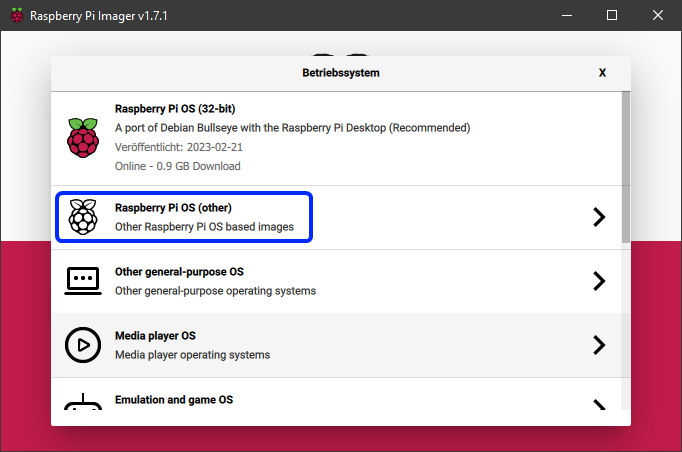
|
||||||
|
3. Choose `Raspberry Pi OS Lite (32bit)` (or 64bit if desired).
|
||||||
|
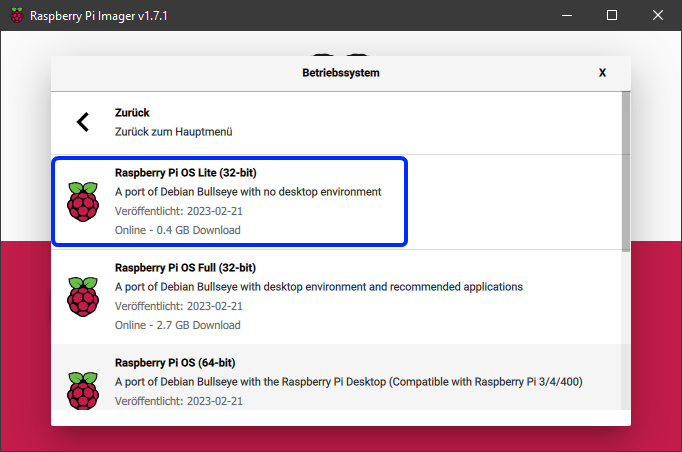
|
||||||
|
4. Insert the microSD card into your computer's SD card reader.
|
||||||
|
5. In the main menu of the Imager, select the correct microSD card.
|
||||||
|
6. Click the gear icon at the bottom left of the main menu to open advanced options.
|
||||||
|
7. Enable SSH and enter your Wi-Fi credentials.
|
||||||
|
|
||||||
|
!!! info
|
||||||
|
Wi-Fi is only necessary if you want to connect to your Raspberry Pi over a wireless network. If you plan to use a wired Ethernet connection, you can skip this step. SSH is required for remote access to your Raspberry Pi, so make sure to enable it.
|
||||||
|
|
||||||
|
8. Click `Save` to close the advanced options menu.
|
||||||
|
9. Click `Write` to start flashing the image to the microSD card.
|
||||||
|
|
||||||
|
!!! warning
|
||||||
|
All data on the microSD card will be overwritten!
|
||||||
|
|
||||||
|
10. Once the flashing process is complete, safely eject the microSD card from your computer.
|
||||||
|
11. Insert the microSD card into your Raspberry Pi.
|
||||||
|
12. Connect your Raspberry Pi to a power source to boot it up.
|
||||||
|
13. Wait for a few minutes to allow the Raspberry Pi to complete its initial setup.
|
||||||
|
14. You can now connect to your Raspberry Pi via SSH using the IP address assigned by your router. The default username is `pi` and the default password is `raspberry`.
|
||||||
|
|
||||||
|
If you successfully connected to your Raspberry Pi via SSH, you can proceed to install KIAUH by following the instructions in the [Installation Guide](installation.md).
|
||||||
15
kiauh.py
Normal file
15
kiauh.py
Normal file
@@ -0,0 +1,15 @@
|
|||||||
|
#!/usr/bin/env python3
|
||||||
|
|
||||||
|
# ======================================================================= #
|
||||||
|
# Copyright (C) 2020 - 2025 Dominik Willner <th33xitus@gmail.com> #
|
||||||
|
# #
|
||||||
|
# This file is part of KIAUH - Klipper Installation And Update Helper #
|
||||||
|
# https://github.com/dw-0/kiauh #
|
||||||
|
# #
|
||||||
|
# This file may be distributed under the terms of the GNU GPLv3 license #
|
||||||
|
# ======================================================================= #
|
||||||
|
|
||||||
|
from kiauh.main import main
|
||||||
|
|
||||||
|
if __name__ == "__main__":
|
||||||
|
main()
|
||||||
127
kiauh.sh
127
kiauh.sh
@@ -1,7 +1,7 @@
|
|||||||
#!/usr/bin/env bash
|
#!/usr/bin/env bash
|
||||||
|
|
||||||
#=======================================================================#
|
#=======================================================================#
|
||||||
# Copyright (C) 2020 - 2025 Dominik Willner <th33xitus@gmail.com> #
|
# Copyright (C) 2020 - 2024 Dominik Willner <th33xitus@gmail.com> #
|
||||||
# #
|
# #
|
||||||
# This file is part of KIAUH - Klipper Installation And Update Helper #
|
# This file is part of KIAUH - Klipper Installation And Update Helper #
|
||||||
# https://github.com/dw-0/kiauh #
|
# https://github.com/dw-0/kiauh #
|
||||||
@@ -15,6 +15,11 @@ clear -x
|
|||||||
# make sure we have the correct permissions while running the script
|
# make sure we have the correct permissions while running the script
|
||||||
umask 022
|
umask 022
|
||||||
|
|
||||||
|
### sourcing all additional scripts
|
||||||
|
KIAUH_SRCDIR="$(dirname -- "$(readlink -f "${BASH_SOURCE[0]}")")"
|
||||||
|
for script in "${KIAUH_SRCDIR}/scripts/"*.sh; do . "${script}"; done
|
||||||
|
for script in "${KIAUH_SRCDIR}/scripts/ui/"*.sh; do . "${script}"; done
|
||||||
|
|
||||||
#===================================================#
|
#===================================================#
|
||||||
#=================== UPDATE KIAUH ==================#
|
#=================== UPDATE KIAUH ==================#
|
||||||
#===================================================#
|
#===================================================#
|
||||||
@@ -52,17 +57,26 @@ function kiauh_update_avail() {
|
|||||||
fi
|
fi
|
||||||
}
|
}
|
||||||
|
|
||||||
|
function save_startup_version() {
|
||||||
|
local launch_version
|
||||||
|
|
||||||
|
echo "${1}"
|
||||||
|
|
||||||
|
sed -i "/^version_to_launch=/d" "${INI_FILE}"
|
||||||
|
sed -i '$a'"version_to_launch=${1}" "${INI_FILE}"
|
||||||
|
}
|
||||||
|
|
||||||
function kiauh_update_dialog() {
|
function kiauh_update_dialog() {
|
||||||
[[ ! $(kiauh_update_avail) == "true" ]] && return
|
[[ ! $(kiauh_update_avail) == "true" ]] && return
|
||||||
echo -e "/-------------------------------------------------------\\"
|
top_border
|
||||||
echo -e "|${green} New KIAUH update available! ${white}|"
|
echo -e "|${green} New KIAUH update available! ${white}|"
|
||||||
echo -e "|-------------------------------------------------------|"
|
hr
|
||||||
echo -e "|${green} View Changelog: https://git.io/JnmlX ${white}|"
|
echo -e "|${green} View Changelog: https://git.io/JnmlX ${white}|"
|
||||||
echo -e "| |"
|
blank_line
|
||||||
echo -e "|${yellow} It is recommended to keep KIAUH up to date. Updates ${white}|"
|
echo -e "|${yellow} It is recommended to keep KIAUH up to date. Updates ${white}|"
|
||||||
echo -e "|${yellow} usually contain bugfixes, important changes or new ${white}|"
|
echo -e "|${yellow} usually contain bugfixes, important changes or new ${white}|"
|
||||||
echo -e "|${yellow} features. Please consider updating! ${white}|"
|
echo -e "|${yellow} features. Please consider updating! ${white}|"
|
||||||
echo -e "\-------------------------------------------------------/"
|
bottom_border
|
||||||
|
|
||||||
local yn
|
local yn
|
||||||
read -p "${cyan}###### Do you want to update now? (Y/n):${white} " yn
|
read -p "${cyan}###### Do you want to update now? (Y/n):${white} " yn
|
||||||
@@ -79,52 +93,85 @@ function kiauh_update_dialog() {
|
|||||||
done
|
done
|
||||||
}
|
}
|
||||||
|
|
||||||
function check_euid() {
|
function launch_kiauh_v5() {
|
||||||
if [[ ${EUID} -eq 0 ]]; then
|
main_menu
|
||||||
echo -e "${red}"
|
|
||||||
echo -e "/-------------------------------------------------------\\"
|
|
||||||
echo -e "| !!! THIS SCRIPT MUST NOT RUN AS ROOT !!! |"
|
|
||||||
echo -e "| |"
|
|
||||||
echo -e "| It will ask for credentials as needed. |"
|
|
||||||
echo -e "\-------------------------------------------------------/"
|
|
||||||
echo -e "${white}"
|
|
||||||
exit 1
|
|
||||||
fi
|
|
||||||
}
|
}
|
||||||
|
|
||||||
function check_if_ratos() {
|
function launch_kiauh_v6() {
|
||||||
if [[ -n $(which ratos) ]]; then
|
local entrypoint
|
||||||
echo -e "${red}"
|
|
||||||
echo -e "/-------------------------------------------------------\\"
|
if ! command -v python3 &>/dev/null || [[ $(python3 -V | cut -d " " -f2 | cut -d "." -f2) -lt 8 ]]; then
|
||||||
echo -e "| !!! RatOS 2.1 or greater detected !!! |"
|
echo "Python 3.8 or higher is not installed!"
|
||||||
echo -e "| |"
|
echo "Please install Python 3.8 or higher and try again."
|
||||||
echo -e "| KIAUH does currently not support RatOS. |"
|
|
||||||
echo -e "| If you have any questions, please ask for help on the |"
|
|
||||||
echo -e "| RatRig Community Discord: https://discord.gg/ratrig |"
|
|
||||||
echo -e "\-------------------------------------------------------/"
|
|
||||||
echo -e "${white}"
|
|
||||||
exit 1
|
exit 1
|
||||||
fi
|
fi
|
||||||
|
|
||||||
|
entrypoint=$(dirname "$(readlink -f "${BASH_SOURCE[0]}")")
|
||||||
|
|
||||||
|
export PYTHONPATH="${entrypoint}"
|
||||||
|
|
||||||
|
clear -x
|
||||||
|
python3 "${entrypoint}/kiauh.py"
|
||||||
}
|
}
|
||||||
|
|
||||||
function main() {
|
function main() {
|
||||||
local entrypoint
|
read_kiauh_ini "${FUNCNAME[0]}"
|
||||||
|
|
||||||
if ! command -v python3 &>/dev/null || [[ $(python3 -V | cut -d " " -f2 | cut -d "." -f2) -lt 8 ]]; then
|
if [[ ${version_to_launch} -eq 5 ]]; then
|
||||||
echo "Python 3.8 or higher is not installed!"
|
launch_kiauh_v5
|
||||||
echo "Please install Python 3.8 or higher and try again."
|
elif [[ ${version_to_launch} -eq 6 ]]; then
|
||||||
exit 1
|
launch_kiauh_v6
|
||||||
fi
|
else
|
||||||
|
top_border
|
||||||
entrypoint=$(dirname "$(readlink -f "${BASH_SOURCE[0]}")")
|
echo -e "| ${green}KIAUH v6.0.0-alpha1 is available now!${white} |"
|
||||||
|
hr
|
||||||
export PYTHONPATH="${entrypoint}"
|
echo -e "| View Changelog: ${magenta}https://git.io/JnmlX${white} |"
|
||||||
|
blank_line
|
||||||
clear -x
|
echo -e "| KIAUH v6 was completely rewritten from the ground up. |"
|
||||||
python3 "${entrypoint}/kiauh/main.py"
|
echo -e "| It's based on Python 3.8 and has many improvements. |"
|
||||||
|
blank_line
|
||||||
|
echo -e "| ${yellow}NOTE: Version 6 is still in alpha, so bugs may occur!${white} |"
|
||||||
|
echo -e "| ${yellow}Yet, your feedback and bug reports are very much${white} |"
|
||||||
|
echo -e "| ${yellow}appreciated and will help finalize the release.${white} |"
|
||||||
|
hr
|
||||||
|
echo -e "| Would you like to try out KIAUH v6? |"
|
||||||
|
echo -e "| 1) Yes |"
|
||||||
|
echo -e "| 2) No |"
|
||||||
|
echo -e "| 3) Yes, remember my choice for next time |"
|
||||||
|
echo -e "| 4) No, remember my choice for next time |"
|
||||||
|
quit_footer
|
||||||
|
while true; do
|
||||||
|
read -p "${cyan}###### Select action:${white} " -e input
|
||||||
|
case "${input}" in
|
||||||
|
1)
|
||||||
|
launch_kiauh_v6
|
||||||
|
break;;
|
||||||
|
2)
|
||||||
|
launch_kiauh_v5
|
||||||
|
break;;
|
||||||
|
3)
|
||||||
|
save_startup_version 6
|
||||||
|
launch_kiauh_v6
|
||||||
|
break;;
|
||||||
|
4)
|
||||||
|
save_startup_version 5
|
||||||
|
launch_kiauh_v5
|
||||||
|
break;;
|
||||||
|
Q|q)
|
||||||
|
echo -e "${green}###### Happy printing! ######${white}"; echo
|
||||||
|
exit 0;;
|
||||||
|
*)
|
||||||
|
error_msg "Invalid Input!\n";;
|
||||||
|
esac
|
||||||
|
done && input=""
|
||||||
|
fi
|
||||||
}
|
}
|
||||||
|
|
||||||
check_if_ratos
|
check_if_ratos
|
||||||
check_euid
|
check_euid
|
||||||
|
init_logfile
|
||||||
|
set_globals
|
||||||
kiauh_update_dialog
|
kiauh_update_dialog
|
||||||
|
read_kiauh_ini
|
||||||
|
init_ini
|
||||||
main
|
main
|
||||||
|
|||||||
@@ -9,6 +9,7 @@
|
|||||||
|
|
||||||
from pathlib import Path
|
from pathlib import Path
|
||||||
|
|
||||||
|
from core.backup_manager import BACKUP_ROOT_DIR
|
||||||
from core.constants import SYSTEMD
|
from core.constants import SYSTEMD
|
||||||
|
|
||||||
# repo
|
# repo
|
||||||
@@ -19,6 +20,7 @@ CROWSNEST_SERVICE_NAME = "crowsnest.service"
|
|||||||
|
|
||||||
# directories
|
# directories
|
||||||
CROWSNEST_DIR = Path.home().joinpath("crowsnest")
|
CROWSNEST_DIR = Path.home().joinpath("crowsnest")
|
||||||
|
CROWSNEST_BACKUP_DIR = BACKUP_ROOT_DIR.joinpath("crowsnest-backups")
|
||||||
|
|
||||||
# files
|
# files
|
||||||
CROWSNEST_MULTI_CONFIG = CROWSNEST_DIR.joinpath("tools/.config")
|
CROWSNEST_MULTI_CONFIG = CROWSNEST_DIR.joinpath("tools/.config")
|
||||||
|
|||||||
@@ -15,6 +15,7 @@ from subprocess import CalledProcessError, run
|
|||||||
from typing import List
|
from typing import List
|
||||||
|
|
||||||
from components.crowsnest import (
|
from components.crowsnest import (
|
||||||
|
CROWSNEST_BACKUP_DIR,
|
||||||
CROWSNEST_BIN_FILE,
|
CROWSNEST_BIN_FILE,
|
||||||
CROWSNEST_DIR,
|
CROWSNEST_DIR,
|
||||||
CROWSNEST_INSTALL_SCRIPT,
|
CROWSNEST_INSTALL_SCRIPT,
|
||||||
@@ -25,8 +26,8 @@ from components.crowsnest import (
|
|||||||
CROWSNEST_SERVICE_NAME,
|
CROWSNEST_SERVICE_NAME,
|
||||||
)
|
)
|
||||||
from components.klipper.klipper import Klipper
|
from components.klipper.klipper import Klipper
|
||||||
|
from core.backup_manager.backup_manager import BackupManager
|
||||||
from core.logger import DialogType, Logger
|
from core.logger import DialogType, Logger
|
||||||
from core.services.backup_service import BackupService
|
|
||||||
from core.settings.kiauh_settings import KiauhSettings
|
from core.settings.kiauh_settings import KiauhSettings
|
||||||
from core.types.component_status import ComponentStatus
|
from core.types.component_status import ComponentStatus
|
||||||
from utils.common import (
|
from utils.common import (
|
||||||
@@ -126,11 +127,11 @@ def update_crowsnest() -> None:
|
|||||||
|
|
||||||
settings = KiauhSettings()
|
settings = KiauhSettings()
|
||||||
if settings.kiauh.backup_before_update:
|
if settings.kiauh.backup_before_update:
|
||||||
svc = BackupService()
|
bm = BackupManager()
|
||||||
svc.backup_directory(
|
bm.backup_directory(
|
||||||
source_path=CROWSNEST_DIR,
|
CROWSNEST_DIR.name,
|
||||||
target_path="crowsnest",
|
source=CROWSNEST_DIR,
|
||||||
backup_name="crowsnest",
|
target=CROWSNEST_BACKUP_DIR,
|
||||||
)
|
)
|
||||||
|
|
||||||
git_pull_wrapper(CROWSNEST_DIR)
|
git_pull_wrapper(CROWSNEST_DIR)
|
||||||
|
|||||||
@@ -9,6 +9,8 @@
|
|||||||
|
|
||||||
from pathlib import Path
|
from pathlib import Path
|
||||||
|
|
||||||
|
from core.backup_manager import BACKUP_ROOT_DIR
|
||||||
|
|
||||||
MODULE_PATH = Path(__file__).resolve().parent
|
MODULE_PATH = Path(__file__).resolve().parent
|
||||||
|
|
||||||
KLIPPER_REPO_URL = "https://github.com/Klipper3d/klipper.git"
|
KLIPPER_REPO_URL = "https://github.com/Klipper3d/klipper.git"
|
||||||
@@ -25,6 +27,7 @@ KLIPPER_SERVICE_NAME = "klipper.service"
|
|||||||
KLIPPER_DIR = Path.home().joinpath("klipper")
|
KLIPPER_DIR = Path.home().joinpath("klipper")
|
||||||
KLIPPER_KCONFIGS_DIR = Path.home().joinpath("klipper-kconfigs")
|
KLIPPER_KCONFIGS_DIR = Path.home().joinpath("klipper-kconfigs")
|
||||||
KLIPPER_ENV_DIR = Path.home().joinpath("klippy-env")
|
KLIPPER_ENV_DIR = Path.home().joinpath("klippy-env")
|
||||||
|
KLIPPER_BACKUP_DIR = BACKUP_ROOT_DIR.joinpath("klipper-backups")
|
||||||
|
|
||||||
# files
|
# files
|
||||||
KLIPPER_REQ_FILE = KLIPPER_DIR.joinpath("scripts/klippy-requirements.txt")
|
KLIPPER_REQ_FILE = KLIPPER_DIR.joinpath("scripts/klippy-requirements.txt")
|
||||||
|
|||||||
@@ -16,6 +16,7 @@ from subprocess import CalledProcessError, run
|
|||||||
from typing import Dict, List
|
from typing import Dict, List
|
||||||
|
|
||||||
from components.klipper import (
|
from components.klipper import (
|
||||||
|
KLIPPER_BACKUP_DIR,
|
||||||
KLIPPER_DIR,
|
KLIPPER_DIR,
|
||||||
KLIPPER_ENV_DIR,
|
KLIPPER_ENV_DIR,
|
||||||
KLIPPER_INSTALL_SCRIPT,
|
KLIPPER_INSTALL_SCRIPT,
|
||||||
@@ -30,10 +31,10 @@ from components.webui_client.base_data import BaseWebClient
|
|||||||
from components.webui_client.client_config.client_config_setup import (
|
from components.webui_client.client_config.client_config_setup import (
|
||||||
create_client_config_symlink,
|
create_client_config_symlink,
|
||||||
)
|
)
|
||||||
|
from core.backup_manager.backup_manager import BackupManager
|
||||||
from core.constants import CURRENT_USER
|
from core.constants import CURRENT_USER
|
||||||
from core.instance_manager.base_instance import SUFFIX_BLACKLIST
|
from core.instance_manager.base_instance import SUFFIX_BLACKLIST
|
||||||
from core.logger import DialogType, Logger
|
from core.logger import DialogType, Logger
|
||||||
from core.services.backup_service import BackupService
|
|
||||||
from core.submodules.simple_config_parser.src.simple_config_parser.simple_config_parser import (
|
from core.submodules.simple_config_parser.src.simple_config_parser.simple_config_parser import (
|
||||||
SimpleConfigParser,
|
SimpleConfigParser,
|
||||||
)
|
)
|
||||||
@@ -197,17 +198,9 @@ def create_example_printer_cfg(
|
|||||||
|
|
||||||
|
|
||||||
def backup_klipper_dir() -> None:
|
def backup_klipper_dir() -> None:
|
||||||
svc = BackupService()
|
bm = BackupManager()
|
||||||
svc.backup_directory(
|
bm.backup_directory("klipper", source=KLIPPER_DIR, target=KLIPPER_BACKUP_DIR)
|
||||||
source_path=KLIPPER_DIR,
|
bm.backup_directory("klippy-env", source=KLIPPER_ENV_DIR, target=KLIPPER_BACKUP_DIR)
|
||||||
backup_name="klipper",
|
|
||||||
target_path="klipper",
|
|
||||||
)
|
|
||||||
svc.backup_directory(
|
|
||||||
source_path=KLIPPER_ENV_DIR,
|
|
||||||
backup_name="klippy-env",
|
|
||||||
target_path="klipper",
|
|
||||||
)
|
|
||||||
|
|
||||||
|
|
||||||
def install_klipper_packages() -> None:
|
def install_klipper_packages() -> None:
|
||||||
|
|||||||
@@ -8,6 +8,7 @@
|
|||||||
# ======================================================================= #
|
# ======================================================================= #
|
||||||
from pathlib import Path
|
from pathlib import Path
|
||||||
|
|
||||||
|
from core.backup_manager import BACKUP_ROOT_DIR
|
||||||
from core.constants import SYSTEMD
|
from core.constants import SYSTEMD
|
||||||
|
|
||||||
# repo
|
# repo
|
||||||
@@ -21,6 +22,7 @@ KLIPPERSCREEN_LOG_NAME = "KlipperScreen.log"
|
|||||||
# directories
|
# directories
|
||||||
KLIPPERSCREEN_DIR = Path.home().joinpath("KlipperScreen")
|
KLIPPERSCREEN_DIR = Path.home().joinpath("KlipperScreen")
|
||||||
KLIPPERSCREEN_ENV_DIR = Path.home().joinpath(".KlipperScreen-env")
|
KLIPPERSCREEN_ENV_DIR = Path.home().joinpath(".KlipperScreen-env")
|
||||||
|
KLIPPERSCREEN_BACKUP_DIR = BACKUP_ROOT_DIR.joinpath("klipperscreen-backups")
|
||||||
|
|
||||||
# files
|
# files
|
||||||
KLIPPERSCREEN_REQ_FILE = KLIPPERSCREEN_DIR.joinpath(
|
KLIPPERSCREEN_REQ_FILE = KLIPPERSCREEN_DIR.joinpath(
|
||||||
|
|||||||
@@ -13,6 +13,7 @@ from typing import List
|
|||||||
|
|
||||||
from components.klipper.klipper import Klipper
|
from components.klipper.klipper import Klipper
|
||||||
from components.klipperscreen import (
|
from components.klipperscreen import (
|
||||||
|
KLIPPERSCREEN_BACKUP_DIR,
|
||||||
KLIPPERSCREEN_DIR,
|
KLIPPERSCREEN_DIR,
|
||||||
KLIPPERSCREEN_ENV_DIR,
|
KLIPPERSCREEN_ENV_DIR,
|
||||||
KLIPPERSCREEN_INSTALL_SCRIPT,
|
KLIPPERSCREEN_INSTALL_SCRIPT,
|
||||||
@@ -24,10 +25,10 @@ from components.klipperscreen import (
|
|||||||
KLIPPERSCREEN_UPDATER_SECTION_NAME,
|
KLIPPERSCREEN_UPDATER_SECTION_NAME,
|
||||||
)
|
)
|
||||||
from components.moonraker.moonraker import Moonraker
|
from components.moonraker.moonraker import Moonraker
|
||||||
|
from core.backup_manager.backup_manager import BackupManager
|
||||||
from core.constants import SYSTEMD
|
from core.constants import SYSTEMD
|
||||||
from core.instance_manager.instance_manager import InstanceManager
|
from core.instance_manager.instance_manager import InstanceManager
|
||||||
from core.logger import DialogType, Logger
|
from core.logger import DialogType, Logger
|
||||||
from core.services.backup_service import BackupService
|
|
||||||
from core.settings.kiauh_settings import KiauhSettings
|
from core.settings.kiauh_settings import KiauhSettings
|
||||||
from core.types.component_status import ComponentStatus
|
from core.types.component_status import ComponentStatus
|
||||||
from utils.common import (
|
from utils.common import (
|
||||||
@@ -96,7 +97,6 @@ def install_klipperscreen() -> None:
|
|||||||
|
|
||||||
|
|
||||||
def patch_klipperscreen_update_manager(instances: List[Moonraker]) -> None:
|
def patch_klipperscreen_update_manager(instances: List[Moonraker]) -> None:
|
||||||
BackupService().backup_moonraker_conf()
|
|
||||||
add_config_section(
|
add_config_section(
|
||||||
section=KLIPPERSCREEN_UPDATER_SECTION_NAME,
|
section=KLIPPERSCREEN_UPDATER_SECTION_NAME,
|
||||||
instances=instances,
|
instances=instances,
|
||||||
@@ -183,7 +183,6 @@ def remove_klipperscreen() -> None:
|
|||||||
mr_instances: List[Moonraker] = get_instances(Moonraker)
|
mr_instances: List[Moonraker] = get_instances(Moonraker)
|
||||||
if mr_instances:
|
if mr_instances:
|
||||||
Logger.print_status("Removing KlipperScreen from update manager ...")
|
Logger.print_status("Removing KlipperScreen from update manager ...")
|
||||||
BackupService().backup_moonraker_conf()
|
|
||||||
remove_config_section("update_manager KlipperScreen", mr_instances)
|
remove_config_section("update_manager KlipperScreen", mr_instances)
|
||||||
Logger.print_ok("KlipperScreen successfully removed from update manager!")
|
Logger.print_ok("KlipperScreen successfully removed from update manager!")
|
||||||
|
|
||||||
@@ -194,14 +193,14 @@ def remove_klipperscreen() -> None:
|
|||||||
|
|
||||||
|
|
||||||
def backup_klipperscreen_dir() -> None:
|
def backup_klipperscreen_dir() -> None:
|
||||||
svc = BackupService()
|
bm = BackupManager()
|
||||||
svc.backup_directory(
|
bm.backup_directory(
|
||||||
source_path=KLIPPERSCREEN_DIR,
|
KLIPPERSCREEN_DIR.name,
|
||||||
backup_name="KlipperScreen",
|
source=KLIPPERSCREEN_DIR,
|
||||||
target_path="KlipperScreen",
|
target=KLIPPERSCREEN_BACKUP_DIR,
|
||||||
)
|
)
|
||||||
svc.backup_directory(
|
bm.backup_directory(
|
||||||
source_path=KLIPPERSCREEN_ENV_DIR,
|
KLIPPERSCREEN_ENV_DIR.name,
|
||||||
backup_name="KlipperScreen-env",
|
source=KLIPPERSCREEN_ENV_DIR,
|
||||||
target_path="KlipperScreen",
|
target=KLIPPERSCREEN_BACKUP_DIR,
|
||||||
)
|
)
|
||||||
|
|||||||
@@ -9,6 +9,8 @@
|
|||||||
|
|
||||||
from pathlib import Path
|
from pathlib import Path
|
||||||
|
|
||||||
|
from core.backup_manager import BACKUP_ROOT_DIR
|
||||||
|
|
||||||
MODULE_PATH = Path(__file__).resolve().parent
|
MODULE_PATH = Path(__file__).resolve().parent
|
||||||
|
|
||||||
MOONRAKER_REPO_URL = "https://github.com/Arksine/moonraker.git"
|
MOONRAKER_REPO_URL = "https://github.com/Arksine/moonraker.git"
|
||||||
@@ -23,6 +25,8 @@ MOONRAKER_ENV_FILE_NAME = "moonraker.env"
|
|||||||
# directories
|
# directories
|
||||||
MOONRAKER_DIR = Path.home().joinpath("moonraker")
|
MOONRAKER_DIR = Path.home().joinpath("moonraker")
|
||||||
MOONRAKER_ENV_DIR = Path.home().joinpath("moonraker-env")
|
MOONRAKER_ENV_DIR = Path.home().joinpath("moonraker-env")
|
||||||
|
MOONRAKER_BACKUP_DIR = BACKUP_ROOT_DIR.joinpath("moonraker-backups")
|
||||||
|
MOONRAKER_DB_BACKUP_DIR = BACKUP_ROOT_DIR.joinpath("moonraker-db-backups")
|
||||||
|
|
||||||
# files
|
# files
|
||||||
MOONRAKER_INSTALL_SCRIPT = MOONRAKER_DIR.joinpath("scripts/install-moonraker.sh")
|
MOONRAKER_INSTALL_SCRIPT = MOONRAKER_DIR.joinpath("scripts/install-moonraker.sh")
|
||||||
|
|||||||
@@ -61,9 +61,6 @@ class SysDepsParser:
|
|||||||
version = distro_info.get("distro_version")
|
version = distro_info.get("distro_version")
|
||||||
if version:
|
if version:
|
||||||
self.distro_version = _convert_version(version)
|
self.distro_version = _convert_version(version)
|
||||||
self.vendor: str = ""
|
|
||||||
if pathlib.Path("/etc/rpi-issue").is_file():
|
|
||||||
self.vendor = "raspberry-pi"
|
|
||||||
|
|
||||||
def _parse_spec(self, full_spec: str) -> str | None:
|
def _parse_spec(self, full_spec: str) -> str | None:
|
||||||
parts = full_spec.split(";", maxsplit=1)
|
parts = full_spec.split(";", maxsplit=1)
|
||||||
@@ -112,9 +109,6 @@ class SysDepsParser:
|
|||||||
elif req_var == "distro_id":
|
elif req_var == "distro_id":
|
||||||
left_op: str | Tuple[int | str, ...] = self.distro_id
|
left_op: str | Tuple[int | str, ...] = self.distro_id
|
||||||
right_op = dep_parts[2].strip().strip("\"'")
|
right_op = dep_parts[2].strip().strip("\"'")
|
||||||
elif req_var == "vendor":
|
|
||||||
left_op = self.vendor
|
|
||||||
right_op = dep_parts[2].strip().strip("\"'")
|
|
||||||
elif req_var == "distro_version":
|
elif req_var == "distro_version":
|
||||||
if not self.distro_version:
|
if not self.distro_version:
|
||||||
logging.info(
|
logging.info(
|
||||||
|
|||||||
@@ -14,6 +14,8 @@ from typing import Dict, List, Optional
|
|||||||
|
|
||||||
from components.moonraker import (
|
from components.moonraker import (
|
||||||
MODULE_PATH,
|
MODULE_PATH,
|
||||||
|
MOONRAKER_BACKUP_DIR,
|
||||||
|
MOONRAKER_DB_BACKUP_DIR,
|
||||||
MOONRAKER_DEFAULT_PORT,
|
MOONRAKER_DEFAULT_PORT,
|
||||||
MOONRAKER_DEPS_JSON_FILE,
|
MOONRAKER_DEPS_JSON_FILE,
|
||||||
MOONRAKER_DIR,
|
MOONRAKER_DIR,
|
||||||
@@ -23,8 +25,8 @@ from components.moonraker import (
|
|||||||
from components.moonraker.moonraker import Moonraker
|
from components.moonraker.moonraker import Moonraker
|
||||||
from components.moonraker.utils.sysdeps_parser import SysDepsParser
|
from components.moonraker.utils.sysdeps_parser import SysDepsParser
|
||||||
from components.webui_client.base_data import BaseWebClient
|
from components.webui_client.base_data import BaseWebClient
|
||||||
|
from core.backup_manager.backup_manager import BackupManager
|
||||||
from core.logger import Logger
|
from core.logger import Logger
|
||||||
from core.services.backup_service import BackupService
|
|
||||||
from core.submodules.simple_config_parser.src.simple_config_parser.simple_config_parser import (
|
from core.submodules.simple_config_parser.src.simple_config_parser.simple_config_parser import (
|
||||||
SimpleConfigParser,
|
SimpleConfigParser,
|
||||||
)
|
)
|
||||||
@@ -166,55 +168,21 @@ def create_example_moonraker_conf(
|
|||||||
|
|
||||||
|
|
||||||
def backup_moonraker_dir() -> None:
|
def backup_moonraker_dir() -> None:
|
||||||
svc = BackupService()
|
bm = BackupManager()
|
||||||
svc.backup_directory(
|
bm.backup_directory("moonraker", source=MOONRAKER_DIR, target=MOONRAKER_BACKUP_DIR)
|
||||||
source_path=MOONRAKER_DIR, backup_name="moonraker", target_path="moonraker"
|
bm.backup_directory(
|
||||||
)
|
"moonraker-env", source=MOONRAKER_ENV_DIR, target=MOONRAKER_BACKUP_DIR
|
||||||
svc.backup_directory(
|
|
||||||
source_path=MOONRAKER_ENV_DIR,
|
|
||||||
backup_name="moonraker-env",
|
|
||||||
target_path="moonraker",
|
|
||||||
)
|
)
|
||||||
|
|
||||||
|
|
||||||
def backup_moonraker_db_dir() -> None:
|
def backup_moonraker_db_dir() -> None:
|
||||||
instances: List[Moonraker] = get_instances(Moonraker)
|
instances: List[Moonraker] = get_instances(Moonraker)
|
||||||
svc = BackupService()
|
bm = BackupManager()
|
||||||
|
|
||||||
if not instances:
|
|
||||||
# fallback: search for printer data directories in the user's home directory
|
|
||||||
Logger.print_info("No Moonraker instances found via systemd services.")
|
|
||||||
Logger.print_info(
|
|
||||||
"Attempting to find printer data directories in home directory..."
|
|
||||||
)
|
|
||||||
|
|
||||||
home_dir = Path.home()
|
|
||||||
printer_data_dirs = []
|
|
||||||
|
|
||||||
for pattern in ["printer_data", "printer_*_data"]:
|
|
||||||
for data_dir in home_dir.glob(pattern):
|
|
||||||
if data_dir.is_dir():
|
|
||||||
printer_data_dirs.append(data_dir)
|
|
||||||
|
|
||||||
if not printer_data_dirs:
|
|
||||||
Logger.print_info("Unable to find directory to backup!")
|
|
||||||
Logger.print_info("No printer data directories found in home directory.")
|
|
||||||
return
|
|
||||||
|
|
||||||
for data_dir in printer_data_dirs:
|
|
||||||
svc.backup_directory(
|
|
||||||
source_path=data_dir.joinpath("database"),
|
|
||||||
target_path=data_dir.name,
|
|
||||||
backup_name="database",
|
|
||||||
)
|
|
||||||
|
|
||||||
return
|
|
||||||
|
|
||||||
for instance in instances:
|
for instance in instances:
|
||||||
svc.backup_directory(
|
name = f"database-{instance.data_dir.name}"
|
||||||
source_path=instance.db_dir,
|
bm.backup_directory(
|
||||||
target_path=f"{instance.data_dir.name}",
|
name, source=instance.db_dir, target=MOONRAKER_DB_BACKUP_DIR
|
||||||
backup_name="database",
|
|
||||||
)
|
)
|
||||||
|
|
||||||
|
|
||||||
|
|||||||
@@ -34,6 +34,7 @@ class BaseWebClient(ABC):
|
|||||||
display_name: str
|
display_name: str
|
||||||
client_dir: Path
|
client_dir: Path
|
||||||
config_file: Path
|
config_file: Path
|
||||||
|
backup_dir: Path
|
||||||
repo_path: str
|
repo_path: str
|
||||||
download_url: str
|
download_url: str
|
||||||
nginx_config: Path
|
nginx_config: Path
|
||||||
@@ -51,5 +52,6 @@ class BaseWebClientConfig(ABC):
|
|||||||
display_name: str
|
display_name: str
|
||||||
config_filename: str
|
config_filename: str
|
||||||
config_dir: Path
|
config_dir: Path
|
||||||
|
backup_dir: Path
|
||||||
repo_url: str
|
repo_url: str
|
||||||
config_section: str
|
config_section: str
|
||||||
|
|||||||
@@ -14,7 +14,6 @@ from components.klipper.klipper import Klipper
|
|||||||
from components.moonraker.moonraker import Moonraker
|
from components.moonraker.moonraker import Moonraker
|
||||||
from components.webui_client.base_data import BaseWebClientConfig
|
from components.webui_client.base_data import BaseWebClientConfig
|
||||||
from core.logger import Logger
|
from core.logger import Logger
|
||||||
from core.services.backup_service import BackupService
|
|
||||||
from core.services.message_service import Message
|
from core.services.message_service import Message
|
||||||
from core.types.color import Color
|
from core.types.color import Color
|
||||||
from utils.config_utils import remove_config_section
|
from utils.config_utils import remove_config_section
|
||||||
@@ -36,8 +35,6 @@ def run_client_config_removal(
|
|||||||
if run_remove_routines(client_config.config_dir):
|
if run_remove_routines(client_config.config_dir):
|
||||||
completion_msg.text.append(f"● {client_config.display_name} removed")
|
completion_msg.text.append(f"● {client_config.display_name} removed")
|
||||||
|
|
||||||
BackupService().backup_printer_config_dir()
|
|
||||||
|
|
||||||
completion_msg = remove_moonraker_config_section(
|
completion_msg = remove_moonraker_config_section(
|
||||||
completion_msg, client_config, mr_instances
|
completion_msg, client_config, mr_instances
|
||||||
)
|
)
|
||||||
|
|||||||
@@ -25,8 +25,8 @@ from components.webui_client.client_utils import (
|
|||||||
)
|
)
|
||||||
from core.instance_manager.instance_manager import InstanceManager
|
from core.instance_manager.instance_manager import InstanceManager
|
||||||
from core.logger import Logger
|
from core.logger import Logger
|
||||||
from core.services.backup_service import BackupService
|
|
||||||
from core.settings.kiauh_settings import KiauhSettings
|
from core.settings.kiauh_settings import KiauhSettings
|
||||||
|
from utils.common import backup_printer_config_dir
|
||||||
from utils.config_utils import add_config_section, add_config_section_at_top
|
from utils.config_utils import add_config_section, add_config_section_at_top
|
||||||
from utils.fs_utils import create_symlink
|
from utils.fs_utils import create_symlink
|
||||||
from utils.git_utils import git_clone_wrapper, git_pull_wrapper
|
from utils.git_utils import git_clone_wrapper, git_pull_wrapper
|
||||||
@@ -57,7 +57,7 @@ def install_client_config(client_data: BaseWebClient, cfg_backup=True) -> None:
|
|||||||
create_client_config_symlink(client_config, kl_instances)
|
create_client_config_symlink(client_config, kl_instances)
|
||||||
|
|
||||||
if cfg_backup:
|
if cfg_backup:
|
||||||
BackupService().backup_printer_config_dir()
|
backup_printer_config_dir()
|
||||||
|
|
||||||
add_config_section(
|
add_config_section(
|
||||||
section=f"update_manager {client_config.name}",
|
section=f"update_manager {client_config.name}",
|
||||||
|
|||||||
@@ -16,9 +16,9 @@ from components.webui_client.base_data import (
|
|||||||
from components.webui_client.client_config.client_config_remove import (
|
from components.webui_client.client_config.client_config_remove import (
|
||||||
run_client_config_removal,
|
run_client_config_removal,
|
||||||
)
|
)
|
||||||
|
from core.backup_manager.backup_manager import BackupManager
|
||||||
from core.constants import NGINX_SITES_AVAILABLE, NGINX_SITES_ENABLED
|
from core.constants import NGINX_SITES_AVAILABLE, NGINX_SITES_ENABLED
|
||||||
from core.logger import Logger
|
from core.logger import Logger
|
||||||
from core.services.backup_service import BackupService
|
|
||||||
from core.services.message_service import Message
|
from core.services.message_service import Message
|
||||||
from core.types.color import Color
|
from core.types.color import Color
|
||||||
from utils.config_utils import remove_config_section
|
from utils.config_utils import remove_config_section
|
||||||
@@ -43,19 +43,8 @@ def run_client_removal(
|
|||||||
kl_instances: List[Klipper] = get_instances(Klipper)
|
kl_instances: List[Klipper] = get_instances(Klipper)
|
||||||
|
|
||||||
if backup_config:
|
if backup_config:
|
||||||
version = ""
|
bm = BackupManager()
|
||||||
src = client.client_dir
|
if bm.backup_file(client.config_file):
|
||||||
if src.joinpath(".version").exists():
|
|
||||||
with open(src.joinpath(".version"), "r") as v:
|
|
||||||
version = v.readlines()[0]
|
|
||||||
|
|
||||||
svc = BackupService()
|
|
||||||
target_path = svc.backup_root.joinpath(f"{client.client_dir.name}_{version}")
|
|
||||||
success = svc.backup_file(
|
|
||||||
source_path=client.config_file,
|
|
||||||
target_path=target_path,
|
|
||||||
)
|
|
||||||
if success:
|
|
||||||
completion_msg.text.append(f"● {client.config_file.name} backup created")
|
completion_msg.text.append(f"● {client.config_file.name} backup created")
|
||||||
|
|
||||||
if remove_client:
|
if remove_client:
|
||||||
@@ -67,7 +56,6 @@ def run_client_removal(
|
|||||||
if remove_client_nginx_logs(client, kl_instances):
|
if remove_client_nginx_logs(client, kl_instances):
|
||||||
completion_msg.text.append("● NGINX logs removed")
|
completion_msg.text.append("● NGINX logs removed")
|
||||||
|
|
||||||
BackupService().backup_moonraker_conf()
|
|
||||||
section = f"update_manager {client_name}"
|
section = f"update_manager {client_name}"
|
||||||
handled_instances: List[Moonraker] = remove_config_section(
|
handled_instances: List[Moonraker] = remove_config_section(
|
||||||
section, mr_instances
|
section, mr_instances
|
||||||
|
|||||||
@@ -37,10 +37,9 @@ from components.webui_client.client_utils import (
|
|||||||
)
|
)
|
||||||
from core.instance_manager.instance_manager import InstanceManager
|
from core.instance_manager.instance_manager import InstanceManager
|
||||||
from core.logger import DialogType, Logger
|
from core.logger import DialogType, Logger
|
||||||
from core.services.backup_service import BackupService
|
|
||||||
from core.settings.kiauh_settings import KiauhSettings
|
from core.settings.kiauh_settings import KiauhSettings
|
||||||
from core.types.color import Color
|
from core.types.color import Color
|
||||||
from utils.common import check_install_dependencies
|
from utils.common import backup_printer_config_dir, check_install_dependencies
|
||||||
from utils.config_utils import add_config_section
|
from utils.config_utils import add_config_section
|
||||||
from utils.fs_utils import unzip
|
from utils.fs_utils import unzip
|
||||||
from utils.input_utils import get_confirm
|
from utils.input_utils import get_confirm
|
||||||
@@ -98,7 +97,7 @@ def install_client(
|
|||||||
if enable_remotemode and client.client == WebClientType.MAINSAIL:
|
if enable_remotemode and client.client == WebClientType.MAINSAIL:
|
||||||
enable_mainsail_remotemode()
|
enable_mainsail_remotemode()
|
||||||
|
|
||||||
BackupService().backup_printer_config_dir()
|
backup_printer_config_dir()
|
||||||
add_config_section(
|
add_config_section(
|
||||||
section=f"update_manager {client.name}",
|
section=f"update_manager {client.name}",
|
||||||
instances=mr_instances,
|
instances=mr_instances,
|
||||||
|
|||||||
@@ -24,13 +24,13 @@ from components.webui_client.base_data import (
|
|||||||
from components.webui_client.client_dialogs import print_client_port_select_dialog
|
from components.webui_client.client_dialogs import print_client_port_select_dialog
|
||||||
from components.webui_client.fluidd_data import FluiddData
|
from components.webui_client.fluidd_data import FluiddData
|
||||||
from components.webui_client.mainsail_data import MainsailData
|
from components.webui_client.mainsail_data import MainsailData
|
||||||
|
from core.backup_manager.backup_manager import BackupManager
|
||||||
from core.constants import (
|
from core.constants import (
|
||||||
NGINX_CONFD,
|
NGINX_CONFD,
|
||||||
NGINX_SITES_AVAILABLE,
|
NGINX_SITES_AVAILABLE,
|
||||||
NGINX_SITES_ENABLED,
|
NGINX_SITES_ENABLED,
|
||||||
)
|
)
|
||||||
from core.logger import Logger
|
from core.logger import Logger
|
||||||
from core.services.backup_service import BackupService
|
|
||||||
from core.settings.kiauh_settings import KiauhSettings, WebUiSettings
|
from core.settings.kiauh_settings import KiauhSettings, WebUiSettings
|
||||||
from core.submodules.simple_config_parser.src.simple_config_parser.simple_config_parser import (
|
from core.submodules.simple_config_parser.src.simple_config_parser.simple_config_parser import (
|
||||||
SimpleConfigParser,
|
SimpleConfigParser,
|
||||||
@@ -118,7 +118,7 @@ def enable_mainsail_remotemode() -> None:
|
|||||||
c_json = MainsailData().client_dir.joinpath("config.json")
|
c_json = MainsailData().client_dir.joinpath("config.json")
|
||||||
with open(c_json, "r") as f:
|
with open(c_json, "r") as f:
|
||||||
config_data = json.load(f)
|
config_data = json.load(f)
|
||||||
|
|
||||||
if config_data["instancesDB"] == "browser" or config_data["instancesDB"] == "json":
|
if config_data["instancesDB"] == "browser" or config_data["instancesDB"] == "json":
|
||||||
Logger.print_info("Remote mode already configured. Skipped ...")
|
Logger.print_info("Remote mode already configured. Skipped ...")
|
||||||
return
|
return
|
||||||
@@ -175,39 +175,26 @@ def get_remote_client_version(client: BaseWebClient) -> str | None:
|
|||||||
|
|
||||||
|
|
||||||
def backup_client_data(client: BaseWebClient) -> None:
|
def backup_client_data(client: BaseWebClient) -> None:
|
||||||
version = ""
|
name = client.name
|
||||||
src = client.client_dir
|
src = client.client_dir
|
||||||
if src.joinpath(".version").exists():
|
dest = client.backup_dir
|
||||||
with open(src.joinpath(".version"), "r") as v:
|
|
||||||
version = v.readlines()[0]
|
|
||||||
|
|
||||||
svc = BackupService()
|
with open(src.joinpath(".version"), "r") as v:
|
||||||
target_path = svc.backup_root.joinpath(f"{client.client_dir.name}_{version}")
|
version = v.readlines()[0]
|
||||||
svc.backup_directory(
|
|
||||||
source_path=client.client_dir,
|
bm = BackupManager()
|
||||||
target_path=target_path,
|
bm.backup_directory(f"{name}-{version}", src, dest)
|
||||||
backup_name=client.name,
|
bm.backup_file(client.config_file, dest)
|
||||||
)
|
bm.backup_file(NGINX_SITES_AVAILABLE.joinpath(name), dest)
|
||||||
svc.backup_file(
|
|
||||||
source_path=client.config_file,
|
|
||||||
target_path=target_path,
|
|
||||||
)
|
|
||||||
|
|
||||||
|
|
||||||
def backup_client_config_data(client: BaseWebClient) -> None:
|
def backup_client_config_data(client: BaseWebClient) -> None:
|
||||||
version = ""
|
client_config = client.client_config
|
||||||
src = client.client_dir
|
name = client_config.name
|
||||||
if src.joinpath(".version").exists():
|
source = client_config.config_dir
|
||||||
with open(src.joinpath(".version"), "r") as v:
|
target = client_config.backup_dir
|
||||||
version = v.readlines()[0]
|
bm = BackupManager()
|
||||||
|
bm.backup_directory(name, source, target)
|
||||||
svc = BackupService()
|
|
||||||
target_path = svc.backup_root.joinpath(f"{client.client_dir.name}_{version}")
|
|
||||||
svc.backup_directory(
|
|
||||||
source_path=client.client_config.config_dir,
|
|
||||||
target_path=target_path,
|
|
||||||
backup_name=client.client_config.name,
|
|
||||||
)
|
|
||||||
|
|
||||||
|
|
||||||
def get_existing_clients() -> List[BaseWebClient]:
|
def get_existing_clients() -> List[BaseWebClient]:
|
||||||
|
|||||||
@@ -18,6 +18,7 @@ from components.webui_client.base_data import (
|
|||||||
WebClientConfigType,
|
WebClientConfigType,
|
||||||
WebClientType,
|
WebClientType,
|
||||||
)
|
)
|
||||||
|
from core.backup_manager import BACKUP_ROOT_DIR
|
||||||
from core.constants import NGINX_SITES_AVAILABLE
|
from core.constants import NGINX_SITES_AVAILABLE
|
||||||
|
|
||||||
|
|
||||||
@@ -29,6 +30,7 @@ class FluiddConfigWeb(BaseWebClientConfig):
|
|||||||
config_dir: Path = Path.home().joinpath("fluidd-config")
|
config_dir: Path = Path.home().joinpath("fluidd-config")
|
||||||
config_filename: str = "fluidd.cfg"
|
config_filename: str = "fluidd.cfg"
|
||||||
config_section: str = f"include {config_filename}"
|
config_section: str = f"include {config_filename}"
|
||||||
|
backup_dir: Path = BACKUP_ROOT_DIR.joinpath("fluidd-config-backups")
|
||||||
repo_url: str = "https://github.com/fluidd-core/fluidd-config.git"
|
repo_url: str = "https://github.com/fluidd-core/fluidd-config.git"
|
||||||
|
|
||||||
|
|
||||||
@@ -41,6 +43,7 @@ class FluiddData(BaseWebClient):
|
|||||||
display_name: str = name.capitalize()
|
display_name: str = name.capitalize()
|
||||||
client_dir: Path = Path.home().joinpath("fluidd")
|
client_dir: Path = Path.home().joinpath("fluidd")
|
||||||
config_file: Path = client_dir.joinpath("config.json")
|
config_file: Path = client_dir.joinpath("config.json")
|
||||||
|
backup_dir: Path = BACKUP_ROOT_DIR.joinpath("fluidd-backups")
|
||||||
repo_path: str = "fluidd-core/fluidd"
|
repo_path: str = "fluidd-core/fluidd"
|
||||||
nginx_config: Path = NGINX_SITES_AVAILABLE.joinpath("fluidd")
|
nginx_config: Path = NGINX_SITES_AVAILABLE.joinpath("fluidd")
|
||||||
nginx_access_log: Path = Path("/var/log/nginx/fluidd-access.log")
|
nginx_access_log: Path = Path("/var/log/nginx/fluidd-access.log")
|
||||||
|
|||||||
@@ -18,6 +18,7 @@ from components.webui_client.base_data import (
|
|||||||
WebClientConfigType,
|
WebClientConfigType,
|
||||||
WebClientType,
|
WebClientType,
|
||||||
)
|
)
|
||||||
|
from core.backup_manager import BACKUP_ROOT_DIR
|
||||||
from core.constants import NGINX_SITES_AVAILABLE
|
from core.constants import NGINX_SITES_AVAILABLE
|
||||||
|
|
||||||
|
|
||||||
@@ -29,6 +30,7 @@ class MainsailConfigWeb(BaseWebClientConfig):
|
|||||||
config_dir: Path = Path.home().joinpath("mainsail-config")
|
config_dir: Path = Path.home().joinpath("mainsail-config")
|
||||||
config_filename: str = "mainsail.cfg"
|
config_filename: str = "mainsail.cfg"
|
||||||
config_section: str = f"include {config_filename}"
|
config_section: str = f"include {config_filename}"
|
||||||
|
backup_dir: Path = BACKUP_ROOT_DIR.joinpath("mainsail-config-backups")
|
||||||
repo_url: str = "https://github.com/mainsail-crew/mainsail-config.git"
|
repo_url: str = "https://github.com/mainsail-crew/mainsail-config.git"
|
||||||
|
|
||||||
|
|
||||||
@@ -41,6 +43,7 @@ class MainsailData(BaseWebClient):
|
|||||||
display_name: str = name.capitalize()
|
display_name: str = name.capitalize()
|
||||||
client_dir: Path = Path.home().joinpath("mainsail")
|
client_dir: Path = Path.home().joinpath("mainsail")
|
||||||
config_file: Path = client_dir.joinpath("config.json")
|
config_file: Path = client_dir.joinpath("config.json")
|
||||||
|
backup_dir: Path = BACKUP_ROOT_DIR.joinpath("mainsail-backups")
|
||||||
repo_path: str = "mainsail-crew/mainsail"
|
repo_path: str = "mainsail-crew/mainsail"
|
||||||
nginx_config: Path = NGINX_SITES_AVAILABLE.joinpath("mainsail")
|
nginx_config: Path = NGINX_SITES_AVAILABLE.joinpath("mainsail")
|
||||||
nginx_access_log: Path = Path("/var/log/nginx/mainsail-access.log")
|
nginx_access_log: Path = Path("/var/log/nginx/mainsail-access.log")
|
||||||
|
|||||||
12
kiauh/core/backup_manager/__init__.py
Normal file
12
kiauh/core/backup_manager/__init__.py
Normal file
@@ -0,0 +1,12 @@
|
|||||||
|
# ======================================================================= #
|
||||||
|
# Copyright (C) 2020 - 2025 Dominik Willner <th33xitus@gmail.com> #
|
||||||
|
# #
|
||||||
|
# This file is part of KIAUH - Klipper Installation And Update Helper #
|
||||||
|
# https://github.com/dw-0/kiauh #
|
||||||
|
# #
|
||||||
|
# This file may be distributed under the terms of the GNU GPLv3 license #
|
||||||
|
# ======================================================================= #
|
||||||
|
|
||||||
|
from pathlib import Path
|
||||||
|
|
||||||
|
BACKUP_ROOT_DIR = Path.home().joinpath("kiauh-backups")
|
||||||
108
kiauh/core/backup_manager/backup_manager.py
Normal file
108
kiauh/core/backup_manager/backup_manager.py
Normal file
@@ -0,0 +1,108 @@
|
|||||||
|
# ======================================================================= #
|
||||||
|
# Copyright (C) 2020 - 2025 Dominik Willner <th33xitus@gmail.com> #
|
||||||
|
# #
|
||||||
|
# This file is part of KIAUH - Klipper Installation And Update Helper #
|
||||||
|
# https://github.com/dw-0/kiauh #
|
||||||
|
# #
|
||||||
|
# This file may be distributed under the terms of the GNU GPLv3 license #
|
||||||
|
# ======================================================================= #
|
||||||
|
from __future__ import annotations
|
||||||
|
|
||||||
|
import shutil
|
||||||
|
from pathlib import Path
|
||||||
|
from typing import List
|
||||||
|
|
||||||
|
from core.backup_manager import BACKUP_ROOT_DIR
|
||||||
|
from core.logger import Logger
|
||||||
|
from utils.common import get_current_date
|
||||||
|
|
||||||
|
|
||||||
|
class BackupManagerException(Exception):
|
||||||
|
pass
|
||||||
|
|
||||||
|
|
||||||
|
# noinspection PyUnusedLocal
|
||||||
|
# noinspection PyMethodMayBeStatic
|
||||||
|
class BackupManager:
|
||||||
|
def __init__(self, backup_root_dir: Path = BACKUP_ROOT_DIR):
|
||||||
|
self._backup_root_dir: Path = backup_root_dir
|
||||||
|
self._ignore_folders: List[str] = []
|
||||||
|
|
||||||
|
@property
|
||||||
|
def backup_root_dir(self) -> Path:
|
||||||
|
return self._backup_root_dir
|
||||||
|
|
||||||
|
@backup_root_dir.setter
|
||||||
|
def backup_root_dir(self, value: Path):
|
||||||
|
self._backup_root_dir = value
|
||||||
|
|
||||||
|
@property
|
||||||
|
def ignore_folders(self) -> List[str]:
|
||||||
|
return self._ignore_folders
|
||||||
|
|
||||||
|
@ignore_folders.setter
|
||||||
|
def ignore_folders(self, value: List[str]):
|
||||||
|
self._ignore_folders = value
|
||||||
|
|
||||||
|
def backup_file(
|
||||||
|
self, file: Path, target: Path | None = None, custom_filename=None
|
||||||
|
) -> bool:
|
||||||
|
Logger.print_status(f"Creating backup of {file} ...")
|
||||||
|
|
||||||
|
if not file.exists():
|
||||||
|
Logger.print_info("File does not exist! Skipping ...")
|
||||||
|
return False
|
||||||
|
|
||||||
|
target = self.backup_root_dir if target is None else target
|
||||||
|
|
||||||
|
if Path(file).is_file():
|
||||||
|
date = get_current_date().get("date")
|
||||||
|
time = get_current_date().get("time")
|
||||||
|
filename = f"{file.stem}-{date}-{time}{file.suffix}"
|
||||||
|
filename = custom_filename if custom_filename is not None else filename
|
||||||
|
try:
|
||||||
|
Path(target).mkdir(exist_ok=True)
|
||||||
|
shutil.copyfile(file, target.joinpath(filename))
|
||||||
|
Logger.print_ok("Backup successful!")
|
||||||
|
return True
|
||||||
|
except OSError as e:
|
||||||
|
Logger.print_error(f"Unable to backup '{file}':\n{e}")
|
||||||
|
return False
|
||||||
|
else:
|
||||||
|
Logger.print_info(f"File '{file}' not found ...")
|
||||||
|
return False
|
||||||
|
|
||||||
|
def backup_directory(
|
||||||
|
self, name: str, source: Path, target: Path | None = None
|
||||||
|
) -> Path | None:
|
||||||
|
Logger.print_status(f"Creating backup of {name} in {target} ...")
|
||||||
|
|
||||||
|
if source is None or not Path(source).exists():
|
||||||
|
Logger.print_info("Source directory does not exist! Skipping ...")
|
||||||
|
return None
|
||||||
|
|
||||||
|
target = self.backup_root_dir if target is None else target
|
||||||
|
try:
|
||||||
|
date = get_current_date().get("date")
|
||||||
|
time = get_current_date().get("time")
|
||||||
|
backup_target = target.joinpath(f"{name.lower()}-{date}-{time}")
|
||||||
|
shutil.copytree(
|
||||||
|
source,
|
||||||
|
backup_target,
|
||||||
|
ignore=self.ignore_folders_func,
|
||||||
|
ignore_dangling_symlinks=True,
|
||||||
|
)
|
||||||
|
Logger.print_ok("Backup successful!")
|
||||||
|
|
||||||
|
return backup_target
|
||||||
|
|
||||||
|
except OSError as e:
|
||||||
|
Logger.print_error(f"Unable to backup directory '{source}':\n{e}")
|
||||||
|
raise BackupManagerException(f"Unable to backup directory '{source}':\n{e}")
|
||||||
|
|
||||||
|
def ignore_folders_func(self, dirpath, filenames) -> List[str]:
|
||||||
|
return (
|
||||||
|
[f for f in filenames if f in self._ignore_folders]
|
||||||
|
if self._ignore_folders
|
||||||
|
else []
|
||||||
|
)
|
||||||
@@ -11,6 +11,8 @@ import os
|
|||||||
import pwd
|
import pwd
|
||||||
from pathlib import Path
|
from pathlib import Path
|
||||||
|
|
||||||
|
from core.backup_manager import BACKUP_ROOT_DIR
|
||||||
|
|
||||||
# global dependencies
|
# global dependencies
|
||||||
GLOBAL_DEPS = ["git", "wget", "curl", "unzip", "dfu-util", "python3-virtualenv"]
|
GLOBAL_DEPS = ["git", "wget", "curl", "unzip", "dfu-util", "python3-virtualenv"]
|
||||||
|
|
||||||
@@ -22,6 +24,7 @@ CURRENT_USER = pwd.getpwuid(os.getuid())[0]
|
|||||||
|
|
||||||
# dirs
|
# dirs
|
||||||
SYSTEMD = Path("/etc/systemd/system")
|
SYSTEMD = Path("/etc/systemd/system")
|
||||||
|
PRINTER_DATA_BACKUP_DIR = BACKUP_ROOT_DIR.joinpath("printer-data-backups")
|
||||||
NGINX_SITES_AVAILABLE = Path("/etc/nginx/sites-available")
|
NGINX_SITES_AVAILABLE = Path("/etc/nginx/sites-available")
|
||||||
NGINX_SITES_ENABLED = Path("/etc/nginx/sites-enabled")
|
NGINX_SITES_ENABLED = Path("/etc/nginx/sites-enabled")
|
||||||
NGINX_CONFD = Path("/etc/nginx/conf.d")
|
NGINX_CONFD = Path("/etc/nginx/conf.d")
|
||||||
|
|||||||
@@ -16,9 +16,8 @@ from typing import List
|
|||||||
|
|
||||||
from utils.fs_utils import get_data_dir
|
from utils.fs_utils import get_data_dir
|
||||||
|
|
||||||
# suffixes that are not allowed to be used for instances
|
SUFFIX_BLACKLIST: List[str] = ["None", "mcu", "obico", "bambu", "companion"]
|
||||||
# because they would cause conflicts with other components or are reserved
|
|
||||||
SUFFIX_BLACKLIST: List[str] = ["None", "mcu", "obico", "bambu", "companion", "hmi"]
|
|
||||||
|
|
||||||
@dataclass(repr=True)
|
@dataclass(repr=True)
|
||||||
class BaseInstance:
|
class BaseInstance:
|
||||||
|
|||||||
@@ -25,8 +25,8 @@ from components.webui_client.fluidd_data import FluiddData
|
|||||||
from components.webui_client.mainsail_data import MainsailData
|
from components.webui_client.mainsail_data import MainsailData
|
||||||
from core.menus import Option
|
from core.menus import Option
|
||||||
from core.menus.base_menu import BaseMenu
|
from core.menus.base_menu import BaseMenu
|
||||||
from core.services.backup_service import BackupService
|
|
||||||
from core.types.color import Color
|
from core.types.color import Color
|
||||||
|
from utils.common import backup_printer_config_dir
|
||||||
|
|
||||||
|
|
||||||
# noinspection PyUnusedLocal
|
# noinspection PyUnusedLocal
|
||||||
@@ -86,7 +86,7 @@ class BackupMenu(BaseMenu):
|
|||||||
backup_moonraker_dir()
|
backup_moonraker_dir()
|
||||||
|
|
||||||
def backup_printer_config(self, **kwargs) -> None:
|
def backup_printer_config(self, **kwargs) -> None:
|
||||||
BackupService().backup_printer_config_dir()
|
backup_printer_config_dir()
|
||||||
|
|
||||||
def backup_moonraker_db(self, **kwargs) -> None:
|
def backup_moonraker_db(self, **kwargs) -> None:
|
||||||
backup_moonraker_db_dir()
|
backup_moonraker_db_dir()
|
||||||
|
|||||||
@@ -1,189 +0,0 @@
|
|||||||
# ======================================================================= #
|
|
||||||
# Copyright (C) 2020 - 2025 Dominik Willner <th33xitus@gmail.com> #
|
|
||||||
# #
|
|
||||||
# This file is part of KIAUH - Klipper Installation And Update Helper #
|
|
||||||
# https://github.com/dw-0/kiauh #
|
|
||||||
# #
|
|
||||||
# This file may be distributed under the terms of the GNU GPLv3 license #
|
|
||||||
# ======================================================================= #
|
|
||||||
from __future__ import annotations
|
|
||||||
|
|
||||||
import shutil
|
|
||||||
from datetime import datetime
|
|
||||||
from pathlib import Path
|
|
||||||
from typing import List, Optional
|
|
||||||
|
|
||||||
from components.klipper.klipper import Klipper
|
|
||||||
from components.moonraker.moonraker import Moonraker
|
|
||||||
from core.logger import Logger
|
|
||||||
from utils.instance_utils import get_instances
|
|
||||||
|
|
||||||
|
|
||||||
class BackupService:
|
|
||||||
def __init__(self):
|
|
||||||
self._backup_root = Path.home().joinpath("kiauh_backups")
|
|
||||||
|
|
||||||
@property
|
|
||||||
def backup_root(self) -> Path:
|
|
||||||
return self._backup_root
|
|
||||||
|
|
||||||
@property
|
|
||||||
def timestamp(self) -> str:
|
|
||||||
return datetime.now().strftime("%Y%m%d-%H%M%S")
|
|
||||||
|
|
||||||
################################################
|
|
||||||
# GENERIC BACKUP METHODS
|
|
||||||
################################################
|
|
||||||
|
|
||||||
def backup_file(
|
|
||||||
self,
|
|
||||||
source_path: Path,
|
|
||||||
target_path: Optional[Path | str] = None,
|
|
||||||
target_name: Optional[str] = None,
|
|
||||||
) -> bool:
|
|
||||||
source_path = Path(source_path)
|
|
||||||
|
|
||||||
Logger.print_status(f"Creating backup of {source_path} ...")
|
|
||||||
|
|
||||||
if not source_path.exists():
|
|
||||||
Logger.print_info(
|
|
||||||
f"File '{source_path}' does not exist! Skipping backup..."
|
|
||||||
)
|
|
||||||
return False
|
|
||||||
|
|
||||||
if not source_path.is_file():
|
|
||||||
Logger.print_info(f"'{source_path}' is not a file! Skipping backup...")
|
|
||||||
return False
|
|
||||||
|
|
||||||
try:
|
|
||||||
self._backup_root.mkdir(parents=True, exist_ok=True)
|
|
||||||
|
|
||||||
filename = (
|
|
||||||
target_name
|
|
||||||
or f"{source_path.stem}_{self.timestamp}{source_path.suffix}"
|
|
||||||
)
|
|
||||||
if target_path is not None:
|
|
||||||
backup_path = self._backup_root.joinpath(target_path, filename)
|
|
||||||
else:
|
|
||||||
backup_path = self._backup_root.joinpath(filename)
|
|
||||||
|
|
||||||
backup_path.mkdir(parents=True, exist_ok=True)
|
|
||||||
shutil.copy2(source_path, backup_path)
|
|
||||||
|
|
||||||
Logger.print_ok(
|
|
||||||
f"Successfully backed up '{source_path}' to '{backup_path}'"
|
|
||||||
)
|
|
||||||
return True
|
|
||||||
|
|
||||||
except Exception as e:
|
|
||||||
Logger.print_error(f"Failed to backup '{source_path}': {e}")
|
|
||||||
return False
|
|
||||||
|
|
||||||
def backup_directory(
|
|
||||||
self,
|
|
||||||
source_path: Path,
|
|
||||||
backup_name: str,
|
|
||||||
target_path: Optional[Path | str] = None,
|
|
||||||
) -> Optional[Path]:
|
|
||||||
source_path = Path(source_path)
|
|
||||||
|
|
||||||
Logger.print_status(f"Creating backup of {source_path} ...")
|
|
||||||
|
|
||||||
if not source_path.exists():
|
|
||||||
Logger.print_info(
|
|
||||||
f"Directory '{source_path}' does not exist! Skipping backup..."
|
|
||||||
)
|
|
||||||
return None
|
|
||||||
|
|
||||||
if not source_path.is_dir():
|
|
||||||
Logger.print_info(f"'{source_path}' is not a directory! Skipping backup...")
|
|
||||||
return None
|
|
||||||
|
|
||||||
try:
|
|
||||||
self._backup_root.mkdir(parents=True, exist_ok=True)
|
|
||||||
|
|
||||||
backup_dir_name = f"{backup_name}_{self.timestamp}"
|
|
||||||
|
|
||||||
if target_path is not None:
|
|
||||||
backup_path = self._backup_root.joinpath(target_path, backup_dir_name)
|
|
||||||
else:
|
|
||||||
backup_path = self._backup_root.joinpath(backup_dir_name)
|
|
||||||
|
|
||||||
shutil.copytree(source_path, backup_path)
|
|
||||||
|
|
||||||
Logger.print_ok(
|
|
||||||
f"Successfully backed up '{source_path}' to '{backup_path}'"
|
|
||||||
)
|
|
||||||
return backup_path
|
|
||||||
|
|
||||||
except Exception as e:
|
|
||||||
Logger.print_error(f"Failed to backup directory '{source_path}': {e}")
|
|
||||||
return None
|
|
||||||
|
|
||||||
################################################
|
|
||||||
# SPECIFIC BACKUP METHODS
|
|
||||||
################################################
|
|
||||||
|
|
||||||
def backup_printer_cfg(self):
|
|
||||||
klipper_instances: List[Klipper] = get_instances(Klipper)
|
|
||||||
for instance in klipper_instances:
|
|
||||||
target_path: Path = self._backup_root.joinpath(
|
|
||||||
instance.data_dir.name, f"config_{self.timestamp}"
|
|
||||||
)
|
|
||||||
self.backup_file(
|
|
||||||
source_path=instance.cfg_file,
|
|
||||||
target_path=target_path,
|
|
||||||
target_name=instance.cfg_file.name,
|
|
||||||
)
|
|
||||||
|
|
||||||
def backup_moonraker_conf(self):
|
|
||||||
moonraker_instances: List[Moonraker] = get_instances(Moonraker)
|
|
||||||
for instance in moonraker_instances:
|
|
||||||
target_path: Path = self._backup_root.joinpath(
|
|
||||||
instance.data_dir.name, f"config_{self.timestamp}"
|
|
||||||
)
|
|
||||||
self.backup_file(
|
|
||||||
source_path=instance.cfg_file,
|
|
||||||
target_path=target_path,
|
|
||||||
target_name=instance.cfg_file.name,
|
|
||||||
)
|
|
||||||
|
|
||||||
def backup_printer_config_dir(self) -> None:
|
|
||||||
instances: List[Klipper] = get_instances(Klipper)
|
|
||||||
if not instances:
|
|
||||||
# fallback: search for printer data directories in the user's home directory
|
|
||||||
Logger.print_info("No Klipper instances found via systemd services.")
|
|
||||||
Logger.print_info(
|
|
||||||
"Attempting to find printer data directories in home directory..."
|
|
||||||
)
|
|
||||||
|
|
||||||
home_dir = Path.home()
|
|
||||||
printer_data_dirs = []
|
|
||||||
|
|
||||||
for pattern in ["printer_data", "printer_*_data"]:
|
|
||||||
for data_dir in home_dir.glob(pattern):
|
|
||||||
if data_dir.is_dir():
|
|
||||||
printer_data_dirs.append(data_dir)
|
|
||||||
|
|
||||||
if not printer_data_dirs:
|
|
||||||
Logger.print_info("Unable to find directory to backup!")
|
|
||||||
Logger.print_info(
|
|
||||||
"No printer data directories found in home directory."
|
|
||||||
)
|
|
||||||
return
|
|
||||||
|
|
||||||
for data_dir in printer_data_dirs:
|
|
||||||
self.backup_directory(
|
|
||||||
source_path=data_dir.joinpath("config"),
|
|
||||||
target_path=data_dir.name,
|
|
||||||
backup_name="config",
|
|
||||||
)
|
|
||||||
|
|
||||||
return
|
|
||||||
|
|
||||||
for instance in instances:
|
|
||||||
self.backup_directory(
|
|
||||||
source_path=instance.base.cfg_dir,
|
|
||||||
target_path=f"{instance.data_dir.name}",
|
|
||||||
backup_name="config",
|
|
||||||
)
|
|
||||||
@@ -14,8 +14,8 @@ from typing import Any, Callable, List, TypeVar
|
|||||||
|
|
||||||
from components.klipper import KLIPPER_REPO_URL
|
from components.klipper import KLIPPER_REPO_URL
|
||||||
from components.moonraker import MOONRAKER_REPO_URL
|
from components.moonraker import MOONRAKER_REPO_URL
|
||||||
|
from core.backup_manager.backup_manager import BackupManager
|
||||||
from core.logger import DialogType, Logger
|
from core.logger import DialogType, Logger
|
||||||
from core.services.backup_service import BackupService
|
|
||||||
from core.submodules.simple_config_parser.src.simple_config_parser.simple_config_parser import (
|
from core.submodules.simple_config_parser.src.simple_config_parser.simple_config_parser import (
|
||||||
SimpleConfigParser,
|
SimpleConfigParser,
|
||||||
)
|
)
|
||||||
@@ -374,8 +374,8 @@ class KiauhSettings:
|
|||||||
kill()
|
kill()
|
||||||
|
|
||||||
def _migrate_repo_config(self) -> None:
|
def _migrate_repo_config(self) -> None:
|
||||||
svc = BackupService()
|
bm = BackupManager()
|
||||||
if not svc.backup_file(CUSTOM_CFG):
|
if not bm.backup_file(CUSTOM_CFG):
|
||||||
Logger.print_dialog(
|
Logger.print_dialog(
|
||||||
DialogType.ERROR,
|
DialogType.ERROR,
|
||||||
[
|
[
|
||||||
|
|||||||
@@ -12,7 +12,6 @@ Specialized for handling Klipper style config files.
|
|||||||
- Option Block: A line starting with a word, followed by a `:` or `=` and a newline
|
- Option Block: A line starting with a word, followed by a `:` or `=` and a newline
|
||||||
- Comment: A line starting with a `#` or `;`
|
- Comment: A line starting with a `#` or `;`
|
||||||
- Blank: A line containing only whitespace characters
|
- Blank: A line containing only whitespace characters
|
||||||
- SaveConfig: Klippers auto-generated SAVE_CONFIG section that can be found at the very end of the config file
|
|
||||||
|
|
||||||
---
|
---
|
||||||
|
|
||||||
|
|||||||
@@ -49,9 +49,6 @@ LINE_COMMENT_RE = re.compile(r"^\s*[#;].*")
|
|||||||
# - the line MUST contain only whitespace characters
|
# - the line MUST contain only whitespace characters
|
||||||
EMPTY_LINE_RE = re.compile(r"^\s*$")
|
EMPTY_LINE_RE = re.compile(r"^\s*$")
|
||||||
|
|
||||||
SAVE_CONFIG_START_RE = re.compile(r"^#\*# <-+ SAVE_CONFIG -+>$")
|
|
||||||
SAVE_CONFIG_CONTENT_RE = re.compile(r"^#\*#.*$")
|
|
||||||
|
|
||||||
BOOLEAN_STATES = {
|
BOOLEAN_STATES = {
|
||||||
"1": True,
|
"1": True,
|
||||||
"yes": True,
|
"yes": True,
|
||||||
|
|||||||
@@ -18,7 +18,7 @@ from ..simple_config_parser.constants import (
|
|||||||
LINE_COMMENT_RE,
|
LINE_COMMENT_RE,
|
||||||
OPTION_RE,
|
OPTION_RE,
|
||||||
OPTIONS_BLOCK_START_RE,
|
OPTIONS_BLOCK_START_RE,
|
||||||
SECTION_RE, LineType, INDENT, SAVE_CONFIG_START_RE, SAVE_CONFIG_CONTENT_RE,
|
SECTION_RE, LineType, INDENT,
|
||||||
)
|
)
|
||||||
|
|
||||||
_UNSET = object()
|
_UNSET = object()
|
||||||
@@ -61,34 +61,25 @@ class SimpleConfigParser:
|
|||||||
|
|
||||||
def __init__(self) -> None:
|
def __init__(self) -> None:
|
||||||
self.header: List[str] = []
|
self.header: List[str] = []
|
||||||
self.save_config_block: List[str] = []
|
|
||||||
self.config: Dict = {}
|
self.config: Dict = {}
|
||||||
self.current_section: str | None = None
|
self.current_section: str | None = None
|
||||||
self.current_opt_block: str | None = None
|
self.current_opt_block: str | None = None
|
||||||
self.in_option_block: bool = False
|
self.in_option_block: bool = False
|
||||||
|
|
||||||
def _match_section(self, line: str) -> bool:
|
def _match_section(self, line: str) -> bool:
|
||||||
"""Whether the given line matches the definition of a section"""
|
"""Wheter or not the given line matches the definition of a section"""
|
||||||
return SECTION_RE.match(line) is not None
|
return SECTION_RE.match(line) is not None
|
||||||
|
|
||||||
def _match_option(self, line: str) -> bool:
|
def _match_option(self, line: str) -> bool:
|
||||||
"""Whether the given line matches the definition of an option"""
|
"""Wheter or not the given line matches the definition of an option"""
|
||||||
return OPTION_RE.match(line) is not None
|
return OPTION_RE.match(line) is not None
|
||||||
|
|
||||||
def _match_options_block_start(self, line: str) -> bool:
|
def _match_options_block_start(self, line: str) -> bool:
|
||||||
"""Whether the given line matches the definition of a multiline option"""
|
"""Wheter or not the given line matches the definition of a multiline option"""
|
||||||
return OPTIONS_BLOCK_START_RE.match(line) is not None
|
return OPTIONS_BLOCK_START_RE.match(line) is not None
|
||||||
|
|
||||||
def _match_save_config_start(self, line: str) -> bool:
|
|
||||||
"""Whether the given line matches the definition of a save config start"""
|
|
||||||
return SAVE_CONFIG_START_RE.match(line) is not None
|
|
||||||
|
|
||||||
def _match_save_config_content(self, line: str) -> bool:
|
|
||||||
"""Whether the given line matches the definition of a save config content"""
|
|
||||||
return SAVE_CONFIG_CONTENT_RE.match(line) is not None
|
|
||||||
|
|
||||||
def _match_line_comment(self, line: str) -> bool:
|
def _match_line_comment(self, line: str) -> bool:
|
||||||
"""Whether the given line matches the definition of a comment"""
|
"""Wheter or not the given line matches the definition of a comment"""
|
||||||
return LINE_COMMENT_RE.match(line) is not None
|
return LINE_COMMENT_RE.match(line) is not None
|
||||||
|
|
||||||
def _match_empty_line(self, line: str) -> bool:
|
def _match_empty_line(self, line: str) -> bool:
|
||||||
@@ -133,14 +124,6 @@ class SimpleConfigParser:
|
|||||||
element["value"].append(line.strip()) # indentation is removed
|
element["value"].append(line.strip()) # indentation is removed
|
||||||
break
|
break
|
||||||
|
|
||||||
elif self._match_save_config_start(line):
|
|
||||||
self.current_opt_block = None
|
|
||||||
self.save_config_block.append(line)
|
|
||||||
|
|
||||||
elif self._match_save_config_content(line):
|
|
||||||
self.current_opt_block = None
|
|
||||||
self.save_config_block.append(line)
|
|
||||||
|
|
||||||
elif self._match_empty_line(line) or self._match_line_comment(line):
|
elif self._match_empty_line(line) or self._match_line_comment(line):
|
||||||
self.current_opt_block = None
|
self.current_opt_block = None
|
||||||
|
|
||||||
@@ -202,11 +185,6 @@ class SimpleConfigParser:
|
|||||||
if not last_line.endswith("\n"):
|
if not last_line.endswith("\n"):
|
||||||
f.write("\n")
|
f.write("\n")
|
||||||
|
|
||||||
if self.save_config_block:
|
|
||||||
for line in self.save_config_block:
|
|
||||||
f.write(line)
|
|
||||||
f.write("\n")
|
|
||||||
|
|
||||||
def get_sections(self) -> List[str]:
|
def get_sections(self) -> List[str]:
|
||||||
"""Return a list of all section names, but exclude any section starting with '#_'"""
|
"""Return a list of all section names, but exclude any section starting with '#_'"""
|
||||||
return list(
|
return list(
|
||||||
|
|||||||
@@ -1,116 +0,0 @@
|
|||||||
# a comment at the very top
|
|
||||||
# should be treated as the file header
|
|
||||||
|
|
||||||
# up to the first section, including all blank lines
|
|
||||||
|
|
||||||
[section_1]
|
|
||||||
option_1: value_1
|
|
||||||
option_1_1: True # this is a boolean
|
|
||||||
option_1_2: 5 ; this is an integer
|
|
||||||
option_1_3: 1.123 #;this is a float
|
|
||||||
|
|
||||||
[section_2] ; comment
|
|
||||||
option_2: value_2
|
|
||||||
|
|
||||||
; comment
|
|
||||||
|
|
||||||
[section_3]
|
|
||||||
option_3: value_3 # comment
|
|
||||||
|
|
||||||
[section_4]
|
|
||||||
# comment
|
|
||||||
option_4: value_4
|
|
||||||
|
|
||||||
[section number 5]
|
|
||||||
#option_5: value_5
|
|
||||||
option_5 = this.is.value-5
|
|
||||||
multi_option:
|
|
||||||
# these are multi-line values
|
|
||||||
value_5_1
|
|
||||||
value_5_2 ; here is a comment
|
|
||||||
value_5_3
|
|
||||||
option_5_1: value_5_1
|
|
||||||
|
|
||||||
[gcode_macro M117]
|
|
||||||
rename_existing: M117.1
|
|
||||||
gcode:
|
|
||||||
{% if rawparams %}
|
|
||||||
{% set escaped_msg = rawparams.split(';', 1)[0].split('\x23', 1)[0]|replace('"', '\\"') %}
|
|
||||||
SET_DISPLAY_TEXT MSG="{escaped_msg}"
|
|
||||||
RESPOND TYPE=command MSG="{escaped_msg}"
|
|
||||||
{% else %}
|
|
||||||
SET_DISPLAY_TEXT
|
|
||||||
{% endif %}
|
|
||||||
|
|
||||||
# SDCard 'looping' (aka Marlin M808 commands) support
|
|
||||||
#
|
|
||||||
# Support SDCard looping
|
|
||||||
[sdcard_loop]
|
|
||||||
[gcode_macro M486]
|
|
||||||
gcode:
|
|
||||||
# Parameters known to M486 are as follows:
|
|
||||||
# [C<flag>] Cancel the current object
|
|
||||||
# [P<index>] Cancel the object with the given index
|
|
||||||
# [S<index>] Set the index of the current object.
|
|
||||||
# If the object with the given index has been canceled, this will cause
|
|
||||||
# the firmware to skip to the next object. The value -1 is used to
|
|
||||||
# indicate something that isn’t an object and shouldn’t be skipped.
|
|
||||||
# [T<count>] Reset the state and set the number of objects
|
|
||||||
# [U<index>] Un-cancel the object with the given index. This command will be
|
|
||||||
# ignored if the object has already been skipped
|
|
||||||
|
|
||||||
{% if 'exclude_object' not in printer %}
|
|
||||||
{action_raise_error("[exclude_object] is not enabled")}
|
|
||||||
{% endif %}
|
|
||||||
|
|
||||||
{% if 'T' in params %}
|
|
||||||
EXCLUDE_OBJECT RESET=1
|
|
||||||
|
|
||||||
{% for i in range(params.T | int) %}
|
|
||||||
EXCLUDE_OBJECT_DEFINE NAME={i}
|
|
||||||
{% endfor %}
|
|
||||||
{% endif %}
|
|
||||||
|
|
||||||
{% if 'C' in params %}
|
|
||||||
EXCLUDE_OBJECT CURRENT=1
|
|
||||||
{% endif %}
|
|
||||||
|
|
||||||
{% if 'P' in params %}
|
|
||||||
EXCLUDE_OBJECT NAME={params.P}
|
|
||||||
{% endif %}
|
|
||||||
|
|
||||||
{% if 'S' in params %}
|
|
||||||
{% if params.S == '-1' %}
|
|
||||||
{% if printer.exclude_object.current_object %}
|
|
||||||
EXCLUDE_OBJECT_END NAME={printer.exclude_object.current_object}
|
|
||||||
{% endif %}
|
|
||||||
{% else %}
|
|
||||||
EXCLUDE_OBJECT_START NAME={params.S}
|
|
||||||
{% endif %}
|
|
||||||
{% endif %}
|
|
||||||
|
|
||||||
{% if 'U' in params %}
|
|
||||||
EXCLUDE_OBJECT RESET=1 NAME={params.U}
|
|
||||||
{% endif %}
|
|
||||||
|
|
||||||
#*# <---------------------- SAVE_CONFIG ---------------------->
|
|
||||||
#*# DO NOT EDIT THIS BLOCK OR BELOW. The contents are auto-generated.
|
|
||||||
#*#
|
|
||||||
#*# [bed_mesh default]
|
|
||||||
#*# version = 1
|
|
||||||
#*# points =
|
|
||||||
#*# -0.152500, -0.133125, -0.113125, -0.159375, -0.232500
|
|
||||||
#*# -0.095000, -0.078750, -0.068125, -0.133125, -0.235000
|
|
||||||
#*# -0.092500, -0.040625, 0.004375, -0.077500, -0.193125
|
|
||||||
#*# -0.073750, 0.023750, 0.085625, 0.026875, -0.085000
|
|
||||||
#*# -0.140625, 0.038125, 0.126250, 0.097500, 0.003750
|
|
||||||
#*# tension = 0.2
|
|
||||||
#*# min_x = 26.0
|
|
||||||
#*# algo = bicubic
|
|
||||||
#*# y_count = 5
|
|
||||||
#*# mesh_y_pps = 2
|
|
||||||
#*# min_y = 5.0
|
|
||||||
#*# x_count = 5
|
|
||||||
#*# max_y = 174.0
|
|
||||||
#*# mesh_x_pps = 2
|
|
||||||
#*# max_x = 194.0
|
|
||||||
@@ -1,22 +0,0 @@
|
|||||||
#*# any content
|
|
||||||
#*#
|
|
||||||
#*# DO NOT EDIT THIS BLOCK OR BELOW. The contents are auto-generated.
|
|
||||||
#*#
|
|
||||||
#*# [bed_mesh default]
|
|
||||||
#*# version = 1
|
|
||||||
#*# points =
|
|
||||||
#*# -0.152500, -0.133125, -0.113125, -0.159375, -0.232500
|
|
||||||
#*# -0.095000, -0.078750, -0.068125, -0.133125, -0.235000
|
|
||||||
#*# -0.092500, -0.040625, 0.004375, -0.077500, -0.193125
|
|
||||||
#*# -0.073750, 0.023750, 0.085625, 0.026875, -0.085000
|
|
||||||
#*# -0.140625, 0.038125, 0.126250, 0.097500, 0.003750
|
|
||||||
#*# tension = 0.2
|
|
||||||
#*# min_x = 26.0
|
|
||||||
#*# algo = bicubic
|
|
||||||
#*# y_count = 5
|
|
||||||
#*# mesh_y_pps = 2
|
|
||||||
#*# min_y = 5.0
|
|
||||||
#*# x_count = 5
|
|
||||||
#*# max_y = 174.0
|
|
||||||
#*# mesh_x_pps = 2
|
|
||||||
#*# max_x = 194.0
|
|
||||||
@@ -1,6 +0,0 @@
|
|||||||
#*# leading space prevents match
|
|
||||||
random
|
|
||||||
*# not starting with hash-star-hash
|
|
||||||
# *# spaced out
|
|
||||||
<- SAVE_CONFIG ->
|
|
||||||
;#*# semicolon first
|
|
||||||
@@ -1,37 +0,0 @@
|
|||||||
# ======================================================================= #
|
|
||||||
# Copyright (C) 2024 Dominik Willner <th33xitus@gmail.com> #
|
|
||||||
# #
|
|
||||||
# https://github.com/dw-0/simple-config-parser #
|
|
||||||
# #
|
|
||||||
# This file may be distributed under the terms of the GNU GPLv3 license #
|
|
||||||
# ======================================================================= #
|
|
||||||
|
|
||||||
from pathlib import Path
|
|
||||||
|
|
||||||
import pytest
|
|
||||||
|
|
||||||
from src.simple_config_parser.simple_config_parser import SimpleConfigParser
|
|
||||||
from tests.utils import load_testdata_from_file
|
|
||||||
|
|
||||||
BASE_DIR = Path(__file__).parent.joinpath("test_data")
|
|
||||||
MATCHING_TEST_DATA_PATH = BASE_DIR.joinpath("matching_data.txt")
|
|
||||||
NON_MATCHING_TEST_DATA_PATH = BASE_DIR.joinpath("non_matching_data.txt")
|
|
||||||
|
|
||||||
|
|
||||||
@pytest.fixture
|
|
||||||
def parser():
|
|
||||||
return SimpleConfigParser()
|
|
||||||
|
|
||||||
|
|
||||||
def test_matching_lines(parser):
|
|
||||||
"""Alle Zeilen in matching_data.txt sollen als Save-Config-Content erkannt werden."""
|
|
||||||
matching_lines = load_testdata_from_file(MATCHING_TEST_DATA_PATH)
|
|
||||||
for line in matching_lines:
|
|
||||||
assert parser._match_save_config_content(line) is True, f"Line should be a save config content: {line!r}"
|
|
||||||
|
|
||||||
|
|
||||||
def test_non_matching_lines(parser):
|
|
||||||
"""Alle Zeilen in non_matching_data.txt sollen NICHT als Save-Config-Content erkannt werden."""
|
|
||||||
non_matching_lines = load_testdata_from_file(NON_MATCHING_TEST_DATA_PATH)
|
|
||||||
for line in non_matching_lines:
|
|
||||||
assert parser._match_save_config_content(line) is False, f"Line should not be a save config content: {line!r}"
|
|
||||||
@@ -1,6 +0,0 @@
|
|||||||
#*# <- SAVE_CONFIG ->
|
|
||||||
#*# <---- SAVE_CONFIG ---->
|
|
||||||
#*# <------------------- SAVE_CONFIG ------------------->
|
|
||||||
#*# <---------------------- SAVE_CONFIG ---------------------->
|
|
||||||
#*# <----- SAVE_CONFIG ->
|
|
||||||
#*# <- SAVE_CONFIG ----------------->
|
|
||||||
@@ -1,13 +0,0 @@
|
|||||||
#*#<- SAVE_CONFIG ->
|
|
||||||
#*# <-SAVE_CONFIG ->
|
|
||||||
#*# <- SAVE_CONFIG->
|
|
||||||
#*# <- SAVE_CONFIG -> extra
|
|
||||||
#*# SAVE_CONFIG ---->
|
|
||||||
#*# < SAVE_CONFIG >
|
|
||||||
# *# <- SAVE_CONFIG ->
|
|
||||||
<- SAVE_CONFIG ->
|
|
||||||
random text
|
|
||||||
#*# <---------------------- SAVE_CONFIG ---------------------->
|
|
||||||
#*# <---------------------- SAVE_CONFIG ----------------------> #*#
|
|
||||||
#*# <-------------------------------------------->
|
|
||||||
#*# SAVE_CONFIG
|
|
||||||
@@ -1,37 +0,0 @@
|
|||||||
# ======================================================================= #
|
|
||||||
# Copyright (C) 2024 Dominik Willner <th33xitus@gmail.com> #
|
|
||||||
# #
|
|
||||||
# https://github.com/dw-0/simple-config-parser #
|
|
||||||
# #
|
|
||||||
# This file may be distributed under the terms of the GNU GPLv3 license #
|
|
||||||
# ======================================================================= #
|
|
||||||
|
|
||||||
from pathlib import Path
|
|
||||||
|
|
||||||
import pytest
|
|
||||||
|
|
||||||
from src.simple_config_parser.simple_config_parser import SimpleConfigParser
|
|
||||||
from tests.utils import load_testdata_from_file
|
|
||||||
|
|
||||||
BASE_DIR = Path(__file__).parent.joinpath("test_data")
|
|
||||||
MATCHING_TEST_DATA_PATH = BASE_DIR.joinpath("matching_data.txt")
|
|
||||||
NON_MATCHING_TEST_DATA_PATH = BASE_DIR.joinpath("non_matching_data.txt")
|
|
||||||
|
|
||||||
|
|
||||||
@pytest.fixture
|
|
||||||
def parser():
|
|
||||||
return SimpleConfigParser()
|
|
||||||
|
|
||||||
|
|
||||||
def test_matching_lines(parser):
|
|
||||||
"""Test that all lines in the matching data file are correctly identified as save config start lines."""
|
|
||||||
matching_lines = load_testdata_from_file(MATCHING_TEST_DATA_PATH)
|
|
||||||
for line in matching_lines:
|
|
||||||
assert parser._match_save_config_start(line) is True, f"Line should be a save config start: {line!r}"
|
|
||||||
|
|
||||||
|
|
||||||
def test_non_matching_lines(parser):
|
|
||||||
"""Test that all lines in the non-matching data file are correctly identified as not save config start lines."""
|
|
||||||
non_matching_lines = load_testdata_from_file(NON_MATCHING_TEST_DATA_PATH)
|
|
||||||
for line in non_matching_lines:
|
|
||||||
assert parser._match_save_config_start(line) is False, f"Line should not be a save config start: {line!r}"
|
|
||||||
@@ -13,7 +13,7 @@ from src.simple_config_parser.simple_config_parser import SimpleConfigParser
|
|||||||
from tests.utils import load_testdata_from_file
|
from tests.utils import load_testdata_from_file
|
||||||
|
|
||||||
BASE_DIR = Path(__file__).parent.parent.joinpath("assets")
|
BASE_DIR = Path(__file__).parent.parent.joinpath("assets")
|
||||||
CONFIG_FILES = ["test_config_1.cfg", "test_config_2.cfg", "test_config_3.cfg", "test_config_4.cfg"]
|
CONFIG_FILES = ["test_config_1.cfg", "test_config_2.cfg", "test_config_3.cfg"]
|
||||||
|
|
||||||
|
|
||||||
@pytest.fixture(params=CONFIG_FILES)
|
@pytest.fixture(params=CONFIG_FILES)
|
||||||
|
|||||||
@@ -150,9 +150,9 @@ class ExtensionSubmenu(BaseMenu):
|
|||||||
if website or repo:
|
if website or repo:
|
||||||
links_lines: List[str] = ["Links:"]
|
links_lines: List[str] = ["Links:"]
|
||||||
if website:
|
if website:
|
||||||
links_lines.append(f"● {website}")
|
links_lines.append(f"- Website: {website}")
|
||||||
if repo:
|
if repo:
|
||||||
links_lines.append(f"● {repo}")
|
links_lines.append(f"- GitHub: {repo}")
|
||||||
|
|
||||||
links_text = Logger.format_content(
|
links_text = Logger.format_content(
|
||||||
links_lines,
|
links_lines,
|
||||||
|
|||||||
@@ -9,13 +9,12 @@
|
|||||||
|
|
||||||
import os
|
import os
|
||||||
import shutil
|
import shutil
|
||||||
from datetime import datetime
|
|
||||||
from typing import List
|
from typing import List
|
||||||
|
|
||||||
from components.klipper.klipper import Klipper
|
from components.klipper.klipper import Klipper
|
||||||
|
from core.backup_manager.backup_manager import BackupManager
|
||||||
from core.instance_manager.instance_manager import InstanceManager
|
from core.instance_manager.instance_manager import InstanceManager
|
||||||
from core.logger import Logger
|
from core.logger import Logger
|
||||||
from core.services.backup_service import BackupService
|
|
||||||
from core.submodules.simple_config_parser.src.simple_config_parser.simple_config_parser import (
|
from core.submodules.simple_config_parser.src.simple_config_parser.simple_config_parser import (
|
||||||
SimpleConfigParser,
|
SimpleConfigParser,
|
||||||
)
|
)
|
||||||
@@ -110,13 +109,11 @@ class GcodeShellCmdExtension(BaseExtension):
|
|||||||
Logger.warn(f"Unable to create example config: {e}")
|
Logger.warn(f"Unable to create example config: {e}")
|
||||||
|
|
||||||
# backup each printer.cfg before modification
|
# backup each printer.cfg before modification
|
||||||
svc = BackupService()
|
bm = BackupManager()
|
||||||
timestamp = datetime.now().strftime("%Y%m%d-%H%M%S")
|
|
||||||
for instance in instances:
|
for instance in instances:
|
||||||
svc.backup_file(
|
bm.backup_file(
|
||||||
source_path=instance.cfg_file,
|
instance.cfg_file,
|
||||||
target_path=f"{instance.data_dir.name}/config_{timestamp}",
|
custom_filename=f"{instance.suffix}.printer.cfg",
|
||||||
target_name=instance.cfg_file.name,
|
|
||||||
)
|
)
|
||||||
|
|
||||||
# add section to printer.cfg if not already defined
|
# add section to printer.cfg if not already defined
|
||||||
|
|||||||
@@ -4,7 +4,6 @@
|
|||||||
"module": "gcode_shell_cmd_extension",
|
"module": "gcode_shell_cmd_extension",
|
||||||
"maintained_by": "dw-0",
|
"maintained_by": "dw-0",
|
||||||
"display_name": "G-Code Shell Command",
|
"display_name": "G-Code Shell Command",
|
||||||
"description": ["Run a shell commands from gcode."],
|
"description": ["Run a shell commands from gcode."]
|
||||||
"updates": false
|
|
||||||
}
|
}
|
||||||
}
|
}
|
||||||
|
|||||||
@@ -5,8 +5,6 @@
|
|||||||
"maintained_by": "Staubgeborener",
|
"maintained_by": "Staubgeborener",
|
||||||
"display_name": "Klipper-Backup",
|
"display_name": "Klipper-Backup",
|
||||||
"description": ["Backup all your Klipper files to GitHub"],
|
"description": ["Backup all your Klipper files to GitHub"],
|
||||||
"website": "https://klipperbackup.xyz",
|
|
||||||
"repo": "https://github.com/Staubgeborener/klipper-backup",
|
|
||||||
"updates": true
|
"updates": true
|
||||||
}
|
}
|
||||||
}
|
}
|
||||||
|
|||||||
@@ -4,8 +4,6 @@
|
|||||||
"module": "mainsail_theme_installer_extension",
|
"module": "mainsail_theme_installer_extension",
|
||||||
"maintained_by": "dw-0",
|
"maintained_by": "dw-0",
|
||||||
"display_name": "Mainsail Theme Installer",
|
"display_name": "Mainsail Theme Installer",
|
||||||
"description": ["Install Mainsail Themes maintained by the Mainsail community."],
|
"description": ["Install Mainsail Themes maintained by the Mainsail community."]
|
||||||
"website": "https://docs.mainsail.xyz/theming/themes",
|
|
||||||
"updates": false
|
|
||||||
}
|
}
|
||||||
}
|
}
|
||||||
|
|||||||
@@ -9,6 +9,7 @@
|
|||||||
|
|
||||||
from pathlib import Path
|
from pathlib import Path
|
||||||
|
|
||||||
|
from core.backup_manager import BACKUP_ROOT_DIR
|
||||||
from core.constants import SYSTEMD
|
from core.constants import SYSTEMD
|
||||||
|
|
||||||
# repo
|
# repo
|
||||||
@@ -22,6 +23,7 @@ MOBILERAKER_LOG_NAME = "mobileraker.log"
|
|||||||
# directories
|
# directories
|
||||||
MOBILERAKER_DIR = Path.home().joinpath("mobileraker_companion")
|
MOBILERAKER_DIR = Path.home().joinpath("mobileraker_companion")
|
||||||
MOBILERAKER_ENV_DIR = Path.home().joinpath("mobileraker-env")
|
MOBILERAKER_ENV_DIR = Path.home().joinpath("mobileraker-env")
|
||||||
|
MOBILERAKER_BACKUP_DIR = BACKUP_ROOT_DIR.joinpath("mobileraker-backups")
|
||||||
|
|
||||||
# files
|
# files
|
||||||
MOBILERAKER_INSTALL_SCRIPT = MOBILERAKER_DIR.joinpath("scripts/install.sh")
|
MOBILERAKER_INSTALL_SCRIPT = MOBILERAKER_DIR.joinpath("scripts/install.sh")
|
||||||
|
|||||||
@@ -7,7 +7,6 @@
|
|||||||
"description": [
|
"description": [
|
||||||
"Companion for Mobileraker, enabling push notification for Klipper using Moonraker."
|
"Companion for Mobileraker, enabling push notification for Klipper using Moonraker."
|
||||||
],
|
],
|
||||||
"repo": "https://github.com/Clon1998/mobileraker_companion",
|
|
||||||
"updates": true
|
"updates": true
|
||||||
}
|
}
|
||||||
}
|
}
|
||||||
|
|||||||
@@ -13,12 +13,13 @@ from typing import List
|
|||||||
|
|
||||||
from components.klipper.klipper import Klipper
|
from components.klipper.klipper import Klipper
|
||||||
from components.moonraker.moonraker import Moonraker
|
from components.moonraker.moonraker import Moonraker
|
||||||
|
from core.backup_manager.backup_manager import BackupManager
|
||||||
from core.instance_manager.instance_manager import InstanceManager
|
from core.instance_manager.instance_manager import InstanceManager
|
||||||
from core.logger import DialogType, Logger
|
from core.logger import DialogType, Logger
|
||||||
from core.services.backup_service import BackupService
|
|
||||||
from core.settings.kiauh_settings import KiauhSettings
|
from core.settings.kiauh_settings import KiauhSettings
|
||||||
from extensions.base_extension import BaseExtension
|
from extensions.base_extension import BaseExtension
|
||||||
from extensions.mobileraker import (
|
from extensions.mobileraker import (
|
||||||
|
MOBILERAKER_BACKUP_DIR,
|
||||||
MOBILERAKER_DIR,
|
MOBILERAKER_DIR,
|
||||||
MOBILERAKER_ENV_DIR,
|
MOBILERAKER_ENV_DIR,
|
||||||
MOBILERAKER_INSTALL_SCRIPT,
|
MOBILERAKER_INSTALL_SCRIPT,
|
||||||
@@ -151,7 +152,6 @@ class MobilerakerExtension(BaseExtension):
|
|||||||
Logger.print_status(
|
Logger.print_status(
|
||||||
"Removing Mobileraker's companion from update manager ..."
|
"Removing Mobileraker's companion from update manager ..."
|
||||||
)
|
)
|
||||||
BackupService().backup_moonraker_conf()
|
|
||||||
remove_config_section(MOBILERAKER_UPDATER_SECTION_NAME, mr_instances)
|
remove_config_section(MOBILERAKER_UPDATER_SECTION_NAME, mr_instances)
|
||||||
Logger.print_ok(
|
Logger.print_ok(
|
||||||
"Mobileraker's companion successfully removed from update manager!"
|
"Mobileraker's companion successfully removed from update manager!"
|
||||||
@@ -163,7 +163,6 @@ class MobilerakerExtension(BaseExtension):
|
|||||||
Logger.print_error(f"Error removing Mobileraker's companion:\n{e}")
|
Logger.print_error(f"Error removing Mobileraker's companion:\n{e}")
|
||||||
|
|
||||||
def _patch_mobileraker_update_manager(self, instances: List[Moonraker]) -> None:
|
def _patch_mobileraker_update_manager(self, instances: List[Moonraker]) -> None:
|
||||||
BackupService().backup_moonraker_conf()
|
|
||||||
add_config_section(
|
add_config_section(
|
||||||
section=MOBILERAKER_UPDATER_SECTION_NAME,
|
section=MOBILERAKER_UPDATER_SECTION_NAME,
|
||||||
instances=instances,
|
instances=instances,
|
||||||
@@ -180,14 +179,14 @@ class MobilerakerExtension(BaseExtension):
|
|||||||
)
|
)
|
||||||
|
|
||||||
def _backup_mobileraker_dir(self) -> None:
|
def _backup_mobileraker_dir(self) -> None:
|
||||||
svc = BackupService()
|
bm = BackupManager()
|
||||||
svc.backup_directory(
|
bm.backup_directory(
|
||||||
source_path=MOBILERAKER_DIR,
|
MOBILERAKER_DIR.name,
|
||||||
backup_name="mobileraker",
|
source=MOBILERAKER_DIR,
|
||||||
target_path="mobileraker",
|
target=MOBILERAKER_BACKUP_DIR,
|
||||||
)
|
)
|
||||||
svc.backup_directory(
|
bm.backup_directory(
|
||||||
source_path=MOBILERAKER_ENV_DIR,
|
MOBILERAKER_ENV_DIR.name,
|
||||||
backup_name="mobileraker-env",
|
source=MOBILERAKER_ENV_DIR,
|
||||||
target_path="mobileraker",
|
target=MOBILERAKER_BACKUP_DIR,
|
||||||
)
|
)
|
||||||
|
|||||||
@@ -11,8 +11,6 @@
|
|||||||
"- 25FPS High-Def Webcam Streaming",
|
"- 25FPS High-Def Webcam Streaming",
|
||||||
"- Free 4.9-Star Mobile App"
|
"- Free 4.9-Star Mobile App"
|
||||||
],
|
],
|
||||||
"website": "https://obico.io",
|
|
||||||
"repo": "github.com/TheSpaghettiDetective/moonraker-obico",
|
|
||||||
"updates": true
|
"updates": true
|
||||||
}
|
}
|
||||||
}
|
}
|
||||||
|
|||||||
@@ -14,7 +14,6 @@ from components.moonraker.moonraker import Moonraker
|
|||||||
from core.instance_manager.base_instance import SUFFIX_BLACKLIST
|
from core.instance_manager.base_instance import SUFFIX_BLACKLIST
|
||||||
from core.instance_manager.instance_manager import InstanceManager
|
from core.instance_manager.instance_manager import InstanceManager
|
||||||
from core.logger import DialogType, Logger
|
from core.logger import DialogType, Logger
|
||||||
from core.services.backup_service import BackupService
|
|
||||||
from core.submodules.simple_config_parser.src.simple_config_parser.simple_config_parser import (
|
from core.submodules.simple_config_parser.src.simple_config_parser.simple_config_parser import (
|
||||||
SimpleConfigParser,
|
SimpleConfigParser,
|
||||||
)
|
)
|
||||||
@@ -32,10 +31,7 @@ from extensions.obico import (
|
|||||||
from extensions.obico.moonraker_obico import (
|
from extensions.obico.moonraker_obico import (
|
||||||
MoonrakerObico,
|
MoonrakerObico,
|
||||||
)
|
)
|
||||||
from utils.common import (
|
from utils.common import check_install_dependencies, moonraker_exists
|
||||||
check_install_dependencies,
|
|
||||||
moonraker_exists,
|
|
||||||
)
|
|
||||||
from utils.config_utils import (
|
from utils.config_utils import (
|
||||||
add_config_section,
|
add_config_section,
|
||||||
remove_config_section,
|
remove_config_section,
|
||||||
@@ -123,8 +119,6 @@ class ObicoExtension(BaseExtension):
|
|||||||
|
|
||||||
cmd_sysctl_manage("daemon-reload")
|
cmd_sysctl_manage("daemon-reload")
|
||||||
|
|
||||||
BackupService().backup_printer_config_dir()
|
|
||||||
|
|
||||||
# add to klippers config
|
# add to klippers config
|
||||||
self._patch_printer_cfg(kl_instances)
|
self._patch_printer_cfg(kl_instances)
|
||||||
InstanceManager.restart_all(kl_instances)
|
InstanceManager.restart_all(kl_instances)
|
||||||
@@ -171,7 +165,6 @@ class ObicoExtension(BaseExtension):
|
|||||||
self._remove_obico_instances(ob_instances)
|
self._remove_obico_instances(ob_instances)
|
||||||
self._remove_obico_dir()
|
self._remove_obico_dir()
|
||||||
self._remove_obico_env()
|
self._remove_obico_env()
|
||||||
BackupService().backup_printer_config_dir()
|
|
||||||
remove_config_section(f"include {OBICO_MACROS_CFG_NAME}", kl_instances)
|
remove_config_section(f"include {OBICO_MACROS_CFG_NAME}", kl_instances)
|
||||||
remove_config_section(f"include {OBICO_UPDATE_CFG_NAME}", mr_instances)
|
remove_config_section(f"include {OBICO_UPDATE_CFG_NAME}", mr_instances)
|
||||||
Logger.print_dialog(
|
Logger.print_dialog(
|
||||||
|
|||||||
@@ -12,7 +12,6 @@
|
|||||||
"- Live Gcode preview",
|
"- Live Gcode preview",
|
||||||
"- And much much more!"
|
"- And much much more!"
|
||||||
],
|
],
|
||||||
"repo": "https://github.com/crysxd/OctoApp-Plugin",
|
|
||||||
"updates": true
|
"updates": true
|
||||||
}
|
}
|
||||||
}
|
}
|
||||||
|
|||||||
@@ -13,7 +13,6 @@ from components.klipper.klipper import Klipper
|
|||||||
from components.moonraker.moonraker import Moonraker
|
from components.moonraker.moonraker import Moonraker
|
||||||
from core.instance_manager.instance_manager import InstanceManager
|
from core.instance_manager.instance_manager import InstanceManager
|
||||||
from core.logger import DialogType, Logger
|
from core.logger import DialogType, Logger
|
||||||
from core.services.backup_service import BackupService
|
|
||||||
from extensions.base_extension import BaseExtension
|
from extensions.base_extension import BaseExtension
|
||||||
from extensions.octoapp import (
|
from extensions.octoapp import (
|
||||||
OA_DEPS_JSON_FILE,
|
OA_DEPS_JSON_FILE,
|
||||||
@@ -134,7 +133,6 @@ class OctoappExtension(BaseExtension):
|
|||||||
self._remove_OA_store_dirs()
|
self._remove_OA_store_dirs()
|
||||||
self._remove_OA_dir()
|
self._remove_OA_dir()
|
||||||
self._remove_OA_env()
|
self._remove_OA_env()
|
||||||
BackupService().backup_moonraker_conf()
|
|
||||||
remove_config_section(f"include {OA_SYS_CFG_NAME}", mr_instances)
|
remove_config_section(f"include {OA_SYS_CFG_NAME}", mr_instances)
|
||||||
run_remove_routines(OA_INSTALLER_LOG_FILE)
|
run_remove_routines(OA_INSTALLER_LOG_FILE)
|
||||||
Logger.print_dialog(
|
Logger.print_dialog(
|
||||||
|
|||||||
@@ -11,8 +11,6 @@
|
|||||||
"- Real-time Notifications",
|
"- Real-time Notifications",
|
||||||
"- Live Streaming, and More!"
|
"- Live Streaming, and More!"
|
||||||
],
|
],
|
||||||
"website": "https://octoeverywhere.com",
|
|
||||||
"repo": "github.com/QuinnDamerell/OctoPrint-OctoEverywhere",
|
|
||||||
"updates": true
|
"updates": true
|
||||||
}
|
}
|
||||||
}
|
}
|
||||||
|
|||||||
@@ -12,7 +12,6 @@ from typing import List
|
|||||||
from components.moonraker.moonraker import Moonraker
|
from components.moonraker.moonraker import Moonraker
|
||||||
from core.instance_manager.instance_manager import InstanceManager
|
from core.instance_manager.instance_manager import InstanceManager
|
||||||
from core.logger import DialogType, Logger
|
from core.logger import DialogType, Logger
|
||||||
from core.services.backup_service import BackupService
|
|
||||||
from extensions.base_extension import BaseExtension
|
from extensions.base_extension import BaseExtension
|
||||||
from extensions.octoeverywhere import (
|
from extensions.octoeverywhere import (
|
||||||
OE_DEPS_JSON_FILE,
|
OE_DEPS_JSON_FILE,
|
||||||
@@ -134,7 +133,6 @@ class OctoeverywhereExtension(BaseExtension):
|
|||||||
self._remove_oe_instances(ob_instances)
|
self._remove_oe_instances(ob_instances)
|
||||||
self._remove_oe_dir()
|
self._remove_oe_dir()
|
||||||
self._remove_oe_env()
|
self._remove_oe_env()
|
||||||
BackupService().backup_moonraker_conf()
|
|
||||||
remove_config_section(f"include {OE_SYS_CFG_NAME}", mr_instances)
|
remove_config_section(f"include {OE_SYS_CFG_NAME}", mr_instances)
|
||||||
run_remove_routines(OE_INSTALLER_LOG_FILE)
|
run_remove_routines(OE_INSTALLER_LOG_FILE)
|
||||||
Logger.print_dialog(
|
Logger.print_dialog(
|
||||||
|
|||||||
@@ -5,7 +5,6 @@
|
|||||||
"maintained_by": "Kragrathea",
|
"maintained_by": "Kragrathea",
|
||||||
"display_name": "PrettyGCode for Klipper",
|
"display_name": "PrettyGCode for Klipper",
|
||||||
"description": ["3D G-Code viewer for Klipper"],
|
"description": ["3D G-Code viewer for Klipper"],
|
||||||
"repo": "https://github.com/Kragrathea/pgcode",
|
|
||||||
"updates": true
|
"updates": true
|
||||||
}
|
}
|
||||||
}
|
}
|
||||||
|
|||||||
@@ -1,16 +1,13 @@
|
|||||||
{
|
{
|
||||||
"metadata": {
|
"metadata": {
|
||||||
"index": 10,
|
"index": 10,
|
||||||
"module": "simply_print_extension",
|
"module": "simply_print_extension",
|
||||||
"maintained_by": "dw-0",
|
"maintained_by": "dw-0",
|
||||||
"display_name": "SimplyPrint",
|
"display_name": "SimplyPrint",
|
||||||
"description": [
|
"description": [
|
||||||
"3D Printer Cloud Management Software.",
|
"3D Printer Cloud Management Software.",
|
||||||
"\n\n",
|
"\n\n",
|
||||||
"3D printing doesn't have to be a complicated, analog, SD card-filled experience; step into the future of modern 3D printing"
|
"3D printing doesn't have to be a complicated, analog, SD card-filled experience; step into the future of modern 3D printing"
|
||||||
],
|
]
|
||||||
"website": "https://simplyprint.io",
|
}
|
||||||
"repo": "https://github.com/SimplyPrint",
|
|
||||||
"updates": false
|
|
||||||
}
|
|
||||||
}
|
}
|
||||||
|
|||||||
@@ -11,12 +11,11 @@ from typing import List
|
|||||||
from components.moonraker.moonraker import Moonraker
|
from components.moonraker.moonraker import Moonraker
|
||||||
from core.instance_manager.instance_manager import InstanceManager
|
from core.instance_manager.instance_manager import InstanceManager
|
||||||
from core.logger import DialogType, Logger
|
from core.logger import DialogType, Logger
|
||||||
from core.services.backup_service import BackupService
|
|
||||||
from core.submodules.simple_config_parser.src.simple_config_parser.simple_config_parser import (
|
from core.submodules.simple_config_parser.src.simple_config_parser.simple_config_parser import (
|
||||||
SimpleConfigParser,
|
SimpleConfigParser,
|
||||||
)
|
)
|
||||||
from extensions.base_extension import BaseExtension
|
from extensions.base_extension import BaseExtension
|
||||||
from utils.common import moonraker_exists
|
from utils.common import backup_printer_config_dir, moonraker_exists
|
||||||
from utils.input_utils import get_confirm
|
from utils.input_utils import get_confirm
|
||||||
|
|
||||||
|
|
||||||
@@ -113,10 +112,10 @@ class SimplyPrintExtension(BaseExtension):
|
|||||||
continue
|
continue
|
||||||
|
|
||||||
if is_install and not scp.has_section("simplyprint"):
|
if is_install and not scp.has_section("simplyprint"):
|
||||||
BackupService().backup_printer_config_dir()
|
backup_printer_config_dir()
|
||||||
scp.add_section(section)
|
scp.add_section(section)
|
||||||
elif not is_install and scp.has_section("simplyprint"):
|
elif not is_install and scp.has_section("simplyprint"):
|
||||||
BackupService().backup_printer_config_dir()
|
backup_printer_config_dir()
|
||||||
scp.remove_section(section)
|
scp.remove_section(section)
|
||||||
scp.write_file(moonraker.cfg_file)
|
scp.write_file(moonraker.cfg_file)
|
||||||
patched_files.append(moonraker.cfg_file)
|
patched_files.append(moonraker.cfg_file)
|
||||||
|
|||||||
@@ -13,7 +13,6 @@
|
|||||||
"\n\n",
|
"\n\n",
|
||||||
"Note: This extension installs Spoolman using Docker. Docker must be installed on your system before installing Spoolman."
|
"Note: This extension installs Spoolman using Docker. Docker must be installed on your system before installing Spoolman."
|
||||||
],
|
],
|
||||||
"repo": "https://github.com/Donkie/Spoolman",
|
|
||||||
"updates": true
|
"updates": true
|
||||||
}
|
}
|
||||||
}
|
}
|
||||||
|
|||||||
@@ -15,9 +15,9 @@ from components.moonraker.moonraker import Moonraker
|
|||||||
from components.moonraker.services.moonraker_instance_service import (
|
from components.moonraker.services.moonraker_instance_service import (
|
||||||
MoonrakerInstanceService,
|
MoonrakerInstanceService,
|
||||||
)
|
)
|
||||||
|
from core.backup_manager.backup_manager import BackupManager
|
||||||
from core.instance_manager.instance_manager import InstanceManager
|
from core.instance_manager.instance_manager import InstanceManager
|
||||||
from core.logger import DialogType, Logger
|
from core.logger import DialogType, Logger
|
||||||
from core.services.backup_service import BackupService
|
|
||||||
from extensions.base_extension import BaseExtension
|
from extensions.base_extension import BaseExtension
|
||||||
from extensions.spoolman import (
|
from extensions.spoolman import (
|
||||||
SPOOLMAN_COMPOSE_FILE,
|
SPOOLMAN_COMPOSE_FILE,
|
||||||
@@ -100,7 +100,6 @@ class SpoolmanExtension(BaseExtension):
|
|||||||
mr_instances: List[Moonraker] = mrsvc.get_all_instances()
|
mr_instances: List[Moonraker] = mrsvc.get_all_instances()
|
||||||
|
|
||||||
Logger.print_status("Removing Spoolman configuration from moonraker.conf...")
|
Logger.print_status("Removing Spoolman configuration from moonraker.conf...")
|
||||||
BackupService().backup_moonraker_conf()
|
|
||||||
remove_config_section("spoolman", mr_instances)
|
remove_config_section("spoolman", mr_instances)
|
||||||
|
|
||||||
Logger.print_status("Removing Spoolman from moonraker.asvc...")
|
Logger.print_status("Removing Spoolman from moonraker.asvc...")
|
||||||
@@ -124,15 +123,16 @@ class SpoolmanExtension(BaseExtension):
|
|||||||
"Failed to remove Spoolman image! Please remove it manually."
|
"Failed to remove Spoolman image! Please remove it manually."
|
||||||
)
|
)
|
||||||
|
|
||||||
|
# backup Spoolman directory to ~/spoolman_data-<timestamp> before removing it
|
||||||
try:
|
try:
|
||||||
svc = BackupService()
|
bm = BackupManager()
|
||||||
success = svc.backup_directory(
|
result = bm.backup_directory(
|
||||||
source_path=SPOOLMAN_DIR,
|
f"{SPOOLMAN_DIR.name}_data",
|
||||||
backup_name="spoolman",
|
source=SPOOLMAN_DIR,
|
||||||
target_path="spoolman",
|
target=SPOOLMAN_DIR.parent,
|
||||||
)
|
)
|
||||||
if success:
|
if result:
|
||||||
Logger.print_ok(f"Spoolman data backed up to {success}")
|
Logger.print_ok(f"Spoolman data backed up to {result}")
|
||||||
Logger.print_status("Removing Spoolman directory...")
|
Logger.print_status("Removing Spoolman directory...")
|
||||||
if run_remove_routines(SPOOLMAN_DIR):
|
if run_remove_routines(SPOOLMAN_DIR):
|
||||||
Logger.print_ok("Spoolman directory removed!")
|
Logger.print_ok("Spoolman directory removed!")
|
||||||
@@ -290,7 +290,6 @@ class SpoolmanExtension(BaseExtension):
|
|||||||
mrsvc.load_instances()
|
mrsvc.load_instances()
|
||||||
mr_instances = mrsvc.get_all_instances()
|
mr_instances = mrsvc.get_all_instances()
|
||||||
|
|
||||||
BackupService().backup_moonraker_conf()
|
|
||||||
# noinspection HttpUrlsUsage
|
# noinspection HttpUrlsUsage
|
||||||
add_config_section(
|
add_config_section(
|
||||||
section="spoolman",
|
section="spoolman",
|
||||||
|
|||||||
@@ -5,7 +5,7 @@
|
|||||||
"maintained_by": "nlef",
|
"maintained_by": "nlef",
|
||||||
"display_name": "Moonraker Telegram Bot",
|
"display_name": "Moonraker Telegram Bot",
|
||||||
"description": ["Control your printer with the Telegram messenger app."],
|
"description": ["Control your printer with the Telegram messenger app."],
|
||||||
"repo": "https://github.com/nlef/moonraker-telegram-bot",
|
"project_url": "https://github.com/nlef/moonraker-telegram-bot",
|
||||||
"updates": true
|
"updates": true
|
||||||
}
|
}
|
||||||
}
|
}
|
||||||
|
|||||||
@@ -13,7 +13,6 @@ from typing import List
|
|||||||
from components.moonraker.moonraker import Moonraker
|
from components.moonraker.moonraker import Moonraker
|
||||||
from core.instance_manager.instance_manager import InstanceManager
|
from core.instance_manager.instance_manager import InstanceManager
|
||||||
from core.logger import DialogType, Logger
|
from core.logger import DialogType, Logger
|
||||||
from core.services.backup_service import BackupService
|
|
||||||
from extensions.base_extension import BaseExtension
|
from extensions.base_extension import BaseExtension
|
||||||
from extensions.telegram_bot import TG_BOT_REPO, TG_BOT_REQ_FILE
|
from extensions.telegram_bot import TG_BOT_REPO, TG_BOT_REQ_FILE
|
||||||
from extensions.telegram_bot.moonraker_telegram_bot import (
|
from extensions.telegram_bot.moonraker_telegram_bot import (
|
||||||
@@ -106,7 +105,6 @@ class TelegramBotExtension(BaseExtension):
|
|||||||
cmd_sysctl_manage("daemon-reload")
|
cmd_sysctl_manage("daemon-reload")
|
||||||
|
|
||||||
# add to moonraker update manager
|
# add to moonraker update manager
|
||||||
BackupService().backup_moonraker_conf()
|
|
||||||
self._patch_bot_update_manager(mr_instances)
|
self._patch_bot_update_manager(mr_instances)
|
||||||
|
|
||||||
# restart moonraker
|
# restart moonraker
|
||||||
@@ -152,7 +150,6 @@ class TelegramBotExtension(BaseExtension):
|
|||||||
self._remove_bot_instances(tb_instances)
|
self._remove_bot_instances(tb_instances)
|
||||||
self._remove_bot_dir()
|
self._remove_bot_dir()
|
||||||
self._remove_bot_env()
|
self._remove_bot_env()
|
||||||
BackupService().backup_moonraker_conf()
|
|
||||||
remove_config_section("update_manager moonraker-telegram-bot", mr_instances)
|
remove_config_section("update_manager moonraker-telegram-bot", mr_instances)
|
||||||
self._delete_bot_logs(tb_instances)
|
self._delete_bot_logs(tb_instances)
|
||||||
except Exception as e:
|
except Exception as e:
|
||||||
|
|||||||
@@ -27,7 +27,3 @@ def main() -> None:
|
|||||||
MainMenu().run()
|
MainMenu().run()
|
||||||
except KeyboardInterrupt:
|
except KeyboardInterrupt:
|
||||||
Logger.print_ok("\nHappy printing!\n", prefix=False)
|
Logger.print_ok("\nHappy printing!\n", prefix=False)
|
||||||
|
|
||||||
|
|
||||||
if __name__ == "__main__":
|
|
||||||
main()
|
|
||||||
|
|||||||
@@ -13,6 +13,7 @@ from pathlib import Path
|
|||||||
from typing import Literal
|
from typing import Literal
|
||||||
|
|
||||||
from components.klipper import (
|
from components.klipper import (
|
||||||
|
KLIPPER_BACKUP_DIR,
|
||||||
KLIPPER_DIR,
|
KLIPPER_DIR,
|
||||||
KLIPPER_ENV_DIR,
|
KLIPPER_ENV_DIR,
|
||||||
KLIPPER_REQ_FILE,
|
KLIPPER_REQ_FILE,
|
||||||
@@ -20,6 +21,7 @@ from components.klipper import (
|
|||||||
from components.klipper.klipper import Klipper
|
from components.klipper.klipper import Klipper
|
||||||
from components.klipper.klipper_utils import install_klipper_packages
|
from components.klipper.klipper_utils import install_klipper_packages
|
||||||
from components.moonraker import (
|
from components.moonraker import (
|
||||||
|
MOONRAKER_BACKUP_DIR,
|
||||||
MOONRAKER_DIR,
|
MOONRAKER_DIR,
|
||||||
MOONRAKER_ENV_DIR,
|
MOONRAKER_ENV_DIR,
|
||||||
MOONRAKER_REQ_FILE,
|
MOONRAKER_REQ_FILE,
|
||||||
@@ -28,10 +30,10 @@ from components.moonraker.moonraker import Moonraker
|
|||||||
from components.moonraker.services.moonraker_setup_service import (
|
from components.moonraker.services.moonraker_setup_service import (
|
||||||
install_moonraker_packages,
|
install_moonraker_packages,
|
||||||
)
|
)
|
||||||
|
from core.backup_manager.backup_manager import BackupManager, BackupManagerException
|
||||||
from core.instance_manager.instance_manager import InstanceManager
|
from core.instance_manager.instance_manager import InstanceManager
|
||||||
from core.logger import Logger
|
from core.logger import Logger
|
||||||
from core.services.backup_service import BackupService
|
from utils.git_utils import GitException, get_repo_name, git_clone_wrapper
|
||||||
from utils.git_utils import GitException, git_clone_wrapper
|
|
||||||
from utils.instance_utils import get_instances
|
from utils.instance_utils import get_instances
|
||||||
from utils.sys_utils import (
|
from utils.sys_utils import (
|
||||||
VenvCreationFailedException,
|
VenvCreationFailedException,
|
||||||
@@ -50,6 +52,7 @@ def run_switch_repo_routine(
|
|||||||
repo_dir: Path = KLIPPER_DIR if name == "klipper" else MOONRAKER_DIR
|
repo_dir: Path = KLIPPER_DIR if name == "klipper" else MOONRAKER_DIR
|
||||||
env_dir: Path = KLIPPER_ENV_DIR if name == "klipper" else MOONRAKER_ENV_DIR
|
env_dir: Path = KLIPPER_ENV_DIR if name == "klipper" else MOONRAKER_ENV_DIR
|
||||||
req_file = KLIPPER_REQ_FILE if name == "klipper" else MOONRAKER_REQ_FILE
|
req_file = KLIPPER_REQ_FILE if name == "klipper" else MOONRAKER_REQ_FILE
|
||||||
|
backup_dir: Path = KLIPPER_BACKUP_DIR if name == "klipper" else MOONRAKER_BACKUP_DIR
|
||||||
_type = Klipper if name == "klipper" else Moonraker
|
_type = Klipper if name == "klipper" else Moonraker
|
||||||
|
|
||||||
# step 1: stop all instances
|
# step 1: stop all instances
|
||||||
@@ -61,17 +64,19 @@ def run_switch_repo_routine(
|
|||||||
env_dir_backup_path: Path | None = None
|
env_dir_backup_path: Path | None = None
|
||||||
|
|
||||||
try:
|
try:
|
||||||
svc = BackupService()
|
# step 2: backup old repo and env
|
||||||
svc.backup_directory(
|
org, _ = get_repo_name(repo_dir)
|
||||||
source_path=repo_dir,
|
backup_dir = backup_dir.joinpath(org)
|
||||||
backup_name=name,
|
bm = BackupManager()
|
||||||
target_path=name,
|
repo_dir_backup_path = bm.backup_directory(
|
||||||
|
repo_dir.name,
|
||||||
|
repo_dir,
|
||||||
|
backup_dir,
|
||||||
)
|
)
|
||||||
env_backup_name: str = f"{name if name == 'moonraker' else 'klippy'}-env"
|
env_dir_backup_path = bm.backup_directory(
|
||||||
svc.backup_directory(
|
env_dir.name,
|
||||||
source_path=env_dir,
|
env_dir,
|
||||||
backup_name=env_backup_name,
|
backup_dir,
|
||||||
target_path=name,
|
|
||||||
)
|
)
|
||||||
|
|
||||||
if not (repo_url or branch):
|
if not (repo_url or branch):
|
||||||
@@ -96,6 +101,10 @@ def run_switch_repo_routine(
|
|||||||
|
|
||||||
Logger.print_ok(f"Switched to {repo_url} at branch {branch}!")
|
Logger.print_ok(f"Switched to {repo_url} at branch {branch}!")
|
||||||
|
|
||||||
|
except BackupManagerException as e:
|
||||||
|
Logger.print_error(f"Error during backup of repository: {e}")
|
||||||
|
raise RepoSwitchFailedException(e)
|
||||||
|
|
||||||
except (GitException, VenvCreationFailedException) as e:
|
except (GitException, VenvCreationFailedException) as e:
|
||||||
# if something goes wrong during cloning or recreating the virtualenv,
|
# if something goes wrong during cloning or recreating the virtualenv,
|
||||||
# we restore the backup of the repo and env
|
# we restore the backup of the repo and env
|
||||||
@@ -113,9 +122,6 @@ def run_switch_repo_routine(
|
|||||||
Logger.print_error(f"Something went wrong: {e}")
|
Logger.print_error(f"Something went wrong: {e}")
|
||||||
return
|
return
|
||||||
|
|
||||||
except Exception as e:
|
|
||||||
raise RepoSwitchFailedException(e)
|
|
||||||
|
|
||||||
Logger.print_status(f"Restarting all {_type.__name__} instances ...")
|
Logger.print_status(f"Restarting all {_type.__name__} instances ...")
|
||||||
InstanceManager.start_all(instances)
|
InstanceManager.start_all(instances)
|
||||||
|
|
||||||
|
|||||||
@@ -14,9 +14,11 @@ from datetime import datetime
|
|||||||
from pathlib import Path
|
from pathlib import Path
|
||||||
from typing import Dict, List, Literal, Set
|
from typing import Dict, List, Literal, Set
|
||||||
|
|
||||||
|
from components.klipper.klipper import Klipper
|
||||||
from components.moonraker.moonraker import Moonraker
|
from components.moonraker.moonraker import Moonraker
|
||||||
from core.constants import (
|
from core.constants import (
|
||||||
GLOBAL_DEPS,
|
GLOBAL_DEPS,
|
||||||
|
PRINTER_DATA_BACKUP_DIR,
|
||||||
)
|
)
|
||||||
from core.logger import DialogType, Logger
|
from core.logger import DialogType, Logger
|
||||||
from core.types.color import Color
|
from core.types.color import Color
|
||||||
@@ -149,6 +151,26 @@ def get_install_status(
|
|||||||
)
|
)
|
||||||
|
|
||||||
|
|
||||||
|
def backup_printer_config_dir() -> None:
|
||||||
|
# local import to prevent circular import
|
||||||
|
from core.backup_manager.backup_manager import BackupManager
|
||||||
|
|
||||||
|
instances: List[Klipper] = get_instances(Klipper)
|
||||||
|
bm = BackupManager()
|
||||||
|
|
||||||
|
if not instances:
|
||||||
|
Logger.print_info("Unable to find directory to backup!")
|
||||||
|
Logger.print_info("Are there no Klipper instances installed?")
|
||||||
|
return
|
||||||
|
|
||||||
|
for instance in instances:
|
||||||
|
bm.backup_directory(
|
||||||
|
instance.data_dir.name,
|
||||||
|
source=instance.base.cfg_dir,
|
||||||
|
target=PRINTER_DATA_BACKUP_DIR,
|
||||||
|
)
|
||||||
|
|
||||||
|
|
||||||
def moonraker_exists(name: str = "") -> List[Moonraker]:
|
def moonraker_exists(name: str = "") -> List[Moonraker]:
|
||||||
"""
|
"""
|
||||||
Helper method to check if a Moonraker instance exists
|
Helper method to check if a Moonraker instance exists
|
||||||
|
|||||||
@@ -73,7 +73,7 @@ def add_config_section_at_top(section: str, instances: List[InstanceType]) -> No
|
|||||||
tmp.writelines(org_content)
|
tmp.writelines(org_content)
|
||||||
|
|
||||||
cfg_file.unlink()
|
cfg_file.unlink()
|
||||||
shutil.move(tmp_cfg_path.as_posix(), cfg_file)
|
shutil.move(tmp_cfg_path, cfg_file)
|
||||||
|
|
||||||
Logger.print_ok("OK!")
|
Logger.print_ok("OK!")
|
||||||
|
|
||||||
@@ -81,7 +81,7 @@ def add_config_section_at_top(section: str, instances: List[InstanceType]) -> No
|
|||||||
def remove_config_section(
|
def remove_config_section(
|
||||||
section: str, instances: List[InstanceType]
|
section: str, instances: List[InstanceType]
|
||||||
) -> List[InstanceType]:
|
) -> List[InstanceType]:
|
||||||
removed_from: List[InstanceType] = []
|
removed_from: List[instances] = []
|
||||||
for instance in instances:
|
for instance in instances:
|
||||||
cfg_file = instance.cfg_file
|
cfg_file = instance.cfg_file
|
||||||
Logger.print_status(f"Remove section '[{section}]' from '{cfg_file}' ...")
|
Logger.print_status(f"Remove section '[{section}]' from '{cfg_file}' ...")
|
||||||
|
|||||||
@@ -1,6 +1,7 @@
|
|||||||
from __future__ import annotations
|
from __future__ import annotations
|
||||||
|
|
||||||
import json
|
import json
|
||||||
|
import re
|
||||||
import shutil
|
import shutil
|
||||||
import urllib.request
|
import urllib.request
|
||||||
from http.client import HTTPResponse
|
from http.client import HTTPResponse
|
||||||
@@ -120,59 +121,6 @@ def get_local_tags(repo_path: Path, _filter: str | None = None) -> List[str]:
|
|||||||
:param _filter: Optional filter to filter the tags by
|
:param _filter: Optional filter to filter the tags by
|
||||||
:return: List of tags
|
:return: List of tags
|
||||||
"""
|
"""
|
||||||
|
|
||||||
def parse_version(version: str) -> tuple:
|
|
||||||
# Remove 'v' prefix if present
|
|
||||||
if version.startswith("v") and version[1:][0].isdigit():
|
|
||||||
version = version[1:]
|
|
||||||
|
|
||||||
# Split into version parts and pre-release parts
|
|
||||||
if "-" in version:
|
|
||||||
version_part, pre_part = version.split("-", 1)
|
|
||||||
pre_parts = pre_part.replace("-", ".").split(".")
|
|
||||||
else:
|
|
||||||
version_part = version
|
|
||||||
pre_parts = []
|
|
||||||
|
|
||||||
# Split version into components
|
|
||||||
version_parts = version_part.split(".")
|
|
||||||
|
|
||||||
# Convert to integers where possible
|
|
||||||
def try_int(x):
|
|
||||||
try:
|
|
||||||
return int(x)
|
|
||||||
except ValueError:
|
|
||||||
return (
|
|
||||||
x.lower()
|
|
||||||
) # Convert strings to lowercase for case-insensitive comparison
|
|
||||||
|
|
||||||
version_ints = [try_int(part) for part in version_parts]
|
|
||||||
|
|
||||||
# Pad version parts to at least 3 components
|
|
||||||
while len(version_ints) < 3:
|
|
||||||
version_ints.append(0)
|
|
||||||
|
|
||||||
# Handle pre-release versions
|
|
||||||
pre_type = 999 # High number for stable releases
|
|
||||||
pre_num = 0
|
|
||||||
|
|
||||||
if pre_parts:
|
|
||||||
pre_type_map = {"alpha": 0, "beta": 1, "rc": 2}
|
|
||||||
pre_type = pre_type_map.get(
|
|
||||||
pre_parts[0].lower(), 3
|
|
||||||
) # Default to 3 for unknown pre-release types
|
|
||||||
|
|
||||||
if len(pre_parts) > 1 and str(pre_parts[1]).isdigit():
|
|
||||||
pre_num = int(pre_parts[1])
|
|
||||||
|
|
||||||
return (
|
|
||||||
version_ints[0], # major
|
|
||||||
version_ints[1], # minor
|
|
||||||
version_ints[2], # patch
|
|
||||||
pre_type, # pre-release type (higher number = more stable)
|
|
||||||
pre_num, # pre-release number
|
|
||||||
)
|
|
||||||
|
|
||||||
try:
|
try:
|
||||||
cmd: List[str] = ["git", "tag", "-l"]
|
cmd: List[str] = ["git", "tag", "-l"]
|
||||||
|
|
||||||
@@ -187,8 +135,10 @@ def get_local_tags(repo_path: Path, _filter: str | None = None) -> List[str]:
|
|||||||
|
|
||||||
tags: List[str] = result.split("\n")[:-1]
|
tags: List[str] = result.split("\n")[:-1]
|
||||||
|
|
||||||
# Sort using our custom version parser
|
return sorted(
|
||||||
return sorted(tags, key=parse_version)
|
tags,
|
||||||
|
key=lambda x: [int(i) if i.isdigit() else i for i in re.split(r"(\d+)", x)],
|
||||||
|
)
|
||||||
|
|
||||||
except CalledProcessError:
|
except CalledProcessError:
|
||||||
return []
|
return []
|
||||||
|
|||||||
84
mkdocs.yml
Normal file
84
mkdocs.yml
Normal file
@@ -0,0 +1,84 @@
|
|||||||
|
site_name: KIAUH Documentation
|
||||||
|
site_description: Documentation for the Klipper Installation And Update Helper
|
||||||
|
repo_url: https://github.com/dw-0/kiauh
|
||||||
|
repo_name: dw-0/kiauh
|
||||||
|
edit_uri: edit/master/docs
|
||||||
|
|
||||||
|
copyright: Copyright © 2025 Dominik Willner
|
||||||
|
|
||||||
|
theme:
|
||||||
|
name: material
|
||||||
|
logo: assets/logo.png
|
||||||
|
favicon: assets/logo.png
|
||||||
|
icon:
|
||||||
|
repo: fontawesome/brands/github
|
||||||
|
palette:
|
||||||
|
- media: "(prefers-color-scheme: light)"
|
||||||
|
scheme: default
|
||||||
|
primary: blue-grey
|
||||||
|
accent: cyan
|
||||||
|
toggle:
|
||||||
|
icon: material/weather-night
|
||||||
|
name: Switch to dark mode
|
||||||
|
- media: "(prefers-color-scheme: dark)"
|
||||||
|
scheme: slate
|
||||||
|
primary: blue-grey
|
||||||
|
accent: cyan
|
||||||
|
toggle:
|
||||||
|
icon: material/weather-sunny
|
||||||
|
name: Switch to light mode
|
||||||
|
features:
|
||||||
|
- navigation.instant
|
||||||
|
- navigation.tracking
|
||||||
|
- navigation.sections
|
||||||
|
- navigation.expand
|
||||||
|
- navigation.indexes
|
||||||
|
- navigation.top
|
||||||
|
- toc.follow
|
||||||
|
- content.code.copy
|
||||||
|
|
||||||
|
plugins:
|
||||||
|
- search
|
||||||
|
- git-revision-date-localized:
|
||||||
|
enable_creation_date: true
|
||||||
|
- mkdocstrings:
|
||||||
|
handlers:
|
||||||
|
python:
|
||||||
|
paths: [.]
|
||||||
|
options:
|
||||||
|
docstring_style: google
|
||||||
|
|
||||||
|
markdown_extensions:
|
||||||
|
- admonition
|
||||||
|
- pymdownx.details
|
||||||
|
- pymdownx.superfences
|
||||||
|
- pymdownx.highlight:
|
||||||
|
anchor_linenums: true
|
||||||
|
- pymdownx.inlinehilite
|
||||||
|
- pymdownx.snippets
|
||||||
|
- pymdownx.superfences
|
||||||
|
- tables
|
||||||
|
- attr_list
|
||||||
|
- md_in_html
|
||||||
|
|
||||||
|
nav:
|
||||||
|
- Home: index.md
|
||||||
|
- Installation:
|
||||||
|
- setup/raspberry-pi-setup.md
|
||||||
|
- setup/installation.md
|
||||||
|
- Configuration: configuration.md
|
||||||
|
- Extensions:
|
||||||
|
- extensions/index.md
|
||||||
|
- extensions/gcode-shell-command.md
|
||||||
|
- Development:
|
||||||
|
- development/contributing.md
|
||||||
|
- development/changelog.md
|
||||||
|
|
||||||
|
extra:
|
||||||
|
social:
|
||||||
|
- icon: simple/github
|
||||||
|
link: https://github.com/dw-0
|
||||||
|
- icon: simple/kofi
|
||||||
|
link: https://ko-fi.com/dw__0
|
||||||
|
- icon: simple/paypal
|
||||||
|
link: https://www.paypal.com/paypalme/dwillner0
|
||||||
@@ -2,7 +2,7 @@
|
|||||||
requires-python = ">=3.8"
|
requires-python = ">=3.8"
|
||||||
|
|
||||||
[project.optional-dependencies]
|
[project.optional-dependencies]
|
||||||
dev=["ruff", "mypy"]
|
dev=["ruff", "pyright"]
|
||||||
|
|
||||||
[tool.ruff]
|
[tool.ruff]
|
||||||
required-version = ">=0.9.10"
|
required-version = ">=0.9.10"
|
||||||
@@ -20,14 +20,3 @@ quote-style = "double"
|
|||||||
|
|
||||||
[tool.ruff.lint]
|
[tool.ruff.lint]
|
||||||
extend-select = ["I"]
|
extend-select = ["I"]
|
||||||
|
|
||||||
[tool.mypy]
|
|
||||||
python_version = "3.8"
|
|
||||||
platform = "linux"
|
|
||||||
# strict = true # TODO: enable this once everything is else is handled
|
|
||||||
check_untyped_defs = true
|
|
||||||
ignore_missing_imports = true
|
|
||||||
warn_redundant_casts = true
|
|
||||||
warn_unused_ignores = true
|
|
||||||
warn_return_any = true
|
|
||||||
warn_unreachable = true
|
|
||||||
|
|||||||
6
pyrightconfig.json
Normal file
6
pyrightconfig.json
Normal file
@@ -0,0 +1,6 @@
|
|||||||
|
{
|
||||||
|
"pythonVersion": "3.8",
|
||||||
|
"pythonPlatform": "Linux",
|
||||||
|
"typeCheckingMode": "standard",
|
||||||
|
"venvPath": "./.kiauh-env"
|
||||||
|
}
|
||||||
@@ -1,2 +1,2 @@
|
|||||||
ruff (>=0.9.10)
|
ruff (>=0.9.10)
|
||||||
mypy
|
pyright
|
||||||
|
|||||||
4
requirements.txt
Normal file
4
requirements.txt
Normal file
@@ -0,0 +1,4 @@
|
|||||||
|
mkdocs-material
|
||||||
|
mkdocs
|
||||||
|
mkdocstrings[python]
|
||||||
|
mkdocs-git-revision-date-localized-plugin
|
||||||
65
resources/autocommit.sh
Executable file
65
resources/autocommit.sh
Executable file
@@ -0,0 +1,65 @@
|
|||||||
|
#!/usr/bin/env bash
|
||||||
|
|
||||||
|
#####################################################################
|
||||||
|
### Please set the paths accordingly. In case you don't have all ###
|
||||||
|
### the listed folders, just keep that line commented out. ###
|
||||||
|
#####################################################################
|
||||||
|
### Path to your config folder you want to back up
|
||||||
|
#config_folder=~/klipper_config
|
||||||
|
|
||||||
|
### Path to your Klipper folder, by default that is '~/klipper'
|
||||||
|
#klipper_folder=~/klipper
|
||||||
|
|
||||||
|
### Path to your Moonraker folder, by default that is '~/moonraker'
|
||||||
|
#moonraker_folder=~/moonraker
|
||||||
|
|
||||||
|
### Path to your Mainsail folder, by default that is '~/mainsail'
|
||||||
|
#mainsail_folder=~/mainsail
|
||||||
|
|
||||||
|
### Path to your Fluidd folder, by default that is '~/fluidd'
|
||||||
|
#fluidd_folder=~/fluidd
|
||||||
|
|
||||||
|
#####################################################################
|
||||||
|
#####################################################################
|
||||||
|
|
||||||
|
|
||||||
|
#####################################################################
|
||||||
|
################ !!! DO NOT EDIT BELOW THIS LINE !!! ################
|
||||||
|
#####################################################################
|
||||||
|
grab_version() {
|
||||||
|
local klipper_commit moonraker_commit
|
||||||
|
local mainsail_ver fluidd_ver
|
||||||
|
|
||||||
|
if [[ -n ${klipper_folder} ]]; then
|
||||||
|
cd "${klipper_folder}"
|
||||||
|
klipper_commit=$(git rev-parse --short=7 HEAD)
|
||||||
|
m1="Klipper on commit: ${klipper_commit}"
|
||||||
|
fi
|
||||||
|
if [[ -n ${moonraker_folder} ]]; then
|
||||||
|
cd "${moonraker_folder}"
|
||||||
|
moonraker_commit=$(git rev-parse --short=7 HEAD)
|
||||||
|
m2="Moonraker on commit: ${moonraker_commit}"
|
||||||
|
fi
|
||||||
|
if [[ -n ${mainsail_folder} ]]; then
|
||||||
|
mainsail_ver=$(head -n 1 "${mainsail_folder}/.version")
|
||||||
|
m3="Mainsail version: ${mainsail_ver}"
|
||||||
|
fi
|
||||||
|
if [[ -n ${fluidd_folder} ]]; then
|
||||||
|
fluidd_ver=$(head -n 1 "${fluidd_folder}/.version")
|
||||||
|
m4="Fluidd version: ${fluidd_ver}"
|
||||||
|
fi
|
||||||
|
}
|
||||||
|
|
||||||
|
push_config() {
|
||||||
|
local current_date
|
||||||
|
|
||||||
|
cd "${config_folder}" || exit 1
|
||||||
|
git pull
|
||||||
|
git add .
|
||||||
|
current_date=$(date +"%Y-%m-%d %T")
|
||||||
|
git commit -m "Autocommit from ${current_date}" -m "${m1}" -m "${m2}" -m "${m3}" -m "${m4}"
|
||||||
|
git push
|
||||||
|
}
|
||||||
|
|
||||||
|
grab_version
|
||||||
|
push_config
|
||||||
6
resources/common_vars.conf
Normal file
6
resources/common_vars.conf
Normal file
@@ -0,0 +1,6 @@
|
|||||||
|
# /etc/nginx/conf.d/common_vars.conf
|
||||||
|
|
||||||
|
map $http_upgrade $connection_upgrade {
|
||||||
|
default upgrade;
|
||||||
|
'' close;
|
||||||
|
}
|
||||||
11
resources/example.printer.cfg
Normal file
11
resources/example.printer.cfg
Normal file
@@ -0,0 +1,11 @@
|
|||||||
|
[mcu]
|
||||||
|
serial: /dev/serial/by-id/<your-mcu-id>
|
||||||
|
|
||||||
|
[virtual_sdcard]
|
||||||
|
path: %GCODES_DIR%
|
||||||
|
on_error_gcode: CANCEL_PRINT
|
||||||
|
|
||||||
|
[printer]
|
||||||
|
kinematics: none
|
||||||
|
max_velocity: 1000
|
||||||
|
max_accel: 1000
|
||||||
96
resources/fluidd
Normal file
96
resources/fluidd
Normal file
@@ -0,0 +1,96 @@
|
|||||||
|
# /etc/nginx/sites-available/fluidd
|
||||||
|
|
||||||
|
server {
|
||||||
|
listen 80;
|
||||||
|
|
||||||
|
access_log /var/log/nginx/fluidd-access.log;
|
||||||
|
error_log /var/log/nginx/fluidd-error.log;
|
||||||
|
|
||||||
|
# disable this section on smaller hardware like a pi zero
|
||||||
|
gzip on;
|
||||||
|
gzip_vary on;
|
||||||
|
gzip_proxied any;
|
||||||
|
gzip_proxied expired no-cache no-store private auth;
|
||||||
|
gzip_comp_level 4;
|
||||||
|
gzip_buffers 16 8k;
|
||||||
|
gzip_http_version 1.1;
|
||||||
|
gzip_types text/plain text/css text/xml text/javascript application/javascript application/x-javascript application/json application/xml;
|
||||||
|
|
||||||
|
# web_path from fluidd static files
|
||||||
|
root /home/pi/fluidd;
|
||||||
|
|
||||||
|
index index.html;
|
||||||
|
server_name _;
|
||||||
|
|
||||||
|
# disable max upload size checks
|
||||||
|
client_max_body_size 0;
|
||||||
|
|
||||||
|
# disable proxy request buffering
|
||||||
|
proxy_request_buffering off;
|
||||||
|
|
||||||
|
location / {
|
||||||
|
try_files $uri $uri/ /index.html;
|
||||||
|
}
|
||||||
|
|
||||||
|
location = /index.html {
|
||||||
|
add_header Cache-Control "no-store, no-cache, must-revalidate";
|
||||||
|
}
|
||||||
|
|
||||||
|
location /websocket {
|
||||||
|
proxy_pass http://apiserver/websocket;
|
||||||
|
proxy_http_version 1.1;
|
||||||
|
proxy_set_header Upgrade $http_upgrade;
|
||||||
|
proxy_set_header Connection $connection_upgrade;
|
||||||
|
proxy_set_header Host $http_host;
|
||||||
|
proxy_set_header X-Real-IP $remote_addr;
|
||||||
|
proxy_set_header X-Forwarded-For $proxy_add_x_forwarded_for;
|
||||||
|
proxy_read_timeout 86400;
|
||||||
|
}
|
||||||
|
|
||||||
|
location ~ ^/(printer|api|access|machine|server)/ {
|
||||||
|
proxy_pass http://apiserver$request_uri;
|
||||||
|
proxy_http_version 1.1;
|
||||||
|
proxy_set_header Upgrade $http_upgrade;
|
||||||
|
proxy_set_header Host $http_host;
|
||||||
|
proxy_set_header X-Real-IP $remote_addr;
|
||||||
|
proxy_set_header X-Forwarded-For $proxy_add_x_forwarded_for;
|
||||||
|
proxy_set_header X-Scheme $scheme;
|
||||||
|
proxy_read_timeout 600;
|
||||||
|
}
|
||||||
|
|
||||||
|
location /webcam/ {
|
||||||
|
postpone_output 0;
|
||||||
|
proxy_buffering off;
|
||||||
|
proxy_ignore_headers X-Accel-Buffering;
|
||||||
|
access_log off;
|
||||||
|
error_log off;
|
||||||
|
proxy_pass http://mjpgstreamer1/;
|
||||||
|
}
|
||||||
|
|
||||||
|
location /webcam2/ {
|
||||||
|
postpone_output 0;
|
||||||
|
proxy_buffering off;
|
||||||
|
proxy_ignore_headers X-Accel-Buffering;
|
||||||
|
access_log off;
|
||||||
|
error_log off;
|
||||||
|
proxy_pass http://mjpgstreamer2/;
|
||||||
|
}
|
||||||
|
|
||||||
|
location /webcam3/ {
|
||||||
|
postpone_output 0;
|
||||||
|
proxy_buffering off;
|
||||||
|
proxy_ignore_headers X-Accel-Buffering;
|
||||||
|
access_log off;
|
||||||
|
error_log off;
|
||||||
|
proxy_pass http://mjpgstreamer3/;
|
||||||
|
}
|
||||||
|
|
||||||
|
location /webcam4/ {
|
||||||
|
postpone_output 0;
|
||||||
|
proxy_buffering off;
|
||||||
|
proxy_ignore_headers X-Accel-Buffering;
|
||||||
|
access_log off;
|
||||||
|
error_log off;
|
||||||
|
proxy_pass http://mjpgstreamer4/;
|
||||||
|
}
|
||||||
|
}
|
||||||
94
resources/gcode_shell_command.py
Executable file
94
resources/gcode_shell_command.py
Executable file
@@ -0,0 +1,94 @@
|
|||||||
|
# Run a shell command via gcode
|
||||||
|
#
|
||||||
|
# Copyright (C) 2019 Eric Callahan <arksine.code@gmail.com>
|
||||||
|
#
|
||||||
|
# This file may be distributed under the terms of the GNU GPLv3 license.
|
||||||
|
import os
|
||||||
|
import shlex
|
||||||
|
import subprocess
|
||||||
|
import logging
|
||||||
|
|
||||||
|
|
||||||
|
class ShellCommand:
|
||||||
|
def __init__(self, config):
|
||||||
|
self.name = config.get_name().split()[-1]
|
||||||
|
self.printer = config.get_printer()
|
||||||
|
self.gcode = self.printer.lookup_object("gcode")
|
||||||
|
cmd = config.get("command")
|
||||||
|
cmd = os.path.expanduser(cmd)
|
||||||
|
self.command = shlex.split(cmd)
|
||||||
|
self.timeout = config.getfloat("timeout", 2.0, above=0.0)
|
||||||
|
self.verbose = config.getboolean("verbose", True)
|
||||||
|
self.proc_fd = None
|
||||||
|
self.partial_output = ""
|
||||||
|
self.gcode.register_mux_command(
|
||||||
|
"RUN_SHELL_COMMAND",
|
||||||
|
"CMD",
|
||||||
|
self.name,
|
||||||
|
self.cmd_RUN_SHELL_COMMAND,
|
||||||
|
desc=self.cmd_RUN_SHELL_COMMAND_help,
|
||||||
|
)
|
||||||
|
|
||||||
|
def _process_output(self, eventime):
|
||||||
|
if self.proc_fd is None:
|
||||||
|
return
|
||||||
|
try:
|
||||||
|
data = os.read(self.proc_fd, 4096)
|
||||||
|
except Exception:
|
||||||
|
pass
|
||||||
|
data = self.partial_output + data.decode()
|
||||||
|
if "\n" not in data:
|
||||||
|
self.partial_output = data
|
||||||
|
return
|
||||||
|
elif data[-1] != "\n":
|
||||||
|
split = data.rfind("\n") + 1
|
||||||
|
self.partial_output = data[split:]
|
||||||
|
data = data[:split]
|
||||||
|
else:
|
||||||
|
self.partial_output = ""
|
||||||
|
self.gcode.respond_info(data)
|
||||||
|
|
||||||
|
cmd_RUN_SHELL_COMMAND_help = "Run a linux shell command"
|
||||||
|
|
||||||
|
def cmd_RUN_SHELL_COMMAND(self, params):
|
||||||
|
gcode_params = params.get("PARAMS", "")
|
||||||
|
gcode_params = shlex.split(gcode_params)
|
||||||
|
reactor = self.printer.get_reactor()
|
||||||
|
try:
|
||||||
|
proc = subprocess.Popen(
|
||||||
|
self.command + gcode_params,
|
||||||
|
stdout=subprocess.PIPE,
|
||||||
|
stderr=subprocess.STDOUT,
|
||||||
|
)
|
||||||
|
except Exception:
|
||||||
|
logging.exception("shell_command: Command {%s} failed" % (self.name))
|
||||||
|
raise self.gcode.error("Error running command {%s}" % (self.name))
|
||||||
|
if self.verbose:
|
||||||
|
self.proc_fd = proc.stdout.fileno()
|
||||||
|
self.gcode.respond_info("Running Command {%s}...:" % (self.name))
|
||||||
|
hdl = reactor.register_fd(self.proc_fd, self._process_output)
|
||||||
|
eventtime = reactor.monotonic()
|
||||||
|
endtime = eventtime + self.timeout
|
||||||
|
complete = False
|
||||||
|
while eventtime < endtime:
|
||||||
|
eventtime = reactor.pause(eventtime + 0.05)
|
||||||
|
if proc.poll() is not None:
|
||||||
|
complete = True
|
||||||
|
break
|
||||||
|
if not complete:
|
||||||
|
proc.terminate()
|
||||||
|
if self.verbose:
|
||||||
|
if self.partial_output:
|
||||||
|
self.gcode.respond_info(self.partial_output)
|
||||||
|
self.partial_output = ""
|
||||||
|
if complete:
|
||||||
|
msg = "Command {%s} finished\n" % (self.name)
|
||||||
|
else:
|
||||||
|
msg = "Command {%s} timed out" % (self.name)
|
||||||
|
self.gcode.respond_info(msg)
|
||||||
|
reactor.unregister_fd(hdl)
|
||||||
|
self.proc_fd = None
|
||||||
|
|
||||||
|
|
||||||
|
def load_config_prefix(config):
|
||||||
|
return ShellCommand(config)
|
||||||
1
resources/klipper.env
Normal file
1
resources/klipper.env
Normal file
@@ -0,0 +1 @@
|
|||||||
|
KLIPPER_ARGS="%KLIPPER_DIR%/klippy/klippy.py %CFG% -I %PRINTER% -l %LOG% -a %UDS%"
|
||||||
18
resources/klipper.service
Normal file
18
resources/klipper.service
Normal file
@@ -0,0 +1,18 @@
|
|||||||
|
[Unit]
|
||||||
|
Description=Klipper 3D Printer Firmware SV1
|
||||||
|
Documentation=https://www.klipper3d.org/
|
||||||
|
After=network-online.target
|
||||||
|
Wants=udev.target
|
||||||
|
|
||||||
|
[Install]
|
||||||
|
WantedBy=multi-user.target
|
||||||
|
|
||||||
|
[Service]
|
||||||
|
Type=simple
|
||||||
|
User=%USER%
|
||||||
|
RemainAfterExit=yes
|
||||||
|
WorkingDirectory=%KLIPPER_DIR%
|
||||||
|
EnvironmentFile=%ENV_FILE%
|
||||||
|
ExecStart=%ENV%/bin/python $KLIPPER_ARGS
|
||||||
|
Restart=always
|
||||||
|
RestartSec=10
|
||||||
96
resources/mainsail
Normal file
96
resources/mainsail
Normal file
@@ -0,0 +1,96 @@
|
|||||||
|
# /etc/nginx/sites-available/mainsail
|
||||||
|
|
||||||
|
server {
|
||||||
|
listen 80;
|
||||||
|
|
||||||
|
access_log /var/log/nginx/mainsail-access.log;
|
||||||
|
error_log /var/log/nginx/mainsail-error.log;
|
||||||
|
|
||||||
|
# disable this section on smaller hardware like a pi zero
|
||||||
|
gzip on;
|
||||||
|
gzip_vary on;
|
||||||
|
gzip_proxied any;
|
||||||
|
gzip_proxied expired no-cache no-store private auth;
|
||||||
|
gzip_comp_level 4;
|
||||||
|
gzip_buffers 16 8k;
|
||||||
|
gzip_http_version 1.1;
|
||||||
|
gzip_types text/plain text/css text/xml text/javascript application/javascript application/x-javascript application/json application/xml;
|
||||||
|
|
||||||
|
# web_path from mainsail static files
|
||||||
|
root /home/pi/mainsail;
|
||||||
|
|
||||||
|
index index.html;
|
||||||
|
server_name _;
|
||||||
|
|
||||||
|
# disable max upload size checks
|
||||||
|
client_max_body_size 0;
|
||||||
|
|
||||||
|
# disable proxy request buffering
|
||||||
|
proxy_request_buffering off;
|
||||||
|
|
||||||
|
location / {
|
||||||
|
try_files $uri $uri/ /index.html;
|
||||||
|
}
|
||||||
|
|
||||||
|
location = /index.html {
|
||||||
|
add_header Cache-Control "no-store, no-cache, must-revalidate";
|
||||||
|
}
|
||||||
|
|
||||||
|
location /websocket {
|
||||||
|
proxy_pass http://apiserver/websocket;
|
||||||
|
proxy_http_version 1.1;
|
||||||
|
proxy_set_header Upgrade $http_upgrade;
|
||||||
|
proxy_set_header Connection $connection_upgrade;
|
||||||
|
proxy_set_header Host $http_host;
|
||||||
|
proxy_set_header X-Real-IP $remote_addr;
|
||||||
|
proxy_set_header X-Forwarded-For $proxy_add_x_forwarded_for;
|
||||||
|
proxy_read_timeout 86400;
|
||||||
|
}
|
||||||
|
|
||||||
|
location ~ ^/(printer|api|access|machine|server)/ {
|
||||||
|
proxy_pass http://apiserver$request_uri;
|
||||||
|
proxy_http_version 1.1;
|
||||||
|
proxy_set_header Upgrade $http_upgrade;
|
||||||
|
proxy_set_header Host $http_host;
|
||||||
|
proxy_set_header X-Real-IP $remote_addr;
|
||||||
|
proxy_set_header X-Forwarded-For $proxy_add_x_forwarded_for;
|
||||||
|
proxy_set_header X-Scheme $scheme;
|
||||||
|
proxy_read_timeout 600;
|
||||||
|
}
|
||||||
|
|
||||||
|
location /webcam/ {
|
||||||
|
postpone_output 0;
|
||||||
|
proxy_buffering off;
|
||||||
|
proxy_ignore_headers X-Accel-Buffering;
|
||||||
|
access_log off;
|
||||||
|
error_log off;
|
||||||
|
proxy_pass http://mjpgstreamer1/;
|
||||||
|
}
|
||||||
|
|
||||||
|
location /webcam2/ {
|
||||||
|
postpone_output 0;
|
||||||
|
proxy_buffering off;
|
||||||
|
proxy_ignore_headers X-Accel-Buffering;
|
||||||
|
access_log off;
|
||||||
|
error_log off;
|
||||||
|
proxy_pass http://mjpgstreamer2/;
|
||||||
|
}
|
||||||
|
|
||||||
|
location /webcam3/ {
|
||||||
|
postpone_output 0;
|
||||||
|
proxy_buffering off;
|
||||||
|
proxy_ignore_headers X-Accel-Buffering;
|
||||||
|
access_log off;
|
||||||
|
error_log off;
|
||||||
|
proxy_pass http://mjpgstreamer3/;
|
||||||
|
}
|
||||||
|
|
||||||
|
location /webcam4/ {
|
||||||
|
postpone_output 0;
|
||||||
|
proxy_buffering off;
|
||||||
|
proxy_ignore_headers X-Accel-Buffering;
|
||||||
|
access_log off;
|
||||||
|
error_log off;
|
||||||
|
proxy_pass http://mjpgstreamer4/;
|
||||||
|
}
|
||||||
|
}
|
||||||
79
resources/mjpg-streamer/webcam.txt
Normal file
79
resources/mjpg-streamer/webcam.txt
Normal file
@@ -0,0 +1,79 @@
|
|||||||
|
### Windows users: To edit this file use Notepad++, VSCode, Atom or SublimeText.
|
||||||
|
### Do not use Notepad or WordPad.
|
||||||
|
|
||||||
|
### MacOSX users: If you use Textedit to edit this file make sure to use
|
||||||
|
### "plain text format" and "disable smart quotes" in "Textedit > Preferences"
|
||||||
|
|
||||||
|
### Configure which camera to use
|
||||||
|
#
|
||||||
|
# Available options are:
|
||||||
|
# - auto: tries first usb webcam, if that's not available tries raspi cam
|
||||||
|
# - usb: only tries usb webcam
|
||||||
|
# - raspi: only tries raspi cam
|
||||||
|
#
|
||||||
|
# Defaults to auto
|
||||||
|
#
|
||||||
|
#camera="auto"
|
||||||
|
|
||||||
|
### Additional options to supply to MJPG Streamer for the USB camera
|
||||||
|
#
|
||||||
|
# See https://faq.octoprint.org/mjpg-streamer-config for available options
|
||||||
|
#
|
||||||
|
# Defaults to a resolution of 640x480 px and a framerate of 10 fps
|
||||||
|
#
|
||||||
|
#camera_usb_options="-r 640x480 -f 10"
|
||||||
|
|
||||||
|
### Additional webcam devices known to cause problems with -f
|
||||||
|
#
|
||||||
|
# Apparently there a some devices out there that with the current
|
||||||
|
# mjpg_streamer release do not support the -f parameter (for specifying
|
||||||
|
# the capturing framerate) and will just refuse to output an image if it
|
||||||
|
# is supplied.
|
||||||
|
#
|
||||||
|
# The webcam daemon will detect those devices by their USB Vendor and Product
|
||||||
|
# ID and remove the -f parameter from the options provided to mjpg_streamer.
|
||||||
|
#
|
||||||
|
# By default, this is done for the following devices:
|
||||||
|
# Logitech C170 (046d:082b)
|
||||||
|
# GEMBIRD (1908:2310)
|
||||||
|
# Genius F100 (0458:708c)
|
||||||
|
# Cubeternet GL-UPC822 UVC WebCam (1e4e:0102)
|
||||||
|
#
|
||||||
|
# Using the following option it is possible to add additional devices. If
|
||||||
|
# your webcam happens to show above symptoms, try determining your cam's
|
||||||
|
# vendor and product id via lsusb, activating the line below by removing # and
|
||||||
|
# adding it, e.g. for two broken cameras "aabb:ccdd" and "aabb:eeff"
|
||||||
|
#
|
||||||
|
# additional_brokenfps_usb_devices=("aabb:ccdd" "aabb:eeff")
|
||||||
|
#
|
||||||
|
#
|
||||||
|
#additional_brokenfps_usb_devices=()
|
||||||
|
|
||||||
|
### Additional options to supply to MJPG Streamer for the RasPi Cam
|
||||||
|
#
|
||||||
|
# See https://faq.octoprint.org/mjpg-streamer-config for available options
|
||||||
|
#
|
||||||
|
# Defaults to 10fps
|
||||||
|
#
|
||||||
|
#camera_raspi_options="-fps 10"
|
||||||
|
|
||||||
|
### Configuration of camera HTTP output
|
||||||
|
#
|
||||||
|
# Usually you should NOT need to change this at all! Only touch if you
|
||||||
|
# know what you are doing and what the parameters mean.
|
||||||
|
#
|
||||||
|
# Below settings are used in the mjpg-streamer call like this:
|
||||||
|
#
|
||||||
|
# -o "output_http.so -w $camera_http_webroot $camera_http_options"
|
||||||
|
#
|
||||||
|
# Current working directory is the mjpg-streamer base directory.
|
||||||
|
#
|
||||||
|
#camera_http_webroot="./www-mainsail"
|
||||||
|
#camera_http_options="-n"
|
||||||
|
|
||||||
|
### EXPERIMENTAL
|
||||||
|
# Support for different streamer types.
|
||||||
|
#
|
||||||
|
# Available options:
|
||||||
|
# mjpeg [default] - stable MJPG-streamer
|
||||||
|
#camera_streamer=mjpeg
|
||||||
303
resources/mjpg-streamer/webcamd
Normal file
303
resources/mjpg-streamer/webcamd
Normal file
@@ -0,0 +1,303 @@
|
|||||||
|
#!/bin/bash
|
||||||
|
|
||||||
|
########################################################################
|
||||||
|
### DO NOT EDIT THIS FILE TO CHANGE THE CONFIG!!! ###
|
||||||
|
### ---------------------------------------------------------------- ###
|
||||||
|
### There is no need to edit this file for changing resolution, ###
|
||||||
|
### frame rates or any other mjpg-streamer parameters. Please edit ###
|
||||||
|
### /home/pi/klipper_config/webcam.txt instead - that's what it's ###
|
||||||
|
### there for! You can even do this with your Pi powered down by ###
|
||||||
|
### directly accessing the file when using the SD card as thumb ###
|
||||||
|
### drive in your regular computer. ###
|
||||||
|
########################################################################
|
||||||
|
|
||||||
|
MJPGSTREAMER_HOME=/home/pi/mjpg-streamer
|
||||||
|
MJPGSTREAMER_INPUT_USB="input_uvc.so"
|
||||||
|
MJPGSTREAMER_INPUT_RASPICAM="input_raspicam.so"
|
||||||
|
|
||||||
|
brokenfps_usb_devices=("046d:082b" "1908:2310" "0458:708c" "1e4e:0102" "0471:0311" "038f:6001" "046d:0804" "046d:0825" "046d:0994" "0ac8:3450")
|
||||||
|
|
||||||
|
config_dir="/home/pi/klipper_config"
|
||||||
|
|
||||||
|
echo "Starting up webcamDaemon..."
|
||||||
|
echo ""
|
||||||
|
|
||||||
|
cfg_files=()
|
||||||
|
#cfg_files+=/boot/mainsail.txt
|
||||||
|
if [[ -d ${config_dir} ]]; then
|
||||||
|
cfg_files+=( `ls ${config_dir}/webcam*.txt` )
|
||||||
|
fi
|
||||||
|
|
||||||
|
array_camera_config=()
|
||||||
|
array_camera=()
|
||||||
|
array_camera_usb_options=()
|
||||||
|
array_camera_usb_device=()
|
||||||
|
array_camera_raspi_options=()
|
||||||
|
array_camera_http_webroot=()
|
||||||
|
array_camera_http_options=()
|
||||||
|
array_additional_brokenfps_usb_devices=()
|
||||||
|
array_camera_device=()
|
||||||
|
array_assigned_device=()
|
||||||
|
|
||||||
|
echo "--- Configuration: ----------------------------"
|
||||||
|
for cfg_file in ${cfg_files[@]}; do
|
||||||
|
# init configuration - DO NOT EDIT, USE /home/pi/klipper_config/webcam*.txt INSTEAD!
|
||||||
|
camera="auto"
|
||||||
|
camera_usb_options="-r 640x480 -f 10"
|
||||||
|
camera_raspi_options="-fps 10"
|
||||||
|
camera_http_webroot="./www-mjpgstreamer"
|
||||||
|
camera_http_options="-n"
|
||||||
|
additional_brokenfps_usb_devices=()
|
||||||
|
|
||||||
|
if [[ -e ${cfg_file} ]]; then
|
||||||
|
source "$cfg_file"
|
||||||
|
fi
|
||||||
|
usb_options="$camera_usb_options"
|
||||||
|
|
||||||
|
# if webcam device is explicitly given in /home/pi/klipper_config/webcam*.txt, save the path of the device
|
||||||
|
# to a variable and remove its parameter from usb_options
|
||||||
|
extracted_device=`echo $usb_options | sed 's@.*-d \(/dev/\(video[0-9]\+\|v4l/[^ ]*\)\).*@\1@'`
|
||||||
|
if [ "$extracted_device" != "$usb_options" ]
|
||||||
|
then
|
||||||
|
# the camera options refer to a device, save it in a variable
|
||||||
|
# replace video device parameter with empty string and strip extra whitespace
|
||||||
|
usb_options=`echo $usb_options | sed 's/\-d \/dev\/\(video[0-9]\+\|v4l\/[^ ]*\)//g' | awk '$1=$1'`
|
||||||
|
else
|
||||||
|
extracted_device=""
|
||||||
|
fi
|
||||||
|
|
||||||
|
# echo configuration
|
||||||
|
echo "cfg_file: $cfg_file"
|
||||||
|
echo "camera: $camera"
|
||||||
|
echo "usb options: $camera_usb_options"
|
||||||
|
echo "raspi options: $camera_raspi_options"
|
||||||
|
echo "http options: -w $camera_http_webroot $camera_http_options"
|
||||||
|
echo ""
|
||||||
|
echo "Explicitly USB device: $extracted_device"
|
||||||
|
echo "-----------------------------------------------"
|
||||||
|
echo ""
|
||||||
|
|
||||||
|
array_camera_config+=( $cfg_file )
|
||||||
|
array_camera+=( $camera )
|
||||||
|
array_camera_usb_options+=("$usb_options")
|
||||||
|
array_camera_usb_device+=("$extracted_device")
|
||||||
|
array_camera_raspi_options+=("$camera_raspi_options")
|
||||||
|
array_camera_http_webroot+=("$camera_http_webroot")
|
||||||
|
array_camera_http_options+=("$camera_http_options")
|
||||||
|
array_camera_brokenfps_usb_devices+=("${brokenfps_usb_devices[*]} ${additional_brokenfps_usb_devices[*]}")
|
||||||
|
array_camera_device+=("")
|
||||||
|
done
|
||||||
|
|
||||||
|
# check if array contains a string
|
||||||
|
function containsString() {
|
||||||
|
local e match="$1"
|
||||||
|
shift
|
||||||
|
for e; do [[ "$e" == "$match" ]] && return 0; done
|
||||||
|
return 1
|
||||||
|
}
|
||||||
|
|
||||||
|
# cleans up when the script receives a SIGINT or SIGTERM
|
||||||
|
function cleanup() {
|
||||||
|
# make sure that all child processed die when we die
|
||||||
|
local pids=$(jobs -pr)
|
||||||
|
[ -n "$pids" ] && kill $pids
|
||||||
|
exit 0
|
||||||
|
}
|
||||||
|
|
||||||
|
# says goodbye when the script shuts down
|
||||||
|
function goodbye() {
|
||||||
|
# say goodbye
|
||||||
|
echo ""
|
||||||
|
echo "Goodbye..."
|
||||||
|
echo ""
|
||||||
|
}
|
||||||
|
|
||||||
|
# runs MJPG Streamer, using the provided input plugin + configuration
|
||||||
|
function runMjpgStreamer {
|
||||||
|
input=$1
|
||||||
|
|
||||||
|
# There are problems with 0x000137ab firmware on VL805 (Raspberry Pi 4}).
|
||||||
|
# Try to autodetect offending firmware and temporarily fix the issue
|
||||||
|
# by changing power management mode
|
||||||
|
echo "Checking for VL805 (Raspberry Pi 4)..."
|
||||||
|
if [[ -f /usr/bin/vl805 ]]; then
|
||||||
|
VL805_VERSION=$(/usr/bin/vl805)
|
||||||
|
VL805_VERSION=${VL805_VERSION#*: }
|
||||||
|
echo " - version 0x${VL805_VERSION} detected"
|
||||||
|
case "$VL805_VERSION" in
|
||||||
|
00013701)
|
||||||
|
echo " - nothing to be done. It shouldn't cause USB problems."
|
||||||
|
;;
|
||||||
|
000137ab)
|
||||||
|
echo -e " - \e[31mThis version is known to cause problems with USB cameras.\e[39m"
|
||||||
|
echo -e " You may want to downgrade to 0x0013701."
|
||||||
|
echo -e " - [FIXING] Trying the setpci -s 01:00.0 0xD4.B=0x41 hack to mitigate the"
|
||||||
|
echo -e " issue. It disables ASPM L1 on the VL805. Your board may (or may not) get"
|
||||||
|
echo -e " slightly hotter. For details see:"
|
||||||
|
echo -e " https://www.raspberrypi.org/forums/viewtopic.php?f=28&t=244421"
|
||||||
|
setpci -s 01:00.0 0xD4.B=0x41
|
||||||
|
;;
|
||||||
|
*)
|
||||||
|
echo " - unknown firmware version. Doing nothing."
|
||||||
|
;;
|
||||||
|
esac
|
||||||
|
else
|
||||||
|
echo " - It seems that you don't have VL805 (Raspberry Pi 4)."
|
||||||
|
echo " There should be no problems with USB (a.k.a. select() timeout)"
|
||||||
|
fi
|
||||||
|
|
||||||
|
pushd $MJPGSTREAMER_HOME > /dev/null 2>&1
|
||||||
|
echo Running ./mjpg_streamer -o "output_http.so -w $camera_http_webroot $camera_http_options" -i "$input"
|
||||||
|
LD_LIBRARY_PATH=. ./mjpg_streamer -o "output_http.so -w $camera_http_webroot $camera_http_options" -i "$input" &
|
||||||
|
sleep 1 &
|
||||||
|
sleep_pid=$!
|
||||||
|
wait ${sleep_pid}
|
||||||
|
popd > /dev/null 2>&1
|
||||||
|
}
|
||||||
|
|
||||||
|
# starts up the RasPiCam
|
||||||
|
function startRaspi {
|
||||||
|
logger -s "Starting Raspberry Pi camera"
|
||||||
|
runMjpgStreamer "$MJPGSTREAMER_INPUT_RASPICAM $camera_raspi_options"
|
||||||
|
}
|
||||||
|
|
||||||
|
# starts up the USB webcam
|
||||||
|
function startUsb {
|
||||||
|
options="$usb_options"
|
||||||
|
device="video0"
|
||||||
|
|
||||||
|
# check for parameter and set the device if it is given as a parameter
|
||||||
|
input=$1
|
||||||
|
if [[ -n $input ]]; then
|
||||||
|
device=`basename "$input"`
|
||||||
|
fi
|
||||||
|
|
||||||
|
# add video device into options
|
||||||
|
options="$options -d /dev/$device"
|
||||||
|
|
||||||
|
uevent_file="/sys/class/video4linux/$device/device/uevent"
|
||||||
|
if [ -e $uevent_file ]; then
|
||||||
|
# let's see what kind of webcam we have here, fetch vid and pid...
|
||||||
|
product=`cat $uevent_file | grep PRODUCT | cut -d"=" -f2`
|
||||||
|
vid=`echo $product | cut -d"/" -f1`
|
||||||
|
pid=`echo $product | cut -d"/" -f2`
|
||||||
|
vidpid=`printf "%04x:%04x" "0x$vid" "0x$pid"`
|
||||||
|
|
||||||
|
# ... then look if it is in our list of known broken-fps-devices and if so remove
|
||||||
|
# the -f parameter from the options (if it's in there, else that's just a no-op)
|
||||||
|
for identifier in ${brokenfps_usb_devices[@]};
|
||||||
|
do
|
||||||
|
if [ "$vidpid" = "$identifier" ]; then
|
||||||
|
echo
|
||||||
|
echo "Camera model $vidpid is known to not work with -f parameter, stripping it out"
|
||||||
|
echo
|
||||||
|
options=`echo $options | sed -e "s/\(\s\+\|^\)-f\s\+[0-9]\+//g"`
|
||||||
|
fi
|
||||||
|
done
|
||||||
|
fi
|
||||||
|
|
||||||
|
logger -s "Starting USB webcam"
|
||||||
|
runMjpgStreamer "$MJPGSTREAMER_INPUT_USB $options"
|
||||||
|
}
|
||||||
|
|
||||||
|
# make sure our cleanup function gets called when we receive SIGINT, SIGTERM
|
||||||
|
trap "cleanup" SIGINT SIGTERM
|
||||||
|
# say goodbye when we EXIT
|
||||||
|
trap "goodbye" EXIT
|
||||||
|
|
||||||
|
# we need this to prevent the later calls to vcgencmd from blocking
|
||||||
|
# I have no idea why, but that's how it is...
|
||||||
|
vcgencmd version > /dev/null 2>&1
|
||||||
|
|
||||||
|
# keep mjpg streamer running if some camera is attached
|
||||||
|
while true; do
|
||||||
|
|
||||||
|
# get list of usb video devices into an array
|
||||||
|
video_devices=($(find /dev -regextype sed -regex '\/dev/video[0-9]\+' | sort -nk1.11 2> /dev/null))
|
||||||
|
|
||||||
|
# add list of raspi camera into an array
|
||||||
|
if [ "`vcgencmd get_camera`" = "supported=1 detected=1" ]; then
|
||||||
|
video_devices+=( "raspi" )
|
||||||
|
fi
|
||||||
|
|
||||||
|
echo "Found video devices:"
|
||||||
|
printf '%s\n' "${video_devices[@]}"
|
||||||
|
|
||||||
|
for scan_mode in "usb" "usb-auto" "raspi" "auto"; do
|
||||||
|
camera=$scan_mode
|
||||||
|
if [[ "usb-auto" == "$scan_mode" ]]; then
|
||||||
|
camera="usb"
|
||||||
|
fi
|
||||||
|
for ((i=0;i<${#array_camera[@]};i++)); do
|
||||||
|
if [[ -z ${array_camera_device[${i}]} ]] && [[ $camera == ${array_camera[${i}]} ]]; then
|
||||||
|
camera_config="${array_camera_config[${i}]}"
|
||||||
|
usb_options="${array_camera_usb_options[${i}]}"
|
||||||
|
camera_usb_device="${array_camera_usb_device[${i}]}"
|
||||||
|
camera_raspi_options="${array_camera_raspi_options[${i}]}"
|
||||||
|
camera_http_webroot="${array_camera_http_webroot[${i}]}"
|
||||||
|
camera_http_options="${array_camera_http_options[${i}]}"
|
||||||
|
brokenfps_usb_devices="${array_camera_brokenfps_usb_devices[${i}]}"
|
||||||
|
if [[ ${camera_usb_device} ]] && { [[ "usb" == ${scan_mode} ]] || [[ "auto" == ${scan_mode} ]]; }; then
|
||||||
|
# usb device is explicitly set in options
|
||||||
|
usb_device_path=`readlink -f ${camera_usb_device}`
|
||||||
|
if containsString "$usb_device_path" "${array_camera_device[@]}"; then
|
||||||
|
if [[ "auto" != ${scan_mode} ]]; then
|
||||||
|
array_camera_device[${i}]="alredy_in_use"
|
||||||
|
echo "config file='$camera_config':Video device already in use."
|
||||||
|
continue
|
||||||
|
fi
|
||||||
|
elif containsString "$usb_device_path" "${video_devices[@]}"; then
|
||||||
|
array_camera_device[${i}]="$usb_device_path"
|
||||||
|
# explicitly set usb device was found in video_devices array, start usb with the found device
|
||||||
|
echo "config file='$camera_config':USB device was set in options and found in devices, start MJPG-streamer with the configured USB video device: $usb_device_path"
|
||||||
|
startUsb "$usb_device_path"
|
||||||
|
continue
|
||||||
|
fi
|
||||||
|
elif [[ -z ${camera_usb_device} ]] && { [[ "usb-auto" == ${scan_mode} ]] || [[ "auto" == ${scan_mode} ]]; }; then
|
||||||
|
for video_device in "${video_devices[@]}"; do
|
||||||
|
if [[ "raspi" != "$video_device" ]]; then
|
||||||
|
if containsString "$video_device" "${array_camera_device[@]}"; then
|
||||||
|
: #already in use
|
||||||
|
else
|
||||||
|
array_camera_device[${i}]="$video_device"
|
||||||
|
# device is not set explicitly in options, start usb with first found usb camera as the device
|
||||||
|
echo "config file='$camera_config':USB device was not set in options, start MJPG-streamer with the first found video device: ${video_device}"
|
||||||
|
startUsb "${video_device}"
|
||||||
|
break
|
||||||
|
fi
|
||||||
|
fi
|
||||||
|
done
|
||||||
|
if [[ -n ${array_camera_device[${i}]} ]]; then
|
||||||
|
continue
|
||||||
|
fi
|
||||||
|
fi
|
||||||
|
if [[ "raspi" == ${scan_mode} ]] || [[ "auto" == ${scan_mode} ]]; then
|
||||||
|
video_device="raspi"
|
||||||
|
if containsString "$video_device" "${array_camera_device[@]}"; then
|
||||||
|
if [[ "auto" != ${scan_mode} ]]; then
|
||||||
|
array_camera_device[${i}]="alredy_in_use"
|
||||||
|
echo "config file='$camera_config':RasPiCam device already in use."
|
||||||
|
fi
|
||||||
|
elif containsString "$video_device" "${video_devices[@]}"; then
|
||||||
|
array_camera_device[${i}]="$video_device"
|
||||||
|
echo "config file='$camera_config':Start MJPG-streamer with video device: ${video_device}"
|
||||||
|
startRaspi
|
||||||
|
sleep 30 &
|
||||||
|
sleep_pid=$!
|
||||||
|
wait ${sleep_pid}
|
||||||
|
fi
|
||||||
|
fi
|
||||||
|
fi
|
||||||
|
done
|
||||||
|
done
|
||||||
|
array_assigned_device=( ${array_camera_device[*]} )
|
||||||
|
if [[ ${#array_camera[@]} -eq ${#array_assigned_device[@]} ]]; then
|
||||||
|
echo "Done bring up all configured video device"
|
||||||
|
exit 0
|
||||||
|
else
|
||||||
|
echo "Scan again in two minutes"
|
||||||
|
sleep 120 &
|
||||||
|
sleep_pid=$!
|
||||||
|
wait ${sleep_pid}
|
||||||
|
fi
|
||||||
|
done
|
||||||
15
resources/mjpg-streamer/webcamd.service
Normal file
15
resources/mjpg-streamer/webcamd.service
Normal file
@@ -0,0 +1,15 @@
|
|||||||
|
[Unit]
|
||||||
|
Description=Starts mjpg-streamer on startup
|
||||||
|
After=network.target
|
||||||
|
|
||||||
|
[Install]
|
||||||
|
WantedBy=multi-user.target
|
||||||
|
|
||||||
|
[Service]
|
||||||
|
Type=forking
|
||||||
|
User=%USER%
|
||||||
|
WorkingDirectory=/usr/local/bin
|
||||||
|
StandardOutput=append:/var/log/webcamd.log
|
||||||
|
StandardError=append:/var/log/webcamd.log
|
||||||
|
ExecStart=/usr/local/bin/webcamd
|
||||||
|
Restart=always
|
||||||
1
resources/moonraker-telegram-bot.env
Normal file
1
resources/moonraker-telegram-bot.env
Normal file
@@ -0,0 +1 @@
|
|||||||
|
TELEGRAM_BOT_ARGS="%TELEGRAM_BOT_DIR%/bot/main.py -c %CFG% -l %LOG%"
|
||||||
16
resources/moonraker-telegram-bot.service
Normal file
16
resources/moonraker-telegram-bot.service
Normal file
@@ -0,0 +1,16 @@
|
|||||||
|
[Unit]
|
||||||
|
Description=Moonraker Telegram Bot SV1 %INST%
|
||||||
|
Documentation=https://github.com/nlef/moonraker-telegram-bot/wiki
|
||||||
|
After=network-online.target
|
||||||
|
|
||||||
|
[Install]
|
||||||
|
WantedBy=multi-user.target
|
||||||
|
|
||||||
|
[Service]
|
||||||
|
Type=simple
|
||||||
|
User=%USER%
|
||||||
|
WorkingDirectory=%TELEGRAM_BOT_DIR%
|
||||||
|
EnvironmentFile=%ENV_FILE%
|
||||||
|
ExecStart=%ENV%/bin/python $TELEGRAM_BOT_ARGS
|
||||||
|
Restart=always
|
||||||
|
RestartSec=10
|
||||||
31
resources/moonraker.conf
Normal file
31
resources/moonraker.conf
Normal file
@@ -0,0 +1,31 @@
|
|||||||
|
[server]
|
||||||
|
host: 0.0.0.0
|
||||||
|
port: %PORT%
|
||||||
|
klippy_uds_address: %UDS%
|
||||||
|
|
||||||
|
[authorization]
|
||||||
|
trusted_clients:
|
||||||
|
%LAN%
|
||||||
|
10.0.0.0/8
|
||||||
|
127.0.0.0/8
|
||||||
|
169.254.0.0/16
|
||||||
|
172.16.0.0/12
|
||||||
|
192.168.0.0/16
|
||||||
|
FE80::/10
|
||||||
|
::1/128
|
||||||
|
cors_domains:
|
||||||
|
*.lan
|
||||||
|
*.local
|
||||||
|
*.internal
|
||||||
|
*://localhost
|
||||||
|
*://localhost:*
|
||||||
|
*://my.mainsail.xyz
|
||||||
|
*://app.fluidd.xyz
|
||||||
|
|
||||||
|
[octoprint_compat]
|
||||||
|
|
||||||
|
[history]
|
||||||
|
|
||||||
|
[update_manager]
|
||||||
|
channel: dev
|
||||||
|
refresh_interval: 168
|
||||||
Some files were not shown because too many files have changed in this diff Show More
Reference in New Issue
Block a user