mirror of
https://github.com/dw-0/kiauh.git
synced 2025-12-14 19:14:27 +05:00
Compare commits
4 Commits
v6.0.0-bet
...
docs
| Author | SHA1 | Date | |
|---|---|---|---|

|
1f08537bcf | ||
|
|
393822b8b6 | ||
|
|
e590f668e6 | ||

|
075f2d384b |
@@ -11,5 +11,5 @@ end_of_line = lf
|
||||
[*.py]
|
||||
max_line_length = 88
|
||||
|
||||
[*.{sh,yml,yaml,json}]
|
||||
[*.{sh,yml,yaml,json,md}]
|
||||
indent_size = 2
|
||||
31
.github/workflows/deploy-docs.yml
vendored
Normal file
31
.github/workflows/deploy-docs.yml
vendored
Normal file
@@ -0,0 +1,31 @@
|
||||
name: Deploy Documentation
|
||||
on:
|
||||
workflow_dispatch:
|
||||
push:
|
||||
branches:
|
||||
- docs
|
||||
permissions:
|
||||
contents: write
|
||||
jobs:
|
||||
deploy:
|
||||
runs-on: ubuntu-latest
|
||||
steps:
|
||||
- uses: actions/checkout@v4
|
||||
- name: Configure Git Credentials
|
||||
run: |
|
||||
git config user.name github-actions[bot]
|
||||
git config user.email 41898282+github-actions[bot]@users.noreply.github.com
|
||||
- uses: actions/setup-python@v5
|
||||
with:
|
||||
python-version: 3.x
|
||||
- run: echo "cache_id=$(date --utc '+%V')" >> $GITHUB_ENV
|
||||
- uses: actions/cache@v4
|
||||
with:
|
||||
key: mkdocs-material-${{ env.cache_id }}
|
||||
path: .cache
|
||||
restore-keys: |
|
||||
mkdocs-material-
|
||||
- name: Install dependencies
|
||||
run: pip install -r requirements.txt
|
||||
- name: Build and deploy documentation
|
||||
run: mkdocs gh-deploy --force
|
||||
6
Dockerfile
Normal file
6
Dockerfile
Normal file
@@ -0,0 +1,6 @@
|
||||
FROM squidfunk/mkdocs-material:latest
|
||||
|
||||
# Install additional plugins required by our mkdocs configuration
|
||||
RUN pip install \
|
||||
mkdocs-git-revision-date-localized-plugin \
|
||||
mkdocstrings[python]
|
||||
206
README_zh.md
Normal file
206
README_zh.md
Normal file
@@ -0,0 +1,206 @@
|
||||
# KIAUH - Klipper 安装与更新助手
|
||||
|
||||
<p align="center">
|
||||
<a>
|
||||
<img src="https://raw.githubusercontent.com/dw-0/kiauh/master/resources/screenshots/kiauh.png" alt="KIAUH logo" height="181">
|
||||
<h1 align="center">Klipper Installation And Update Helper</h1>
|
||||
</a>
|
||||
</p>
|
||||
|
||||
<p align="center">
|
||||
一个方便的安装脚本,让安装Klipper(以及更多组件)变得轻松!
|
||||
</p>
|
||||
|
||||
<p align="center">
|
||||
<a><img src="https://img.shields.io/github/license/dw-0/kiauh"></a>
|
||||
<a><img src="https://img.shields.io/github/stars/dw-0/kiauh"></a>
|
||||
<a><img src="https://img.shields.io/github/forks/dw-0/kiauh"></a>
|
||||
<a><img src="https://img.shields.io/github/languages/top/dw-0/kiauh?logo=gnubash&logoColor=white"></a>
|
||||
<a><img src="https://img.shields.io/github/v/tag/dw-0/kiauh"></a>
|
||||
<br />
|
||||
<a><img src="https://img.shields.io/github/last-commit/dw-0/kiauh"></a>
|
||||
<a><img src="https://img.shields.io/github/contributors/dw-0/kiauh"></a>
|
||||
</p>
|
||||
|
||||
## 📄 使用说明
|
||||
|
||||
### 📋 系统要求
|
||||
KIAUH 是一个帮助您在 Linux 系统上安装 Klipper 的脚本工具,
|
||||
它需要一个已经写入树莓派(或其他单板计算机)SD 卡的 Linux 系统。
|
||||
如果您使用树莓派,推荐使用 `Raspberry Pi OS Lite (32位或64位)` 系统镜像。
|
||||
[官方 Raspberry Pi Imager](https://www.raspberrypi.com/software/) 是将此类镜像写入 SD 卡的最简单方式。
|
||||
|
||||
* 下载、安装并启动 Raspberry Pi Imager 后,
|
||||
选择 `Choose OS -> Raspberry Pi OS (other)`:
|
||||
|
||||
<p align="center">
|
||||
<img src="https://raw.githubusercontent.com/dw-0/kiauh/master/resources/screenshots/rpi_imager1.png" alt="KIAUH logo" height="350">
|
||||
</p>
|
||||
|
||||
* 然后选择 `Raspberry Pi OS Lite (32位)` (或如果您想使用64位版本):
|
||||
|
||||
<p align="center">
|
||||
<img src="https://raw.githubusercontent.com/dw-0/kiauh/master/resources/screenshots/rpi_imager2.png" alt="KIAUH logo" height="350">
|
||||
</p>
|
||||
|
||||
* 返回 Raspberry Pi Imager 主界面,选择对应的 SD 卡作为写入目标。
|
||||
|
||||
* 确保点击左下角的齿轮图标(在主菜单中)
|
||||
启用 SSH 并配置 Wi-Fi。
|
||||
|
||||
* 如果您需要更多关于使用 Raspberry Pi Imager 的帮助,请访问 [官方文档](https://www.raspberrypi.com/documentation/computers/getting-started.html)。
|
||||
|
||||
这些步骤**仅适用于**您实际使用树莓派的情况。如果您想使用其他单板计算机(如香橙派或其他 Pi 衍生产品),
|
||||
请查找如何将合适的 Linux 镜像写入 SD 卡(通常使用 Balena Etcher)。
|
||||
同时确保 KIAUH 能够在您要安装的 Linux 发行版上运行。
|
||||
您在使用基于 Debian 11 Bullseye 的系统时可能会获得最佳体验。
|
||||
请阅读本文档下方的注意事项。
|
||||
|
||||
### 💾 下载并使用 KIAUH
|
||||
|
||||
**📢 免责声明:使用此脚本的风险由您自行承担!**
|
||||
|
||||
* **第一步:**
|
||||
要下载此脚本,需要先安装 git。
|
||||
如果您不确定是否已安装 git,请运行以下命令:
|
||||
```shell
|
||||
sudo apt-get update && sudo apt-get install git -y
|
||||
```
|
||||
|
||||
* **第二步:**
|
||||
安装完 git 后,
|
||||
使用以下命令将 KIAUH 下载到您的主目录:
|
||||
|
||||
```shell
|
||||
cd ~ && git clone https://github.com/dw-0/kiauh.git
|
||||
```
|
||||
|
||||
* **第三步:**
|
||||
最后,通过运行以下命令启动 KIAUH:
|
||||
|
||||
```shell
|
||||
./kiauh/kiauh.sh
|
||||
```
|
||||
|
||||
* **第四步:**
|
||||
您现在应该会看到 KIAUH 的主菜单。
|
||||
根据您的选择,
|
||||
您会看到几个可选操作。
|
||||
要选择某个操作,只需在 "Perform action" 提示后输入对应的数字并按回车键确认。
|
||||
|
||||
## ❗ 注意事项
|
||||
|
||||
### **📋 请查看 [更新日志](docs/changelog.md) 以了解可能的重要更新!**
|
||||
|
||||
- 主要在 Raspberry Pi OS Lite (Debian 10 Buster / Debian 11 Bullseye) 上测试
|
||||
- 其他基于 Debian 的发行版(如 Ubuntu 20 到 22)也可能正常工作
|
||||
- 据报告在 Armbian 上也可用,但未进行详细测试
|
||||
- 在使用此脚本的过程中,
|
||||
您会被要求输入 sudo 密码。
|
||||
因为有几个功能需要 sudo 权限。
|
||||
|
||||
## 🌐 相关资源与更多信息
|
||||
|
||||
<table align="center">
|
||||
<tr>
|
||||
<th><h3><a href="https://github.com/Klipper3d/klipper">Klipper</a></h3></th>
|
||||
<th><h3><a href="https://github.com/Arksine/moonraker">Moonraker</a></h3></th>
|
||||
<th><h3><a href="https://github.com/mainsail-crew/mainsail">Mainsail</a></h3></th>
|
||||
</tr>
|
||||
<tr>
|
||||
<th><img src="https://raw.githubusercontent.com/Klipper3d/klipper/master/docs/img/klipper-logo.png" alt="Klipper Logo" height="64"></th>
|
||||
<th><img src="https://avatars.githubusercontent.com/u/9563098?v=4" alt="Arksine avatar" height="64"></th>
|
||||
<th><img src="https://raw.githubusercontent.com/mainsail-crew/docs/master/assets/img/logo.png" alt="Mainsail Logo" height="64"></th>
|
||||
</tr>
|
||||
<tr>
|
||||
<th>由 <a href="https://github.com/KevinOConnor">KevinOConnor</a></th>
|
||||
<th>由 <a href="https://github.com/Arksine">Arksine</a></th>
|
||||
<th>由 <a href="https://github.com/mainsail-crew">mainsail-crew</a></th>
|
||||
</tr>
|
||||
|
||||
<tr>
|
||||
<th><h3><a href="https://github.com/fluidd-core/fluidd">Fluidd</a></h3></th>
|
||||
<th><h3><a href="https://github.com/jordanruthe/KlipperScreen">KlipperScreen</a></h3></th>
|
||||
<th><h3><a href="https://github.com/OctoPrint/OctoPrint">OctoPrint</a></h3></th>
|
||||
</tr>
|
||||
<tr>
|
||||
<th><img src="https://raw.githubusercontent.com/fluidd-core/fluidd/master/docs/assets/images/logo.svg" alt="Fluidd Logo" height="64"></th>
|
||||
<th><img src="https://avatars.githubusercontent.com/u/31575189?v=4" alt="jordanruthe avatar" height="64"></th>
|
||||
<th><img src="https://raw.githubusercontent.com/OctoPrint/OctoPrint/master/docs/images/octoprint-logo.png" alt="OctoPrint Logo" height="64"></th>
|
||||
</tr>
|
||||
<tr>
|
||||
<th>由 <a href="https://github.com/fluidd-core">fluidd-core</a></th>
|
||||
<th>由 <a href="https://github.com/jordanruthe">jordanruthe</a></th>
|
||||
<th>由 <a href="https://github.com/OctoPrint">OctoPrint</a></th>
|
||||
</tr>
|
||||
|
||||
<tr>
|
||||
<th><h3><a href="https://github.com/nlef/moonraker-telegram-bot">Moonraker-Telegram-Bot</a></h3></th>
|
||||
<th><h3><a href="https://github.com/Kragrathea/pgcode">PrettyGCode for Klipper</a></h3></th>
|
||||
<th><h3><a href="https://github.com/TheSpaghettiDetective/moonraker-obico">Obico for Klipper</a></h3></th>
|
||||
</tr>
|
||||
<tr>
|
||||
<th><img src="https://avatars.githubusercontent.com/u/52351624?v=4" alt="nlef avatar" height="64"></th>
|
||||
<th><img src="https://avatars.githubusercontent.com/u/5917231?v=4" alt="Kragrathea avatar" height="64"></th>
|
||||
<th><img src="https://avatars.githubusercontent.com/u/46323662?s=200&v=4" alt="Obico logo" height="64"></th>
|
||||
</tr>
|
||||
<tr>
|
||||
<th>由 <a href="https://github.com/nlef">nlef</a></th>
|
||||
<th>由 <a href="https://github.com/Kragrathea">Kragrathea</a></th>
|
||||
<th>由 <a href="https://github.com/TheSpaghettiDetective">Obico</a></th>
|
||||
</tr>
|
||||
|
||||
<tr>
|
||||
<th><h3><a href="https://github.com/Clon1998/mobileraker_companion">Mobileraker's Companion</a></h3></th>
|
||||
<th><h3><a href="https://octoeverywhere.com/?source=kiauh_readme">OctoEverywhere For Klipper</a></h3></th>
|
||||
<th><h3><a href="https://github.com/crysxd/OctoApp-Plugin">OctoApp For Klipper</a></h3></th>
|
||||
</tr>
|
||||
<tr>
|
||||
<th><a href="https://github.com/Clon1998/mobileraker_companion"><img src="https://raw.githubusercontent.com/Clon1998/mobileraker/master/assets/icon/mr_appicon.png" alt="Mobileraker Logo" height="64"></a></th>
|
||||
<th><a href="https://octoeverywhere.com/?source=kiauh_readme"><img src="https://octoeverywhere.com/img/logo.svg" alt="OctoEverywhere Logo" height="64"></a></th>
|
||||
<th><a href="https://octoapp.eu/?source=kiauh_readme"><img src="https://octoapp.eu/octoapp.webp" alt="OctoApp Logo" height="64"></a></th>
|
||||
</tr>
|
||||
<tr>
|
||||
<th>由 <a href="https://github.com/Clon1998">Patrick Schmidt</a></th>
|
||||
<th>由 <a href="https://github.com/QuinnDamerell">Quinn Damerell</a></th>
|
||||
<th>由 <a href="https://github.com/crysxd">Christian Würthner</a></th>
|
||||
</tr>
|
||||
|
||||
<tr>
|
||||
<th><h3><a href="https://github.com/staubgeborener/klipper-backup">Klipper-Backup</a></h3></th>
|
||||
<th><h3><a href="https://simplyprint.io/">SimplyPrint for Klipper</a></h3></th>
|
||||
</tr>
|
||||
<tr>
|
||||
<th><a href="https://github.com/staubgeborener/klipper-backup"><img src="https://avatars.githubusercontent.com/u/28908603?v=4" alt="Staubgeroner Avatar" height="64"></a></th>
|
||||
<th><a href="https://github.com/SimplyPrint"><img src="https://avatars.githubusercontent.com/u/64896552?s=200&v=4" alt="" height="64"></a></th>
|
||||
</tr>
|
||||
<tr>
|
||||
<th>由 <a href="https://github.com/Staubgeborener">Staubgeborener</a></th>
|
||||
<th>由 <a href="https://github.com/SimplyPrint">SimplyPrint</a></th>
|
||||
</tr>
|
||||
</table>
|
||||
|
||||
## 🎖️ 贡献者
|
||||
|
||||
<div align="center">
|
||||
<a href="https://github.com/dw-0/kiauh/graphs/contributors">
|
||||
<img src="https://contrib.rocks/image?repo=dw-0/kiauh" alt=""/>
|
||||
</a>
|
||||
</div>
|
||||
|
||||
<div align="center">
|
||||
<img src="https://repobeats.axiom.co/api/embed/a1afbda9190c04a90cf4bd3061e5573bc836cb05.svg" alt="Repobeats analytics image"/>
|
||||
</div>
|
||||
|
||||
## ✨ 特别感谢
|
||||
|
||||
* 非常感谢 [lixxbox](https://github.com/lixxbox) 设计了如此出色的 KIAUH 标志!
|
||||
* 同时,非常感谢所有通过 [Ko-fi](https://ko-fi.com/dw__0) 支持我的工作的人!
|
||||
* 最后但同样重要的是:感谢所有为 Klipper 社区做出贡献的成员,以及喜欢和分享这个项目的朋友们!
|
||||
|
||||
<h4 align="center">特别感谢 JetBrains 为本项目提供其出色的软件赞助!</h4>
|
||||
<p align="center">
|
||||
<a href="https://www.jetbrains.com/community/opensource/#support" target="_blank">
|
||||
<img src="https://resources.jetbrains.com/storage/products/company/brand/logos/jb_beam.png" alt="JetBrains Logo (Main) logo." height="128">
|
||||
</a>
|
||||
</p>
|
||||
8
docker-compose.yml
Normal file
8
docker-compose.yml
Normal file
@@ -0,0 +1,8 @@
|
||||
services:
|
||||
mkdocs:
|
||||
build: .
|
||||
ports:
|
||||
- "8000:8000"
|
||||
volumes:
|
||||
- ./:/docs
|
||||
command: serve --dev-addr=0.0.0.0:8000
|
||||
BIN
docs/assets/logo-large.png
Normal file
BIN
docs/assets/logo-large.png
Normal file

Binary file not shown.
|
After Width: | Height: | Size: 22 KiB |

|
Before Width: | Height: | Size: 18 KiB After Width: | Height: | Size: 18 KiB |
BIN
docs/assets/rpi_imager1.png
Normal file
BIN
docs/assets/rpi_imager1.png
Normal file

Binary file not shown.
|
After Width: | Height: | Size: 49 KiB |
BIN
docs/assets/rpi_imager2.png
Normal file
BIN
docs/assets/rpi_imager2.png
Normal file

Binary file not shown.
|
After Width: | Height: | Size: 58 KiB |
@@ -276,7 +276,7 @@ Each service gets its corresponding instance added to the service filename.
|
||||
|
||||
* The user can now choose to install Klipper as a systemd service.
|
||||
|
||||
* The Shell Command extension and `shell_command.py` got renamed to G-Code Shell Command extension and `gcode_shell_command.py`. In case the [pending PR](https://github.com/KevinOConnor/klipper/pull/2173) will be merged in the future, this was an early attempt to dodge possible incompatibilities. The [G-Code Shell Command docs](gcode_shell_command.md) has been updated accordingly.
|
||||
* The Shell Command extension and `shell_command.py` got renamed to G-Code Shell Command extension and `gcode_shell_command.py`. In case the [pending PR](https://github.com/KevinOConnor/klipper/pull/2173) will be merged in the future, this was an early attempt to dodge possible incompatibilities. The [G-Code Shell Command docs](extensions/gcode-shell-command) has been updated accordingly.
|
||||
|
||||
* The way how KIAUH interacts and writes to the users printer.cfg got changed. Usually KIAUH wrote everything directly into the printer.cfg. The way it will work from now on is, that a new file called `kiauh.cfg` will be created if there is something that needs to be written to the printer.cfg and everything gets written to `kiauh.cfg` instead. The only thing which then gets written to the users printer.cfg is `[include kiauh.cfg]`. This line will be located at the very top of the existing printer.cfg with a little comment as a note. The user can then decide to either keep the `kiauh.cfg` or take its content, places it into the printer.cfg directly and remove the `[include kiauh.cfg]`.
|
||||
|
||||
1
docs/extensions/index.md
Normal file
1
docs/extensions/index.md
Normal file
@@ -0,0 +1 @@
|
||||
# Community Extensions
|
||||
23
docs/index.md
Normal file
23
docs/index.md
Normal file
@@ -0,0 +1,23 @@
|
||||
!!! tip "Important"
|
||||
This documentation is for KIAUH version 6 and still work in progress!
|
||||
|
||||
<h1 align="center">
|
||||
KIAUH - Klipper Installation And Update Helper
|
||||
</h1>
|
||||
|
||||
<p align="center">
|
||||
<img src="assets/logo-large.png" alt="KIAUH logo" width="400"/>
|
||||
</p>
|
||||
<p align="center" style="font-size: 1.2em; font-weight: bold;">
|
||||
A handy installation script that makes installing Klipper (and more) a breeze!
|
||||
</p>
|
||||
|
||||
|
||||
## Features
|
||||
|
||||
- Easy installation of Klipper and related components
|
||||
- Support for multiple instances
|
||||
- Extension system for additional functionality
|
||||
- Configuration management
|
||||
- And more!
|
||||
|
||||
39
docs/setup/installation.md
Normal file
39
docs/setup/installation.md
Normal file
@@ -0,0 +1,39 @@
|
||||
# Installing KIAUH
|
||||
|
||||
In the following sections, you will be guided through the installation
|
||||
process step-by-step.
|
||||
|
||||
To use KIAUH, it is enough to download the script and run it on your
|
||||
Raspberry Pi or other compatible device. If you need to know how to
|
||||
set up a Raspberry Pi or if you are unsure whether your current setup
|
||||
is sufficient, please refer to the [Raspberry Pi Installation Guide](raspberry-pi-setup.md)
|
||||
and follow the steps therein. Afterwards, you can return to this guide to install KIAUH.
|
||||
|
||||
### Prerequisites
|
||||
Before you can download and run KIAUH, you need to ensure that ``git`` is
|
||||
installed on your system. Open a terminal and run the following command:
|
||||
|
||||
```bash
|
||||
sudo apt-get update && sudo apt-get install git -y
|
||||
```
|
||||
|
||||
### Downloading KIAUH
|
||||
After `git` was successfully installed, you can download KIAUH by
|
||||
cloning the repository from GitHub. It is recommended to clone it into
|
||||
your home directory. Run the following command in your terminal:
|
||||
```bash
|
||||
cd ~ && git clone https://github.com/dw-0/kiauh.git
|
||||
```
|
||||
|
||||
### Running KIAUH
|
||||
Once the repository is cloned, you can start KIAUH. Make sure you are in
|
||||
your home directory and execute the script by running the following
|
||||
command:
|
||||
```bash
|
||||
./kiauh/kiauh.sh
|
||||
```
|
||||
|
||||
After executing the command, you will be presented with the KIAUH menu,
|
||||
which allows you to install and manage various 3D printing software.
|
||||
For more information on how to use KIAUH, please refer to the
|
||||
[Usage Guide](usage.md).
|
||||
49
docs/setup/raspberry-pi-setup.md
Normal file
49
docs/setup/raspberry-pi-setup.md
Normal file
@@ -0,0 +1,49 @@
|
||||
# Raspberry Pi Setup
|
||||
|
||||
This guide will help you set up a Raspberry Pi for running Klipper and other,
|
||||
Klipper related 3D printing software. In case you are using a different single-board
|
||||
computer (SBC), please refer to the manufacturer's instructions for installing
|
||||
a compatible version of Linux on your device.
|
||||
|
||||
It is assumed that you have at least a Raspberry Pi 3 or newer, along with a
|
||||
microSD card (at least 8GB, preferably 16GB or more) and a power supply.
|
||||
Additionally, you will need a computer with an SD card reader to prepare
|
||||
the microSD card.
|
||||
|
||||
KIAUH requires a Linux operating system that has already been flashed to your
|
||||
Raspberry Pi's (or other SBC's) microSD card. As a result, you must ensure that you
|
||||
already have a functional Linux system on hand before you can proceed with
|
||||
installing KIAUH. `Raspberry Pi OS Lite` (either 32bit or 64bit) is a recommended Linux image
|
||||
if you are using a Raspberry Pi.
|
||||
|
||||
---
|
||||
|
||||
To flash `Raspberry Pi OS Lite` to your microSD card using the official [Raspberry Pi Imager](https://www.raspberrypi.com/software/),
|
||||
follow the steps below. If you encounter any issues or need further assistance, please refer to the [official Raspberry Pi documentation](https://www.raspberrypi.com/documentation/computers/getting-started.html).
|
||||
|
||||
1. Open the Raspberry Pi Imager application on your computer.
|
||||
2. Click on `Choose OS` and select `Raspberry Pi OS (other)`.
|
||||
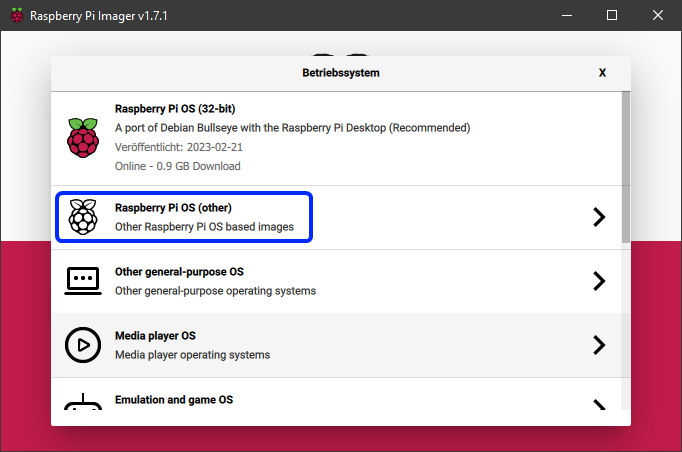
|
||||
3. Choose `Raspberry Pi OS Lite (32bit)` (or 64bit if desired).
|
||||
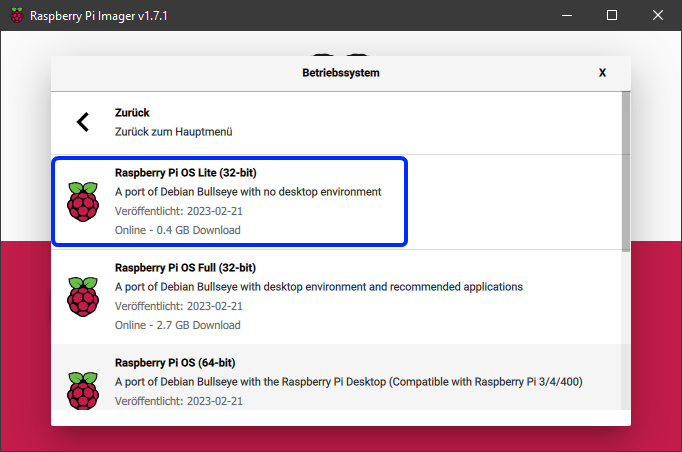
|
||||
4. Insert the microSD card into your computer's SD card reader.
|
||||
5. In the main menu of the Imager, select the correct microSD card.
|
||||
6. Click the gear icon at the bottom left of the main menu to open advanced options.
|
||||
7. Enable SSH and enter your Wi-Fi credentials.
|
||||
|
||||
!!! info
|
||||
Wi-Fi is only necessary if you want to connect to your Raspberry Pi over a wireless network. If you plan to use a wired Ethernet connection, you can skip this step. SSH is required for remote access to your Raspberry Pi, so make sure to enable it.
|
||||
|
||||
8. Click `Save` to close the advanced options menu.
|
||||
9. Click `Write` to start flashing the image to the microSD card.
|
||||
|
||||
!!! warning
|
||||
All data on the microSD card will be overwritten!
|
||||
|
||||
10. Once the flashing process is complete, safely eject the microSD card from your computer.
|
||||
11. Insert the microSD card into your Raspberry Pi.
|
||||
12. Connect your Raspberry Pi to a power source to boot it up.
|
||||
13. Wait for a few minutes to allow the Raspberry Pi to complete its initial setup.
|
||||
14. You can now connect to your Raspberry Pi via SSH using the IP address assigned by your router. The default username is `pi` and the default password is `raspberry`.
|
||||
|
||||
If you successfully connected to your Raspberry Pi via SSH, you can proceed to install KIAUH by following the instructions in the [Installation Guide](installation.md).
|
||||
@@ -42,10 +42,13 @@ from utils.sys_utils import (
|
||||
def get_kiauh_version() -> str:
|
||||
"""
|
||||
Helper method to get the current KIAUH version by reading the latest tag
|
||||
:return: string of the latest tag
|
||||
:return: string of the latest tag or a default value if no tags exist
|
||||
"""
|
||||
lastest_tag: str = get_local_tags(Path(__file__).parent.parent)[-1]
|
||||
return lastest_tag
|
||||
tags = get_local_tags(Path(__file__).parent.parent)
|
||||
if tags:
|
||||
return tags[-1]
|
||||
else:
|
||||
return "v?.?.?"
|
||||
|
||||
|
||||
def convert_camelcase_to_kebabcase(name: str) -> str:
|
||||
|
||||
84
mkdocs.yml
Normal file
84
mkdocs.yml
Normal file
@@ -0,0 +1,84 @@
|
||||
site_name: KIAUH Documentation
|
||||
site_description: Documentation for the Klipper Installation And Update Helper
|
||||
repo_url: https://github.com/dw-0/kiauh
|
||||
repo_name: dw-0/kiauh
|
||||
edit_uri: edit/master/docs
|
||||
|
||||
copyright: Copyright © 2025 Dominik Willner
|
||||
|
||||
theme:
|
||||
name: material
|
||||
logo: assets/logo.png
|
||||
favicon: assets/logo.png
|
||||
icon:
|
||||
repo: fontawesome/brands/github
|
||||
palette:
|
||||
- media: "(prefers-color-scheme: light)"
|
||||
scheme: default
|
||||
primary: blue-grey
|
||||
accent: cyan
|
||||
toggle:
|
||||
icon: material/weather-night
|
||||
name: Switch to dark mode
|
||||
- media: "(prefers-color-scheme: dark)"
|
||||
scheme: slate
|
||||
primary: blue-grey
|
||||
accent: cyan
|
||||
toggle:
|
||||
icon: material/weather-sunny
|
||||
name: Switch to light mode
|
||||
features:
|
||||
- navigation.instant
|
||||
- navigation.tracking
|
||||
- navigation.sections
|
||||
- navigation.expand
|
||||
- navigation.indexes
|
||||
- navigation.top
|
||||
- toc.follow
|
||||
- content.code.copy
|
||||
|
||||
plugins:
|
||||
- search
|
||||
- git-revision-date-localized:
|
||||
enable_creation_date: true
|
||||
- mkdocstrings:
|
||||
handlers:
|
||||
python:
|
||||
paths: [.]
|
||||
options:
|
||||
docstring_style: google
|
||||
|
||||
markdown_extensions:
|
||||
- admonition
|
||||
- pymdownx.details
|
||||
- pymdownx.superfences
|
||||
- pymdownx.highlight:
|
||||
anchor_linenums: true
|
||||
- pymdownx.inlinehilite
|
||||
- pymdownx.snippets
|
||||
- pymdownx.superfences
|
||||
- tables
|
||||
- attr_list
|
||||
- md_in_html
|
||||
|
||||
nav:
|
||||
- Home: index.md
|
||||
- Installation:
|
||||
- setup/raspberry-pi-setup.md
|
||||
- setup/installation.md
|
||||
- Configuration: configuration.md
|
||||
- Extensions:
|
||||
- extensions/index.md
|
||||
- extensions/gcode-shell-command.md
|
||||
- Development:
|
||||
- development/contributing.md
|
||||
- development/changelog.md
|
||||
|
||||
extra:
|
||||
social:
|
||||
- icon: simple/github
|
||||
link: https://github.com/dw-0
|
||||
- icon: simple/kofi
|
||||
link: https://ko-fi.com/dw__0
|
||||
- icon: simple/paypal
|
||||
link: https://www.paypal.com/paypalme/dwillner0
|
||||
4
requirements.txt
Normal file
4
requirements.txt
Normal file
@@ -0,0 +1,4 @@
|
||||
mkdocs-material
|
||||
mkdocs
|
||||
mkdocstrings[python]
|
||||
mkdocs-git-revision-date-localized-plugin
|
||||
Reference in New Issue
Block a user